Upiti
Upiti (Prompts) su unapred definisane zastavice i opcije specifične za svaki tip šablona koje možete uključiti da biste omogućili prilagođavanje u vreme izvršavanja. Za razliku od anketnih promenljivih (Survey Variables), koje su prilagođena polja koja sami kreirate, upiti su ugrađene opcije koje odgovaraju određenim CLI zastavicama za Ansible, Terraform i druge alate.
Ova funkcionalnost vam omogućava da:
- Zamenite podrazumevane vrednosti šablona u vreme izvršavanja
- Ciljate određene hostove ili resurse
- Kontrolišete ponašanje izvršavanja pomoću CLI zastavica
- Prosleđujete opcije izvršavanja preko API poziva ili rasporeda
Upiti i anketne promenljive
| Karakteristika | Upiti | Anketne promenljive |
|---|---|---|
| Definicija | Unapred definisane opcije specifične za šablon | Prilagođena polja koja sami kreirate |
| Primeri | Ansible: --limit, --tagsTerraform: workspace-ovi, -destroy | Naziv okruženja, broj verzije, prilagođeni parametri |
| Podešavanje | Uključuju se poljima za potvrdu u šablonu | Dodaju se u podešavanjima šablona sa nazivom i tipom |
| Prosleđuju se kao | Ugrađene CLI zastavice | Ansible: --extra-varsTerraform: -var |
Upiti su standardizovane opcije ugrađene u Semaphore za određene alate, dok su anketne promenljive fleksibilna prilagođena polja koja sami definišete.
Ansible upiti
Za šablone Ansible playbook-a možete uključiti upite za sledeće CLI opcije:
Limit
Uključite upit --limit da biste naveli koje hostove treba ciljati pri pokretanju playbook-a.
CLI ekvivalent: ansible-playbook playbook.yml --limit webservers
Slučajevi upotrebe:
- Pokretanje playbook-a na podskupu hostova iz inventara
- Ciljanje određenih servera za isporuku
- Testiranje izmena na jednom hostu pre šireg uvođenja
Primer:
- Vaš inventar sadrži 50 veb servera
- Uključite upit Limit
- Pri pokretanju zadatka navedite
web-01.example.comda biste ciljali samo taj server - Ili navedite
webservers:&productionda biste ciljali produkcione veb servere
Tags
Uključite upit --tags da biste pokretali samo taskove sa određenim tagovima.
CLI ekvivalent: ansible-playbook playbook.yml --tags deploy,restart
Slučajevi upotrebe:
- Izvršavanje samo određenih delova playbook-a
- Pokretanje koraka isporuke bez konfiguracionih taskova
- Brzo ponovno pokretanje servisa bez izvršavanja celog playbook-a
Primer:
---
- hosts: all
  tasks:
    - name: Install packages
      apt:
        name: nginx
      tags: install

    - name: Deploy application
      copy:
        src: app.tar.gz
        dest: /opt/app/
      tags: deploy

    - name: Restart service
      service:
        name: nginx
        state: restarted
      tags: restart
Uključite upit Tags i unesite deploy,restart da biste preskočili korak instalacije.
Skip Tags
Uključite upit --skip-tags da biste preskočili taskove sa određenim tagovima.
CLI ekvivalent: ansible-playbook playbook.yml --skip-tags testing,debug
Slučajevi upotrebe:
- Preskakanje opcionih taskova u produkciji
- Izuzimanje taskova za debagovanje ili testiranje
- Zaobilaženje vremenski zahtevnih taskova kada nisu potrebni
Primer: Koristeći gornji playbook, uključite Skip Tags i unesite install da biste preskočili instalaciju paketa i pokrenuli samo taskove isporuke i ponovnog pokretanja.
Preskoči Galaxy instalaciju
Uključite upit da biste korisniku omogućili da pri pokretanju zadatka preskoči korak ansible-galaxy install za uloge i kolekcije.
Slučajevi upotrebe:
- Zahtevi su već instalirani u image-u runner-a
- Ušteda vremena pri ponovljenim pokretanjima kada se ništa nije promenilo u
requirements.yml
Prisilna Galaxy instalacija
Uključite upit da biste korisniku omogućili da prisilno pokrene ansible-galaxy install --force za svaki fajl zahteva, ignorišući kontrolnu sumu zahteva koju Semaphore čuva između pokretanja.
CLI ekvivalent: ansible-galaxy role install -r requirements.yml --force
Slučajevi upotrebe:
- Fajl zahteva referencira granu umesto fiksne verzije i potreban vam je najnoviji commit
- Prethodna instalacija je ostavila uloge ili kolekcije u neispravnom stanju
- Provera da playbook radi sa čistim skupom zavisnosti
Pogledajte Galaxy zahtevi da biste saznali kako rade podrazumevane vrednosti na nivou šablona.
Uključivanje Ansible upita
Da biste uključili Ansible upite:
- Idite na Šablone zadataka (Task Templates) i izaberite svoj Ansible šablon
- Pronađite odeljak Ansible upiti (Ansible Prompts) u podešavanjima šablona
- Uključite polja za potvrdu za željene upite:
- ☐ Limit - Uključuje zastavicu
--limit - ☐ Tags - Uključuje zastavicu
--tags - ☐ Skip Tags - Uključuje zastavicu
--skip-tags - ☐ Debug - Uključuje izbor nivoa detaljnosti (
-v) - ☐ Preskoči Galaxy instalaciju (Skip Galaxy install) - Dozvoljava preskakanje
ansible-galaxy install - ☐ Prisilna Galaxy instalacija (Force Galaxy install) - Dozvoljava prisilno izvršavanje
ansible-galaxy install --force
- ☐ Limit - Uključuje zastavicu
- Sačuvajte šablon
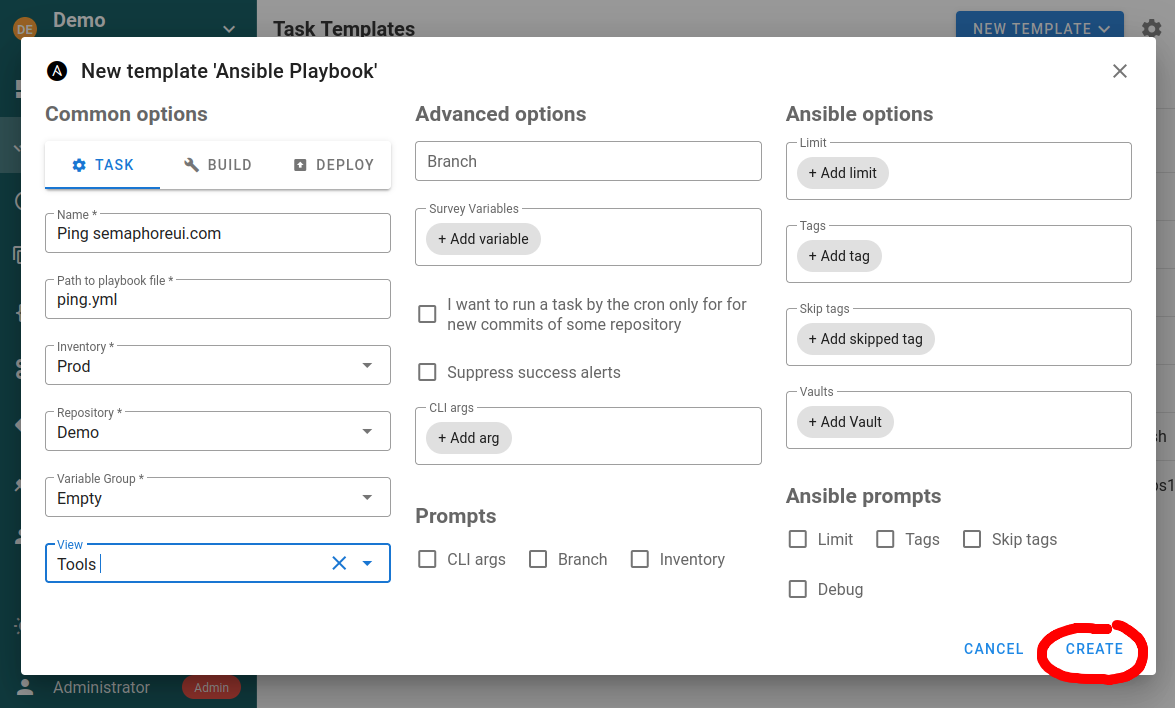
Kada su uključena, ova polja se pojavljuju u formi za pokretanje zadatka, API zahtevima i podešavanjima rasporeda.
Terraform/OpenTofu upiti
Za Terraform i OpenTofu šablone Semaphore nudi nekoliko ugrađenih upita:
Izbor workspace-a
Izaberite koji Terraform workspace će se koristiti za izvršavanje zadatka.
CLI ekvivalent: terraform workspace select staging
Slučajevi upotrebe:
- Upravljanje više okruženja (dev, staging, production)
- Odvojeni state fajlovi za različite konfiguracije
- Izolovano testiranje izmena infrastrukture
Podešavanje:
- Kreirajte workspace-ove na kartici Workspaces šablona
- Birač workspace-a se automatski pojavljuje u formi zadatka
- Korisnici biraju ciljni workspace pri pokretanju zadataka
Detaljno podešavanje potražite u odeljku Terraform workspace-ovi.
Zastavica Destroy
Uključite zastavicu -destroy da biste uklonili infrastrukturu.
CLI ekvivalent: terraform apply -destroy
Slučajevi upotrebe:
- Čišćenje privremenih testnih okruženja
- Povlačenje infrastrukture iz upotrebe
- Uklanjanje određenih resursa
Važno: Ovo je destruktivna operacija. Koristite je oprezno i razmislite o obaveznoj potvrdi u svojim tokovima rada.
Zastavica Migrate State
Uključite zastavicu -migrate-state kada menjate konfiguraciju backend-a.
CLI ekvivalent: terraform init -migrate-state
Slučajevi upotrebe:
- Premeštanje state-a na drugi backend
- Migracija između lokacija skladištenja
- Ažuriranje konfiguracije backend-a
Uključivanje Terraform upita
Terraform upiti su dostupni u podešavanjima šablona:
- Idite na Šablone zadataka (Task Templates) i izaberite svoj Terraform šablon
- Podesite dostupne upite u podešavanjima šablona:
- Izbor workspace-a (automatski uključen ako su workspace-ovi podešeni)
- Opcija zastavice Destroy
- Opcija Migrate state
- Sačuvajte šablon
Forma zadatka prikazuje ove opcije pri pokretanju Terraform zadataka.
Bash, PowerShell i Python upiti
Za Bash, PowerShell i Python šablone upiti su minimalni, jer se većina prilagođavanja obavlja preko anketnih promenljivih.
Dostupni upiti su:
- CLI argumenti
- Grana
Ovi tipovi šablona imaju više koristi od prilagođenih anketnih promenljivih za prosleđivanje parametara skriptama.
Korišćenje upita
Ručno izvršavanje zadatka
Pri pokretanju zadatka iz šablona sa uključenim upitima:
- Kliknite na Pokreni (Run) na šablonu
- Pojavljuje se forma sa uključenim poljima upita
- Popunite vrednosti za upite koje želite da koristite (opciona polja mogu ostati prazna)
- Kliknite na Pokreni zadatak (Run Task)
Zadatak se izvršava sa vrednostima upita koje ste naveli, prosleđenim kao CLI zastavice.
API pozivi
Da biste vrednosti upita prosledili preko API-ja, uključite ih u telo zahteva:
Ansible primer:
curl -XPOST \
  -H 'Content-Type: application/json' \
  -H 'Authorization: Bearer YOUR_TOKEN' \
  -d '{
    "template_id": 123,
    "limit": "webservers",
    "tags": "deploy,restart",
    "skip_tags": "testing"
  }' \
  https://your-semaphore.com/api/project/1/tasks
Važno: Upiti moraju biti uključeni u šablonu da bi vrednosti bile prihvaćene. Ako vrednosti upita prosledite preko API-ja bez da ih uključite, te vrednosti će biti ignorisane.
Zakazani zadaci
Rasporedi (Schedules) mogu sadržati vrednosti upita radi prilagođavanja automatizovanog izvršavanja zadataka:
Primer: Raspored sa Ansible upitima
- Dnevni raspored isporuke sa
limit: "production"itags: "deploy" - Nedeljni raspored održavanja sa
tags: "updates,cleanup"
Podesite vrednosti upita u podešavanjima rasporeda tako da svako zakazano pokretanje koristi navedene opcije.
Integracije i webhook-ovi
Integracije (Integrations) mogu izdvajati vrednosti iz webhook-ova i mapirati ih na upite:
Primer: GitHub webhook pokreće isporuku
- Izdvojite naziv grane iz webhook-a
- Mapirajte ga na upit Limit da biste ciljali određeno okruženje
- Isporučite samo na servere koji odgovaraju okruženju grane
Podešavanje webhook-ova potražite u odeljku Integracije.
Najbolje prakse
Uključite samo neophodne upite
Svaki uključeni upit dodaje polje u formu zadatka. Uključite samo upite koje će korisnici zaista morati da prilagođavaju.
✅ Dobro: Uključite Limit za operativne timove koji moraju da ciljaju određene hostove ❌ Loše: Uključite sve upite „za svaki slučaj“
Kombinujte sa anketnim promenljivama
Koristite upite za CLI opcije specifične za alat, a anketne promenljive za prilagođene parametre:
Primer Ansible šablona:
- Upiti: Limit (koji hostovi), Tags (koji taskovi)
- Anketne promenljive:
app_version(koja verzija),enable_rollback(prilagođena logika)
Dokumentujte upotrebu API-ja
Ako se šabloni pokreću preko API-ja, dokumentujte koji su upiti dostupni i njihov očekivani format:
## API Usage

Enabled prompts:
- `limit`: Host pattern (optional)
- `tags`: Comma-separated tag list (optional)

Example:
POST /api/project/1/tasks
{
  "template_id": 123,
  "limit": "webservers:&production",
  "tags": "deploy"
}
Koristite Limit za bezbedno testiranje
Potencijalno destruktivne playbook-ove uvek prvo testirajte pomoću upita Limit:
- Uključite upit Limit u šablonu
- Prvo pokretanje: Navedite
limit: "test-server-01"da biste testirali na jednom hostu - Proverite da je uspelo
- Drugo pokretanje: Navedite
limit: "production"da biste uveli izmene na sve hostove
Proveravajte kombinacije upita
Neke kombinacije upita možda nemaju smisla. Dodajte dokumentaciju ili validaciju:
- Korišćenje
--tags deployzajedno sa--skip-tags deployje u sukobu - Navođenje i workspace-a i zastavice destroy zahteva dodatnu opreznost
Uobičajeni slučajevi upotrebe
Postepeno uvođenje pomoću Limit
Postepeno isporučujte u produkciju pomoću Ansible upita Limit:
- Pokretanje 1:
limit: "web-01.example.com"- Isporuka na jedan server - Pratite da li ima problema
- Pokretanje 2:
limit: "webservers:&canary"- Isporuka na canary servere - Proverite metrike
- Pokretanje 3:
limit: "webservers:&production"- Potpuno uvođenje
Selektivno izvršavanje pomoću Tags
Koristite Tags da biste pokretali samo određene delove playbook-a:
Ujutru: tags: "deploy" - Isporuka nove verzije
Popodne: tags: "config" - Ažuriranje konfiguracije
Uveče: tags: "restart" - Ponovno pokretanje servisa sa novom konfiguracijom
Upravljanje okruženjima pomoću workspace-ova
Koristite izbor Terraform workspace-a za upravljanje okruženjima:
- Razvoj: Izaberite workspace
dev- jeftiniji resursi, brže iteracije - Staging: Izaberite workspace
staging- okruženje nalik produkciji za testiranje - Produkcija: Izaberite workspace
prod- puna produkciona infrastruktura
Čišćenje pomoću Destroy
Koristite Terraform destroy za privremenu infrastrukturu:
- Kreirajte testno okruženje: Pokrenite sa workspace-om
test-branch-123 - Pokrenite integracione testove
- Očistite: Pokrenite sa uključenom zastavicom destroy i workspace-om
test-branch-123
Rešavanje problema
Vrednosti upita se ignorišu
Problem: Prosleđujete vrednosti upita, ali nemaju efekta
Rešenje: Proverite da li je odgovarajući upit uključen u podešavanjima šablona. Upiti moraju biti eksplicitno uključeni.
Nije moguće navesti limit
Problem: Polje Limit se ne pojavljuje u formi zadatka
Rešenje:
- Izmenite šablon
- Pronađite odeljak „Ansible upiti“ (Ansible Prompts)
- Uključite polje za potvrdu „Limit“
- Sačuvajte šablon
API pozivi sa vrednostima upita ne uspevaju
Problem: API zahtevi sa vrednostima upita vraćaju greške
Rešenje:
- Uverite se da su upiti uključeni u šablonu
- Proverite JSON formatiranje u telu zahteva
- Proverite da se nazivi polja tačno poklapaju (
limit, a nehost_limit)
Tagovi ne filtriraju taskove
Problem: Navodite tagove, ali se i dalje izvršavaju svi taskovi
Rešenje:
- Proverite da taskovi u playbook-u imaju pravilno definisane tagove
- Proverite da li ima grešaka u kucanju u nazivima tagova
- Uverite se da su tagovi razdvojeni zarezom bez razmaka:
deploy,restart, a nedeploy, restart
Povezana dokumentacija
- Anketne promenljive - Prilagođena polja za šablone
- Ansible šabloni - Podešavanja specifična za Ansible
- Terraform šabloni - Podešavanja specifična za Terraform
- Rasporedi - Automatizovano izvršavanje zadataka
- Integracije - Zadaci pokrenuti webhook-om
- API dokumentacija - API referenca