Tokovi rada Pro
Tokovi rada (Workflow) omogućavaju da povežete više šablona zadataka (Task Template) u usmereni graf (DAG) sa grananjem, odobrenjima i vremenskim pauzama. Izvršavanje toka rada napreduje automatski kako se svaki korak završava — graf jednom dizajnirate u vizuelnom uređivaču, a zatim pokrećete izvršavanja sa stranice Workflows.
Tokovi rada su funkcija Semaphore Pro izdanja. Stavka menija Workflows pojavljuje se samo kada je vaša pretplata obuhvata.
Pregled
Tok rada se sastoji od:
- Čvorova — koraka u grafu (pokretanje šablona, čekanje na odobrenje, pauza radi odlaganja ili beleška kao napomena).
- Ivica — veza između čvorova, pri čemu je svaka označena uslovom koji određuje kada nizvodni čvor počinje.
Kada pokrenete tok rada, Semaphore kreira izvršavanje toka rada (workflow run). Server upravlja napredovanjem: kako se zadaci završavaju, odobrenja razrešavaju ili odlaganja isteknu, nizvodni čvorovi se pokreću u skladu sa uslovima ivica.
Kreiranje toka rada
- Otvorite svoj projekat (Project) i idite na Workflows.
- Kliknite na New Workflow.
- U grafičkom uređivaču:
- Prevucite čvorove sa palete na platno.
- Povežite čvorove prevlačenjem sa izlazne tačke jednog čvora na drugi.
- Kliknite na čvor ili ivicu da biste uredili njihova svojstva u bočnoj tabli.
- Postavite naziv (i opciono početnu verziju za verzionisanje izvršavanja).
- Rešite sve probleme navedene u tabli Problems, a zatim kliknite na Save.
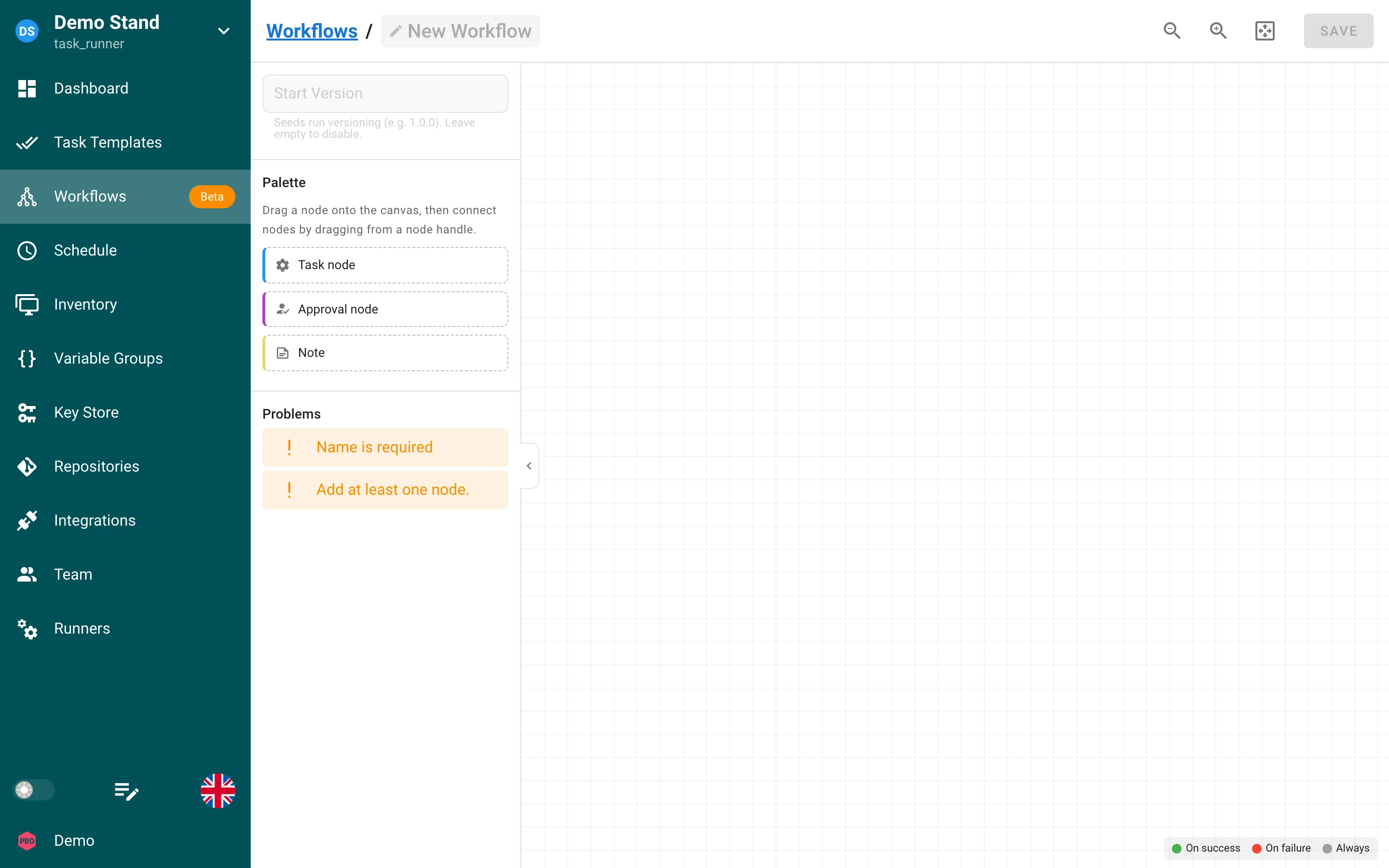
Uređivač proverava ispravnost grafa pre čuvanja. Ispravan tok rada mora imati najmanje jedan čvor, tačno jedan početni čvor (bez dolaznih ivica), bez ciklusa, i potpunu konfiguraciju na svakom izvršnom čvoru.
Vrste čvorova
| Vrsta | Namena |
|---|---|
| Task | Pokreće šablon zadatka. Parametre šablona (inventar, okruženje, Ansible limit, dodatne argumente komandne linije) možete zameniti po čvoru pomoću task params. |
| Approval | Pauzira izvršavanje dok korisnik sa odgovarajućom dozvolom ne odobri ili odbije. Opciono postavite vremensko ograničenje (u sekundama) i poruku odobrenja. |
| Delay | Čeka podešeni broj sekundi pre nastavka ka nizvodnim čvorovima. Korisno za periode mirovanja, prozore održavanja ili razmak između zavisnih koraka. |
| Note | Slobodna napomena na platnu. Čvorovi tipa Note se ne izvršavaju i ne povezuju se ivicama — služe isključivo za dokumentovanje. |
Konvergencija
Čvorovi sa više dolaznih ivica mogu zahtevati da se završe svi uzvodni čvorovi (podrazumevano) ili bilo koji od njih. Podesite Convergence u tabli sa svojstvima čvora.
Čvorovi odlaganja
Čvor odlaganja pauzira izvršavanje toka rada za podešeno trajanje (najmanje 1 sekunda). Tokom čekanja:
- Izvršavanje ostaje u statusu running.
- Prikaz izvršavanja prikazuje odbrojavanje uživo na čvoru odlaganja.
- Nizvodni čvorovi povezani ivicama ne pokreću se dok se odlaganje ne završi.
Ako je izvršavanje toka rada zaustavljeno dok je odlaganje aktivno, odlaganje se otkazuje i izvršavanje se završava u statusu stopped.
Čvorovi odobrenja
Kada izvršavanje stigne do čvora odobrenja, status se menja u approval dok neko ne odobri ili odbije. Kontrole Approve/Reject pojavljuju se u prikazu izvršavanja. Odbijena odobrenja dovode do neuspeha izvršavanja u skladu sa uslovima povezanih ivica.
Uslovi ivica
Svaka ivica ima uslov koji određuje kada nizvodni čvor postaje spreman:
| Uslov | Nizvodni čvor počinje kada se uzvodni čvor… |
|---|---|
| On success | Uspešno završi (podrazumevano). |
| On failure | Završi sa greškom. |
| Always | Završi u bilo kom konačnom stanju (uspeh ili neuspeh). |
Koristite grane On failure za kompenzacione radnje ili obaveštenja. Koristite Always kada sledeći korak treba da se izvrši bez obzira na ishod.
Pokretanje i praćenje
- Run workflow — pokreće novo izvršavanje sa liste Workflows.
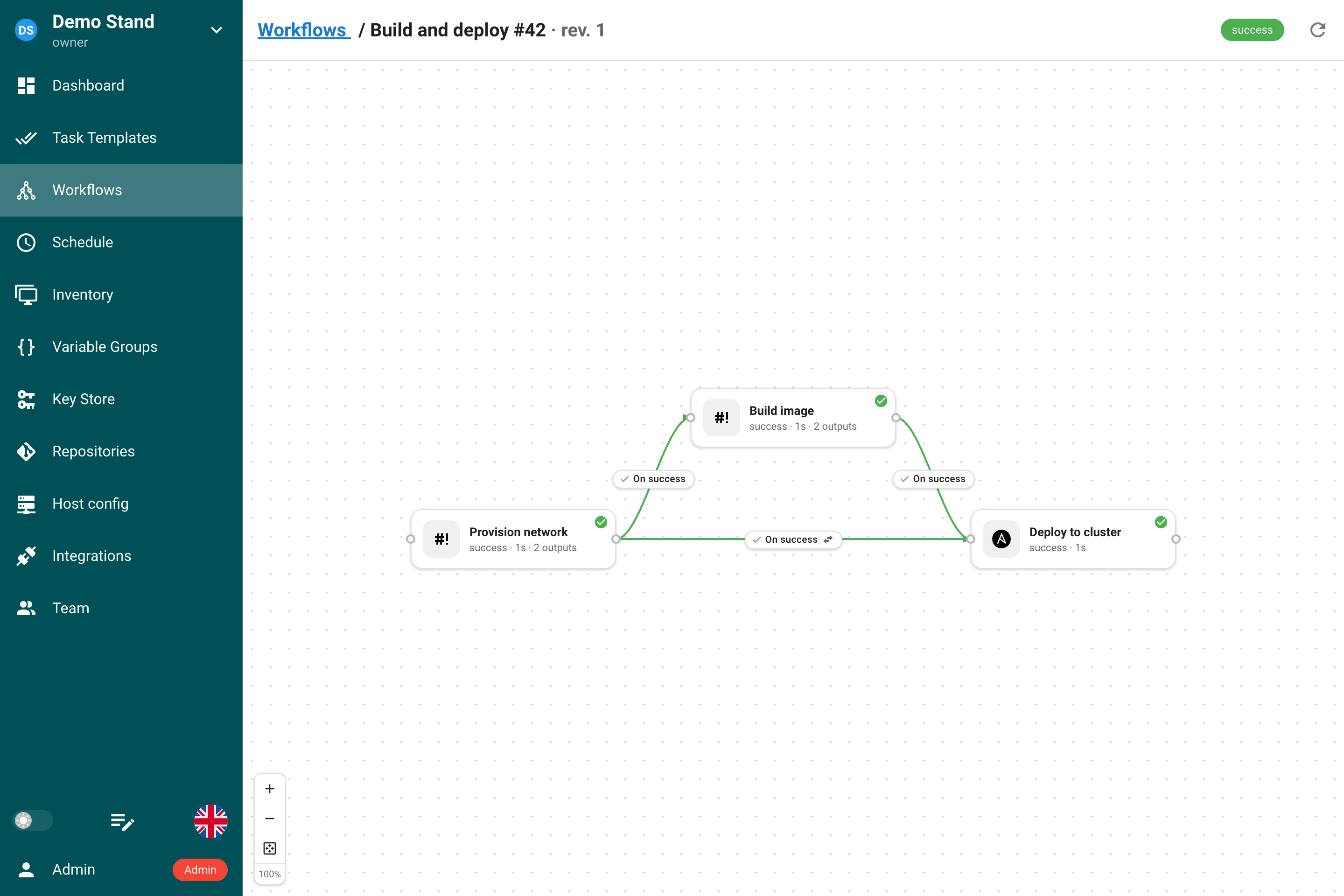
- Prikaz izvršavanja — graf preko celog ekrana sa statusom uživo na svakom čvoru (running, success, failed, approval, odbrojavanje odlaganja).
- Stop — dok je izvršavanje u stanju
runningiliapproval, korisnici sa dozvolomrun_project_tasksmogu da ga zaustave. Svi aktivni zadaci se zaustavljaju, odobrenja na čekanju se odbijaju, a izvršavanje se označava kao stopped.
Statusi izvršavanja: running, approval, success, failed, stopped.
Verzionisanje izvršavanja
Podesite Start version na toku rada (na primer 1.0.0) da biste omogućili oznake
verzija na svakom izvršavanju. Semaphore povećava verziju pri uzastopnim izvršavanjima,
slično kao kod build šablona.
Izlazi i ulazi
Čvor tipa Task može da preda strukturirane podatke čvorovima posle sebe. Zadatak proizvodi izlaze (outputs): JSON objekat imenovanih vrednosti, koji se čuva uz zadatak kada se uspešno završi. Veza ka sledećem čvoru tipa Task isporučuje ulaze (inputs): popunjava anketne promenljive šablona tog čvora iz izlaza čvora pre njega. Ne prenose se datoteke, samo vrednosti.
Proizvodnja izlaza
Svaki zadatak koji pokrene izvršavanje toka rada dobija promenljivu okruženja
SEMAPHORE_OUTPUTS_FILE: putanju prazne datoteke kreirane samo za taj zadatak. Sve što
zadatak upiše u nju kao JSON objekat postaje njegovi izlazi.
| Aplikacija | Kako se proizvode izlazi |
|---|---|
| Ansible | ansible.builtin.set_stats sa per_host: false (podrazumevano). Ugrađeni callback dodatak semaphore_outputs upisuje zbirnu statistiku izvršavanja u datoteku; statistika po hostu nije izlaz. |
| Terraform, OpenTofu, Terragrunt | Preuzimaju se automatski iz output -json posle uspešnog izvršavanja. Vrednost koju je zadatak sam upisao u datoteku ima prednost nad preuzetim izlazom istog naziva. |
| Bash, Python, PowerShell, Pulumi | Skripta sama upisuje datoteku. |
# Bash: upisivanje datoteke sa izlazima
cat > "$SEMAPHORE_OUTPUTS_FILE" <<EOF
{"image_tag": "1.4.2", "replicas": 3, "subnet_ids": ["subnet-1", "subnet-2"]}
EOF
# Ansible: set_stats postaje izlazi
- name: Publish the image tag for the next nodes
  ansible.builtin.set_stats:
    data:
      image_tag: "{{ built_tag }}"
Pravila:
- Izlazi se čitaju samo kada se zadatak uspešno završi. Neuspeli ili zaustavljeni zadatak nema izlaze, pa grana On failure ne dobija ništa od čvora koji nije uspeo.
- Nazivi izlaza odgovaraju izrazu
^[A-Za-z_][A-Za-z0-9_-]*$. Vrednost može biti bilo koja JSON vrednost: string, broj, logička vrednost, lista ili objekat. - Ograničenja: datoteka ima najviše 256 KB, sa najviše 100 izlaza od najviše 32 KB svaki.
- Nepostojeća ili prazna datoteka znači „nema izlaza“. Datoteka koja nije JSON objekat, koristi neispravan naziv ili prekoračuje neko ograničenje dovodi do neuspeha zadatka, a razlog je naveden u njegovom logu.
- Terraform izlazi koji ne mogu da se sačuvaju — označeni kao
sensitive, preveliki, sa neispravnim nazivom ili preko ograničenja — preskaču se i navode u logu zadatka i u tabli Outputs zadatka kao Not captured. Oni nikada ne dovode do neuspeha zadatka.
Isporuka ulaza
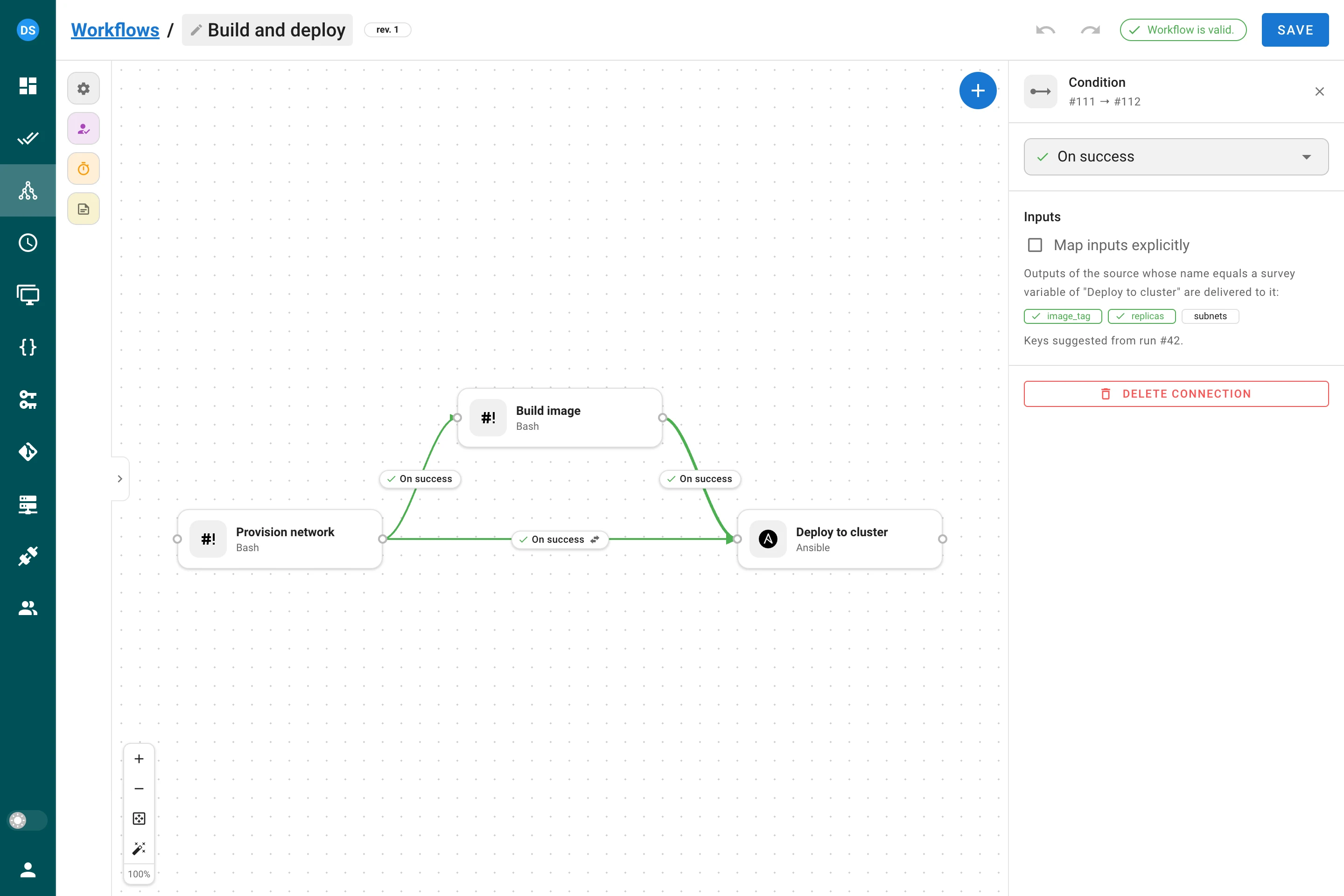
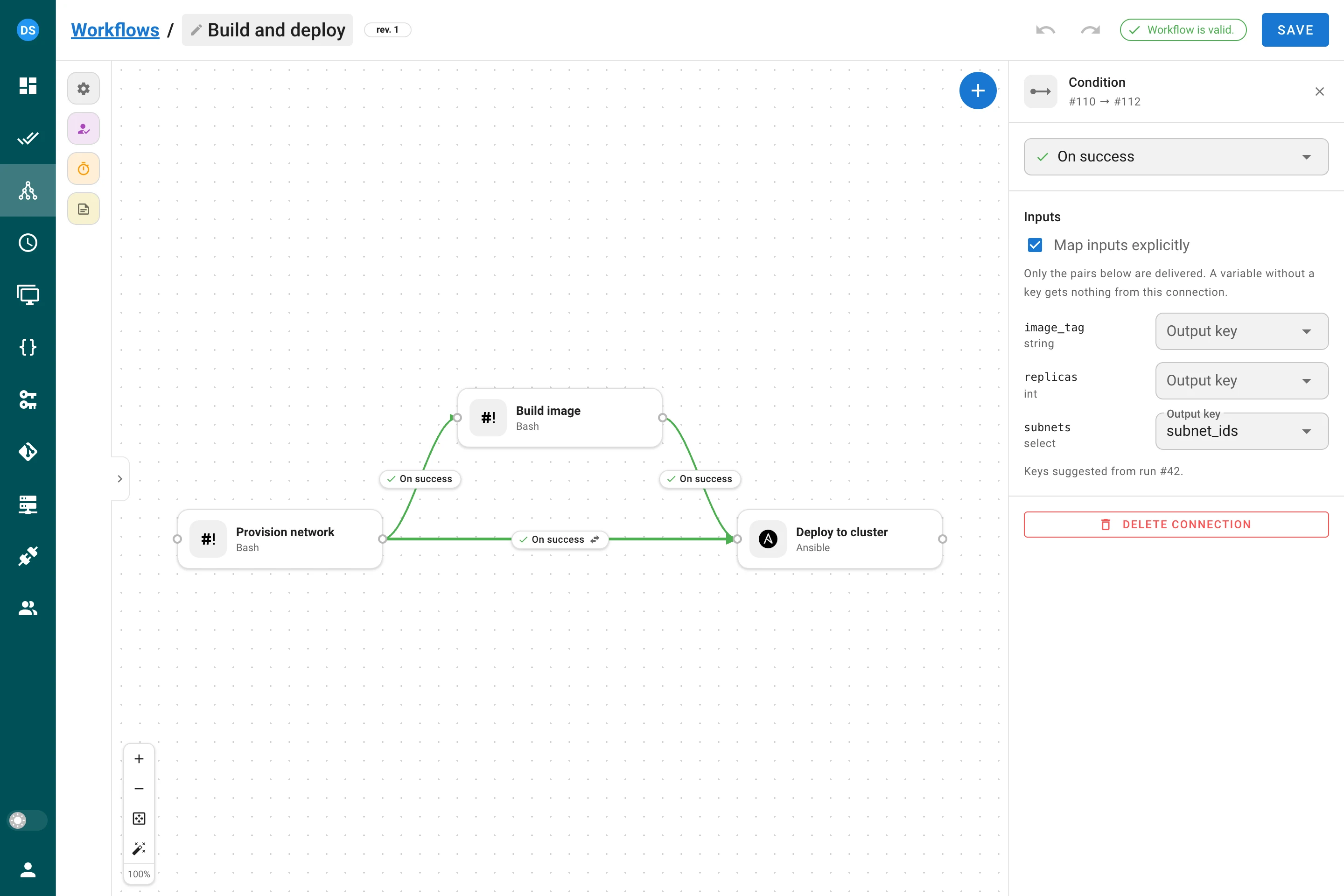
Kliknite na vezu koja se završava u čvoru tipa Task: njena bočna tabla ima odeljak Inputs.
- Po nazivu (By name, podrazumevano). Svaki izlaz izvornog čvora čiji je naziv jednak nekoj anketnoj promenljivoj odredišnog šablona popunjava tu promenljivu. Izlazi bez odgovarajuće promenljive se zanemaruju; Terraform izlaz sa crticom u nazivu nikada nije ispravan naziv promenljive, pa se ne isporučuje.
- Map inputs explicitly. Označite ovo polje da biste isporučili samo parove koje navedete: anketnu promenljivu odredišnog šablona i ključ izlaza koji je popunjava. Prazna lista ne isporučuje ništa. Kada tok rada ima završeno izvršavanje, tabla predlaže ključeve koje je to izvršavanje proizvelo i označava ključ koji nije preuzet.
Promenljiva koju nijedna veza ne popuni dobija vrednost postavljenu na čvoru, a ako je nema, podrazumevanu vrednost promenljive. Obavezna (required) promenljiva ostavljena bez vrednosti dovodi do neuspeha zadatka čvora pre nego što počne, uz red u logu koji navodi promenljivu, pa izvršavanje prati svoje ivice On failure.
Vrednosti se prilagođavaju tipu promenljive: promenljiva int prima broj ili string od
cifara, promenljiva enum ili select prima samo sopstvene opcije, a promenljiva string
ili text prima bilo šta (objekat ili lista stižu kao kompaktan JSON). Vrednost koja ne
odgovara tipu se zanemaruje, uz razlog u logu zadatka, i primenjuje se rezervna vrednost.
Čvorovi odobrenja i odlaganja propuštaju izlaze: task → approval → task i dalje
isporučuje podatke, a primenjuje se režim poslednje veze.
Više veza ka jednom čvoru. Doprinosi svaka veza čiji se izvor uspešno završio. Kada dve od njih popunjavaju istu promenljivu, eksplicitno mapiranje ima prednost nad isporukom po nazivu; između dve veze iste vrste pobeđuje ona koja je prva kreirana, pa izvršavanje svaki put daje isti rezultat. Log zadatka navodi koja je veza pobedila.
Gde ih videti
- Prikaz izvršavanja prikazuje oznaku N outputs na svakom čvoru koji je proizveo izlaze.
- Dijalog zadatka ima tabelu Outputs sa vrednostima i listom Not captured.
- Log zadatka koji dobija ulaze preko veze počinje jednim redom po promenljivoj, na primer
Input "image_tag" <- output "image_tag" of node 3 (task #41), tako da je izvor svake vrednosti naveden jedan red iznad same vrednosti.
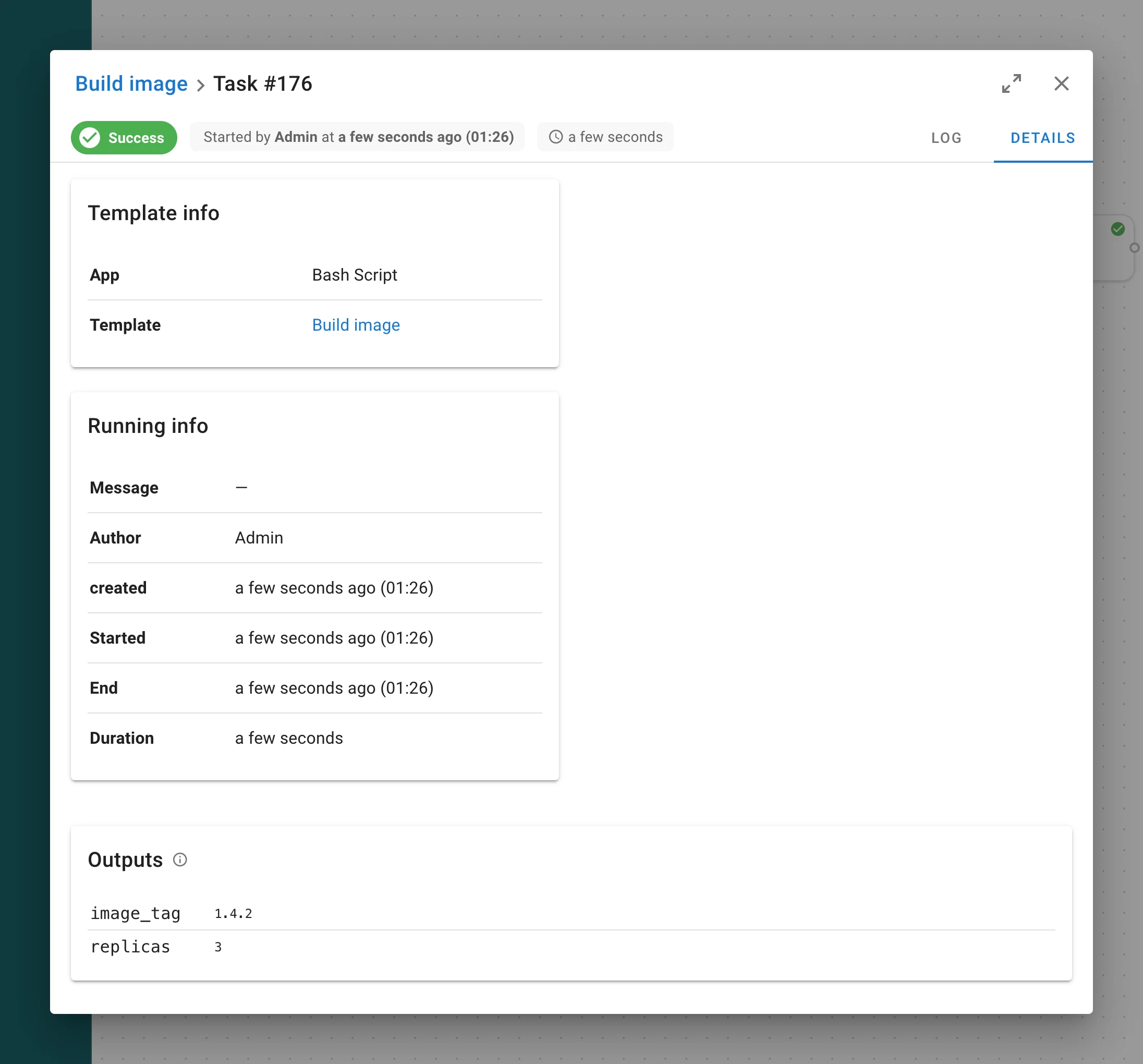
Ograničenja
- Izlazi se čuvaju i prikazuju kao običan tekst svima koji mogu da vide zadatak. Ne
prosleđujte tajne kroz izlaze. Anketna promenljiva tipa
secretne može da se popuni preko veze. - Izlazi su vrednosti, nikada kod: Ansible ih prima kao doslovne stringove, a Jinja2 izraz unutar vrednosti se ne izračunava.
- Zadaci na udaljenim runner-ima proizvode i primaju izlaze isto kao zadaci na serveru. Zadaci koje izvršava Docker ili Kubernetes izvršilac (executor) runner-a još ne proizvode izlaze; njihov log to navodi.
Promenljive okruženja
Zadatak koji pokrene tok rada dobija, pored promenljivih koje dobija svaki zadatak:
| Promenljiva | Vrednost |
|---|---|
SEMAPHORE_WORKFLOW_ID | ID toka rada |
SEMAPHORE_WORKFLOW_RUN_ID | ID trenutnog izvršavanja |
SEMAPHORE_WORKFLOW_VERSION | Verzija trenutnog izvršavanja, ako postoji |
SEMAPHORE_WORKFLOW_URL | Veza ka stranici izvršavanja, na primer https://semaphore.example.com/project/1/workflows/7/runs/42 (zahteva web_host u konfiguraciji servera) |
SEMAPHORE_OUTPUTS_FILE | Putanja datoteke u koju zadatak upisuje svoje izlaze |
Ove promenljive se postavljaju za sve aplikacije, uključujući Ansible i Terraform, i dostupne su zadacima koji se izvršavaju na udaljenim runner-ima.
Dozvole
- Upravljanje tokovima rada (kreiranje, uređivanje, brisanje) zahteva dozvole za upravljanje resursima projekta.
- Pokretanje tokova rada zahteva
run_project_tasks. - Razrešavanje odobrenja zahteva odgovarajući pristup projektu (isti korisnici koji mogu da pokreću zadatke u projektu).
API
Šabloni tokova rada i izvršavanja dostupni su na putanji
/api/project/{project_id}/workflows. Pogledajte
dokumentaciju API-ja za šeme zahteva i odgovora, uključujući polja
čvora delay (delay_seconds), input_mode i input_mappings na ivicama, dokument
artifacts svakog zadatka u detaljima izvršavanja (GET …/runs/{run_id}) i krajnju
tačku za zaustavljanje (POST …/runs/{run_id}/stop).