Teams
In Semaphore UI, every project is associated with a Team. Only team members and admins can access the project. Each member of the team is assigned one of four built-in roles, which govern their level of access and the actions they can perform.
In the Enterprise edition, built-in roles can be extended with custom roles that grant additional, fine-grained permissions on specific templates.
To avoid losing access to a project, it's recommended to have at least two team members with the Owner role.
The Team section of a project has two tabs: Members with users and their roles, and Roles with custom roles (Enterprise).
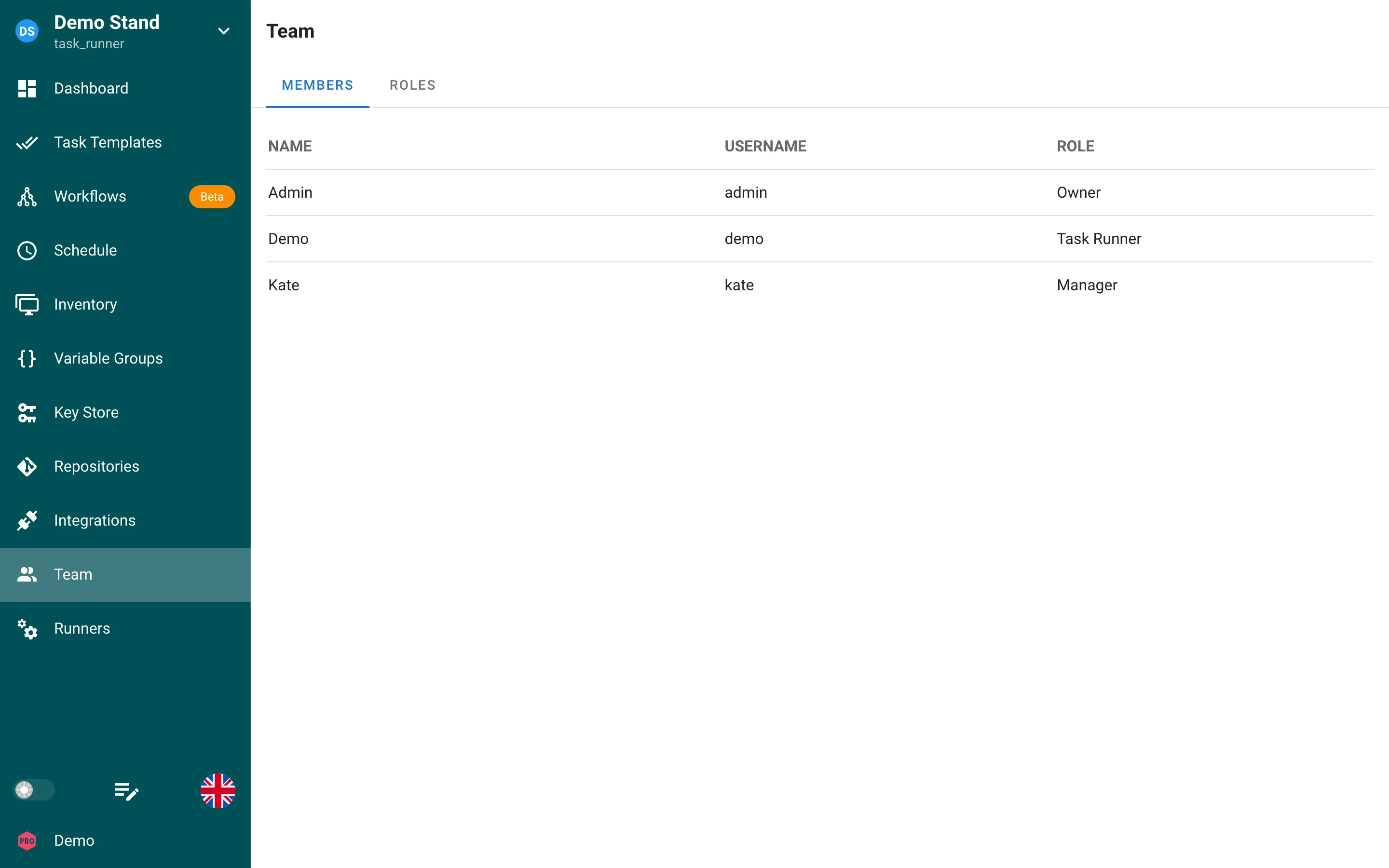
Built-in roles
Every team member has exactly one of these four roles:
- Owner
- Manager
- Task Runner
- Guest
Below are detailed descriptions of each role and its permissions.
Owner
-
Full permissions
Owners can do anything within the project, including managing roles, adding/removing members, and configuring any project settings. -
Multiple owners
A project can have multiple Owners, ensuring there is more than one person with full privileges. -
Restrictions on self-removal
An Owner cannot remove themselves if they are the only Owner of the project. This prevents the project from being left without an Owner. -
Managing other owners
Owners can manage (including remove or change roles of) all team members, including other Owners.
Manager
-
Broad project control: Managers have almost the same permissions as Owners, allowing them to handle most day-to-day tasks and manage the project environment.
-
Managers cannot:
- Remove the project.
- Remove or change the roles of Owners.
-
Typical use case: Assign the Manager role to senior team members who need extensive access but don't require the authority to delete the project or manage Owners.
Task Runner
-
Run tasks: Task Runners can execute any task template that exists within the project.
-
Read-only for other resources: While they can run tasks, they only have read‐only access to other resources such as inventory, variables, repositories, etc.
-
Typical use case: Developers or QA engineers who need to trigger and monitor tasks but do not need the ability to modify project settings or manage team membership.
Guest
-
Read-only access: Guests have read-only access to all project resources (e.g., viewing logs, inventories, dashboards).
-
No write permissions: They cannot modify settings, run tasks, or change roles.
-
Typical use case: Stakeholders or other collaborators who only need to view project status and details without making changes.
Extended RBAC Enterprise
Extended RBAC is available in the Semaphore Enterprise edition, starting with Semaphore v2.17.
Extended RBAC layers additional permissions on top of the four built-in roles. The built-in roles themselves are unchanged. If you do not define custom roles, every project behaves exactly as it does in the community edition.
With Extended RBAC, custom roles can grant individual project-wide permissions. You can also grant a role permissions on selected task templates. This lets you give a team member access to the templates they need without promoting them to a higher built-in role.
Custom roles
A custom role is a named set of permissions that supplements a member's built-in project role. Every team member keeps their built-in role. Custom roles add permissions to it.
Custom roles are available at two scopes:
- Global roles are defined at the instance level and can be used in any project.
- Project roles are defined inside a single project and are available only within that project.
Permission levels
Custom roles grant permissions at two levels:
- Project-wide permissions extend a user's access throughout a project. You choose these when you create the role.
- Template permissions control actions on one task template. You choose these on that template's Permissions tab after adding the role to the template.
Create a custom role
Choose the scope before opening the role form.
Global role
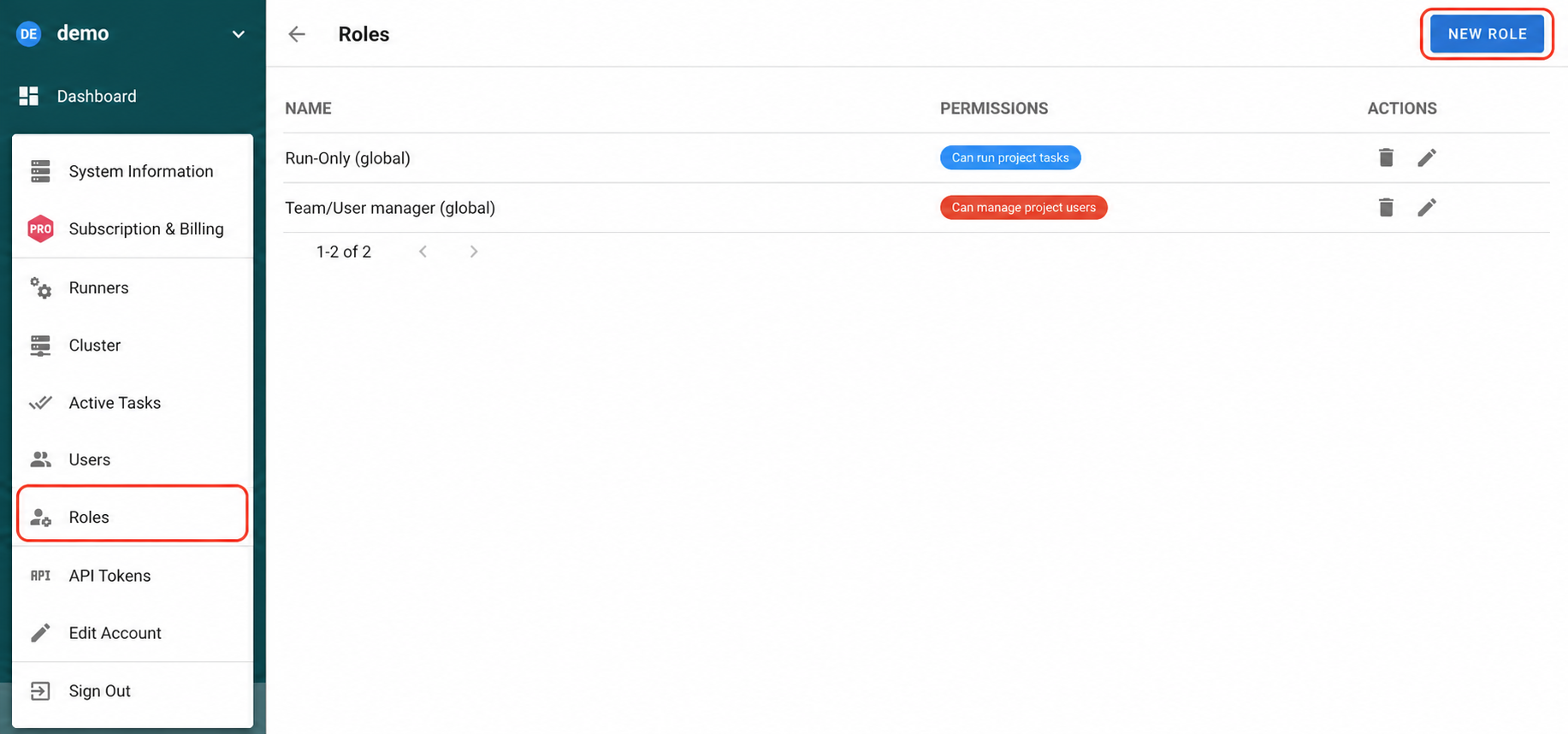
Global roles are created once and can be assigned to users in any project. Only an instance administrator can create a global role.
Open the bottom-left admin menu and select Roles.
On the instance-wide list of roles, select New Role.
Project role
Project roles are available only in the project where they are created. Project Owners and Managers can create them.
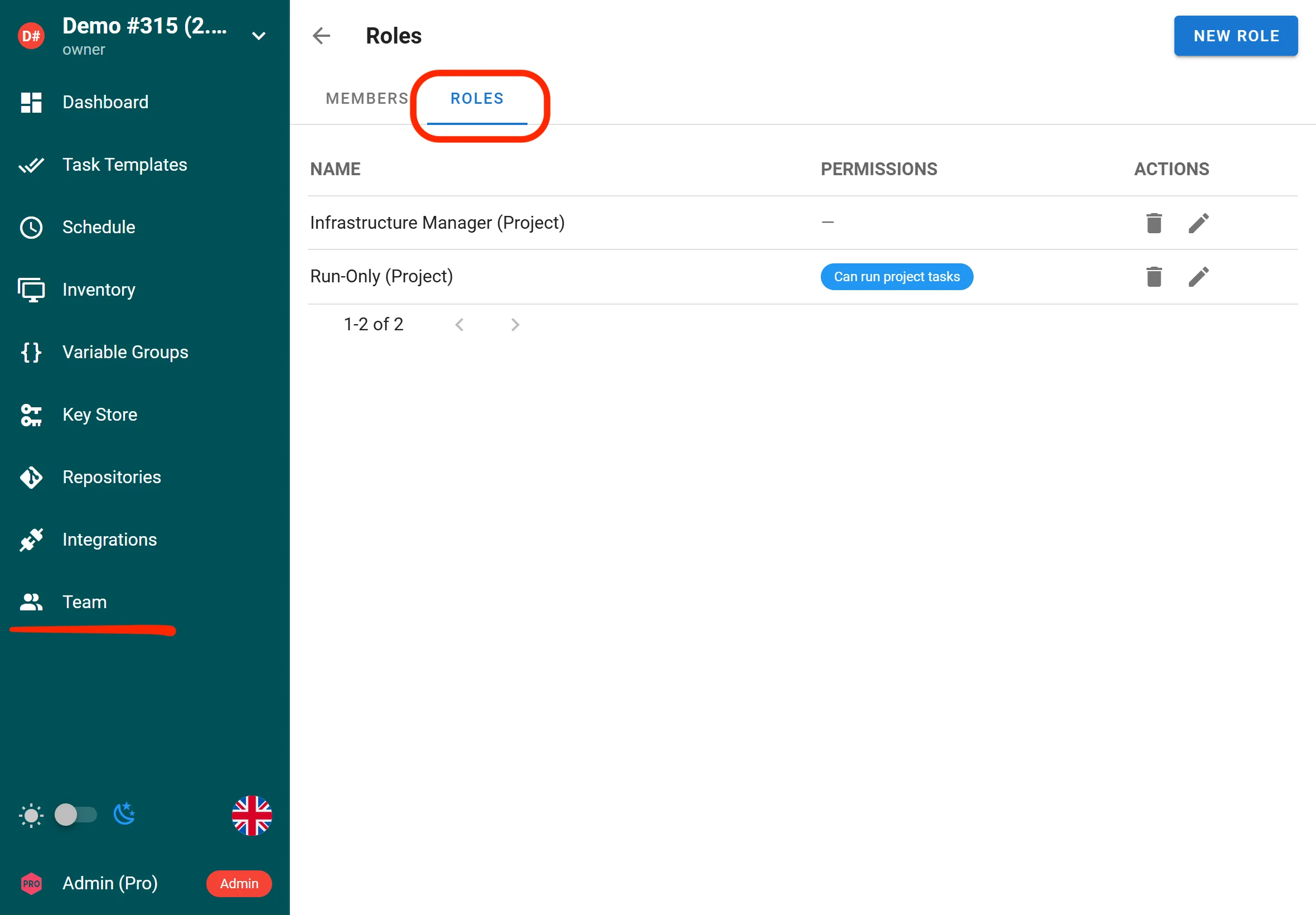
- Open the project and go to Team > Roles.
- Select New Role.
The Roles tab is empty until the first project role is created. It lists all project roles and contains the New Role button.
Configure a custom role
Both paths open the same role form. Configure the role to match the access your team member needs.
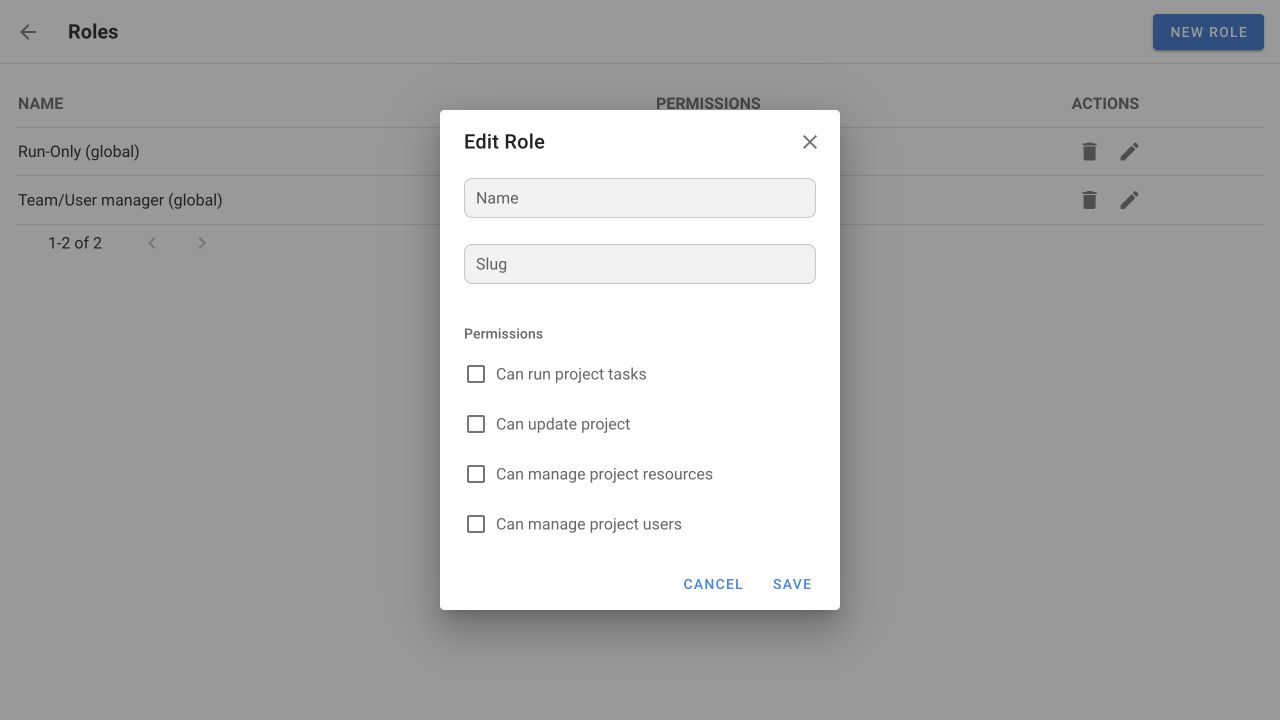
| Field | Description |
|---|---|
| Name | A human-readable label for the role. |
| Slug | A unique technical identifier used to reference the role. It can contain letters, numbers, _ and -, up to 100 characters, for example release_operator. Letter case does not matter: Ops and ops are the same slug. You cannot change the slug after you create the role. |
| Permissions | The project-wide permissions granted by the role. |
Project-wide permissions
Choose only the project-wide permissions that the role needs:
| Permission | Description |
|---|---|
| Can run project tasks | Run project tasks. |
| Can update project | Edit basic project information in Dashboard > Settings. |
| Can manage project resources | Manage project resources, such as task templates, repositories, inventory, environments, Key Store entries, schedules, integrations, and runners. This is project-wide access. It cannot be limited to individual non-template resources. |
| Can manage project users | Manage project membership and role assignments. |
Project-wide permissions cannot be limited to a single inventory, repository, environment, or Key Store entry. Task templates are the only resource type that supports granular role assignments.
To create a granular role that adds access only to selected task templates, leave every project-wide permission unchecked. The role then adds no project-wide permissions of its own. Add it to the required templates and choose only the actions that role needs there.
Select Save when the role configuration is ready.
Configure access to specific task templates
Template permissions add access on selected task templates. The example below uses a custom role with no project-wide permissions. This least-privilege configuration is useful when a team member needs only selected template actions. You can also add template permissions to a role that already grants project-wide access.
Open the required template
- Open Task Templates and select the target template.
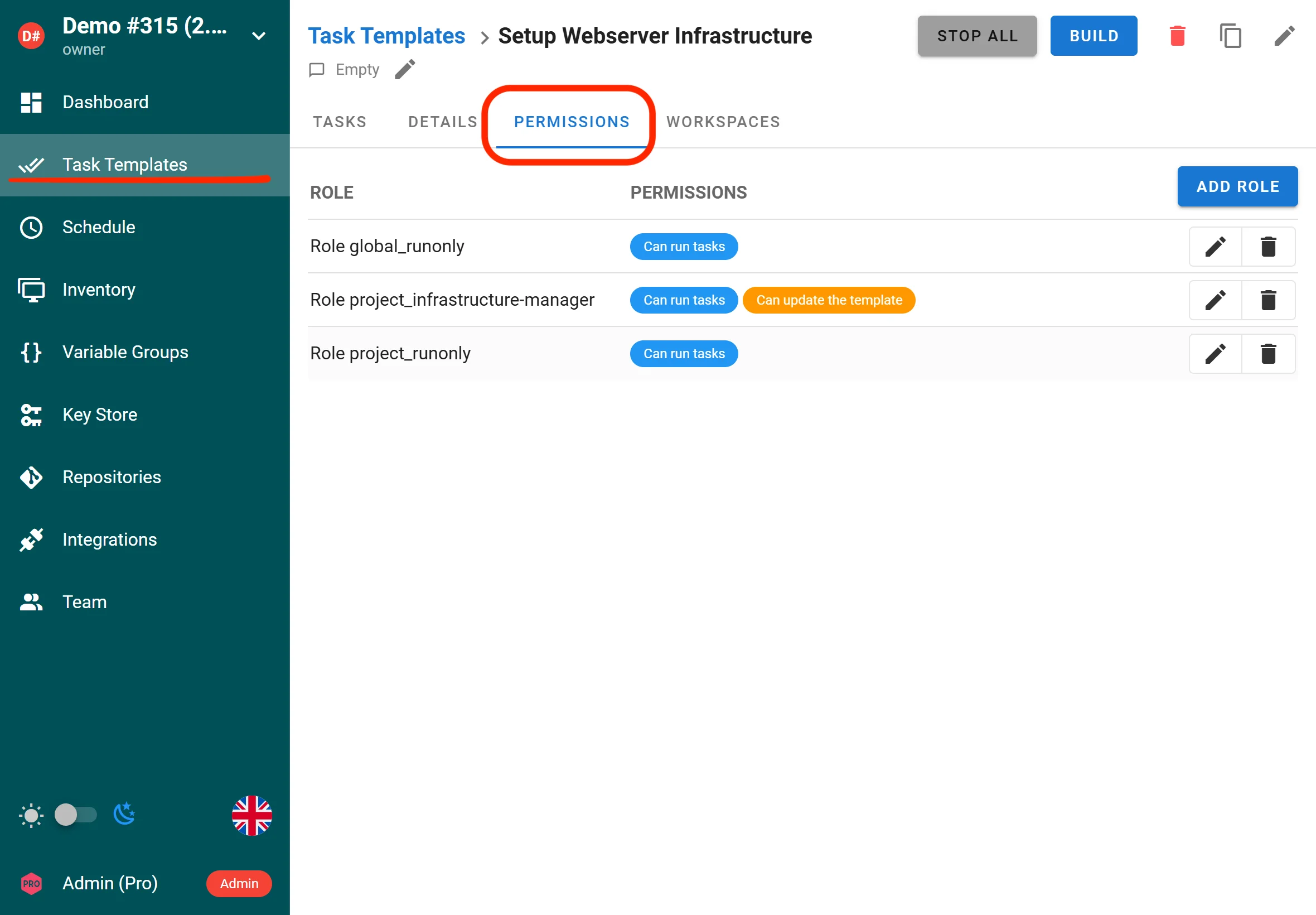
- Open the Permissions tab.
The Permissions tab lists the roles already added to the template.
Add the role and grant template permissions
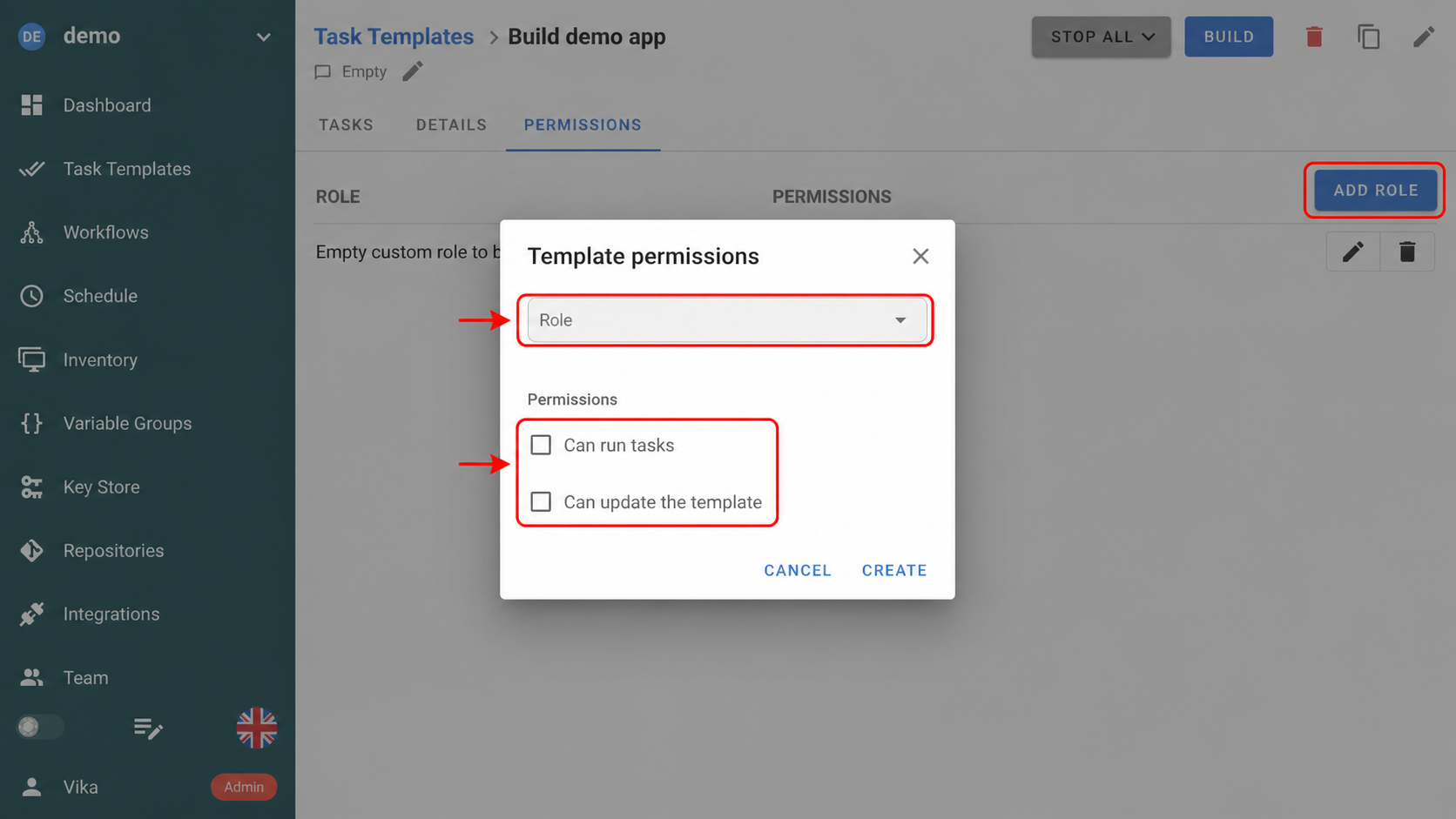
- Select Add Role and choose the custom role to add to this template.
- Select only the template permissions that the role needs, such as Can run tasks or Can update the template.
This example uses a previously created role with no project-wide permissions. You can choose any custom role that is available in the project.
To grant the same role access to additional templates, repeat these steps for each template.
Template permissions are additive. They add access without replacing or reducing access from a user's built-in role or other custom roles. If a user can already run or update all task templates, adding a template-specific role does not narrow that access.
Assign a custom role in a project
After creating and configuring a global or project role, assign it to the required team member:
- Open the project and go to Team.
- Expand Roles next to the required user.
- Select the custom role.
Not currently supported
- LDAP / OIDC group mapping. Custom roles are assigned per user. Mapping external directory groups to custom roles is not supported.
- Granular permissions for non-template resources. Only templates can be governed by custom roles at the individual-resource level today.
Managing team members
-
Inviting new members: Owners and Managers can invite new users to join the team and assign them an initial role.
-
Changing roles: Owners can always change the roles of any team member. Managers can change the roles of Task Runners and Guests, but not other Managers or Owners.
-
Removing members: Owners and Managers can remove team members with lower roles.
- An Owner can remove anyone (including other Owners), but cannot remove themselves if they are the sole Owner.
- A Manager can remove Task Runners and Guests, but not other Managers or Owners.
Best practices
- Maintain redundancy: Assign the Owner role to at least two people to ensure continuous access and prevent a single point of failure.
- Follow the principle of least privilege:
- Give team members the minimum role necessary for their tasks.
- Use Task Runner or Guest roles for those who only need limited permissions.
- On Enterprise, prefer custom roles to grant access to specific templates instead of elevating a member's built-in role.
- Review membership regularly:
- As team structures change, re‐evaluate roles.
- Revoke access or downgrade roles for users who no longer need high‐level privileges.
- Use managers for day-to-day administration:
- Reserve the Owner role for a smaller group with ultimate authority.
- Delegate routine project management tasks to Managers to reduce the risk of accidental major changes or project deletions.
Frequently asked questions
1. Can an Owner remove another Owner?
Yes, an Owner can remove or change the role of any other Owner, unless they are the only remaining Owner in the project.
2. Who can delete the project?
Only Owners can delete a project.
3. Can Managers add or remove other Managers?
No. Managers can only add or remove users with Task Runner or Guest roles. To manage Owners or other Managers, you must be an Owner.
4. What happens if I remove all Owners by accident?
Semaphore UI prevents the removal of an Owner if it would leave the project with no Owners at all. There must be at least one Owner at all times.
5. Can Guests run tasks?
No. Guests have read‐only access and cannot trigger or manage tasks. In the Enterprise edition you can grant a Guest permission to run individual templates through a custom role.
6. Do custom roles replace the built-in roles?
No. Custom roles extend the built-in roles with additional project and template-level permissions. Every team member still has exactly one built-in role.
7. Is Extended RBAC available in the community edition?
No. Extended RBAC requires a Semaphore Enterprise subscription.