

Semaphore v2.17 introduces new features and improvements for infrastructure automation and DevOps teams. This release focuses on enhancing developer experience and streamlining infrastructure-as-code workflows.
Custom issuer name in TOTP app
Semaphore v2.17 introduces a new option to customize the issuer name displayed in TOTP (Time-based One-Time Password) authenticator apps.
Purpose:
The issuer name helps users identify which account in their authenticator app belongs to Semaphore, especially useful when managing accounts from multiple organizations or environments.
How to Configure:
You can set the issuer name in two ways:
-
Environment Variable
Set the environment variable
SEMAPHORE_TOTP_ISSUERto your desired issuer name when starting Semaphore.Example (Docker Compose):
environment:
  - SEMAPHORE_TOTP_ISSUER=MyCompany Semaphore
Example (Standalone):
SEMAPHORE_TOTP_ISSUER="MyCompany Semaphore" ./semaphore server -
Configuration File
In your
config.jsonfile, set the following option inside theauthsection:{ "auth": { "totp": { "issuer": "MyCompany Semaphore" } } }
Precedence:
If both the environment variable and the config file option are set, the environment variable (SEMAPHORE_TOTP_ISSUER) takes precedence.
Default Value:
If not set, the default issuer name will be Semaphore.
Result:
When users add their Semaphore TOTP account to an authenticator app, the selected issuer name will appear, making it easier to distinguish between multiple accounts.
For full details on all available environment variables, see the installation environment variable documentation.
Read secrets from files and environment variables
Secret values can now be sourced directly from raw files on the filesystem. This opens up a much wider range of integration patterns for secret delivery without ever exposing sensitive values through the Semaphore UI or configuration files.
The most immediate use case is Kubernetes-native secret injection: when secrets are mounted into a pod via Kubernetes Secrets or a CSI secrets driver (such as the Secrets Store CSI Driver with Vault, AWS Secrets Manager, or Azure Key Vault backends), Semaphore can now read them directly from the mounted path at task runtime.
A particularly powerful combination is with HashiCorp Vault Agent. Vault Agent can run as a sidecar container or a system service alongside Semaphore, authenticate to Vault automatically using any supported auth method (AppRole, Kubernetes, AWS IAM, and others), and write the resulting secret values to files on disk using its file sink. Semaphore can then read those files as secret sources. This means Vault Agent handles all the complexity of token renewal, lease management, and secret rotation — and Semaphore always picks up the latest value from the file at task start, without any manual intervention or re-configuration. This pattern is recommended for production deployments where secrets must be rotated regularly and where storing credentials inside Semaphore’s own database is not desirable.
One-time scheduled tasks
Semaphore now supports one-time schedules in addition to cron schedules. Use this when you need a task to run at a specific date and time and execute only once.
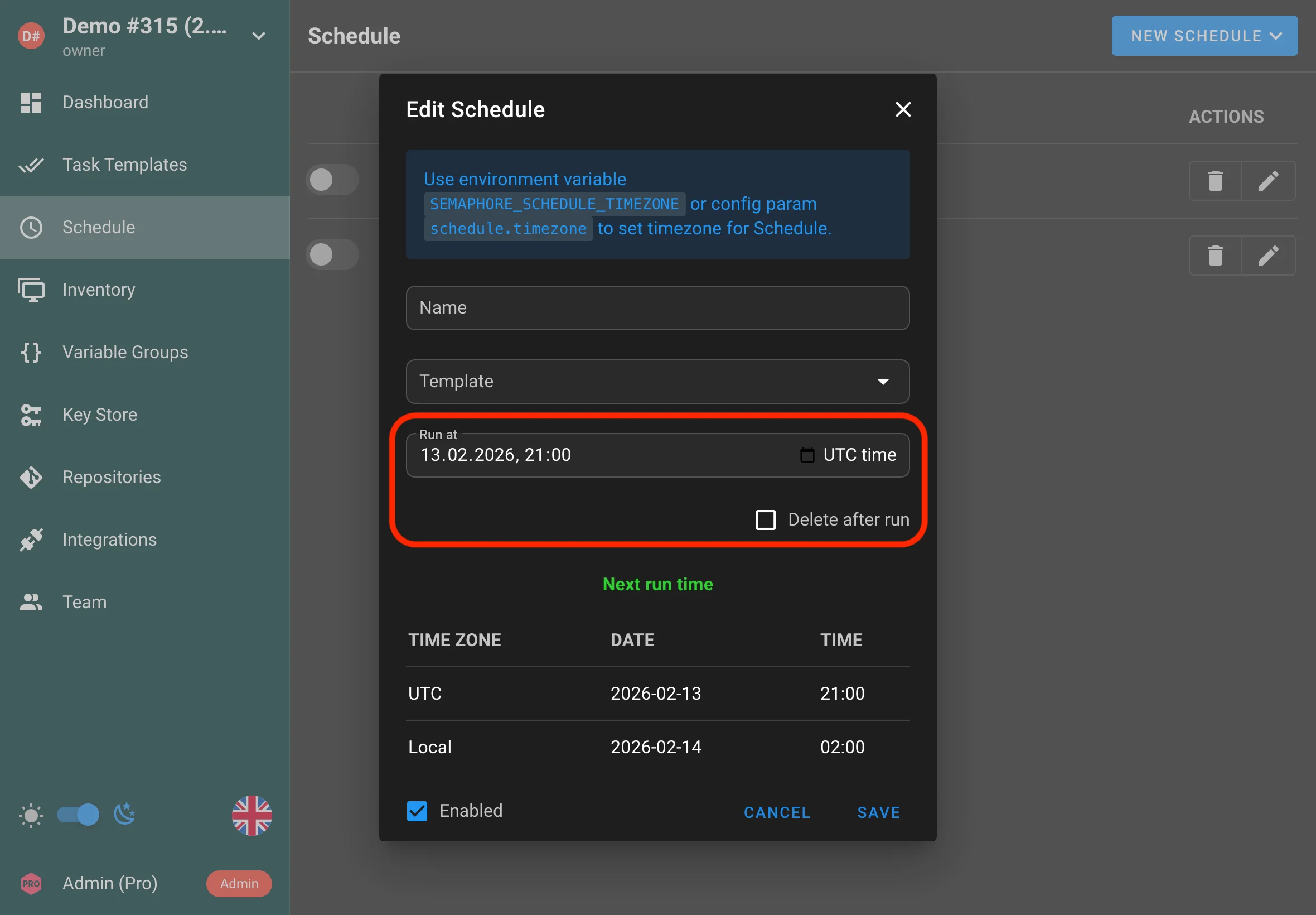
Use cases:
- Run a maintenance task during an approved change window
- Kick off a one-off rollout or backfill job
Customizable views
Template views are now more customizable, allowing you to tailor what’s shown and how it’s organized to better match your workflow.
-
Now you can move the All tab to any place in the bar.
-
You can hide the All tab from regular project users entirely.
-
You can change the default template sorting for a specific view.
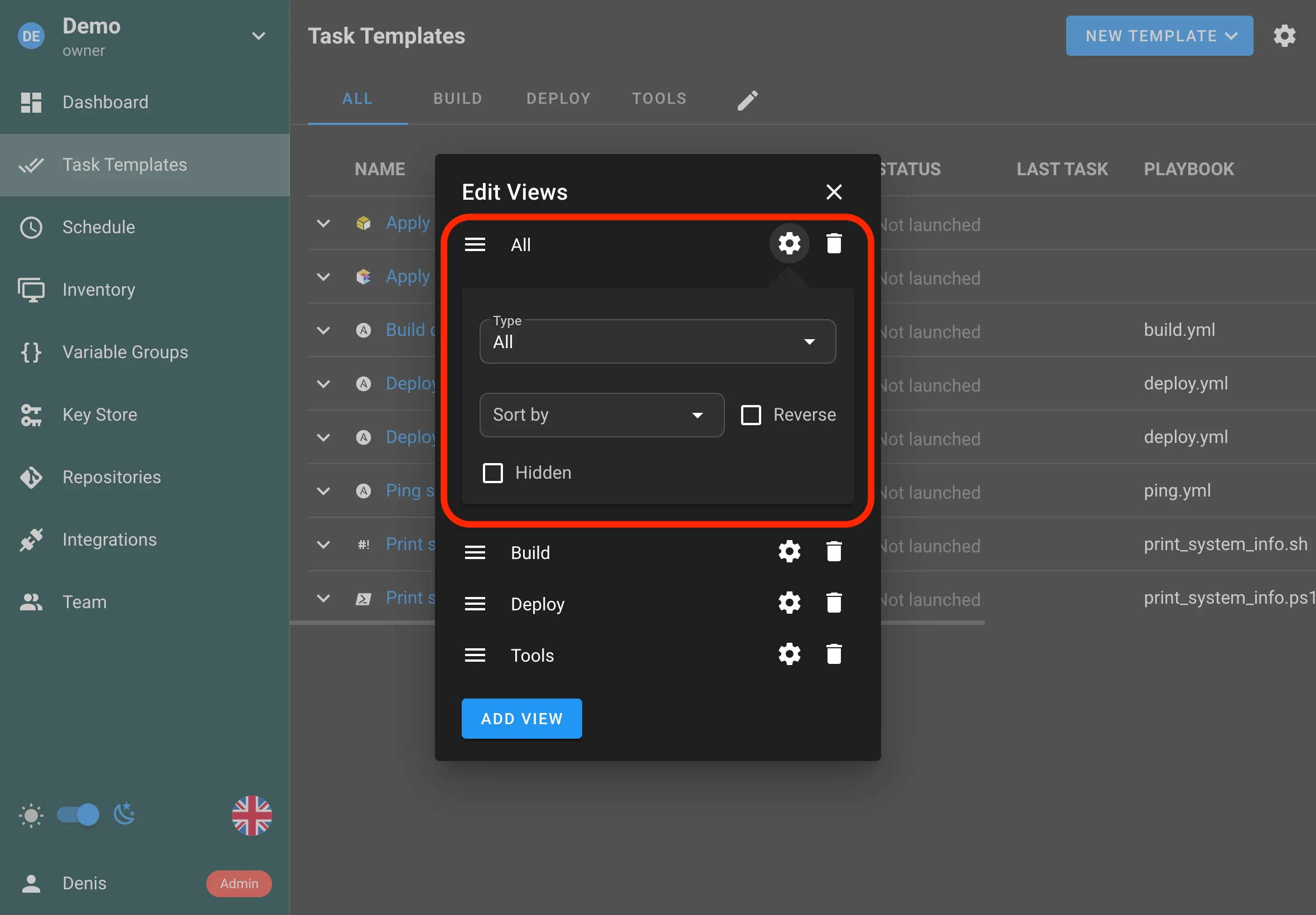
Typical improvements include:
- Better organization of template-related information
- More flexibility in how view content is arranged
Stop all tasks
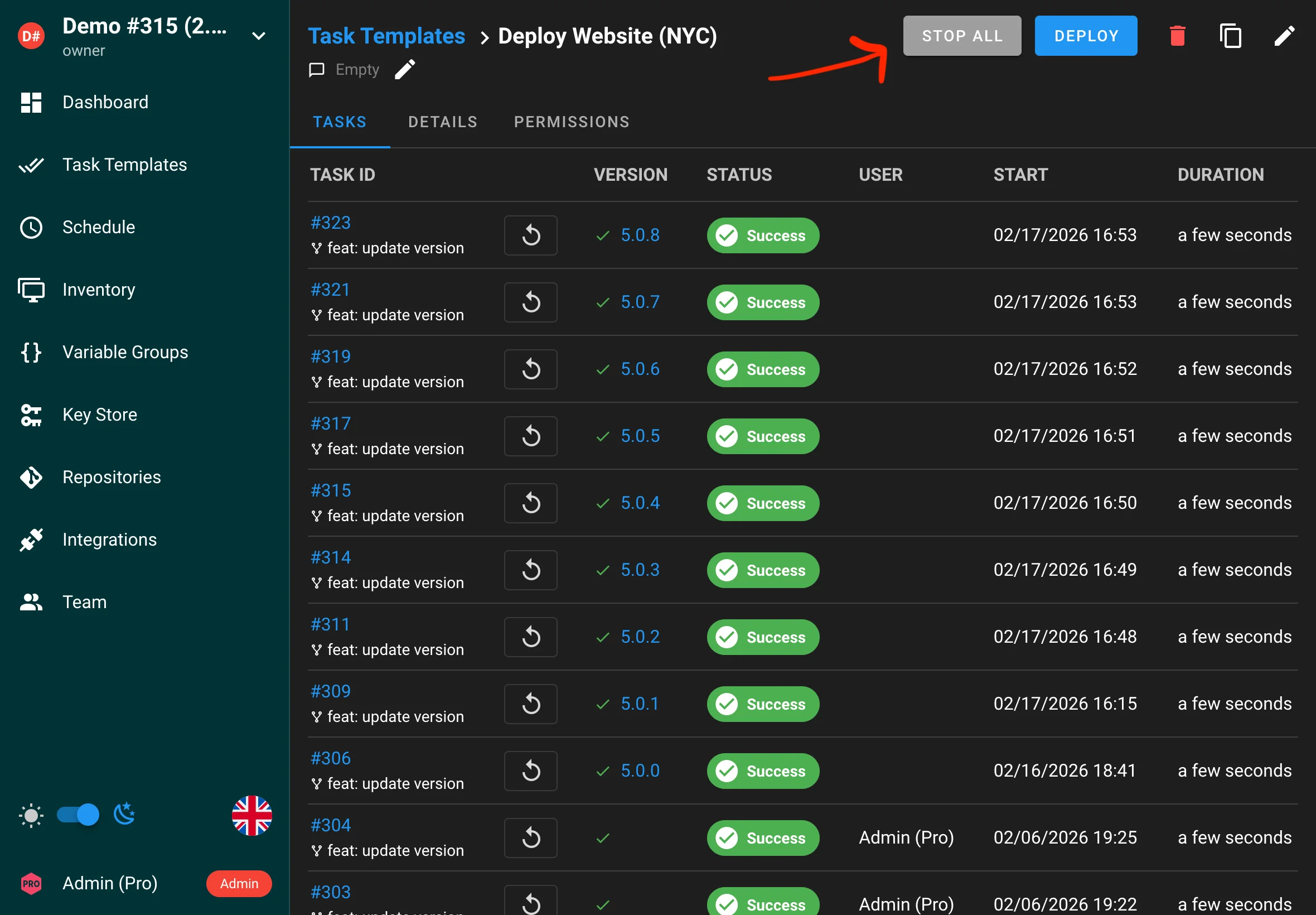
You can now stop all running tasks for a template with a single action. This helps you quickly halt a rollout or cancel jobs that were started accidentally.
Syslog server support
Semaphore can now forward logs to an external syslog server, making it easier to centralize log collection and integrate with existing monitoring and alerting pipelines.
config.json:
{
  "syslog": {
    "enabled": true,
    "network": "udp",
    "address": "localhost:514",
    "tag": "semaphore"
  }
}
Environment variables:
export SEMAPHORE_SYSLOG_ENABLED=True
export SEMAPHORE_SYSLOG_NETWORK=udp
export SEMAPHORE_SYSLOG_ADDRESS=localhost:514
export SEMAPHORE_SYSLOG_TAG=semaphore
Rollback database migrations
Database migrations can now be rolled back. This makes it safer to recover from an upgrade issue and can simplify downgrades when necessary.
semaphore migrate --undo-to 2.16
Drag and drop for survey variables, CLI args, etc
You can now reorder survey variables, CLI arguments, and other list items via drag and drop, making templates easier to maintain and review.
Project export and import via CLI
Semaphore now supports automatic project importing.
Docker container accepts environment variables SEMAPHORE_IMPORT_PROJECT_FILE and SEMAPHORE_IMPORT_PROJECT_NAME for this.
If you need to import a project from the CLI, you can use the following command:
semaphore project import --file /path/to/the/backup.json --project-name "Demo project"
If the project name isn’t provided, the project name from the backup metadata will be used.
To import all projects from a directory, use the following command:
semaphore project import --dir /path/to/the/dir
To export a project, you can use the following command:
semaphore project export --project-name "Demo project" --file /path/to/the/backup.json
If you want to export all projects to a directory:
semaphore project export --dir /path/to/the/dir
By combining this command with cron, you can implement automatic project backups.
CLI tool to migrate from BoltDB to SQLite/MySQL/Postgres
BoltDB is being deprecated and will be removed in v2.9.
For users who have been running Semaphore with the embedded BoltDB storage backend, v2.17 ships a complete, built-in migration tool to move all data to a SQL backend (SQLite, MySQL, or PostgreSQL). The migration preserves all projects, templates, inventories, tasks, integrations, and users. A progress indicator keeps you informed during large migrations, and the --merge-existing-users flag lets you map existing BoltDB users onto pre-existing SQL accounts instead of duplicating them. For Docker users, setting the SEMAPHORE_MIGRATE_FROM_BOLTDB environment variable triggers the migration automatically on container startup. This is a significant quality-of-life improvement for long-running Semaphore deployments that started before SQL support became the standard.
semaphore migrate --from-boltdb /path/to/boltdb/file
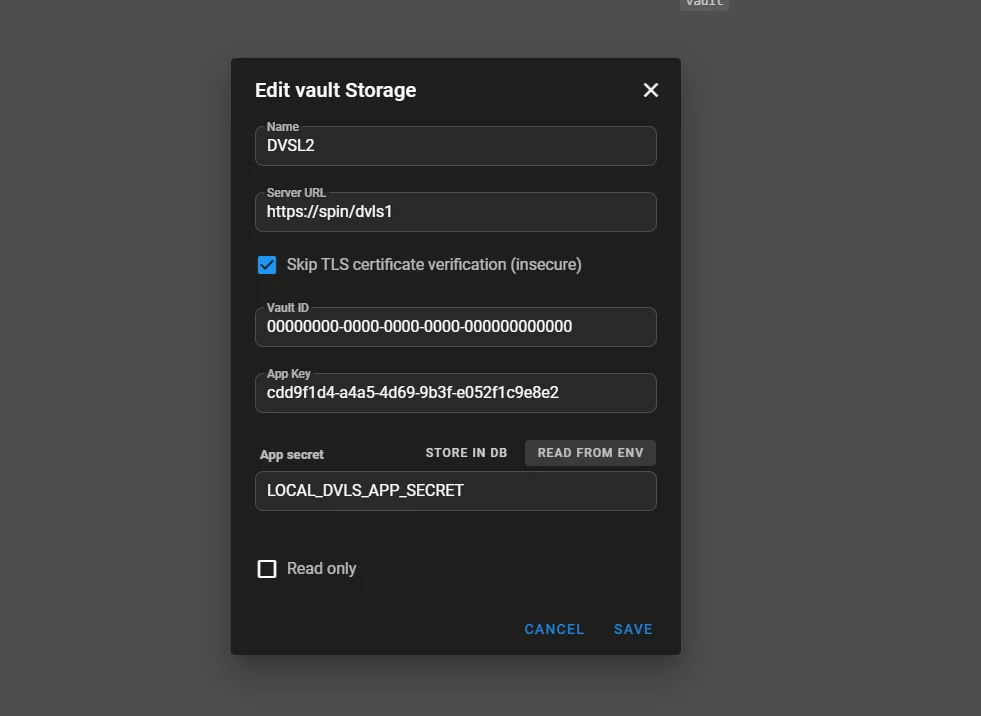
Devolutions Server support (Enterprise)
Enterprise installations can now integrate with Devolutions Server as a secrets backend, similar to HashiCorp Vault.
Custom roles and Extended RBAC (Enterprise)
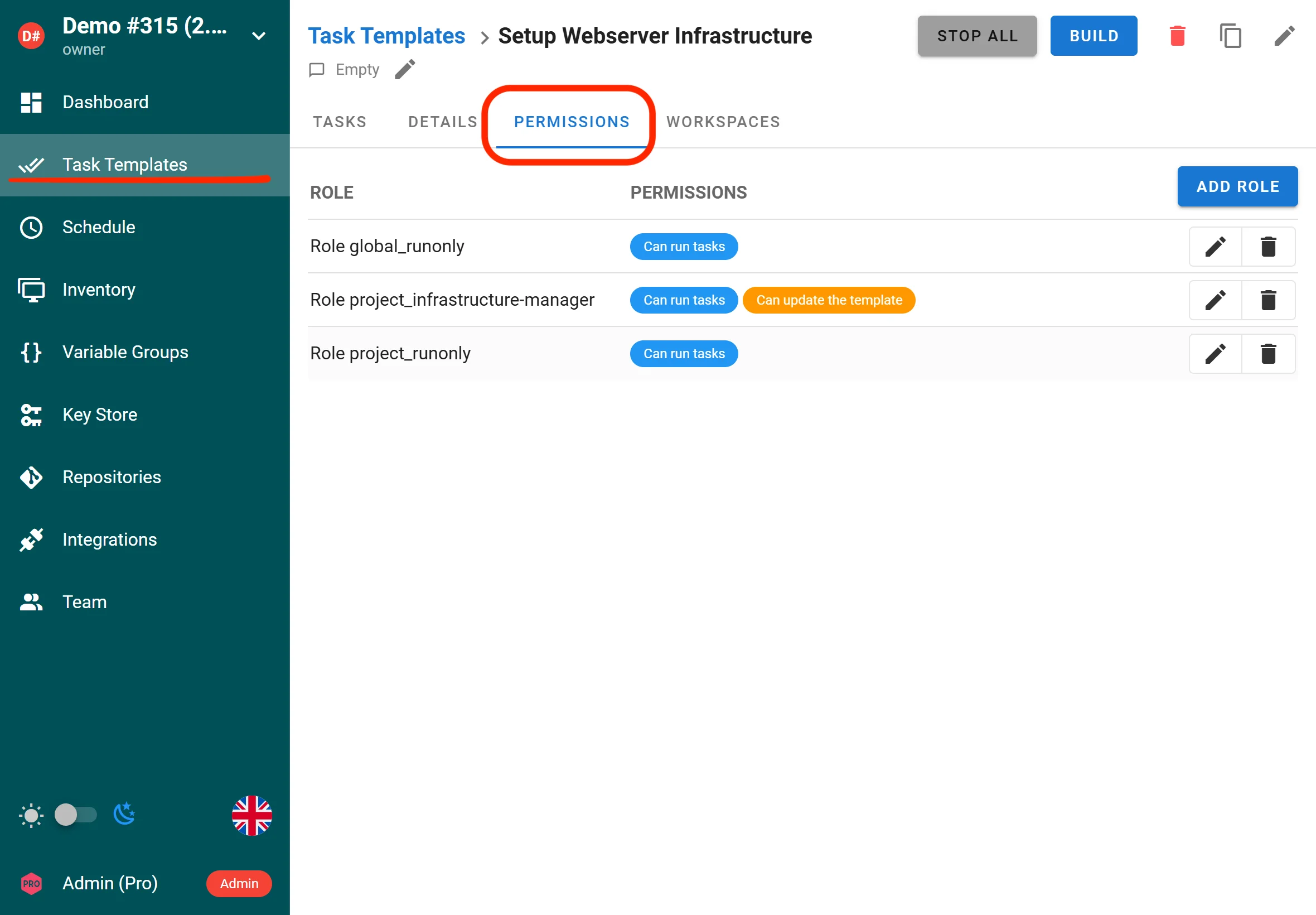
Semaphore UI now supports custom project-level and global roles, enabling fine-grained access control for tasks and templates. RBAC has been extended with more granular controls across Semaphore resources, helping teams apply least-privilege access more precisely.
Enterprise users can define custom roles with tailored permissions to match organizational access requirements.
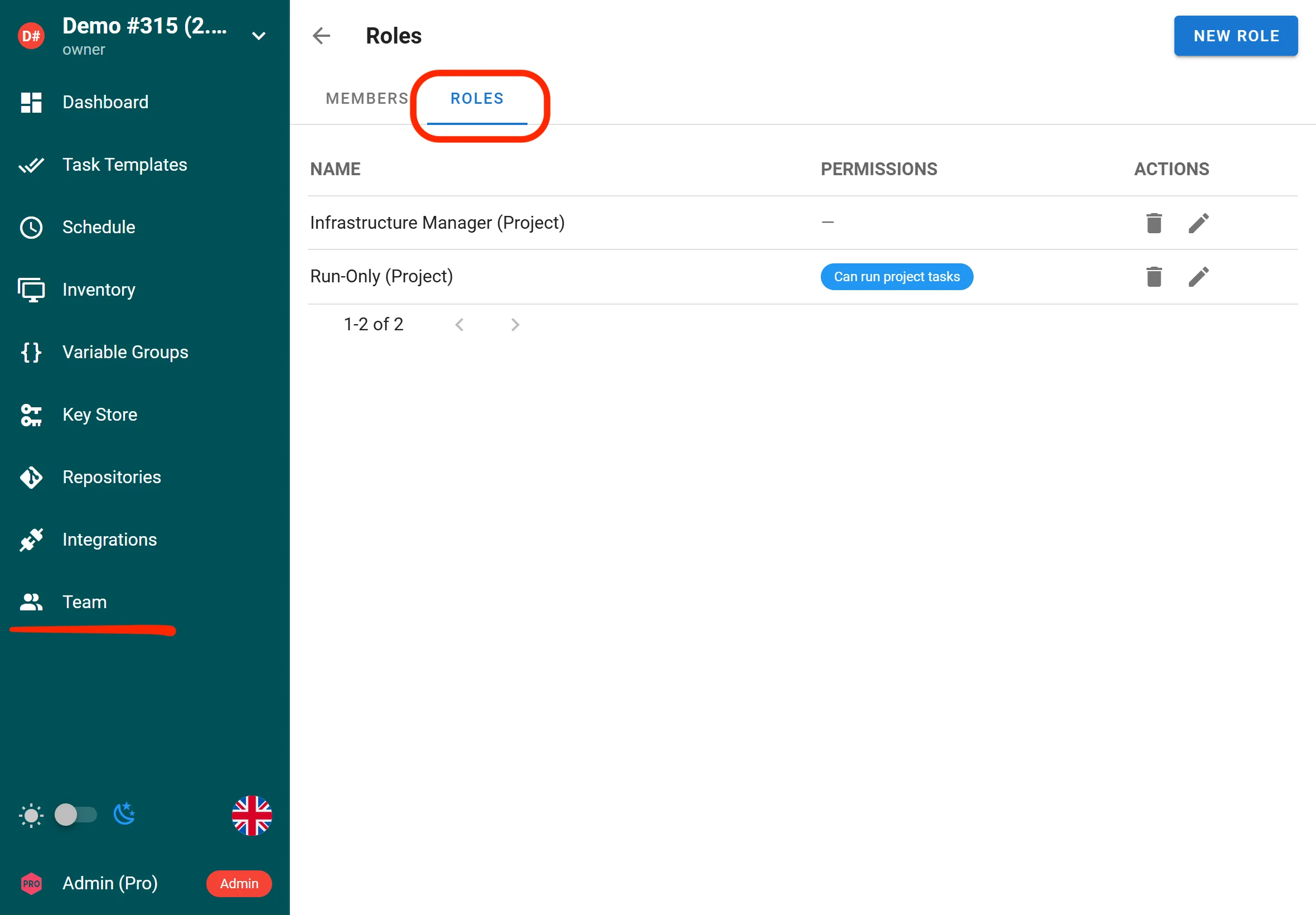
Project owners and managers can assign these roles to specific templates and grant them targeted permissions for running, viewing, or managing tasks.
Active-active high availability (Enterprise)
In a standard single-node setup, one Semaphore process does everything: serves the web UI, runs scheduled jobs, executes tasks, and pushes live updates to browsers. If that process goes down, everything stops.
With active-active HA, you run multiple identical Semaphore instances behind a load balancer. All of them are fully active at the same time - there is no “primary” or “standby.” Any node can serve any request, run any task, or fire any schedule. They coordinate through a shared Redis instance to avoid stepping on each other. All instances connect to the same two backends:
- Database (Postgres or MySQL) — the single source of truth for all persistent data: projects, templates, schedules, task history, users, etc.
- Redis — the coordination layer. Redis serves three purposes:
- Distributed locks — to prevent two nodes from running the same thing
- Pub/Sub messaging — to relay real-time events between nodes
- Shared task queue state — so all nodes see the same queue
{
  "ha": {
    "enabled": true,
    "node_id": "node1",
    "redis": {
      "addr": "localhost:6379"
    }
  }
}
Improved logging
Logging has been improved to provide more context and clarity, helping you troubleshoot failures and understand what happened during a run.
Subscription key via environment variable (PRO)
PRO subscription keys can now be provided via an environment variable, which is helpful for containerized deployments and CI/CD-driven rollouts.
Other features
Force Stop All Tasks
A new “Force Stop All” action is available for operators who need to immediately terminate all running and queued tasks. The regular “Stop All” action sends a graceful stop signal and waits for tasks to finish cleanly. The new force variant bypasses the graceful shutdown and is intended for emergency situations — for example, runaway playbooks, stuck tasks, or before taking a node offline for maintenance. This gives operators a reliable escape hatch when the normal stop mechanism is insufficient.
HashiCorp Vault Mount Field in UI
The HashiCorp Vault secret backend integration now exposes the mount field directly in the UI. Previously, users who configured Vault secret engines on non-default mount paths had to work around this limitation. Now the mount path can be set per secret store, making it straightforward to work with multiple Vault secret engines or custom mount configurations without any manual configuration file editing.
Drag-and-Drop Ordering for Survey Variables and Arguments
Template survey variables and argument lists can now be reordered using drag-and-drop in the UI. Previously, the only way to change the order of survey variables or template arguments was to delete and recreate them in the desired sequence. The new drag-and-drop interface makes it trivial to reorganize prompts so users see them in a logical order when running a template. This is a small but impactful usability improvement for teams that manage complex templates with many user-facing inputs.
Integration Task Details in Headers and Environment Variables
When an integration triggers a task, the response now includes full task details in X-Semaphore-* HTTP response headers. Additionally, the triggered task receives Semaphore task metadata as extra environment variables, making it easy for downstream systems and playbooks to know which task they belong to, what triggered them, and other contextual details. This makes Semaphore integrations significantly more powerful for event-driven automation pipelines where the caller needs to track or react to the triggered task.
Remote Secret Storage Sync
Semaphore supports external secret storage backends — such as Devolutions Server — where credentials and secrets are managed centrally outside of Semaphore itself. Previously, when secrets changed in the external system, Semaphore had no way to know. Operators had to manually open each variable group, find the affected entries, and update them by hand to keep Semaphore in sync with the source of truth.
v2.17 solves this with a dedicated sync mechanism. A new sync button in the UI lets operators trigger a pull from the remote backend on demand, refreshing all secret values stored in a variable group from the external system in one click. A corresponding API endpoint is also available for teams that want to automate this as part of a CI/CD pipeline or a scheduled job.
In practice this means: when a password is rotated in Devolutions Server, an operator clicks Sync in Semaphore (or a script calls the API), and all affected tasks immediately run with the updated credentials — no manual edits, no risk of stale secrets causing failed deployments.
Bug Fixes
Windows Absolute Path Handling
Absolute file paths on Windows (e.g., C:\Users\...) were not correctly recognized or processed by Semaphore’s path handling logic, which was written with Unix-style paths in mind. This caused failures when working with repositories, inventory files, or project directories stored on Windows systems. The fix adds proper handling for Windows-style absolute paths throughout the codebase, improving compatibility for users running Semaphore on Windows hosts.
Git Branch Names with Slashes Truncated
When fetching the list of remote branches from a Git repository, branch names containing forward slashes — a common convention for structured branch naming like feature/my-feature or release/2.17 — were being silently truncated at the slash. This caused branches to appear with incorrect names in the UI and made it impossible to select them for template execution. The fix correctly handles slash-separated branch names throughout the branch listing logic.
Race Condition in Runner Task Status Updates
A concurrency bug in the runner subsystem caused tasks in the waiting_confirmation or confirmed states to receive incorrect status transitions when multiple runners were active simultaneously. The race condition could result in a task appearing stuck, being double-executed, or having its status permanently set to an incorrect value. The fix introduces proper synchronization around task state transitions to ensure status updates are atomic and consistent regardless of how many runners are running concurrently.
access_key_encryption Not Validated at Startup
If the access_key_encryption key was missing, invalid, or incorrectly formatted in the Semaphore configuration, this was not caught when the service started. Instead, the error would surface later at runtime — often when a task attempted to decrypt a stored credential — producing confusing and misleading error messages. The fix validates the encryption key at startup and fails fast with a clear error message if it is not properly configured, preventing difficult-to-diagnose runtime failures.
Terragrunt Command Execution Broken
Tasks using Terragrunt were failing to execute correctly due to an error in how the command was constructed before being passed to the shell. The fix corrects the command construction logic so Terragrunt tasks execute as expected.


