
Semaphore UI vs Rundeck: Ansible and runbook automation

 17 min read
Rundeck and Semaphore UI turn repeatable operations into jobs a team can launch, schedule and review. They differ in how those jobs are assembled, how hosts are represented and how access is delegated. This comparison covers Rundeck 6.2.1 and Semaphore UI 2.20.0, with commercial capabilities identified separately.
Discuss this article with AI


Overview
A restart, a database backup and a new test environment all become harder to share when the procedure lives on one engineer’s laptop. Colleagues need a repeatable operation with the right targets, credentials and inputs, followed by a result they can review. Rundeck and Semaphore UI provide that shared place, using different models for preparing the work.
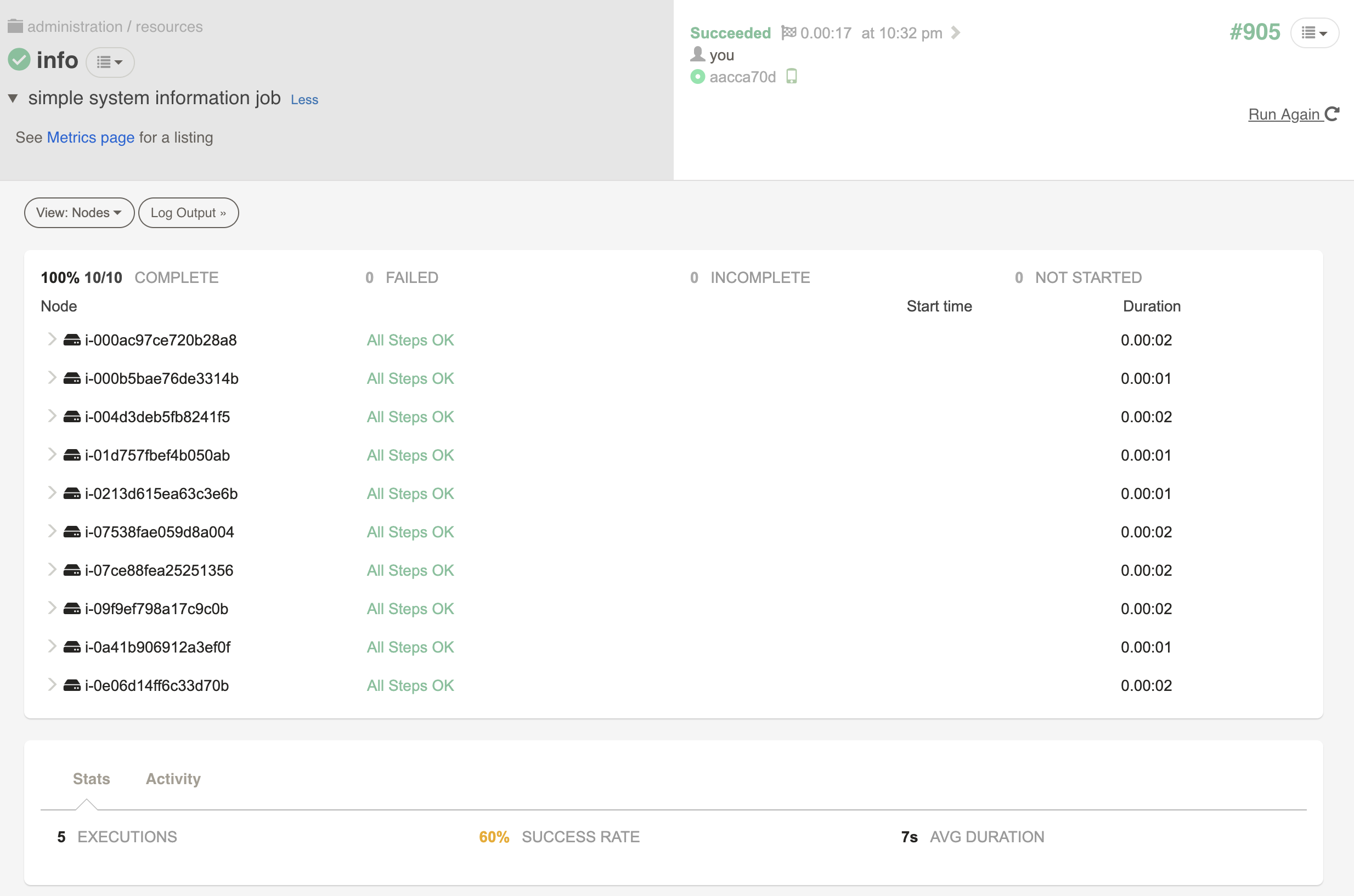
Rundeck builds operational runbooks from commands, plugin actions and references to other jobs. Machines are represented as nodes, which operators can select through filters and which administrators can govern through access-control policies. Its built-in Ansible integration also lets teams bring playbooks and inventories into that model. PagerDuty Runbook Automation adds commercial capabilities through SaaS and self-hosted offerings.
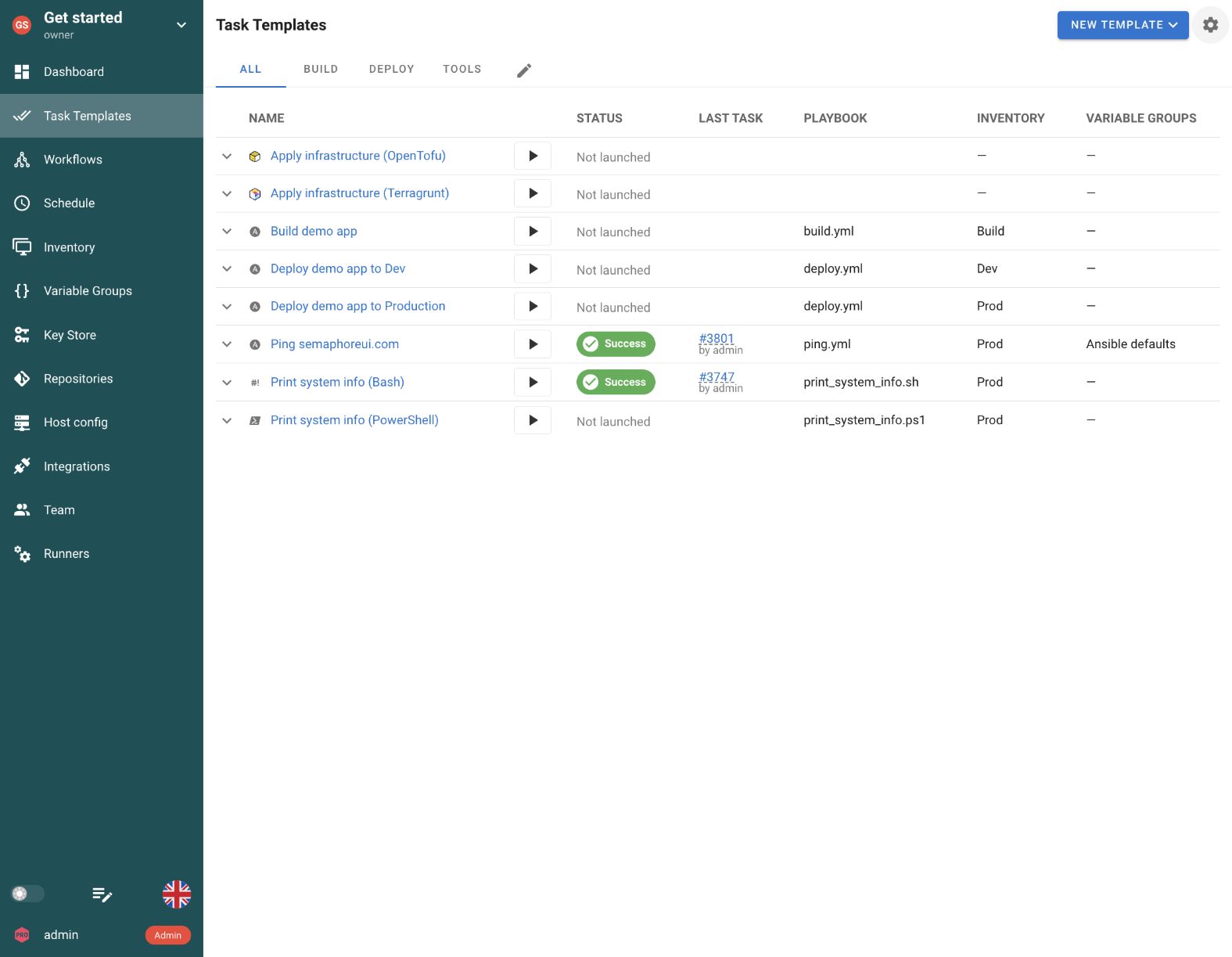
Semaphore UI starts with reusable templates for Ansible, Terraform/OpenTofu, Terragrunt, Bash, PowerShell and Python. A project brings their repositories, inventories, credentials and variables together. An engineer can prepare a deployment or maintenance operation, give colleagues a launch form and schedule the same template for recurring work. Workflows connect those operations when provisioning, configuration and checks need to run in sequence.
Quick comparison
Both products handle manual launches and recurring jobs. The main differences are how they turn existing automation into a shared operation, represent target hosts and manage Infrastructure as Code.
| Criteria | Semaphore UI | Rundeck |
|---|---|---|
| Automation tools | Ansible, Terraform/OpenTofu, Terragrunt, Bash, PowerShell, Python | Commands, scripts, built-in Ansible integration and plugins |
| Installation | Binary, native packages, Docker, Kubernetes | Native packages, executable WAR, Docker, Java runtime |
| Hosting | Self-hosted | Self-hosted Community, commercial SaaS or self-hosted |
| Execution | Server or runners, optional task containers | Server and remote nodes, commercial Enterprise Runners |
| Job configuration | Tool-specific templates, surveys and variable groups | Multi-step jobs, options, node filters and plugins |
| Inventory management | Static and Git inventories, Ansible discovery plugins | Node records, resource-model sources and node filters |
| Credentials | Reusable Key Store entries, external vault integrations | Reusable Key Storage entries, external storage plugins |
| Workflows | Visual connections between templates | Steps, job references, workflow strategies and error handlers |
| Access control | Project roles, Enterprise custom roles and template permissions | ACL policies for projects, jobs, nodes and key storage |
| License | MIT Community, commercial Pro and Enterprise | Apache 2.0 Community, commercial Runbook Automation |
For a team with existing Ansible playbooks, Semaphore UI keeps the playbook, inventory, credentials and launch inputs in a tool-specific template, backed by reusable project resources. The same project can hold Terraform/OpenTofu provisioning and later host maintenance, with an optional Pro state backend. Rundeck can also reuse whole playbooks and Ansible inventory through its built-in integration. Its node records, filters and ACLs are particularly useful when selecting machines and controlling node-level access are part of the operator’s daily work.
Feature comparison
An operational service has to support the whole procedure: prepare the job, reach the target environment, collect the inputs and make the result understandable. Those steps reveal more than a list of executable tools.
Installation and setup
The automation service and the machines running its commands do not have to be the same system. Deployment choices affect both the initial setup and access to private environments.
| Criteria | Semaphore UI | Rundeck |
|---|---|---|
| Self-hosted deployment | Yes | Yes |
| Standalone native binary | Yes | NoJava runtime required |
| Native Linux packages | Yes | Yes |
| Docker deployment | Yes | Yes |
| Native Windows server | Yes | YesJava runtime required |
| High availability | YesEnterprise | YesRunbook Automation |
Rundeck runs on a conventional server without Kubernetes, using native packages, an executable WAR or Docker, with a Java runtime. It bundles H2 for an initial setup. H2 is not supported for production, so teams configure a supported external database for that installation. Commercial Runbook Automation is also available as a managed service.
Semaphore UI offers a standalone binary, native packages and Docker, as well as Kubernetes. An operations team can put the service on an existing host and connect its automation repositories without introducing a JVM. This is useful when the requirement is a shared interface for a handful of recurring procedures as well as when a larger team wants to self-host its automation. Both products can also run their server on Windows, with Rundeck requiring Java. Ansible execution needs a supported control environment, such as Linux, WSL or a Linux runner or container. A native Windows web server does not make Windows a native Ansible control node.
Automation tools
Teams often combine configuration management with provisioning and small maintenance programs. Both platforms can run these tools, but the amount of job configuration differs.
| Criteria | Semaphore UI | Rundeck |
|---|---|---|
| Ansible playbooks | YesTask Template | YesBuilt-in Ansible integration |
| Terraform/OpenTofu | YesTask Template | YesCommand or script step |
| Terragrunt | YesTask Template | YesCommand or script step |
| Bash | YesTask Template | YesCommand or script step |
| PowerShell | YesTask Template | YesCommand or script step |
| Python | YesTask Template | YesCommand or script step |
| Built-in Terraform state backend | YesProHTTP backend and state history | NoUse the backend configured for Terraform |
Rundeck’s built-in Ansible integration runs playbooks and modules and can import Ansible inventory. Teams can therefore keep an existing playbook rather than rewrite it as individual command steps. Its command and script steps also run Bash, PowerShell and Python when the necessary interpreter is available.
Semaphore UI gives each supported tool its own template settings. An Ansible operation selects the playbook and inventory. Terraform/OpenTofu and Terragrunt templates expose the infrastructure configuration and workspace, while Bash, PowerShell and Python templates run the corresponding files directly. This keeps an Ansible-first team’s provisioning and supporting utilities in the same interface as its host operations.
A test-environment request illustrates the benefit. Terraform/OpenTofu creates the infrastructure, Ansible configures the hosts and Python can check an application endpoint. Each Semaphore UI template retains its tool-specific settings and references shared repository, inventory and Variable Group objects. Rundeck represents the same procedure through workflow steps, plugins and job references. The difference is how the team prepares and reuses that configuration, rather than which language its automation must use.
For teams that also need shared Terraform/OpenTofu state, Semaphore UI Pro includes an HTTP backend with workspaces, version history and UI management. An existing external backend can still be used. Rundeck can launch Terraform against the backend configured in the infrastructure code. Its Terraform provider manages Rundeck configuration, which is a different purpose from storing the state of infrastructure jobs.
For a process that must approve and apply the exact saved Terraform plan, configure explicit plan storage and reuse. Semaphore UI’s default execution plans and applies separately, and its default commands use -lock=false unless overridden. Providing a state backend does not change those task command settings.
Setup and scheduling
A reusable operation needs a saved definition, shared configuration and a launch form. A scheduled launch should reuse that preparation rather than require the operator to reproduce a command.
| Criteria | Semaphore UI | Rundeck |
|---|---|---|
| Automation repository settings | YesRepository objects shared by templates | PartialSCM for job definitions, Git steps for code |
| Shared configuration across jobs | YesNamed Variable Groups | YesProject globals and job options |
| Launch forms | Yes | Yes |
| Recurring schedules | Yes | Yes |
Rundeck calls a saved procedure a job. It combines workflow steps with options that collect launch inputs, including required values, validation and choices obtained from an external URL. This works well when the runbook itself defines a sequence of node actions and plugin steps.
In Semaphore UI, a Task Template is a reusable configuration for one automation operation. For an Ansible service restart, the engineer selects the repository, playbook, inventory and credentials, then attaches a Variable Group for shared configuration. A survey can ask the colleague for a service name or change reference. The next launch reuses that preparation, so the colleague works with the operation rather than reconstructing its command line.
Repository objects also keep a Git URL, default branch and access credential in one place for multiple templates. A team can connect its playbook repository once and reuse it for backups, deployments and certificate renewals. Rundeck's Git SCM integration versions and imports job definitions. Fetching the automation code used by a job is a separate step or integration.
Named Variable Groups give Semaphore UI templates reusable sets of environment configuration. A region's endpoints and domain settings can be maintained together and attached to the operations that use them. Rundeck also shares values through project globals and collects run-specific values through job options. Semaphore UI keeps the grouping and assignment visible in the template configuration.
The same pattern covers recurring work. A database-backup playbook can run from a cron schedule with its configured inputs, while an operator can launch it manually before a maintenance window. Certificate checks, renewals and patching can use separate templates against the same inventory. Both platforms support recurring schedules, so the distinction is how the saved job and its surrounding configuration fit the team’s existing automation.
Inventory
| Criteria | Semaphore UI | Rundeck |
|---|---|---|
| Ansible inventory reuse | YesUse inventory definitions directly | YesUse Ansible inventory and import nodes |
| Dynamic host discovery | YesAnsible inventory plugins | YesResource-model sources |
| Select target hosts | YesInventory groups and Ansible host limit | YesNode filters, tags and attributes |
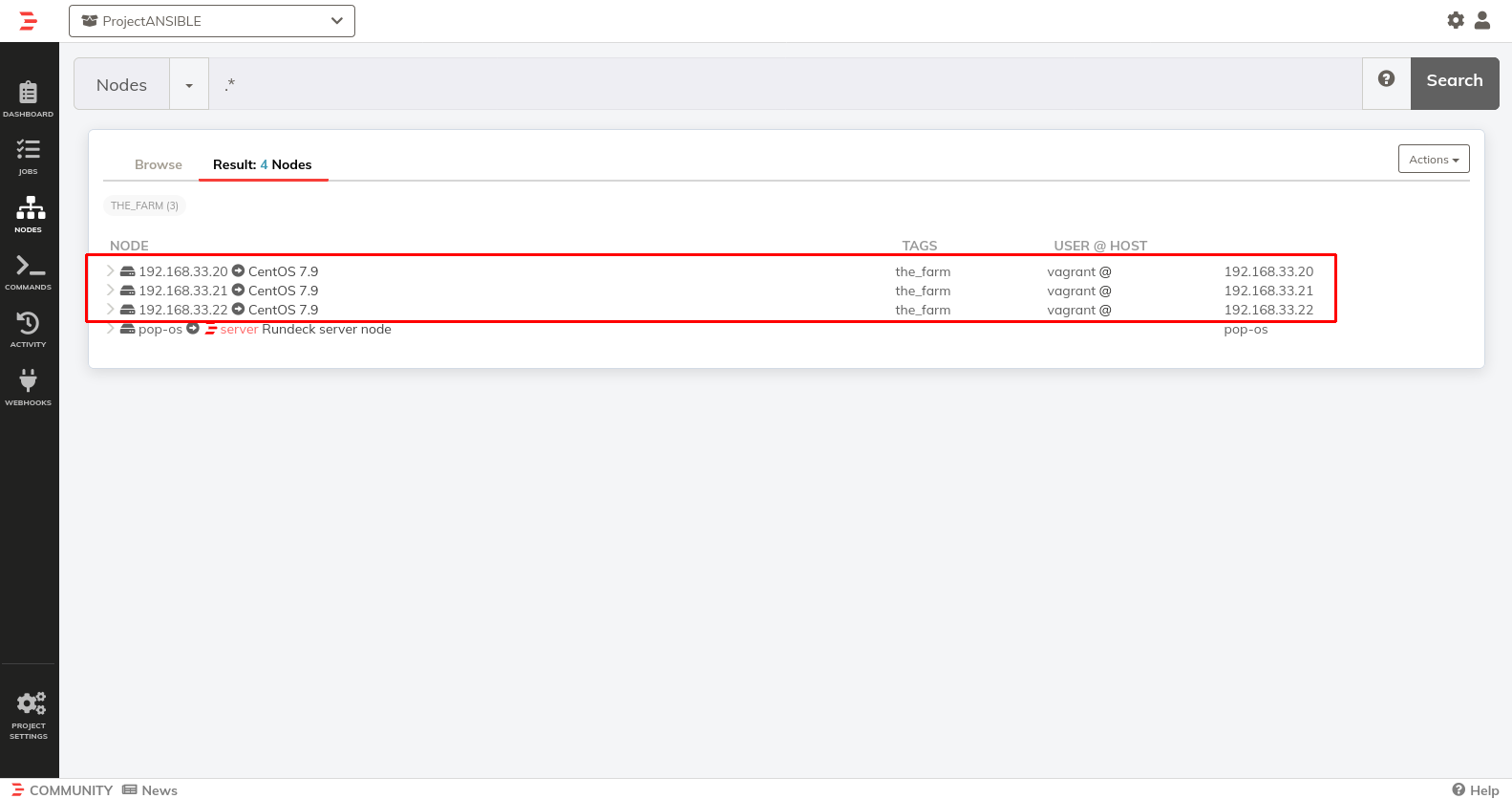
Rundeck represents machines as nodes populated through resource-model sources and plugins. Operators can filter those nodes by attributes and tags when launching a job. Combined with node ACLs, this is useful for a support or operations team that selects authorized machines from a centrally maintained estate.
Semaphore UI reuses Ansible inventory definitions directly. A template can use an INI/YAML definition, an inventory from Git or an Ansible discovery plugin. If Git or an external system already describes the environment, the team can retain that source and reuse the inventory across prepared operations. Rundeck’s Ansible integration can also import that inventory into its node model.
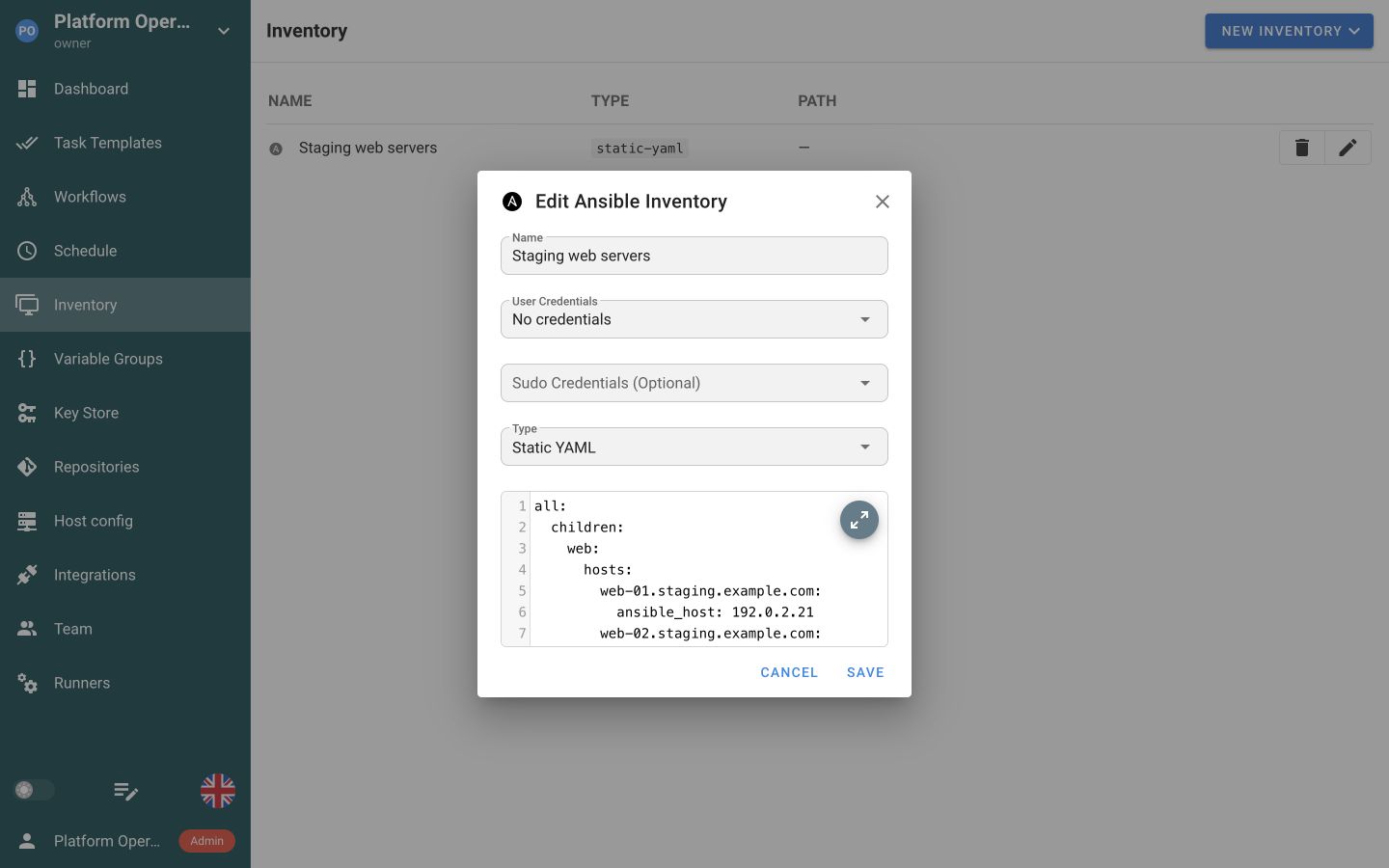
This also makes inventory a reusable part of daily work. The same production inventory can support a certificate check, a deployment and a backup, each with its own template and inputs. Engineers change the inventory source when the estate changes, while colleagues continue to use the prepared operations. Rundeck’s host-selection interface remains a meaningful difference when operators need to browse and filter individual nodes themselves.
Secrets
| Criteria | Semaphore UI | Rundeck |
|---|---|---|
| Stored credentials | Yes | Yes |
| HashiCorp Vault | YesPro | YesKey Storage plugin |
| AWS Secrets Manager | YesEnterprise | YesCommercialKey Storage plugin |
| Azure Key Vault | YesEnterprise | YesCommercialKey Storage plugin |
| OpenBao | YesPro | PartialCustom retrieval step |
| Devolutions Server | YesEnterprise | PartialCustom API or script step |
| CyberArk | YesEnterprisePVWA REST integration | YesCommercialKey Storage plugin |
A prepared operation needs a repeatable way to obtain its credentials. Rundeck Key Storage and Semaphore UI’s Key Store let an engineer configure credential references once, so a colleague launching a backup or deployment does not have to paste an SSH key or password into every run. In Semaphore UI, stored keys can also be reused across the project’s repositories and Ansible operations.
When an organization already uses a central secret store, the automation service can retrieve values from it. Rundeck Community supports HashiCorp Vault through a Key Storage plugin, bundled with commercial Runbook Automation. Semaphore UI Pro integrates HashiCorp Vault and OpenBao. Enterprise adds AWS Secrets Manager, Azure Key Vault, Devolutions Server and CyberArk. The benefit is keeping the existing secret-management process while sharing prepared jobs through the automation interface.
Commercial Rundeck Key Storage plugins also connect AWS Secrets Manager, Azure Key Vault and CyberArk. Semaphore UI Enterprise offers these alongside Devolutions Server. The existing secret service can therefore stay authoritative in either product. Semaphore UI’s Key Store and template references keep those credentials beside the Ansible inventory and tool configuration, while Rundeck connects its storage paths to job options, plugins and node execution.
For OpenBao or Devolutions Server, a Rundeck job can include a custom retrieval step using the secret service’s API. The team supplies and maintains that lookup and its authentication. This differs from a named Key Storage plugin or Semaphore UI’s configured storage connection, and it should be included in the evaluation when the existing secret service is a requirement.
Execution
A job may need to run on private hosts, on a nearby runner or in a controlled runtime. The location of the web service does not by itself determine those execution choices.
| Criteria | Semaphore UI | Rundeck |
|---|---|---|
| Remote execution | YesRunners | YesSSH and node executors |
| Remote execution hubs | YesRunners | YesRunbook AutomationEnterprise Runners |
| Execution routing | YesProProject runners and tags | YesRunbook AutomationRunner tags |
| Concurrency controls | YesTemplate and project limits | YesMultiple executions and node threads |
| Containerized job execution | YesProDocker task executor | YesDocker command or execution plugin |
Execution can stay close to private infrastructure. For example, a Semaphore UI runner inside a customer network can run an Ansible maintenance playbook against hosts reachable from that network. Community includes global runners, while Pro adds project-assigned runners and tag-based routing. Docker task execution starts with Pro and Kubernetes task execution requires Enterprise. Both routing models can select execution machines by tags, with the corresponding commercial edition.
Rundeck Community already runs commands on remote nodes, commonly through SSH or another node executor. Commercial Enterprise Runners provide separate execution hubs in remote environments. Compare where each procedure needs to execute and which connections it needs, rather than treating all remote execution as a paid feature. Installing either application in Docker is separate from running each job in its own container.
Both services also control concurrent work. Semaphore UI configures parallel execution per template and limits running tasks per project. Rundeck can allow multiple executions of a job and set the number of node-dispatch threads. These settings help a team share execution capacity without changing the underlying playbook or runbook.
Workflows
A service update may require a backup, configuration change and verification, with recovery after failure. Composition and reusable subprocedures determine how the team maintains that runbook.
| Criteria | Semaphore UI | Rundeck |
|---|---|---|
| Workflow editor | YesGraph connecting prepared templates | YesStep editor with workflow strategies |
| Multi-tool workflows | Yes | Yes |
| Reusable child workflows | No | YesJob references |
| Passing workflow values | Yes | Yes |
| Success and failure handling | YesBranches on task outcome | YesStep error handlers and workflow strategies |
| Approval checkpoints | YesWorkflow approval nodes | PartialExternal gate and separately launched jobs |
When several operations belong together, Semaphore UI workflows connect templates with success and failure paths, approvals and delays. For example, a backup can precede an Ansible update and a verification task. Rundeck adds reusable job references, step-level error handlers and strategies that distinguish steps run once from those dispatched to each selected node. Semaphore UI reuses individual templates across workflows, but cannot embed a complete workflow inside another workflow.
Both platforms pass captured values to later steps. Semaphore UI 2.20 collects Ansible set_stats, Terraform/OpenTofu/Terragrunt outputs and JSON from Bash, PowerShell or Python, then maps those values into destination inputs. Collection works with the local executor on the server or a runner, but not the Docker and Kubernetes executors. Rundeck uses log filters to capture data and its built-in Global Variable step to expose values to later steps or parent jobs. In either model, a value such as a host address can be passed directly, while a file or archive needs storage accessible to the next step or an explicit transfer. The receiving template declares the input, which its playbook or inventory configuration then uses to target the new host.
For a production update, a Semaphore UI workflow can pause at an approval node before the sensitive operation. Its 2.20 approval permission follows permission to run the project’s tasks, with a separate approver role announced for 2.21. Rundeck’s job references and API let a team split an approved procedure into separately launched jobs and connect an external approval process. That requires the team to implement the gate and continuation rather than treating an ordinary job launch as an enforced approval.
Nested Rundeck job references are especially useful when many runbooks share the same multi-step remediation. In Semaphore UI, keeping common operations as templates works well when each reusable unit is one playbook or tool invocation. A procedure that needs a workflow inside another workflow requires API orchestration or a different decomposition, adding setup and result handling.
Access control and authentication
Giving a colleague a service-restart button also requires a decision about the permitted procedure, hosts and sign-in method. These controls should match how operators choose their work.
| Criteria | Semaphore UI | Rundeck |
|---|---|---|
| Project access control | YesProject roles | YesACL policies |
| Per-node access policies | NoConstrain prepared jobs instead | Yes |
| Job-level launch permissions | YesEnterprise | Yes |
| LDAP and Active Directory sign-in | YesPro | YesJAAS LDAP configuration |
Rundeck ACL policies distinguish jobs, nodes and other resources. A team can give an operator access to particular procedures and subsets of the host estate, which is valuable when the operator chooses targets across many runbooks.
Semaphore UI delegates work around projects and prepared templates. Community project roles already let colleagues run tasks without giving every operator responsibility for editing the automation resources. A team can collect its service restarts, backups and checks in a project, with engineers maintaining the definitions and colleagues launching the operations they need.
Enterprise adds custom roles and template-level execution permissions when project-wide launch access is too broad. For example, support staff may need a service-restart template while deployment remains restricted to another role. The inventory, credentials and enabled launch overrides still belong to that template’s configuration. This model differs from independent node permissions that apply across arbitrary jobs.
Semaphore UI Pro adds LDAP/Active Directory and OIDC sign-in, plus local TOTP. Rundeck supports local accounts and directory authentication through JAAS, including LDAP and Active Directory. Authentication identifies the person, while project roles or ACL policies separately determine what that person may launch. A prepared operation should expose only the host and parameter overrides that fit that delegation.
Logs and audit
Execution records explain a failed operation. An audit trail answers who used or changed the service, and can be collected separately by the security team.
| Criteria | Semaphore UI | Rundeck |
|---|---|---|
| Run history and logs | Yes | Yes |
| Host result summaries | YesProAnsible host summary | YesNode and workflow-step results |
| Administrative audit records | YesAdministrator audit-log view, enable recording | YesLocal audit trail file |
| Export audit events | YesProTLS Syslog and Splunk HEC | YesCommercialAudit Stream plugin |
After an operation runs, the colleague needs to know what happened without asking the author to reproduce it. Both products retain execution results and logs. Rundeck shows a job’s steps and results for its nodes. Semaphore UI keeps each task’s status, output, repository revision and launch details, so the team can return to the same run when investigating an incident.
For an Ansible patching or certificate job, Semaphore UI Pro adds a host summary showing successful hosts and failed tasks per server. An operator can start from the affected host and inspect the corresponding output. Community task history and logs remain useful without that summary. These execution records explain the automation run, while administrative audit events serve a separate purpose.
Rundeck records audit events through its audit listener, with a separate authorization log for ACL decisions. Commercial Runbook Automation adds an Audit Stream plugin for external services, and a logging agent can also collect local files. Semaphore UI provides an administrator audit-log view when recording is enabled, and Pro forwards events through TLS Syslog or Splunk HEC. A security team can use these records for access and configuration reviews while engineers use task logs and host summaries to investigate the operation itself.
Integrations
| Criteria | Semaphore UI | Rundeck |
|---|---|---|
| REST API | Yes | Yes |
| Incoming webhooks | YesRequest matching and input extraction | YesRun Job handler |
| Job notifications | YesEmail, Slack, Teams and other channels | YesEmail, webhook and notification plugins |
Rundeck’s plugin system covers execution, discovery, notifications and secret storage, with some integrations reserved for commercial Runbook Automation. Incoming webhooks use handlers such as Run Job. That breadth is valuable when a runbook needs actions specific to several operational products.
Semaphore UI provides a REST API and webhook integrations with request matching and input extraction. A CI pipeline can build and publish a release, then request a prepared deployment using its version identifier. Semaphore UI holds the deployment inventory, credentials and execution history, while the CI system keeps responsibility for the build. The calling integration must handle authentication and, if it needs to wait for completion, check the task result.
Semaphore UI’s built-in notification channels include email, Slack, Microsoft Teams, Telegram, Rocket.Chat, DingTalk and Gotify. Rundeck sends job-event notifications through email, webhooks and notification plugins. A failed backup or certificate check can therefore reach the existing operational channel, with the execution record retained in the automation service. An interactive approval in chat requires more than sending a notification link.
AI-assisted automation
| Criteria | Semaphore UI | Rundeck |
|---|---|---|
| MCP connectors | Yes | YesOfficial MCP server |
Rundeck provides an official MCP server connecting assistants to its instance API. Semaphore UI has MCP connectors and has announced official MCP support for Pro in 2.21.0. Documentation and APIs also help coding assistants prepare configurations and investigate job output without an MCP connection.
Licensing and support
Both products have free open-source editions. Commercial capabilities, the chosen hosting model and the support agreement change what the team pays for and operates.
Rundeck options
Rundeck Community is Apache 2.0 licensed. PagerDuty Runbook Automation is the commercial offering, adding features such as Enterprise Runners, clustering and additional plugins, with professional support. Its SaaS option also transfers responsibility for the application service to the vendor.
Semaphore UI editions
Semaphore UI Community is free and MIT licensed. Templates, surveys, Variable Groups, schedules, project roles, task history and global runners already support a shared operations service. Pro adds capabilities such as the Terraform state backend, project runners, Docker task execution and external vault integrations. Enterprise adds custom roles, template permissions, Kubernetes task execution and high availability. Commercial support is available through Pro and Enterprise, with commitments defined by the applicable plan and agreement.
Operating costs
For an Ansible-first team, Semaphore UI can reduce the preparation needed to share existing playbooks and IaC configurations. Tool-specific templates and reusable project resources handle work that might otherwise need a command wrapper or additional job configuration. The native binary also offers a deployment path without a JVM. That can make a focused installation simpler to operate, while an established Rundeck service may already provide the integrations and job model the team needs.
How to choose
Start with a procedure colleagues need to perform: a service restart, a backup, a deployment or environment provisioning. The important questions are who prepares it, who chooses its targets and which parts of the operation the platform should manage.
When to choose Rundeck
Rundeck is a strong fit when the runbook and its node model are central to daily operations.
- Operators select and manage nodes through the platform. Node attributes, filters and independent node policies determine which machines an operator can act on across different jobs.
- Your procedures depend on reusable job steps and plugins. Job references, node-specific steps and error handlers model the recovery or maintenance procedure you need.
- The managed service or existing integrations are valuable. Commercial Runbook Automation can provide SaaS hosting, execution hubs and product-specific integrations your team would otherwise maintain.
When to choose Semaphore UI
Choose Semaphore UI when the team wants to share existing playbooks, Terraform/OpenTofu configurations or scripts through dedicated task templates. It can serve an Ansible-only or IaC-only workflow, or bring several tools into one operations service.
- Ansible playbooks already describe your work. Reuse the repository, inventory and credentials for patching, restarts, backups and certificate renewal, with surveys for the inputs a colleague supplies.
- Provisioning and maintenance belong in the same service. Use Terraform/OpenTofu or Terragrunt directly, connect configuration and checks through workflows, and add Pro state storage if you need a shared backend.
- Your targets already come from Ansible inventories. Reuse those definitions across prepared operations without needing a separate node catalog or node-level permissions in the automation platform. Share project templates in Community, adding Enterprise permissions when access must be limited to selected operations.
- You want a focused self-hosted installation. Run a binary, package or container on existing infrastructure, with runners close to private systems and commercial editions available as execution and support needs grow.
Using Semaphore UI with Rundeck
A team can retain Rundeck runbooks that depend on node filters or specialized plugins while moving Ansible and IaC operations into reusable Semaphore UI templates. For example, a Rundeck recovery job can call the Semaphore UI task API to run an Ansible repair against the selected hosts, using the template’s prepared inventory and credentials. This lets the team reuse its runbooks while introducing Semaphore UI for configuration, provisioning and scheduled maintenance.
The team builds this connection, rather than installing a ready-made integration. The calling job needs an API token, network access, a mapping from its node selection to the template’s host-limit input and logic to check the returned task’s final status. Enable host-limit overrides on the template when the runbook needs to supply the targets. Map Rundeck node names to the Ansible inventory host names the template expects. The Semaphore UI API identity’s own permissions govern the run, Rundeck node-level permissions do not transfer with the request. Running two services is useful when the existing Rundeck runbooks remain valuable, otherwise consolidating the operations avoids maintaining the extra integration.
FAQ
Can we reuse our existing Ansible playbooks and inventories?
Yes. Rundeck’s built-in Ansible integration runs playbooks and imports inventory into its node model. Semaphore UI connects a playbook to a reusable inventory, credential references and Variable Groups through a Task Template. The same inventory can serve deployments, certificate checks and other prepared operations.
Can colleagues run a service restart without editing the automation?
Yes. Semaphore UI Community project roles let Task Runners launch prepared templates while engineers maintain the configuration. Enterprise adds permissions for selected templates when project-wide launch access is too broad. Rundeck uses job and node ACLs, which are useful when the operator also needs to choose authorized hosts across runbooks.
Can jobs reach systems inside private networks?
Yes. Semaphore UI can execute through a runner near the target systems, with Pro adding project assignment and tag-based routing. Rundeck Community already dispatches commands to remote nodes, while commercial Enterprise Runners add separate execution hubs. The appropriate model depends on where the automation runtime and its network connections need to be.
What needs to be mapped when moving a Rundeck runbook to Semaphore UI?
Existing playbooks and supported command files can be reused, while job options, node filters, credentials, permissions and step relationships need corresponding template and workflow configuration. Check job references and error handlers in particular. Semaphore UI reuses individual templates across workflows, but does not embed a complete workflow inside another workflow.
Can Rundeck and Semaphore UI be used together?
Yes. A Rundeck job can call the Semaphore UI API to launch a prepared Ansible or IaC task and check its final status. This can retain node-oriented or plugin-heavy runbooks in Rundeck while Semaphore UI handles tool-specific operations and later maintenance. The team implements the API connection and result handling.
Was this article helpful?
Sources
- Semaphore UI, “Semaphore automation applications”. URL: https://semaphoreui.com/docs/user-guide/apps (accessed: ).
- Semaphore UI, “Semaphore installation methods and dependencies”. URL: https://semaphoreui.com/docs/admin-guide/installation (accessed: ).
- Semaphore UI, “Semaphore global runners”. URL: https://semaphoreui.com/docs/admin-guide/runners/ (accessed: ).
- Semaphore UI, “Semaphore workflow nodes and approvals”. URL: https://semaphoreui.com/docs/user-guide/workflows (accessed: ).
- Semaphore UI, “Semaphore Community, Pro and Enterprise”. URL: https://semaphoreui.com/pricing (accessed: ).
- Semaphore UI, “Semaphore Terraform HTTP backend”. URL: https://semaphoreui.com/docs/user-guide/apps/terraform/states (accessed: ).
- Semaphore UI, “Semaphore project access”. URL: https://semaphoreui.com/docs/user-guide/projects (accessed: ).
- Semaphore UI, “Semaphore inventories”. URL: https://semaphoreui.com/docs/user-guide/inventory (accessed: ).
- Semaphore UI, “Semaphore variable groups”. URL: https://semaphoreui.com/docs/user-guide/environment (accessed: ).
- Semaphore UI, “Semaphore scheduled tasks”. URL: https://semaphoreui.com/docs/user-guide/schedules (accessed: ).
- Semaphore UI, “Semaphore Key Store”. URL: https://semaphoreui.com/docs/user-guide/key-store (accessed: ).
- Semaphore UI, “Semaphore high availability prerequisites”. URL: https://semaphoreui.com/docs/admin-guide/ha#prerequisites (accessed: ).
- Semaphore UI, “Semaphore local execution, workflow outputs, inventory paths, host limits and branch overrides”. URL: https://github.com/semaphoreui/semaphore/blob/58a596ed20b724af67c468588edcda12d1779549/services/tasks/local_executor.go (accessed: ).
- Semaphore UI, “Semaphore task dispatch, runner routing, concurrency and remote workflow outputs”. URL: https://github.com/semaphoreui/semaphore/blob/58a596ed20b724af67c468588edcda12d1779549/services/tasks/TaskPool.go (accessed: ).
- PagerDuty, “Installing Rundeck”. URL: https://docs.rundeck.com/docs/administration/install/ (accessed: ).
- PagerDuty, “Instance System Requirements”. URL: https://docs.rundeck.com/docs/administration/install/system-requirements.html (accessed: ).
- Rundeck contributors, “Rundeck 6.2.1 Apache 2.0 license”. URL: https://github.com/rundeck/rundeck/blob/v6.2.1/LICENSE (accessed: ).
- Rundeck contributors, “Rundeck 6.2.1 release”. URL: https://github.com/rundeck/rundeck/releases/tag/v6.2.1 (accessed: ).
- PagerDuty, “Integrate with Ansible”. URL: https://docs.rundeck.com/docs/learning/howto/using-ansible.html (accessed: ).
- PagerDuty, “Builtin Node Steps”. URL: https://docs.rundeck.com/docs/manual/jobs/job-plugins/node-steps/builtin.html (accessed: ).
- PagerDuty, “Creating jobs”. URL: https://docs.rundeck.com/docs/manual/jobs/creating-jobs.html (accessed: ).
- PagerDuty, “Job Options”. URL: https://docs.rundeck.com/docs/manual/jobs/job-options.html (accessed: ).
- PagerDuty, “Job Workflows”. URL: https://docs.rundeck.com/docs/manual/jobs/job-workflows.html (accessed: ).
- PagerDuty, “Builtin Workflow Steps and global variables”. URL: https://docs.rundeck.com/docs/manual/jobs/job-plugins/workflow-steps/builtin.html (accessed: ).
- PagerDuty, “Overview of Access Control”. URL: https://docs.rundeck.com/docs/learning/getting-started/acl-overview.html (accessed: ).
- PagerDuty, “Enterprise Runner”. URL: https://docs.rundeck.com/docs/administration/runner/runner-overview.html (accessed: ).
- PagerDuty, “Runbook Automation”. URL: https://docs.rundeck.com/docs/enterprise/ (accessed: ).
- PagerDuty, “Runbook Automation SaaS”. URL: https://docs.rundeck.com/docs/about/cloud/ (accessed: ).
- PagerDuty, “Plugin Developer Guide”. URL: https://docs.rundeck.com/docs/developer/ (accessed: ).
- PagerDuty, “Rundeck / Runbook Automation MCP Server”. URL: https://docs.rundeck.com/docs/mcp/ (accessed: ).
- Semaphore UI, “Semaphore REST API”. URL: https://semaphoreui.com/api-docs (accessed: ).
- Semaphore UI, “Semaphore team roles and template-level permissions”. URL: https://semaphoreui.com/docs/user-guide/team#extended-rbac (accessed: ).
- Semaphore UI, “Semaphore source and MIT license”. URL: https://github.com/semaphoreui/semaphore (accessed: ).
- Semaphore UI, “Semaphore workflow input mapping model”. URL: https://github.com/semaphoreui/semaphore/blob/58a596ed20b724af67c468588edcda12d1779549/db/Workflow.go#L27-L44 (accessed: ).
- Semaphore MCP contributors, “Semaphore MCP connector”. URL: https://github.com/cloin/semaphore-mcp (accessed: ).
- Semaphore UI, “Semaphore task template options and survey field types”. URL: https://github.com/semaphoreui/semaphore/blob/58a596ed20b724af67c468588edcda12d1779549/db/Template.go (accessed: ).
- PagerDuty, “API Reference”. URL: https://docs.rundeck.com/docs/api/ (accessed: ).
- PagerDuty, “Integrate with HashiCorp Vault”. URL: https://docs.rundeck.com/docs/learning/howto/vault-integration.html (accessed: ).
- PagerDuty, “Webhooks”. URL: https://docs.rundeck.com/docs/manual/webhooks.html (accessed: ).
- Semaphore UI, “Tasks, execution history and Ansible summaries”. URL: https://semaphoreui.com/docs/user-guide/tasks (accessed: ).
- Semaphore UI, “Terraform plan and apply command construction in the Semaphore UI 2.20 candidate”. URL: https://github.com/semaphoreui/semaphore/blob/58a596ed20b724af67c468588edcda12d1779549/db_lib/TerraformApp.go (accessed: ).
- PagerDuty, “Node Sources Overview”. URL: https://docs.rundeck.com/docs/manual/projects/resource-model-sources/ (accessed: ).
- PagerDuty, “Nodes”. URL: https://docs.rundeck.com/docs/manual/05-nodes.html (accessed: ).
- PagerDuty, “Activity”. URL: https://docs.rundeck.com/docs/manual/08-activity.html (accessed: ).
- PagerDuty, “Rundeck Key Storage”. URL: https://docs.rundeck.com/docs/manual/key-storage/ (accessed: ).
- Semaphore UI, “Netbox Dynamic Inventory Integration with Semaphore”. URL: https://semaphoreui.com/docs/user-guide/inventory/netbox-dynamic-inventory (accessed: ).
- Semaphore UI, “Semaphore UI integrations”. URL: https://semaphoreui.com/docs/user-guide/integrations (accessed: ).
- Semaphore UI, “Repositories and shared automation checkout”. URL: https://semaphoreui.com/docs/user-guide/repositories (accessed: ).
- PagerDuty, “Git SCM for job definitions”. URL: https://docs.rundeck.com/docs/manual/projects/scm/git.html (accessed: ).
- PagerDuty, “Job variables and project global variables”. URL: https://docs.rundeck.com/docs/manual/jobs/job-variables.html (accessed: ).
- Rundeck, “AWS Secrets Manager Key Storage plugin”. URL: https://docs.rundeck.com/docs/manual/key-storage/storage-plugins/aws-secrets-manager.html (accessed: ).
- Rundeck, “Azure Key Vault Key Storage plugin (Commercial)”. URL: https://docs.rundeck.com/docs/manual/key-storage/storage-plugins/azure-vault.html (accessed: ).
- Semaphore UI, “Semaphore UI authentication”. URL: https://semaphoreui.com/docs/admin-guide/authentication (accessed: ).
- Rundeck, “Authenticating Rundeck users”. URL: https://docs.rundeck.com/docs/administration/security/authentication.html (accessed: ).
- Semaphore UI, “Semaphore UI audit log and forwarding”. URL: https://semaphoreui.com/docs/admin-guide/audit-log (accessed: ).
- Rundeck, “Rundeck audit trail log”. URL: https://docs.rundeck.com/docs/administration/security/audit-trail.html (accessed: ).
- Semaphore UI, “View the Semaphore UI audit log”. URL: https://semaphoreui.com/docs/admin-guide/audit-log/view (accessed: ).
- Rundeck, “Rundeck application and audit logs”. URL: https://docs.rundeck.com/docs/administration/maintenance/logs.html (accessed: ).
- Semaphore UI, “Semaphore UI notification channels”. URL: https://semaphoreui.com/docs/admin-guide/notifications (accessed: ).
- Rundeck, “Rundeck job notifications”. URL: https://docs.rundeck.com/docs/manual/jobs/job-notifications.html (accessed: ).
- Semaphore UI, “OpenBao secret storage”. URL: https://semaphoreui.com/docs/user-guide/key-store/openbao (accessed: ).
- Semaphore UI, “Devolutions Server secret storage”. URL: https://semaphoreui.com/docs/user-guide/key-store/devolutions-server (accessed: ).
- Semaphore UI, “CyberArk secret storage”. URL: https://semaphoreui.com/docs/user-guide/key-store/cyberark (accessed: ).
- Rundeck, “CyberArk Key Storage plugin (Commercial)”. URL: https://docs.rundeck.com/docs/manual/key-storage/storage-plugins/cyberark-storage.html (accessed: ).
- Rundeck, “Rundeck 6.2.1 audit log listener”. URL: https://github.com/rundeck/rundeck/blob/v6.2.1/plugins/audit-logging-plugin/src/main/groovy/org/rundeck/plugin/audit/AuditLoggerPlugin.groovy (accessed: ).
- Rundeck, “Rundeck 6.2.1 audit event dispatch”. URL: https://github.com/rundeck/rundeck/blob/v6.2.1/rundeckapp/src/main/groovy/rundeck/services/audit/AuditEventsService.groovy (accessed: ).
- Rundeck, “Rundeck Audit Stream plugin”. URL: https://docs.rundeck.com/docs/administration/security/audit-stream-plugin.html (accessed: ).
Comparison by Semaphore UI Team using the documentation, repositories and product information listed above. Access dates are recorded for each source.
Useful links
Evaluate the operations your team already runs and the controls it needs.