
IaC management platform: Semaphore UI vs Spacelift

 18 min read
Spacelift and Semaphore UI both run Ansible and Infrastructure as Code (IaC). Spacelift Deploy manages infrastructure stacks and policy-controlled changes, while Flows connects services through visual automations. Semaphore UI brings Ansible operations, Terraform/OpenTofu provisioning and recurring maintenance into one self-hosted interface. This comparison covers Spacelift documentation as of 21 October 2026 and Semaphore UI 2.20.0.
Discuss this article with AI


Overview
A new environment needs more than a successful Terraform apply. Someone must configure its hosts, deploy services and keep them working through patches, certificate renewals and backups. As these procedures become shared work, the team needs a place to manage their configuration, delegate execution and see what happened.
Spacelift Deploy connects repositories to infrastructure stacks. Each stack holds its configuration and execution settings, while policies, reviews and dependencies coordinate changes. It supports Terraform/OpenTofu, Ansible, Terragrunt, Pulumi, CloudFormation and Kubernetes. Flows extends the platform with a visual canvas for events, service integrations and Deploy actions.
Semaphore UI starts with reusable operations. An Ansible Task Template combines a playbook with its inventory, credentials, variables and launch inputs. Dedicated Terraform/OpenTofu, Terragrunt, Bash, PowerShell and Python templates extend the same model to provisioning and other operations. Projects hold the shared resources, schedules repeat jobs and workflows connect the steps of a longer procedure.
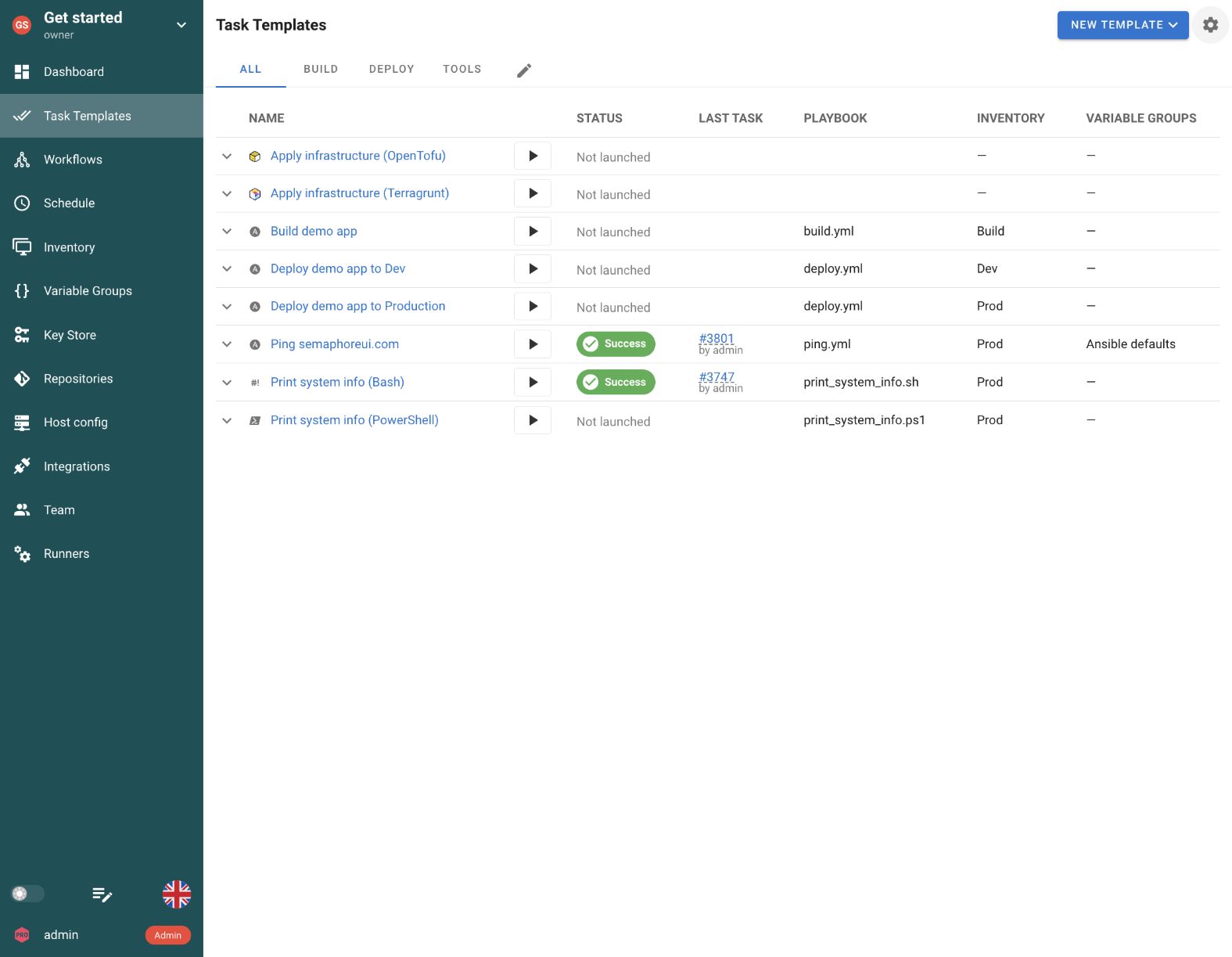
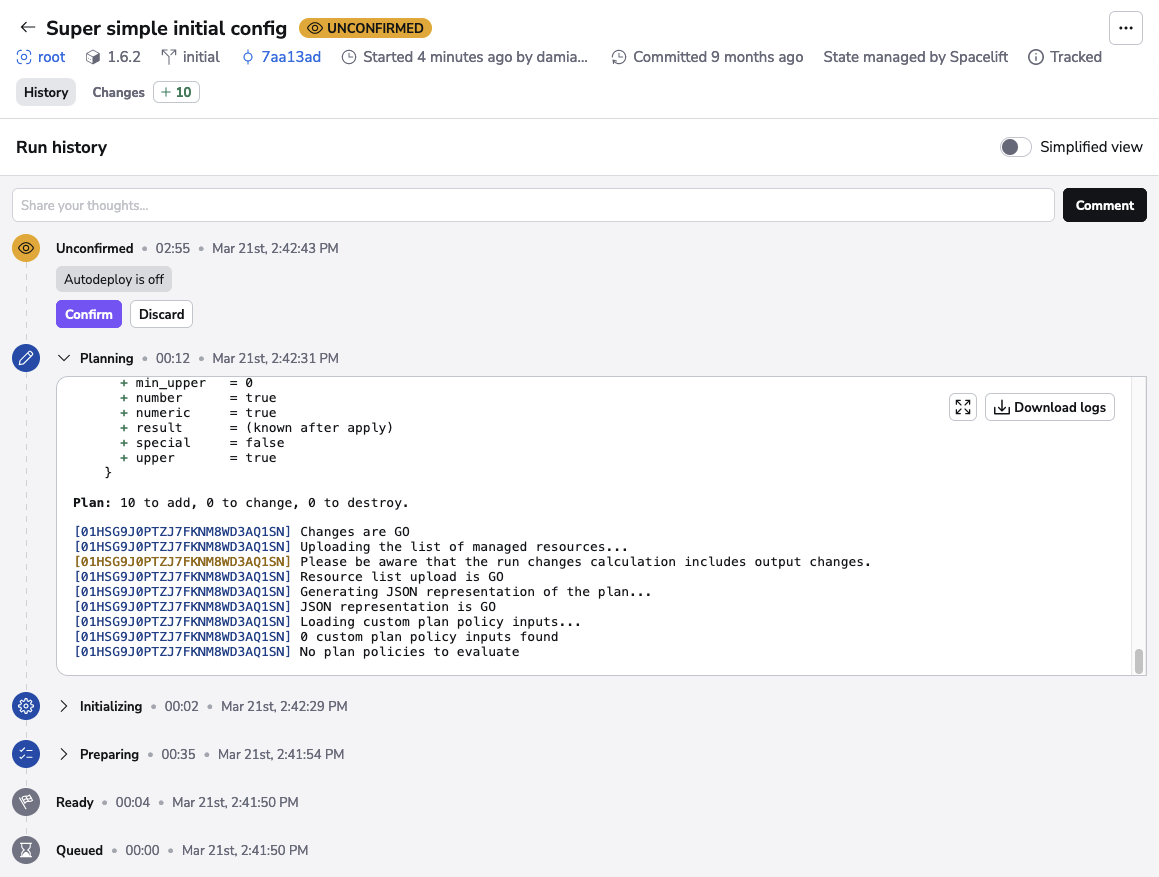
Quick comparison
Both platforms can provision infrastructure and configure it with Ansible. They differ in how teams prepare an operation, share its configuration, control changes and host the service.
| Criteria | Semaphore UI | Spacelift |
|---|---|---|
| Primary model | Projects, reusable templates and workflows | Deploy stacks and policies, Flows visual automations |
| Automation tools | Dedicated templates for Ansible, Terraform/OpenTofu, Terragrunt, Bash, PowerShell and Python | Native integrations for Ansible, Terraform/OpenTofu, Terragrunt, Pulumi, CloudFormation and Kubernetes. Bash, PowerShell and Python through Tasks or configured workflow tools |
| Hosting | Self-hosted binary, packages, Docker or Kubernetes | SaaS, commercial self-hosted and on-premises |
| Execution | Server or runners, optional task containers | Hosted workers or private worker pools |
| Scheduling | Cron and one-time runs in Community | Deploy stack schedules (Business+), Flows schedule blocks |
| Terraform state | Built-in HTTP backend in Pro, external backends supported | Managed stack state or an external backend |
| Change controls | Template settings, workflow approvals and automation code | Plan review, approval policies, OPA/Rego and drift detection |
| Shared configuration | Variable groups, credentials and inventories | Contexts, environment variables and cloud integrations |
| Access control | Project roles, template permissions in Enterprise | Spaces, RBAC and stack resource permissions |
| License and plans | MIT Community, commercial Pro and Enterprise | Proprietary service, free plan and paid subscriptions |
An Ansible-first team can keep an existing Git inventory, playbooks and operational procedures in Semaphore UI, then give colleagues a prepared launch form. Provisioning can use the same interface, with Pro state storage when the team wants a built-in backend. Spacelift applies a stack-based model to both IaC and Ansible, adding a shared process for infrastructure reviews and policy decisions. Flows coordinates those actions with events and services outside the stack.
That distinction remains useful after deployment. A backup or certificate check may need a saved configuration, a schedule and a clear result, while a change to a shared network may also need policy evaluation and review of the exact plan. The platform should match the work being delegated, rather than make every operation follow the same procedure.
Feature comparison
The overlap becomes clearer when following an environment from provisioning to daily operation. Tool support and state handling establish what can run, while inventories, launch inputs, schedules and access determine how the team will use it.
Installation and setup
An automation service needs to reach the systems it manages. The location of the web application and the location of the machine executing a job are separate choices.
| Criteria | Semaphore UI | Spacelift |
|---|---|---|
| Standalone native binary | Yes | NoSaaS or containerized services |
| Self-hosted control plane | Yes | YesEnterprise+ |
| Free self-hosted edition | YesMIT Community | NoCommercial self-hosting |
| Run without Kubernetes | Yes | YesDeploy SaaS or ECS, self-hosted Flows needs EKS |
Spacelift Deploy is available as a hosted service, so a team can use it without operating the control plane. Enterprise+ provides fully self-hosted, on-premises and air-gapped options, including ECS and Kubernetes installation methods. Flows is a separately linked module with its own access settings. Its documented self-hosted installation requires a license and currently uses AWS EKS.
Semaphore UI Community provides the self-hosted service without a license fee. A binary, native package or Docker installation can use an existing server, while Kubernetes remains an option. This is useful when the team wants to share provisioning and maintenance jobs without purchasing a self-hosted platform tier or introducing a cluster solely for automation. The team operates the application and database itself.
Automation tools and state
Teams often provision with one tool and configure the resulting systems with another. Direct tool support and a shared state backend determine how much of that procedure can stay in one service.
| Criteria | Semaphore UI | Spacelift |
|---|---|---|
| Ansible playbooks | Yes | Yes |
| Terraform/OpenTofu | Yes | Yes |
| Terragrunt | Yes | Yes |
| Python | YesDedicated template | YesTasks (paid) or configured workflow tools |
| PowerShell | YesDedicated template | YesTasks (paid) or configured workflow tools |
| Bash | YesDedicated template | YesTasks (paid) or configured workflow tools |
| Pulumi lifecycle integration | PartialCustom CLI or Ansible automation | YesNative stack integration, preview |
| CloudFormation lifecycle integration | PartialCustom CLI or Ansible automation | YesNative stack integration |
| Kubernetes lifecycle integration | PartialCustom CLI or Ansible automation | YesNative kubectl stack integration |
| Built-in state storage | YesPro | Yes |
| State version history | YesPro | Yes |
Spacelift treats Ansible as a supported stack type alongside its IaC integrations. A stack selects a playbook and normally runs Ansible check mode before execution, with an option to skip that phase. Its configuration-management view exposes host and task results. Terraform/OpenTofu state management and stack dependencies extend the same platform across infrastructure technologies. Pulumi has its own preview/apply lifecycle, currently labelled a preview integration. CloudFormation and Kubernetes also have native stack integrations with change review and policies.
Semaphore UI gives Ansible, Terraform/OpenTofu, Terragrunt, Bash, PowerShell and Python their own templates. Existing automation can run directly, with its repository and tool settings saved for the next launch. A team can use Ansible for host configuration without describing every Python operation or Terraform invocation inside an additional playbook. Pulumi, CloudFormation and kubectl commands can run through custom scripts or Ansible automation, but Semaphore UI does not provide their dedicated stack lifecycles. The team supplies the commands, dependencies and change-review procedure for those tools.
For a PowerShell service check, Semaphore UI stores a PowerShell Task Template with its repository, variables and launch inputs. Spacelift can run that command through Tasks or a custom workflow tool in a stack runtime, and Blueprints or Templates can reuse the stack setup. The difference is the dedicated language-specific configuration, rather than whether the script can execute.
For provisioning, a Semaphore UI Terraform/OpenTofu template selects the repository, workspace and reusable Variable Groups. Pro adds a built-in HTTP state backend with version history and UI management, so the team can keep shared state alongside the jobs that change it. An existing external backend remains an option. Spacelift likewise supports its managed state backend or an external backend, with state integrated into the stack’s change lifecycle.
Setup and scheduling
A colleague should be able to launch a prepared operation without rebuilding its repository, settings and credentials. Saved definitions and launch inputs determine how much preparation can be reused.
| Criteria | Semaphore UI | Spacelift |
|---|---|---|
| Saved automation definitions | YesTask Templates for each tool | YesDeploy stacks and Flows definitions |
| Reusable variables and configuration | YesVariable groups | YesContexts |
| Prepared input forms | YesTask Template surveys | YesBusiness+Infrastructure Templates |
| Scheduled automation | Yes | YesDeploy with Business+ and private workers, Flows Schedule blocks |
| Custom maintenance commands | Yes | YesPaid plansDeploy Tasks in a stack runtime |
Spacelift Deploy saves the repository, runtime and configuration in a stack. Contexts share variables, files and hooks across stacks. Business Templates offer form-based infrastructure deployments, while paid Deploy Tasks accept custom noninteractive commands. These are useful self-service paths, but a provisioning Template and an ad hoc Task command serve different purposes.
Semaphore UI saves an operation as a Task Template. An engineer selects its repository, tool settings and reusable Variable Groups, then supplies credentials and, for Ansible, an inventory. A survey asks the colleague only for the inputs the operation needs, such as a service name or change reference. A team can prepare a Terraform environment request and a PowerShell service check without forcing either into a general stack-maintenance command.
A scheduled launch reuses that saved configuration. Semaphore UI Community supports cron and one-time schedules for backups, certificate checks and provisioning. Spacelift Deploy schedules stack runs and Tasks from Business, using private workers. Flows separately provides cron and interval Schedule blocks with timezone settings. The distinction is where the operation is prepared and how it connects to the rest of the team’s procedures.
Inventory
A provisioning output becomes useful to operations when the next job can identify the right hosts. The inventory source and target-selection model matter more than simply being able to run Ansible.
| Criteria | Semaphore UI | Spacelift |
|---|---|---|
| Git and dynamic Ansible inventories | YesReusable project inventory | YesInventory files and Ansible plugins |
| Limit an Ansible run to selected hosts | YesPrepared inventory and launch limit | YesAnsible configuration and CLI arguments |
Spacelift Ansible stacks use the inventory and command settings configured for that playbook. Existing Git inventories and Ansible discovery plugins can therefore stay part of the automation. Stack dependencies can supply infrastructure outputs, but the playbook or inventory still needs to use those values to identify its targets.
Semaphore UI makes an inventory a reusable project resource. A Task Template can select an INI or YAML inventory, a definition from Git or a dynamic Ansible source. A team that discovers hosts through NetBox or cloud APIs can reuse that definition for deployment, certificate renewal and backup templates, rather than maintain a separate host list for each operation.
For recovery on one host, a prepared Ansible operation can use a restricted inventory or an enabled host limit. That reduces the work needed to target the repair, while the template’s role and configuration still determine what the operator may launch. Neither an inventory tag nor an Ansible limit is a separate per-host authorization policy.
Execution
A scheduled backup and a provisioning run both need a runtime that can reach their targets. Installation of the control plane is separate from placement of that execution capacity.
| Criteria | Semaphore UI | Spacelift |
|---|---|---|
| Execution in private networks | YesRunners | YesStarter+Private workers |
| Execution routing | YesProRunner tags on templates or inventories | YesWorker pool assigned to a stack |
| Containerized job execution | YesProDocker executor | Yes |
| Concurrent execution controls | YesTemplate, project and instance limits | YesWorker capacity and serialized stack operations |
Spacelift Deploy runs jobs on hosted or private workers. A private pool lets infrastructure code and Ansible reach systems inside the team’s network, and is included from Starter+. Stack settings select the worker pool and execution image. Deploy Tasks are serialized with other state-changing work on that stack, protecting it from overlapping operations.
Semaphore UI can start with execution on its server and use runners near private hosts or remote sites. Community includes global runners. Pro adds project runners, tag-based routing and Docker task execution, while Enterprise adds Kubernetes task execution. A project can route its certificate checks to the network that owns the hosts while keeping provisioning and verification in the same interface.
For a Python verification or PowerShell maintenance operation, the runner needs the corresponding interpreter and network access. A task container can provide a repeatable dependency set. Installing the web service in Docker does not by itself isolate every job, and Semaphore UI workflow output collection currently uses the local executor rather than its Docker or Kubernetes executors.
Workflows
Creating a server, configuring it and checking the application is one procedure, even when different tools perform each step. Workflows coordinate that procedure and the path taken after a failure.
| Criteria | Semaphore UI | Spacelift |
|---|---|---|
| Visual workflows | YesTemplates, approvals and branches | YesFlows canvas and integration blocks |
| Mixed-tool procedures | YesConnect native tool templates | YesFlows blocks and Deploy actions |
| Human approval gates | YesApproval nodes | YesDeploy approval policies and run review |
| Passing workflow values | Yes | Yes |
Spacelift Flows connects events, conditions, data transformations and service actions on a visual canvas. Deploy blocks can start runs or Tasks, follow their progress and confirm or review changes. This is useful when an alert or ticket must coordinate infrastructure work with notifications and other services. Deploy stack dependencies separately order infrastructure changes and map available stack outputs.
Semaphore UI workflows connect prepared Task Templates with success and failure paths, approvals and delays. An OpenTofu template can create the environment, Ansible can configure it and Python can check the endpoint. The same templates remain available for independent provisioning or recovery. An approval node can pause a sensitive change without requiring a separate orchestration service. In 2.20, approval follows permission to run the project’s tasks. A separate approver role is announced for 2.21.
Semaphore UI 2.20 collects Ansible set_stats, Terraform/OpenTofu/Terragrunt outputs and JSON from Bash, PowerShell or Python, then maps values to later inputs. This works on the server or a runner using the local executor, not Docker or Kubernetes executors. Flows passes and transforms event data between blocks. Deploy output dependencies have tool-specific limits, including Ansible and Kubernetes stacks that can receive values without producing referenceable stack outputs.
Semaphore UI reuses individual templates but cannot embed a complete workflow inside another workflow. A team can keep reusable procedures as templates or orchestrate separate workflows through the API, which requires connection and result handling. Passing a host address is also different from transferring a saved plan file, which needs accessible storage or an explicit transfer.
Infrastructure change controls
The next question is how to coordinate a change that spans provisioning and configuration, and which decisions the platform should enforce before that change reaches production.
| Criteria | Semaphore UI | Spacelift |
|---|---|---|
| Apply the reviewed plan | PartialSave and reuse the plan explicitly | Yes |
| Scheduled drift checks | PartialScheduled plan and custom handling | YesStarter+Private workers |
| Built-in policy engine | NoExternal checks can run in tasks | YesStarter+OPA / Rego |
| Private module registry | NoUse an external registry | Yes |
Spacelift provides a tracked lifecycle for planning, reviewing and applying infrastructure changes. Approval policies define review requirements, while OPA/Rego policies evaluate decisions such as whether a proposed change may proceed. Drift detection on private workers checks for differences from the intended configuration and can trigger reconciliation. A private module registry helps teams distribute and test common infrastructure modules.
The distinction becomes important when approval must cover an exact Terraform plan. Spacelift makes plan review part of the tracked run. Semaphore UI’s default Terraform task does not automatically preserve a plan and later apply that same file, so that procedure needs explicit plan storage and reuse. Passing workflow values does not transfer the plan file. Scheduled Semaphore UI plans can also support drift checks, but result classification and remediation remain part of the team’s automation rather than a built-in policy or drift engine.
These controls matter when a platform team must enforce organization-wide infrastructure rules or distribute approved modules. Semaphore UI can run external validation tools, keep modules in an existing registry and schedule plan checks, but the team must implement policy decisions and drift response. For a prepared environment request, a backup or a service repair that does not need those centralized controls, dedicated tool templates can cover the operation without the broader governance layer.
Access control and authentication
Sharing a job means deciding who can edit it, who can run it and how those people sign in. A launch form is not an authorization boundary by itself.
| Criteria | Semaphore UI | Spacelift |
|---|---|---|
| Role-based access | Yes | Yes |
| Custom roles | YesEnterprise | Yes |
| Scoped launch permissions | YesEnterpriseIndividual templates | YesResources within a Space |
| OIDC single sign-on | YesPro | YesPaid plans |
| SAML single sign-on | NoUse OIDC instead | YesEnterprise |
Spacelift Spaces delegate access to stacks, policies, worker pools and other resource types within a Space. RBAC bindings apply at Space scope, rather than selecting an individual stack as the permission boundary. Contexts share environment variables, files and hooks, letting a platform team distribute common configuration while individual teams manage their own stacks. Native AWS, Azure and Google Cloud integrations obtain short-lived credentials for runs, making cloud-account access part of the platform configuration.
Semaphore UI projects bring templates, repositories, inventories, credentials and Variable Groups together. Community project roles already support sharing automation with colleagues who have permission to launch jobs. An engineer can prepare an operation with its target configuration and credentials, and another team member can run it and review the recorded result without setting up a separate local environment.
Enterprise custom roles and template-level execution permissions make that delegation more specific. A support team, for example, can be given access to a prepared service-restart operation rather than general editing access to the project. The permitted action follows from the automation, template configuration and role permissions together. A survey provides the requested inputs, while the actual authorization remains the role’s responsibility.
Semaphore UI Pro supports LDAP/Active Directory and OIDC sign-in, plus local TOTP. Spacelift supports external identity providers, OIDC on paid plans and SAML on Enterprise. This can be a deciding difference when the organization mandates SAML directly. Semaphore UI can instead use an OIDC-capable identity provider, while application roles continue to control the permitted operations.
Secrets
A prepared operation needs credentials without asking the colleague launching it to paste a key or token. The important difference is how the platform stores or obtains those values.
| Criteria | Semaphore UI | Spacelift |
|---|---|---|
| Stored SSH credentials | YesKey Store | YesSensitive mounted files |
| Sensitive variables and files | YesSecrets and Key Store references | YesSensitive variables and mounted files |
| HashiCorp Vault access | YesProConfigured external vault | YesPaid plansOIDC trust and runtime lookup |
| OpenBao | YesPro | PartialCustom runtime lookup |
| AWS Secrets Manager | YesEnterprise | PartialAWS credentials, lookup in automation |
| Azure Key Vault | YesEnterprise | PartialAzure credentials, lookup in automation |
| Devolutions Server | YesEnterprise | PartialCustom runtime or API lookup |
| CyberArk | YesEnterprisePVWA REST integration | PartialCustom runtime or API lookup |
Spacelift Deploy stores sensitive environment values and mounted files, and Contexts reuse configuration across stacks. Its cloud integrations and workload OIDC can supply temporary credentials, including access to HashiCorp Vault. Flows has project secrets that blocks and app installations reference at runtime. The team configures the relevant trust and lookup for the service it uses.
Semaphore UI’s Key Store gives repositories and automation templates reusable SSH keys and passwords. Pro adds HashiCorp Vault and OpenBao integrations, while Enterprise adds AWS Secrets Manager, Azure Key Vault, Devolutions Server and CyberArk. An engineer can prepare the credential reference alongside the inventory and variables, so a colleague launches the approved backup or configuration job without reconstructing secret access for every run.
These approaches solve different setup work. Semaphore UI exposes the supported vault connection in the automation configuration. Spacelift’s identity federation is useful when cloud or Vault access should be granted to a particular run without a long-lived provider credential. Secret retrieval, launch permission and what the automation can do with that credential remain separate decisions.
OpenBao, cloud secret stores, Devolutions Server or CyberArk can also be reached from Spacelift automation through an SDK, CLI or HTTP call. Those custom lookups require runtime code and credential handling. They are different from selecting a configured secret storage in Semaphore UI’s Key Store. The native cloud identity integrations grant credentials for a run, rather than automatically retrieving every secret that the operation needs.
Logs and audit
A failed deployment needs execution details, while an access review needs a record of who changed configuration. Those are different records and should be compared separately.
| Criteria | Semaphore UI | Spacelift |
|---|---|---|
| Execution history and output | Yes | Yes |
| Ansible host summaries | YesPro | Yes |
| Administrative audit history | YesAdministrator audit log, enable recording | YesEnterpriseResource changes and account audit UI |
| Forward audit events | YesProTLS Syslog and Splunk HEC | YesEnterpriseAudit webhooks |
Spacelift retains runs and their logs, with its Ansible configuration-management view grouping host and task results. Semaphore UI retains task status, output and launch details, and Pro adds an Ansible host summary. For a certificate check or patching job, that summary helps an operator identify the affected host and open the failed task’s details instead of searching one undifferentiated log.
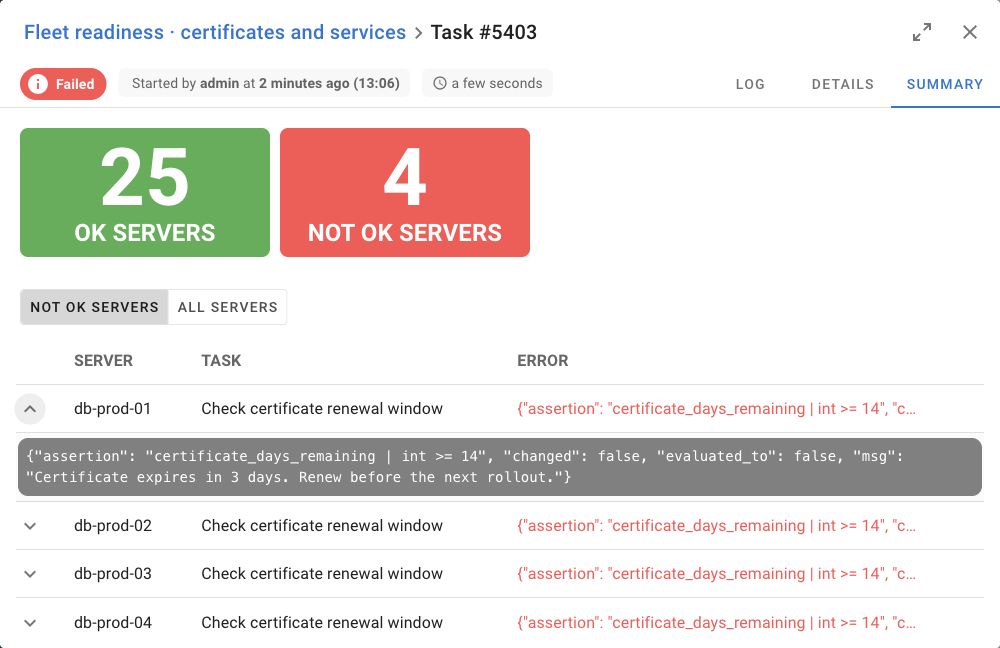
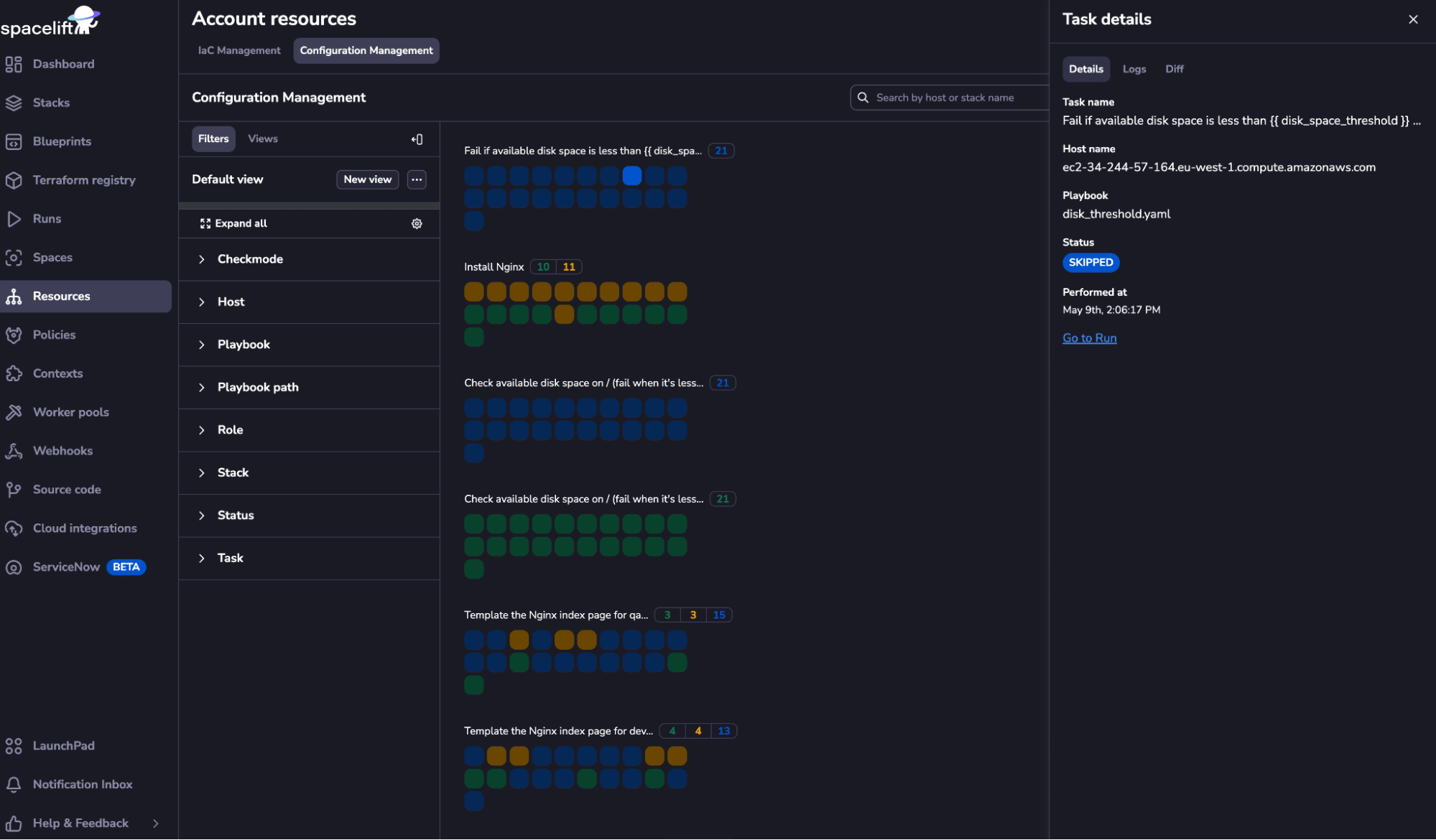
Administrative audit records answer a separate question. Semaphore UI has an administrator audit-log view when recording is enabled, with Pro forwarding through TLS Syslog or Splunk HEC. Spacelift Enterprise provides an audit UI for resource-changing operations and webhook forwarding. A security team can route those events into its existing SIEM while task output remains available for operational troubleshooting.
Integrations and notifications
A build, monitoring alert or service request may initiate the operation. API and webhook connections decide how that event reaches the prepared job and how its result returns to the surrounding process.
| Criteria | Semaphore UI | Spacelift |
|---|---|---|
| Automation API | YesREST | YesGraphQL |
| Incoming event triggers | YesMatchers and input extraction | YesFlows HTTP endpoints |
| Run notifications | YesEmail, Slack, Teams and other channels | YesNotification policies and Flows integrations |
| Git repository integration | YesReusable repository objects | YesStack VCS integration |
Spacelift Deploy connects repository changes to stack runs, with notification policies for Slack messages, webhooks and pull-request updates. Flows extends this to incoming HTTP events, external service actions and Deploy run or Task blocks. This is valuable when infrastructure actions are one part of a larger ticketing or incident-response process.
Semaphore UI provides a REST API and incoming webhook integrations with request matching and input extraction. A pipeline can publish an application, then pass its version to a deployment template. A monitoring system can request a prepared check or recovery operation. The template keeps the inventory, variables and credentials together, while the originating system retains its own build or alert history.
Built-in Semaphore UI notifications include email, Slack, Microsoft Teams, Telegram, Rocket.Chat, DingTalk and Gotify. They let a colleague see that a scheduled backup or deployment needs attention and return to its result. For an API-driven process that must wait, the integration also checks the final task status. A notification containing a link is not approval within the chat service.
AI-assisted automation
| Criteria | Semaphore UI | Spacelift |
|---|---|---|
| MCP connector | Yes | YesOfficial |
Both platforms expose APIs that an assistant can use through an appropriate integration. Spacelift provides a GraphQL API and an official MCP endpoint with read and write scopes, alongside additional infrastructure-oriented capabilities in its Intelligence offering. Semaphore UI provides a REST API, MCP connectors and announced official MCP support for Pro in 2.21.0.
Semaphore UI’s public documentation and source code also help coding assistants work with an existing operation. Given a playbook, its template configuration and the failing task output, Claude Code or Codex can help trace a configuration issue or draft an API integration. That troubleshooting context is useful independently of an MCP connection.
Licensing and support
Spacelift sells a broader infrastructure-governance platform, with hosted and commercial self-hosted options. Semaphore UI offers a focused self-hosted automation service, starting with a free MIT-licensed Community edition. The useful comparison is the scope and support the team needs, rather than a feature count.
Spacelift options
Spacelift is proprietary, with a free hosted plan and paid subscriptions. Starter+ includes private workers, drift detection and the policy engine. Business adds advanced scheduling, while fully self-hosted, on-premises and air-gapped deployment is listed under Enterprise+. These are Deploy plan terms. Flows is a separate linked module, so confirm its entitlement alongside the required Deploy features. Spacelift’s value is strongest when shared infrastructure controls and cross-service orchestration are part of the platform team’s responsibilities.
Semaphore UI editions
Community covers the core service for shared automation, including tool-specific templates, workflows, schedules, project roles and execution history. Pro adds state storage, project runners, Docker task execution, external vault integrations and business-time vendor support. Enterprise adds custom roles, template permissions, Kubernetes task execution, high availability and tailored support options. Teams can add those capabilities while continuing to use the same product family.
Operating costs
For a team sharing Ansible procedures and selected Terraform/OpenTofu jobs, Semaphore UI can be a simpler and more economical fit. A binary or native-package installation uses an existing server, with no need to buy a fully self-hosted edition to operate the control plane. The team still maintains the server, database and automation dependencies, but its investment can stay focused on that service.
Spacelift’s hosted service removes control-plane hosting from the team, and its policy and stack-management capabilities can justify the broader subscription. The practical question is whether those controls solve work the team would otherwise need to implement, or whether prepared jobs, shared state and the required access rules already cover the need.
How to choose
Start with the work your colleagues need to carry out. Preparing a repeatable host-maintenance operation and governing infrastructure changes across many stacks are related requirements, but they do not always need the same platform scope.
When to choose Spacelift
Choose Spacelift when a platform team needs a common Git-driven process for infrastructure changes across many stacks. Plan policies, drift detection, module distribution and stack dependencies are concrete reasons to use it. Its first-class Ansible integration keeps configuration work within the same governance model as Terraform/OpenTofu, Pulumi or CloudFormation. Flows is relevant when that process also needs event-driven coordination with monitoring, ticketing and other services.
When to choose Semaphore UI
Choose Semaphore UI when the team needs a shared service for Terraform/OpenTofu, Ansible, Bash, PowerShell or Python operations, with dedicated templates, launch inputs and schedules. The starting point can be infrastructure provisioning, host maintenance or both.
Terraform/OpenTofu and Terragrunt templates keep the repository, variables and credentials together, with optional Pro state storage. Ansible inventories support prepared patching, deployment and recovery operations. Workflows connect those templates when a procedure spans several tools, while each operation remains available on its own.
A self-hosted installation on an existing server and optional commercial support keep the investment focused on the operations service. Spacelift becomes the stronger fit when organization-wide plan policies, built-in drift handling and multi-stack governance are required parts of that service.
Using Semaphore UI with Spacelift
A platform team can keep Spacelift responsible for governed provisioning and use Semaphore UI for the host operations that follow. For example, Spacelift creates the approved network and servers, then a Flows HTTP Request block or a CI integration passes their identifiers to the Semaphore UI API. Semaphore UI applies the Ansible configuration and later runs scheduled backups, certificate checks and delegated service operations.
The team implements this API connection with a scoped token and network access, passes the target identifiers into the prepared template and checks its final task status before marking the handoff complete. This is a custom integration, not an automatic Spacelift connector.
This division makes sense when Spacelift’s change controls are necessary and Semaphore UI provides a better operating interface for recurring or delegated jobs. Keep the work in Spacelift when its inputs, permissions, scheduling and execution already meet the users’ needs.
FAQ
Which platform fits an Ansible-first operations team?
Semaphore UI connects playbooks to reusable inventories, credentials, Variable Groups, launch forms and schedules. This fits teams sharing patching, service changes, backups and provisioning. Spacelift also has a native Ansible integration, and is particularly relevant when those jobs need the same stack reviews and policy controls as the team’s IaC changes.
Can automation stay inside our own network?
Semaphore UI is self-hosted, with runners available near private systems. Spacelift private workers keep execution in your infrastructure while its control plane remains SaaS, and are available from Starter+. A fully self-hosted Spacelift control plane is a separate Enterprise+ option. Decide whether the requirement applies to job execution, the control plane or both.
Do we need a separate Terraform state service with Semaphore UI?
Not if you choose Pro’s built-in HTTP backend, which provides workspaces, version history and UI management for Terraform/OpenTofu state. You can also retain an existing external backend. Configure locking and exact saved-plan reuse for the actual task commands, rather than assuming a state backend supplies the complete review process.
What needs a separate implementation when moving from Spacelift?
Check approval policies, OPA/Rego decisions, drift detection and reconciliation, module distribution and cross-stack dependencies. Semaphore UI covers prepared provisioning and operational jobs, but importing the underlying code does not recreate those Spacelift controls. Its workflows, state backend and schedules can cover a focused operational requirement when those broader controls are unnecessary.
Can we keep Spacelift for provisioning and use Semaphore UI for operations?
Yes. An integration can pass approved infrastructure identifiers from Spacelift to a prepared Semaphore UI operation through its API. Semaphore UI can then run Ansible configuration, scheduled backups, certificate checks and delegated service actions. The integration must supply the required inputs and check completion when the surrounding process depends on the result.
Was this article helpful?
Sources
- Spacelift, “Ansible automation and configuration management”. URL: https://spacelift.io/blog/ansible-automation (accessed: ).
- Semaphore UI, “Semaphore automation applications”. URL: https://semaphoreui.com/docs/user-guide/apps (accessed: ).
- Semaphore UI, “Semaphore installation methods and dependencies”. URL: https://semaphoreui.com/docs/admin-guide/installation (accessed: ).
- Semaphore UI, “Semaphore global runners”. URL: https://semaphoreui.com/docs/admin-guide/runners/ (accessed: ).
- Semaphore UI, “Semaphore workflow nodes and approvals”. URL: https://semaphoreui.com/docs/user-guide/workflows (accessed: ).
- Semaphore UI, “Semaphore Community, Pro and Enterprise”. URL: https://semaphoreui.com/pricing (accessed: ).
- Semaphore UI, “Semaphore Terraform HTTP backend”. URL: https://semaphoreui.com/docs/user-guide/apps/terraform/states (accessed: ).
- Semaphore UI, “Semaphore project access”. URL: https://semaphoreui.com/docs/user-guide/projects (accessed: ).
- Semaphore UI, “Semaphore variable groups”. URL: https://semaphoreui.com/docs/user-guide/environment (accessed: ).
- Semaphore UI, “Semaphore scheduled tasks”. URL: https://semaphoreui.com/docs/user-guide/schedules (accessed: ).
- Semaphore UI, “Semaphore Key Store”. URL: https://semaphoreui.com/docs/user-guide/key-store (accessed: ).
- Semaphore UI, “Terraform plan and apply execution”. URL: https://github.com/semaphoreui/semaphore/blob/58a596ed20b724af67c468588edcda12d1779549/db_lib/TerraformApp.go (accessed: ).
- Semaphore UI, “Semaphore local execution, workflow outputs, inventory paths, host limits and branch overrides”. URL: https://github.com/semaphoreui/semaphore/blob/58a596ed20b724af67c468588edcda12d1779549/services/tasks/local_executor.go (accessed: ).
- Semaphore UI, “Semaphore task dispatch, runner routing, concurrency and remote workflow outputs”. URL: https://github.com/semaphoreui/semaphore/blob/58a596ed20b724af67c468588edcda12d1779549/services/tasks/TaskPool.go (accessed: ).
- Spacelift, “Ansible”. URL: https://docs.spacelift.io/vendors/ansible (accessed: ).
- Spacelift, “OpenTofu”. URL: https://docs.spacelift.io/vendors/opentofu (accessed: ).
- Spacelift, “Terraform”. URL: https://docs.spacelift.io/vendors/terraform (accessed: ).
- Spacelift, “State management”. URL: https://docs.spacelift.io/vendors/terraform/state-management (accessed: ).
- Spacelift, “Worker pools”. URL: https://docs.spacelift.io/concepts/worker-pools (accessed: ).
- Spacelift, “Enterprise deployment options”. URL: https://spacelift.io/platform/deployment-options (accessed: ).
- Spacelift, “Self-hosted install methods”. URL: https://docs.spacelift.io/self-hosted/latest/installing-spacelift/install-methods (accessed: ).
- Spacelift, “Tracked run and approval flow”. URL: https://docs.spacelift.io/concepts/run/tracked (accessed: ).
- Spacelift, “Policy”. URL: https://docs.spacelift.io/concepts/policy (accessed: ).
- Spacelift, “Approval policy”. URL: https://docs.spacelift.io/concepts/policy/approval-policy (accessed: ).
- Spacelift, “Drift detection”. URL: https://docs.spacelift.io/concepts/stack/drift-detection (accessed: ).
- Spacelift, “Stack dependencies and vendor limitations”. URL: https://docs.spacelift.io/concepts/stack/stack-dependencies (accessed: ).
- Spacelift, “Module registry”. URL: https://docs.spacelift.io/vendors/terraform/module-registry (accessed: ).
- Spacelift, “Context”. URL: https://docs.spacelift.io/concepts/configuration/context (accessed: ).
- Spacelift, “Spaces”. URL: https://docs.spacelift.io/concepts/spaces.html (accessed: ).
- Spacelift, “Spacelift MCP”. URL: https://docs.spacelift.io/concepts/intelligence/spacelift-mcp (accessed: ).
- Spacelift, “Plans and pricing”. URL: https://spacelift.io/pricing (accessed: ).
- Semaphore UI, “Semaphore REST API”. URL: https://semaphoreui.com/api-docs (accessed: ).
- Semaphore UI, “Semaphore team roles and template-level permissions”. URL: https://semaphoreui.com/docs/user-guide/team#extended-rbac (accessed: ).
- Semaphore UI, “Semaphore source and MIT license”. URL: https://github.com/semaphoreui/semaphore (accessed: ).
- Semaphore MCP contributors, “Semaphore MCP connector”. URL: https://github.com/cloin/semaphore-mcp (accessed: ).
- Semaphore UI, “Semaphore 2.20 API routes and resource model”. URL: https://github.com/semaphoreui/semaphore/blob/58a596ed20b724af67c468588edcda12d1779549/api/router.go (accessed: ).
- Spacelift, “Role-Based Access Control (RBAC)”. URL: https://docs.spacelift.io/concepts/authorization/rbac-system (accessed: ).
- Spacelift, “GraphQL API”. URL: https://docs.spacelift.io/integrations/api (accessed: ).
- Spacelift, “Runtime configuration and hooks”. URL: https://docs.spacelift.io/concepts/configuration/runtime-configuration (accessed: ).
- Spacelift, “Ansible stack settings and execution”. URL: https://docs.spacelift.io/vendors/ansible/reference (accessed: ).
- Spacelift, “Ansible configuration management view”. URL: https://docs.spacelift.io/vendors/ansible/configuration-management (accessed: ).
- Spacelift, “Task”. URL: https://docs.spacelift.io/concepts/run/task (accessed: ).
- Spacelift, “Spacelift cloud provider integrations”. URL: https://docs.spacelift.io/integrations/cloud-providers (accessed: ).
- Semaphore UI, “Task Templates”. URL: https://semaphoreui.com/docs/user-guide/task-templates (accessed: ).
- Semaphore UI, “Inventory”. URL: https://semaphoreui.com/docs/user-guide/inventory (accessed: ).
- Semaphore UI, “Task history and output”. URL: https://semaphoreui.com/docs/user-guide/tasks (accessed: ).
- Semaphore UI, “Semaphore cron and one-time schedule execution”. URL: https://github.com/semaphoreui/semaphore/blob/58a596ed20b724af67c468588edcda12d1779549/services/schedules/SchedulePool.go (accessed: ).
- Spacelift, “Scheduling stack actions”. URL: https://docs.spacelift.io/concepts/stack/scheduling (accessed: ).
- Spacelift, “Custom workflow tools”. URL: https://docs.spacelift.io/vendors/terraform/workflow-tool (accessed: ).
- Spacelift, “Blueprints and Templates for reusable stack configuration”. URL: https://docs.spacelift.io/concepts/blueprint (accessed: ).
- Spacelift, “Introduction to Spacelift Flows”. URL: https://docs.spacelift.io/flows/introduction (accessed: ).
- Spacelift, “Flows Time Blocks”. URL: https://docs.spacelift.io/flows/core-blocks-reference/time-blocks (accessed: ).
- Spacelift, “Flows Business Logic Blocks”. URL: https://docs.spacelift.io/flows/core-blocks-reference/business-logic-blocks (accessed: ).
- Spacelift, “Spacelift Deploy Blocks in Flows”. URL: https://docs.spacelift.io/flows/spacelift-deploy-integration/spacelift-blocks (accessed: ).
- Spacelift, “Flows HTTP Blocks”. URL: https://docs.spacelift.io/flows/core-blocks-reference/http-blocks (accessed: ).
- Spacelift, “Linking Spacelift Deploy and Flows”. URL: https://docs.spacelift.io/flows/spacelift-deploy-integration/setup (accessed: ).
- Spacelift, “Self-hosting Spacelift Flows”. URL: https://docs.spacelift.io/flows/self-hosting (accessed: ).
- Spacelift, “Spacelift Templates and self-service deployment forms”. URL: https://docs.spacelift.io/concepts/template (accessed: ).
- Spacelift, “Pulumi integration”. URL: https://docs.spacelift.io/vendors/pulumi (accessed: ).
- Spacelift, “AWS CloudFormation integration”. URL: https://docs.spacelift.io/vendors/cloudformation (accessed: ).
- Spacelift, “Kubernetes integration”. URL: https://docs.spacelift.io/vendors/kubernetes (accessed: ).
- Semaphore UI, “Semaphore UI authentication”. URL: https://semaphoreui.com/docs/admin-guide/authentication (accessed: ).
- Spacelift, “Spacelift single sign-on”. URL: https://docs.spacelift.io/integrations/single-sign-on (accessed: ).
- Spacelift, “Sensitive environment variables and mounted files”. URL: https://docs.spacelift.io/concepts/configuration/environment (accessed: ).
- Spacelift, “Secrets in Spacelift Flows”. URL: https://docs.spacelift.io/flows/configuration-and-expressions/secrets (accessed: ).
- Spacelift, “HashiCorp Vault authentication for Spacelift runs”. URL: https://docs.spacelift.io/integrations/cloud-providers/oidc/vault-oidc (accessed: ).
- Spacelift, “Spacelift workload OIDC”. URL: https://docs.spacelift.io/integrations/cloud-providers/oidc (accessed: ).
- Semaphore UI, “Semaphore UI audit log and forwarding”. URL: https://semaphoreui.com/docs/admin-guide/audit-log (accessed: ).
- Spacelift, “Spacelift audit trail”. URL: https://docs.spacelift.io/integrations/audit-trail (accessed: ).
- Semaphore UI, “View the Semaphore UI audit log”. URL: https://semaphoreui.com/docs/admin-guide/audit-log/view (accessed: ).
- Semaphore UI, “Semaphore UI webhook integrations”. URL: https://semaphoreui.com/docs/user-guide/integrations (accessed: ).
- Semaphore UI, “Semaphore UI notification channels”. URL: https://semaphoreui.com/docs/admin-guide/notifications (accessed: ).
- Spacelift, “Spacelift notification policies”. URL: https://docs.spacelift.io/concepts/policy/notification-policy (accessed: ).
- Semaphore UI, “Semaphore UI repositories”. URL: https://semaphoreui.com/docs/user-guide/repositories (accessed: ).
- Semaphore UI, “OpenBao secret storage”. URL: https://semaphoreui.com/docs/user-guide/key-store/openbao (accessed: ).
- Semaphore UI, “Devolutions Server secret storage”. URL: https://semaphoreui.com/docs/user-guide/key-store/devolutions-server (accessed: ).
- Semaphore UI, “CyberArk secret storage”. URL: https://semaphoreui.com/docs/user-guide/key-store/cyberark (accessed: ).
Comparison by Semaphore UI Team using the documentation, repositories and product information listed above. Access dates are recorded for each source.
Useful links
Evaluate the operations your team already runs and the controls it needs.