Terraform UI: Semaphore UI vs Gaia

Denis GukovFounder & CTO at Semaphore UI
15 min read

Gaia and Semaphore UI both provide a web interface for infrastructure automation. Gaia offers a self-service catalog of Terraform modules and stacks. Semaphore UI runs Terraform/OpenTofu alongside Ansible, Terragrunt, Bash, PowerShell and Python, covering provisioning and the operations that follow. This comparison covers Gaia 2.4.0 and Semaphore UI 2.20.0.

Discuss this article with AI

Overview

A Terraform module can create an environment, but sharing that process involves more than running apply. Users need to supply the right inputs, use the correct credentials and find the resulting state and outputs. The servers and services then need configuration, backups, updates and an operating procedure other people can repeat.

Gaia packages the provisioning part as a Terraform service catalog. Authors publish modules, users create separately configured stacks, and jobs plan, apply or destroy their resources. Each stack keeps its own variables, credentials, state and execution history around one infrastructure instance.

Semaphore UI brings provisioning into a broader automation service. Terraform/OpenTofu templates can use workspaces, reusable variables and launch forms. Ansible templates add inventories and host configuration, while Bash, PowerShell, Python and Terragrunt operations use the same project and execution model. Workflows connect the steps, and schedules keep later maintenance in that interface.

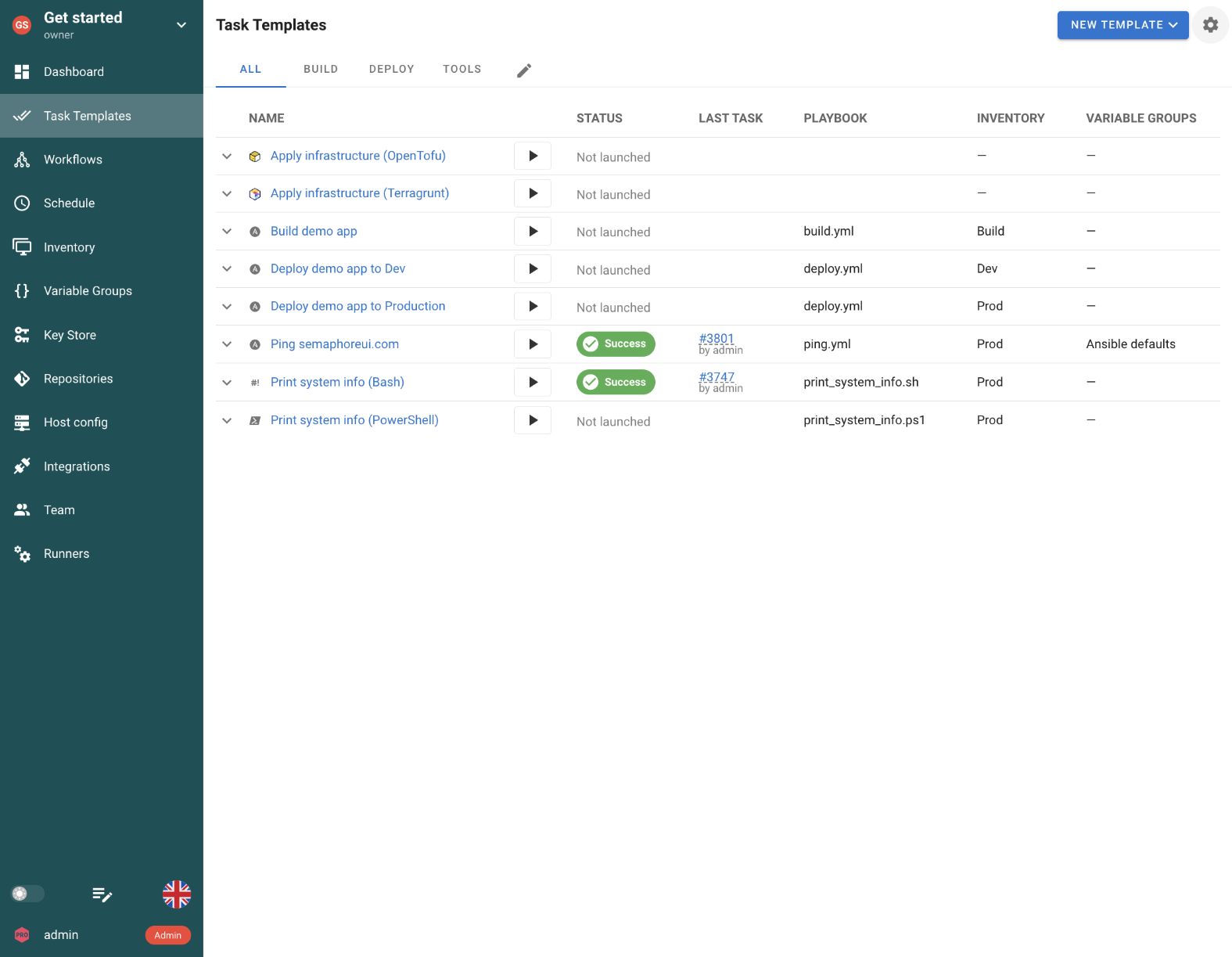
Semaphore UI task templates for several automation tools in one project.
Semaphore UI. Prepared Ansible, Infrastructure as Code and command-line operations share a project’s task list.
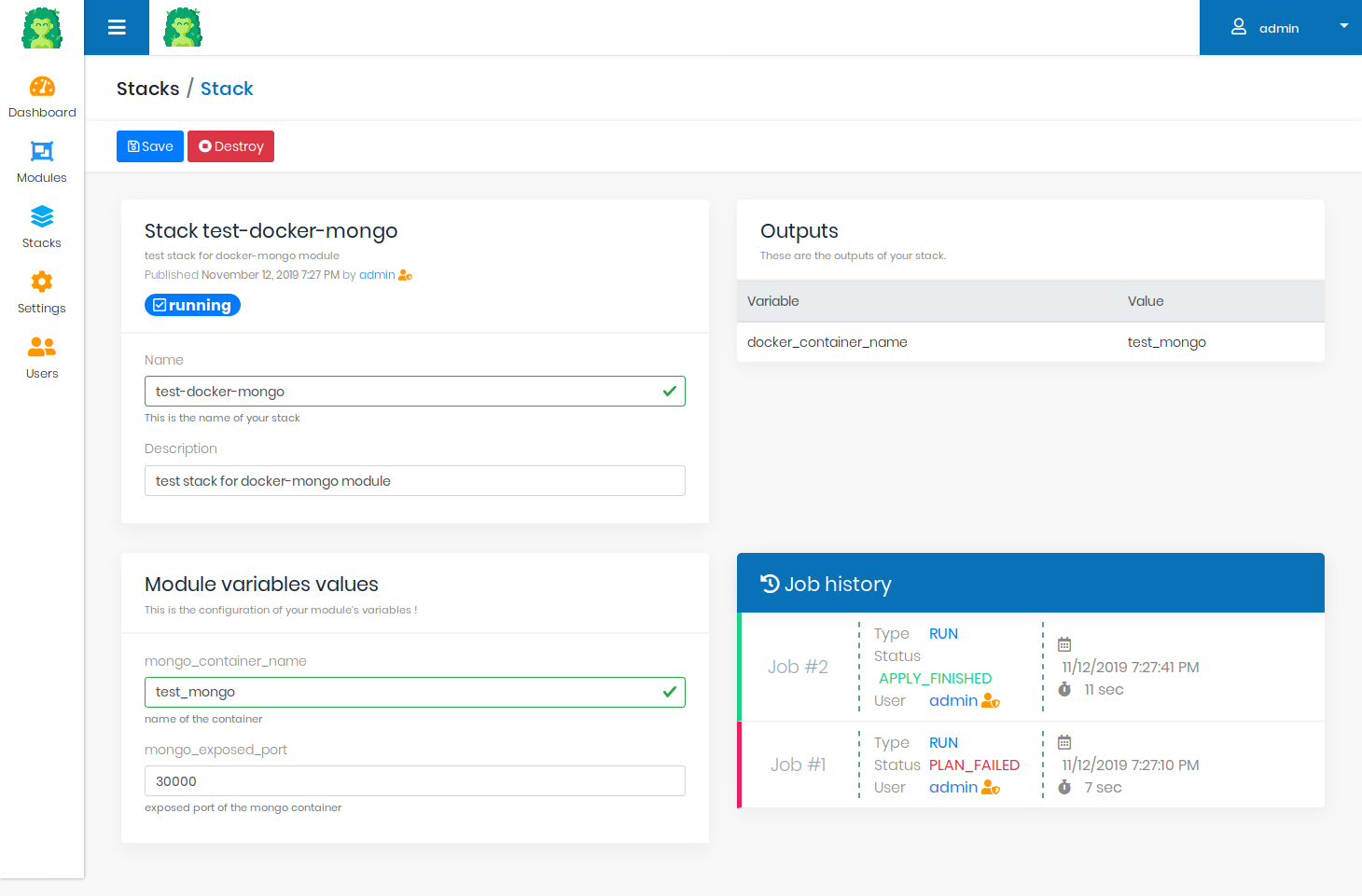
Gaia stack view with input variables, Terraform jobs and outputs.
Gaia. A module instance is managed as a stack with its own inputs, jobs and state. Official documentation example. Source

Quick comparison

Both products let users run infrastructure code without reproducing its setup on every laptop. Their main difference is what the shared service manages, from a Terraform module catalog to provisioning, Ansible configuration and recurring operations.

Gaia and Semaphore UI: key characteristics
Criteria Semaphore UI Gaia
Automation tools Ansible, Terraform/OpenTofu, Terragrunt, Bash, PowerShell, Python Terraform
Reusable unit Task templates and workflows Terraform modules and independently configured stacks
Installation Binary, packages, Docker, Kubernetes Java application, Docker Compose, Kubernetes
Runtime dependencies Database, Git and selected tools Java application, MongoDB and a Docker/Kubernetes runner
Execution On the server or runners Separate runner using Docker or Kubernetes
Scheduling Cron expressions and one-time runs External scheduler through plan/apply job APIs
Workflows Connected Ansible, IaC and script templates Terraform plan/apply stages, external orchestration
State storage Existing backends or built-in HTTP backend in Pro Built-in stack state backend
Inputs Survey forms, reusable variable groups and secrets Module variables, defaults and validation
Inventory Reusable Ansible definitions and discovery plugins Terraform resources and outputs per stack
Access control Project roles, custom roles in Enterprise Administrator and user roles, organization-based module access
Credentials Key Store and external secret stores Cloud credentials, optional Vault integration
License MIT Community, commercial Pro and Enterprise MPL 2.0 open source

Gaia keeps an approved module and its separate stack instances together, with built-in Terraform state storage included in the open-source project. Semaphore UI prepares operations around the team’s existing tools and configurations. A provisioning job can therefore share its interface with the Ansible playbooks and maintenance jobs used throughout the environment’s life.

That wider scope does not require every job to become a workflow. A colleague can launch a prepared backup or service-restart job independently, while engineers connect provisioning and configuration when the procedure calls for both.

Feature comparison

Reusable inputs, inventories and credentials let colleagues run an operation without rebuilding its configuration. Execution settings determine where that operation runs, while schedules, workflows and recorded results support the work that follows provisioning.

Installation and setup

A shared automation service can run on an existing server or as part of a container platform. The application and the job runtime are separate deployment choices.

SupportedPartially supportedNot supported
Installation and setup: Gaia and Semaphore UI
Criteria Semaphore UI Gaia
Standalone native binary Yes NoJava runtime required
Native Linux packages Yes NoJava application distribution
Docker deployment Yes YesDocker Compose services
Kubernetes deployment Yes Yes

Gaia separates its Java web application, MongoDB database and execution runner. The runner starts Terraform in Docker containers or Kubernetes pods, with a configurable limit on parallel jobs. Docker Compose assembles these services, while an experimental Helm chart provides a Kubernetes installation option.

Semaphore UI runs as a binary or native package, as well as in Docker or Kubernetes. A team moving routine automation off engineers’ laptops can start on an existing server and use the same service for Terraform provisioning and Ansible maintenance. The selected execution mode determines whether job containers are needed.
Automation tools

Provisioning, configuring hosts and maintaining services use different tools. Direct templates let a team run those procedures independently, while Terraform provisioners attach commands to a resource lifecycle.

SupportedPartially supportedNot supported
Automation tools: Gaia and Semaphore UI
Criteria Semaphore UI Gaia
Terraform / OpenTofu Yes PartialTerraform modules, no OpenTofu template
Ansible playbooks Yes PartialProvisioner with an Ansible runtime
Direct Terragrunt jobs Yes NoTerraform command lifecycle
Bash Yes PartialProvisioner with the required interpreter
PowerShell Yes PartialProvisioner with the required interpreter
Python Yes PartialProvisioner with the required interpreter
Independent Ansible and script operations Yes NoRUN and DESTROY stack jobs

Gaia runs Terraform modules through a generated Terraform command sequence. Terraform provisioners can call Ansible or command-line programs when the runner image or remote target supplies the required tools. This can configure a newly provisioned resource, but the command remains attached to a Terraform run rather than becoming an independent Gaia operation. Its standard command construction does not provide a separate OpenTofu or Terragrunt template.

Semaphore UI has direct templates for Ansible, Terraform/OpenTofu, Terragrunt, Bash, PowerShell and Python. A team can create infrastructure with OpenTofu, configure packages with Ansible and run a Python readiness check. Later, the Ansible configuration or PowerShell maintenance operation can run by itself, without starting another Terraform lifecycle. The built-in Pro state backend also keeps Terraform/OpenTofu state and its history beside those jobs.

Operation setup and inputs

An author prepares the configuration once so colleagues can request a repeatable operation. Gaia saves a module and its stack instances, while Semaphore UI saves templates that can be reused for provisioning and maintenance.

SupportedPartially supportedNot supported
Operation setup and inputs: Gaia and Semaphore UI
Criteria Semaphore UI Gaia
Saved operation configuration YesTask Templates YesModules and stacks
Input forms Yes Yes
Variable configuration and reuse YesNamed groups shared across templates YesModule defaults and per-stack values
Input validation YesRequired fields, integer checks and choices YesRequired values and regular expressions

Gaia’s module author defines the source repository, Terraform version and variable schema. Users create stacks from that module and supply the values and cloud credential appropriate to their environment. The stack becomes a durable instance with its own state and jobs, which suits a catalog of independently requested infrastructure. Gaia validates required values and configurable regular expressions. Semaphore UI surveys validate required fields, integers and choices, without an equivalent configurable regex rule.

Semaphore UI calls the saved operation a Task Template. It brings together a repository, tool configuration, variables and any inventory or credentials the operation needs. Named Variable Groups reuse environment settings across templates, while survey fields collect launch inputs. For example, a service-restart template can offer a choice of service and environment instead of asking the colleague to construct a command. A provisioning template can use the same pattern for environment parameters.

Terraform lifecycle

A useful Terraform interface must do more than launch a command. It needs a repeatable relationship between code, inputs, state and the operations users are allowed to request.

SupportedPartially supportedNot supported
Terraform lifecycle: Gaia and Semaphore UI
Criteria Semaphore UI Gaia
Terraform plan and apply Yes Yes
Separate environment instances YesPrepared templates and workspace configuration YesStacks created from a module
Environment-specific state and credentials YesConfigured backend, workspace and credentials YesSeparate stack state and cloud credentials
Destroy an environment YesTerraform/OpenTofu destroy operation YesDestroy job
Apply a previously saved plan by default No No
Built-in state storage YesPro Yes

Gaia runs plan, apply and destroy against a stack’s configured module, inputs and cloud credentials. Its built-in backend keeps that stack’s state, while the stack page collects outputs and job history. Separate test environments can therefore retain independent state and execution records even when they originate from the same module.

Semaphore UI uses a Task Template to select the Terraform/OpenTofu repository, workspace and configuration. Variable Groups reuse settings across related jobs, and survey forms collect inputs at launch. An engineer can prepare an environment-provisioning operation once, then let colleagues request it through that saved configuration. Each environment also needs its own variables, credentials and backend state. Gaia represents these as separate stack instances. In Semaphore UI, the team prepares the corresponding template, workspace and backend configuration. Workspace isolation depends on the backend, so selecting a workspace alone does not separate state for every backend. Terragrunt and OpenTofu are direct template choices alongside Terraform.

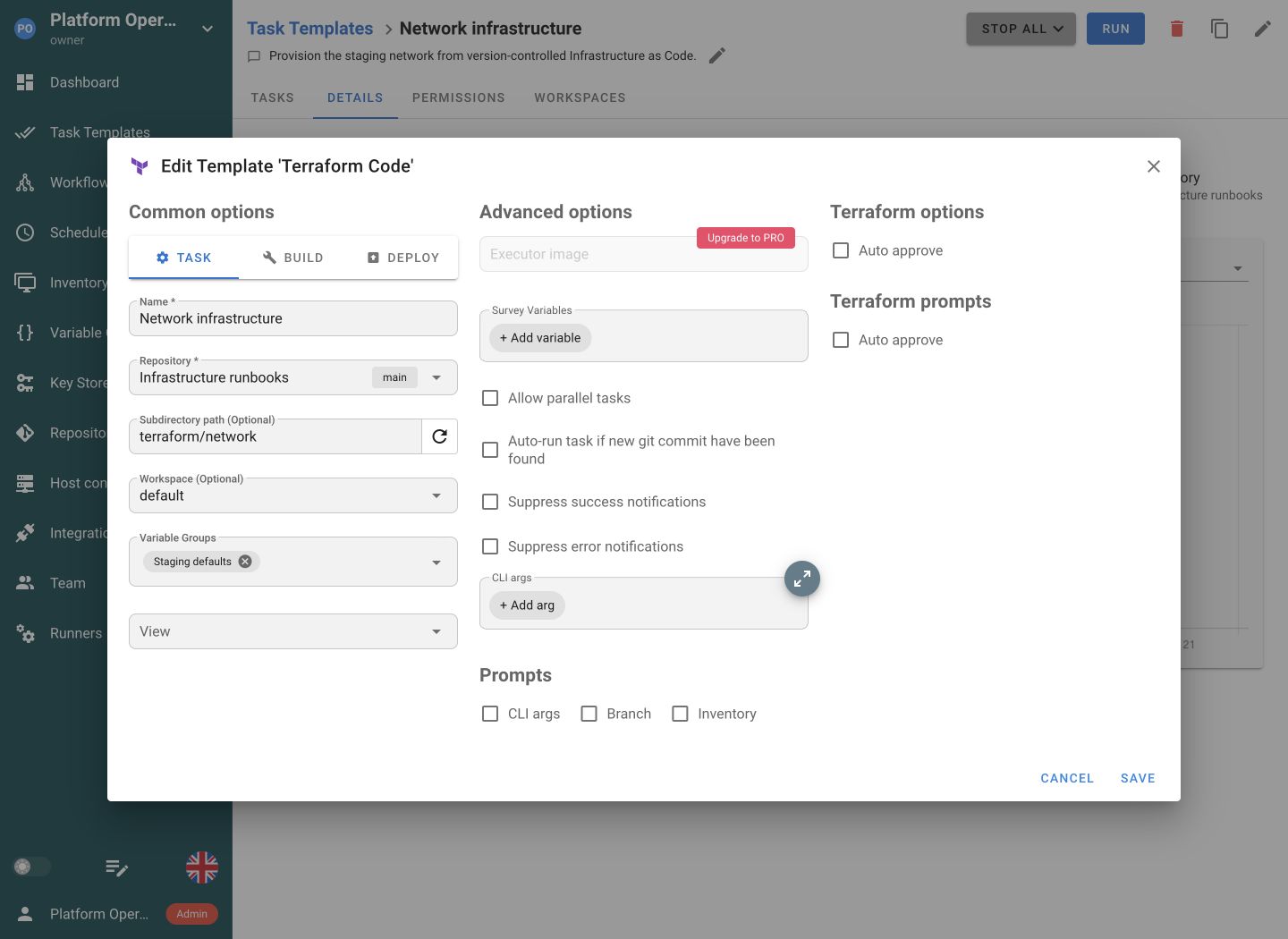
Semaphore UI Terraform template configuration with repository, workspace and variable groups.
Semaphore UI. A Terraform template brings source code, workspace and reusable variables into one prepared operation.
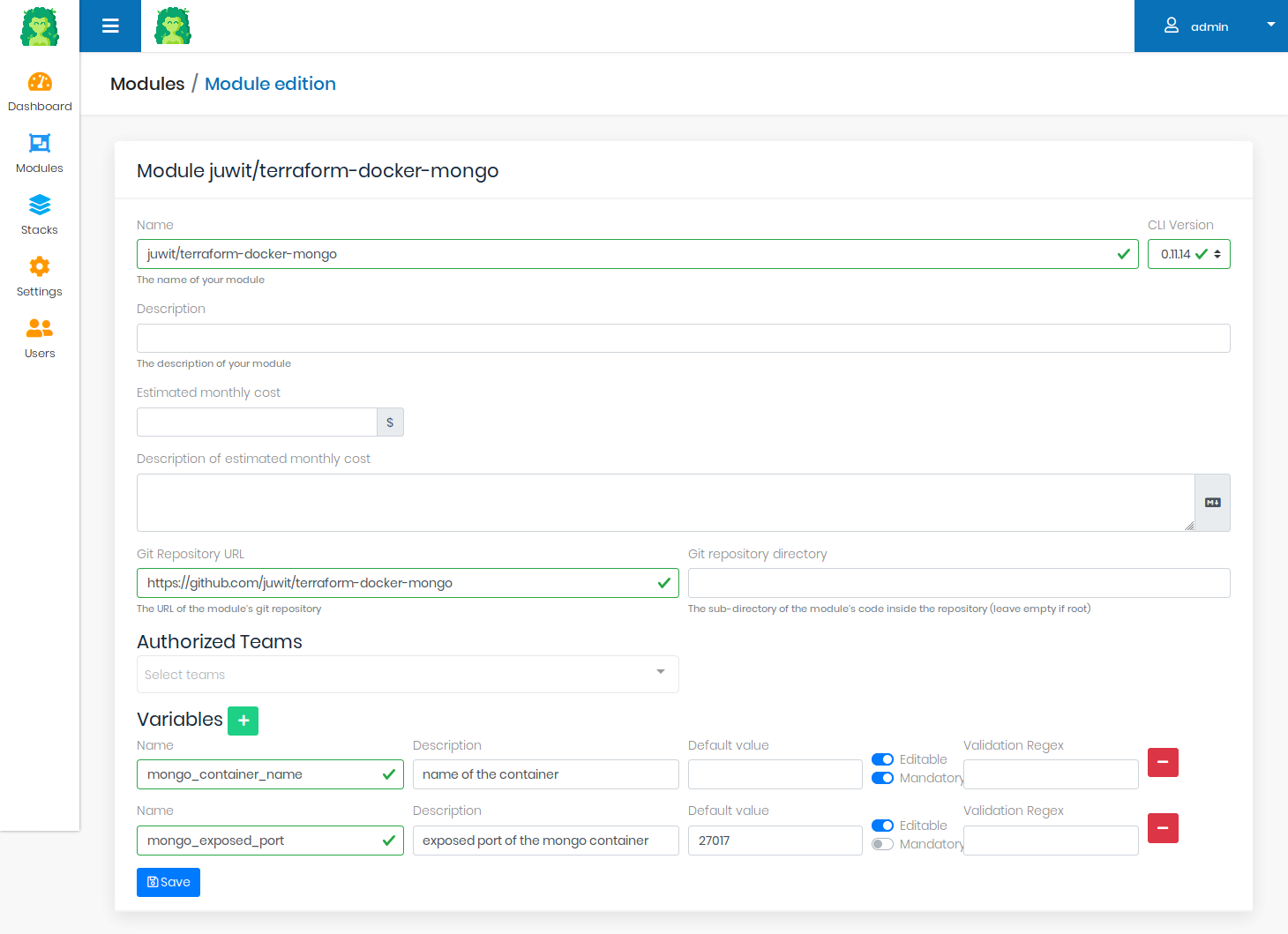
Gaia module editor showing repository settings, authorized teams and editable input variables.
Gaia. A module defines its repository, authorized teams and input validation. Official project example. Source

State is a separate part of that setup. Gaia includes a state backend for each stack without a commercial license. Semaphore UI uses the backend configured for the Terraform/OpenTofu code, and Pro also provides a built-in HTTP state backend with history and UI management. Keeping that backend in Semaphore UI puts the shared state next to the jobs that change it, rather than adding another state service.

Neither product applies a previously saved plan file by default. Gaia 2.4.0 displays the planning result, but its apply command does not use the saved plan file. Semaphore UI’s default execution also plans and applies separately. If approval must cover the exact proposed change, the procedure needs explicit storage and reuse of that plan.

Inventory

A patching or certificate-check job needs a repeatable way to select hosts. Ansible inventories serve that purpose, whereas Terraform state describes the resources managed by a stack.

SupportedPartially supportedNot supported
Inventory: Gaia and Semaphore UI
Criteria Semaphore UI Gaia
Reusable Ansible inventories YesUI definitions or files in Git NoNo inventory resource
Dynamic host discovery YesAnsible inventory plugins PartialGenerated inventory or Ansible called from Terraform

Gaia keeps Terraform resources and outputs with each stack. A Terraform output can provide the host address needed by a provisioner or by another system, but it does not create an Ansible inventory resource in Gaia’s interface. Ansible invoked through a provisioner must receive or generate its inventory as part of that automation.

Semaphore UI stores Ansible inventories as reusable project resources. Teams can edit a static definition, use a file from Git or let Ansible inventory plugins discover hosts when a job runs. The same inventory can serve deployment, patching and certificate checks. This is especially useful when provisioning is only the start of the work and operators return to an existing fleet throughout its life.

Execution

Execution settings decide which machine reaches the targets and which dependencies it supplies. Both platforms can execute inside private infrastructure, with different choices for a job without containers.

SupportedPartially supportedNot supported
Execution: Gaia and Semaphore UI
Criteria Semaphore UI Gaia
Jobs without containers Yes NoTerraform job runner requires Docker or Kubernetes
Remote execution YesRunners YesSeparate Gaia Runner
Docker job execution YesPro Yes
Kubernetes job pods YesEnterprise Yes

Gaia separates the application from its runner. The runner requests pending Terraform steps and executes them in Docker containers or Kubernetes pods, with configurable concurrency. It can run near private infrastructure as long as it can reach the Gaia API and the services used by the module. The selected image supplies Terraform and any additional programs required by provisioners.

Semaphore UI can run jobs on its application server or on runners placed near the targets. This lets a small installation start without a container platform and lets a larger one reach separate networks through runners. Pro adds project runners and Docker job execution, while Enterprise adds Kubernetes job pods. Installing the web application in Docker and executing each job in its own container remain separate choices.

Scheduling

Scheduling matters when infrastructure jobs must run at a chosen time or repeat without a manual launch. Semaphore UI schedules its prepared templates directly. Gaia needs an external scheduler to coordinate Terraform stack jobs. Semaphore UI’s wider task model also lets the same scheduling interface cover independent backups, patching and certificate checks.

SupportedPartially supportedNot supported
Scheduling: Gaia and Semaphore UI
Criteria Semaphore UI Gaia
Cron schedules Yes PartialExternal scheduler calling the job API
One-time scheduled runs Yes PartialExternal scheduler calling the job API

Semaphore UI saves cron and one-time schedules against prepared templates. A nightly backup, a recurring certificate check or a patching job can reuse the inventory, credentials and launch settings selected by the author. Manual and scheduled runs then appear in the same execution history.

Gaia 2.4.0 does not include a scheduling interface. An external scheduler can create a RUN or DESTROY job through POST /api/stacks/{id}/{jobType}, then start its plan through POST /api/jobs/{jobId}/plan. Applying the change is a separate POST to /api/jobs/{jobId}/apply after the plan finishes. A scheduler must handle that lifecycle and inspect the final job result, rather than treating creation of a job ID as a completed run.

Workflows

A complete environment procedure can provision infrastructure, configure hosts and verify a service. Gaia manages the plan/apply stages of a stack job, while Semaphore UI connects separate operations and their outcomes.

SupportedPartially supportedNot supported
Workflows: Gaia and Semaphore UI
Criteria Semaphore UI Gaia
Visual workflows across tools Yes NoNo mixed-tool workflow editor
Approval steps Yes PartialConfirmation between Terraform plan and apply
Passing values between operations Yes PartialStack outputs through code or API integration

Gaia guides a stack through planning and application. Its interface offers a separate confirmation after the plan, including for destroying a stack. Terraform provisioners can perform further actions inside that lifecycle, and an external system can coordinate multiple jobs through the API. Gaia does not provide a visual graph of independently reusable Ansible, Terraform and script operations.

Semaphore UI connects saved templates through a visual workflow, including approval, success and failure paths. A rollout can provision infrastructure, wait for approval, configure hosts and run a verification step, while each template stays available for later maintenance. Collected values can pass between steps using the local executor on the server or a runner. Generated files and saved Terraform plans still need accessible storage or an explicit transfer. Neither product applies a previously saved Terraform plan by default.

Access control

Sharing a provisioning module and delegating a prepared service restart require different boundaries. Access settings should let the author prepare an operation and give colleagues the permissions needed to use it.

SupportedPartially supportedNot supported
Access control: Gaia and Semaphore UI
Criteria Semaphore UI Gaia
Role-based access YesProject roles YesRoles and module organizations
Custom roles YesEnterprise NoFixed application roles
External sign-in YesProLDAP and OIDC YesGitHub and GitLab OAuth2, LDAP

Gaia uses organizations to share modules, with administrator and user roles. A module author can make an approved Terraform definition available to a team, while users supply the configuration for their own stacks. GitHub and GitLab integrations combine OAuth2 sign-in with repository importing, and LDAP is also supported.

Semaphore UI Community organizes shared automation within projects. Project roles control who can view, run or edit automation within the project. Colleagues with execution permission can launch a deployment, backup or maintenance job and review its result. The engineer prepares the operation, while the colleague uses its saved configuration and launch inputs.

Enterprise adds custom roles and template-level execution permissions when access must be limited to selected operations. For example, a team can delegate a service-restart template without giving the operator general project-editing rights. That boundary comes from the role permissions and operation configuration together, rather than the survey form alone. Pro adds LDAP and OIDC sign-in for teams using a central identity provider. Semaphore UI Pro also adds TOTP two-factor authentication for local accounts.

Secrets

Cloud provisioning credentials and the SSH credentials used to configure a host are separate resources. A shared service should reuse them without asking an operator to paste a secret into every run.

SupportedPartially supportedNot supported
Secrets: Gaia and Semaphore UI
Criteria Semaphore UI Gaia
Stored credentials YesSSH keys and passwords YesCloud credential objects
HashiCorp Vault YesProSecret lookup YesTransit encryption and dynamic AWS credentials
Built-in OpenBao lookup YesPro No
Built-in AWS Secrets Manager lookup YesEnterprise No
Built-in Azure Key Vault lookup YesEnterprise No
Built-in Devolutions Server lookup YesEnterprise No
Built-in CyberArk lookup YesEnterprisePVWA REST API No

Gaia supplies cloud credentials for AWS, Google Cloud and Azure. Its optional Vault integration uses the Transit engine for encryption and can request dynamic AWS credentials from a Vault secrets engine. These credentials support the Terraform stack lifecycle.

Semaphore UI’s Key Store supports the credentials used across the team’s procedures, including SSH keys and passwords for Ansible hosts. A prepared operation references those stored entries instead of requiring the operator to paste credentials at each launch. Pro adds secret lookup from HashiCorp Vault and OpenBao, while Enterprise adds AWS Secrets Manager, Azure Key Vault and Devolutions Server integrations, plus CyberArk through its PVWA API.

For example, one environment can use a cloud credential for provisioning and an SSH key for its subsequent Ansible configuration. Those remain separate credentials associated with the relevant operation. Both platforms can work with Vault, but Gaia’s encryption and dynamic-credential features differ from looking up a stored secret for a job. Gaia’s built-in credential types do not include connectors for the other secret stores listed above. Terraform code can retrieve secrets through its own data sources or external commands, with that lookup configured and maintained in the automation rather than Gaia’s credential interface.

Logs and audit

After a job runs, operators need its result and enough context to investigate a failure. Terraform stack history and Ansible host results answer different questions about the same environment.

SupportedPartially supportedNot supported
Logs and audit: Gaia and Semaphore UI
Criteria Semaphore UI Gaia
Execution history and logs Yes Yes
Run owner and timestamps Yes Yes
Built-in Ansible host/task report YesPro NoTerraform plan/apply output
Administrative audit interface YesSign-ins and recorded actions NoJob history, no administrative audit interface

Gaia records the user, status, timing and plan/apply steps of a stack job. That history helps a team inspect an environment’s provisioning changes and investigate the Terraform output. It is a record of stack operations rather than an Ansible host-reporting or administrative audit interface.

Semaphore UI keeps task history across the supported tools. Pro Ansible summaries add host and task results, helping an operator identify which servers failed a patch or certificate check. Its audit log records sign-ins and supported administrative actions separately from the task output. A team running both provisioning and host maintenance can therefore investigate those operations in the same service without treating Terraform state as a report of every action on a server. Pro adds audit filtering and export, including Syslog and Splunk HEC delivery for a team’s SIEM pipeline.

Integrations and AI-assisted work

An existing pipeline or service can request prepared automation through an API. Repository integrations bring the code into the service, while an event-driven connection also needs a reliable way to track the result.

SupportedPartially supportedNot supported
Integrations and AI-assisted work: Gaia and Semaphore UI
Criteria Semaphore UI Gaia
REST API Yes Yes
Git repositories Yes YesGitHub and GitLab module imports
Incoming automation webhooks YesRequest matching and input extraction PartialExternal receiver calling the job API

Gaia imports modules from GitHub or GitLab and exposes APIs for stacks, jobs and their results. A CI pipeline or external request service can create a stack job, start planning and decide when to apply it. A webhook-driven setup needs an adapter that performs those calls and follows the outcome. Semaphore UI provides a REST API and incoming integration webhooks that match requests and map their values into prepared task inputs.

For a team keeping Gaia’s Terraform catalog, an API integration can trigger a Semaphore UI Ansible configuration or maintenance template after provisioning completes. Semaphore UI then owns that operation’s inventory, credentials and execution record. This is a connection the team implements, not a built-in Gaia-to-Semaphore integration. Both projects also expose documentation and source code that a coding assistant can consult when drafting that connection or investigating configuration and job output.

Licensing and support

Gaia and Semaphore UI both have free, self-hosted open-source editions. Their scope differs before any paid features enter the comparison, from a Terraform module catalog to a service for several automation tools. Commercial capabilities and support are a separate part of the decision.

Open-source and commercial options

Gaia is MPL-2.0 licensed and includes its Terraform stack state backend. Semaphore UI Community is MIT licensed and covers templates, workflows, schedules, project roles and execution history across its supported tools. Pro adds the built-in state backend, project runners, Docker task execution and external vault integrations. Enterprise adds more specific access, execution and availability controls.

For a team that needs both Terraform provisioning and recurring Ansible operations, those Community capabilities already provide a shared automation service. Whether Pro or Enterprise is needed follows from the state, access and execution requirements, rather than the mere presence of several tools.

Maintenance and support

Gaia’s latest published release is 2.4.0, dated 12 August 2022, and the application repository’s main branch points to the same commit as checked on 21 October 2026. A team adopting it needs to assess current dependencies and maintain any changes it requires.

Semaphore UI continues to publish releases and offers vendor support within the same product family. Community assistance is best effort, Pro includes business-time vendor support and Enterprise offers tailored support options. A team can start with shared jobs in Community and obtain commercial capabilities or support as its operational requirements grow.

How to choose

Start with how the team wants to request and manage infrastructure. Gaia organizes provisioning around a module catalog and separate stack instances. Semaphore UI organizes it around reusable Terraform/OpenTofu templates, variables and execution settings, with schedules and workflows for the wider procedure. Both can serve provisioning. The choice depends on the operating model and whether the same interface must also support other automation.

When to choose Gaia

Gaia is a focused choice when your requirement is to publish approved Terraform modules and let users create their own stack instances.

  • Separate stack instances are the core service. Each requested environment needs its own inputs, credentials, state and plan/apply/destroy history, while configuration management and maintenance are handled elsewhere.
  • Included state storage is important. You want the module catalog and Terraform state backend in one open-source product, and the team can own maintenance of the application and runner.

When to choose Semaphore UI

Choose Semaphore UI when you want reusable Terraform/OpenTofu operations with flexible execution and commercial support options, or when provisioning needs to connect with Ansible, Bash, PowerShell and Python.

  • You want deployment and support choices. Start on an existing server with a binary or native package, add remote execution where needed and obtain Pro or Enterprise capabilities and vendor support in the same product family.
  • Ansible work continues after provisioning. The same service needs to configure hosts and run patching, certificate checks or backups using existing inventories, credentials and playbooks.
  • Your IaC code already defines the environments you operate. Prepare Terraform/OpenTofu or Terragrunt templates with the required variables, credentials and state configuration, then let colleagues run or schedule those operations. This fits a team that wants shared execution of existing configurations without organizing the service around a module catalog and separately requested stack instances.
  • Your procedure combines several tools. Terraform/OpenTofu or Terragrunt provisioning can lead into Ansible configuration, Bash or PowerShell operations and Python checks through reusable templates and workflows.

FAQ

Can colleagues create separate environments from one configuration?

Gaia publishes a Terraform module once and lets users create separate stacks with their own inputs, credentials and state. Semaphore UI uses templates, survey inputs, Variable Groups and Terraform/OpenTofu workspaces. When preparing an environment request in Semaphore UI, give each environment the appropriate workspace and backend state configuration.

Which state backend would we use with Semaphore UI?

Semaphore UI can keep the backend already configured in your Terraform/OpenTofu code. Pro also provides a built-in HTTP backend with history and UI management. Gaia includes its stack state backend in the open-source product. Moving the launch interface requires preserving the relationship between each environment, its configuration and its state.

Can execution stay inside a private environment?

Yes. Gaia Runner is separate from its web application and executes Terraform in Docker containers or Kubernetes pods. Semaphore UI runs tasks on its server or separate runners, with optional per-task Docker execution in Pro and Kubernetes execution in Enterprise. The execution machine needs access to the target infrastructure and required services.

Can provisioning continue into Ansible configuration and maintenance?

Yes, in Semaphore UI. A workflow can connect Terraform/OpenTofu provisioning, Ansible configuration and a verification task. The individual templates also remain available for later backups, updates or service operations, and schedules can repeat maintenance. Gaia’s built-in lifecycle focuses on Terraform plan, apply and destroy, with subsequent operations handled through other systems.

Can we transfer a Gaia module catalog directly to Semaphore UI?

The underlying Terraform code can be reused, but Gaia’s module-and-stack catalog is a different model from Semaphore UI templates and workspaces. Map each environment’s inputs, credential references, backend state and execution dependencies to the prepared operation.

Was this article helpful?

Sources

  1. Gaia contributors, “Gaia v2.4.0 release”. URL: https://github.com/gaia-app/gaia/releases/tag/v2.4.0 (accessed: ).
  2. Gaia, “Gaia concepts”. URL: https://docs.gaia-app.io/getting-started/concepts/ (accessed: ).
  3. Gaia, “QuickStart”. URL: https://docs.gaia-app.io/getting-started/quick-start/ (accessed: ).
  4. Gaia, “Gaia Runner configuration”. URL: https://docs.gaia-app.io/configuration/runner-configuration/ (accessed: ).
  5. Gaia contributors, “Mozilla Public License 2.0”. URL: https://github.com/gaia-app/gaia/blob/v2.4.0/LICENSE (accessed: ).
  6. Gaia contributors, “Gaia v2.4.0 source code”. URL: https://github.com/gaia-app/gaia/tree/v2.4.0 (accessed: ).
  7. Gaia, “GitHub integration”. URL: https://docs.gaia-app.io/configuration/github-integration/ (accessed: ).
  8. Gaia, “GitLab integration”. URL: https://docs.gaia-app.io/configuration/gitlab-integration/ (accessed: ).
  9. Semaphore UI, “Installation”. URL: https://semaphoreui.com/docs/admin-guide/installation (accessed: ).
  10. Semaphore UI, “Applications”. URL: https://semaphoreui.com/docs/user-guide/apps (accessed: ).
  11. Semaphore UI, “Terraform/OpenTofu”. URL: https://semaphoreui.com/docs/user-guide/apps/terraform (accessed: ).
  12. Semaphore UI, “Task Templates”. URL: https://semaphoreui.com/docs/user-guide/task-templates (accessed: ).
  13. Semaphore UI, “Workflows”. URL: https://semaphoreui.com/docs/user-guide/workflows (accessed: ).
  14. Semaphore UI, “Runners”. URL: https://semaphoreui.com/docs/admin-guide/runners (accessed: ).
  15. Semaphore UI, “Semaphore UI editions”. URL: https://semaphoreui.com/pricing (accessed: ).
  16. Semaphore UI, “Variable Groups”. URL: https://semaphoreui.com/docs/user-guide/environment (accessed: ).
  17. Gaia, “Gaia interface example”. URL: https://github.com/gaia-app/gaia/blob/v2.4.0/README.md (accessed: ).
  18. Gaia contributors, “Terraform plan and apply command construction”. URL: https://github.com/gaia-app/gaia/blob/v2.4.0/src/main/java/io/gaia_app/runner/RunnerCommandBuilder.java (accessed: ).
  19. Semaphore UI, “Terraform execution implementation”. URL: https://github.com/semaphoreui/semaphore/blob/58a596ed20b724af67c468588edcda12d1779549/db_lib/TerraformApp.go (accessed: ).
  20. Semaphore UI, “Inventory”. URL: https://semaphoreui.com/docs/user-guide/inventory (accessed: ).
  21. Semaphore UI, “Schedules”. URL: https://semaphoreui.com/docs/user-guide/schedules (accessed: ).
  22. Semaphore UI, “Semaphore cron and one-time schedule execution”. URL: https://github.com/semaphoreui/semaphore/blob/58a596ed20b724af67c468588edcda12d1779549/services/schedules/SchedulePool.go (accessed: ).
  23. Semaphore UI, “Task history and output”. URL: https://semaphoreui.com/docs/user-guide/tasks (accessed: ).
  24. Semaphore UI, “Team roles and extended RBAC”. URL: https://semaphoreui.com/docs/user-guide/team#extended-rbac (accessed: ).
  25. Semaphore UI, “Key Store”. URL: https://semaphoreui.com/docs/user-guide/key-store (accessed: ).
  26. Semaphore UI, “Semaphore local execution, workflow outputs, inventory paths, host limits and branch overrides”. URL: https://github.com/semaphoreui/semaphore/blob/58a596ed20b724af67c468588edcda12d1779549/services/tasks/local_executor.go (accessed: ).
  27. Gaia contributors, “Stack job launch API for RUN and DESTROY”. URL: https://github.com/gaia-app/gaia/blob/v2.4.0/src/main/java/io/gaia_app/stacks/controller/StackRestController.java#L104-L123 (accessed: ).
  28. Gaia contributors, “Independent stacks, variables and credential references”. URL: https://github.com/gaia-app/gaia/blob/v2.4.0/src/main/java/io/gaia_app/stacks/bo/Stack.java (accessed: ).
  29. Semaphore UI, “External secret storage types in the Semaphore UI 2.20 candidate”. URL: https://github.com/semaphoreui/semaphore/blob/58a596ed20b724af67c468588edcda12d1779549/db/SecretStorage.go (accessed: ).
  30. Gaia contributors, “Gaia 2.4.0 built-in credential types”. URL: https://github.com/gaia-app/gaia/blob/v2.4.0/src/main/java/io/gaia_app/credentials/Credentials.kt (accessed: ).
  31. Semaphore UI, “CyberArk secret storage for Enterprise”. URL: https://semaphoreui.com/docs/user-guide/key-store/cyberark (accessed: ).
  32. Gaia contributors, “Gaia 2.4.0 application routes”. URL: https://github.com/gaia-app/gaia/blob/v2.4.0/src/main/client/app/router.js (accessed: ).
  33. Gaia contributors, “Gaia RUN and DESTROY job types”. URL: https://github.com/gaia-app/gaia/blob/v2.4.0/src/main/java/io/gaia_app/stacks/bo/JobType.java (accessed: ).
  34. Gaia contributors, “Configurable Terraform runner image”. URL: https://github.com/gaia-app/gaia/blob/v2.4.0/src/main/java/io/gaia_app/modules/bo/TerraformImage.kt (accessed: ).
  35. Gaia contributors, “Runner scripts, stack inputs and execution environment”. URL: https://github.com/gaia-app/gaia/blob/v2.4.0/src/main/java/io/gaia_app/runner/RunnerController.java (accessed: ).
  36. Gaia contributors, “Separate plan, apply and retry API actions”. URL: https://github.com/gaia-app/gaia/blob/v2.4.0/src/main/java/io/gaia_app/stacks/controller/JobRestController.kt (accessed: ).
  37. Gaia contributors, “Stack job identity, user, timing and execution steps”. URL: https://github.com/gaia-app/gaia/blob/v2.4.0/src/main/java/io/gaia_app/stacks/bo/Job.java (accessed: ).
  38. HashiCorp, “Terraform provisioners and command execution”. URL: https://developer.hashicorp.com/terraform/language/provisioners (accessed: ).
  39. Semaphore UI, “Audit log and external log forwarding”. URL: https://semaphoreui.com/docs/admin-guide/audit-log (accessed: ).
  40. Semaphore UI, “Incoming integrations and webhooks”. URL: https://semaphoreui.com/docs/user-guide/integrations (accessed: ).
  41. Semaphore UI, “Reusable Git repositories”. URL: https://semaphoreui.com/docs/user-guide/repositories (accessed: ).
  42. Gaia contributors, “Stack state API used to retrieve Terraform outputs”. URL: https://github.com/gaia-app/gaia/blob/v2.4.0/src/main/java/io/gaia_app/stacks/controller/TerraformStateController.java (accessed: ).

Comparison by Semaphore UI Team using the documentation, repositories and product information listed above. Access dates are recorded for each source.