
Automation server: Semaphore UI vs Jenkins

 18 min read
Jenkins and Semaphore UI run many of the same automation tools, but organize the work around them differently. Jenkins connects builds, tests and deployments through jobs, Pipelines and plugins. Semaphore UI brings Ansible, Terraform/OpenTofu, Terragrunt, Bash, PowerShell and Python into a shared service for preparing, running and delegating infrastructure operations. This comparison covers Jenkins 2.580.1 LTS and Semaphore UI 2.20.0.
Discuss this article with AI


Overview
Automation usually starts with working code: a playbook that patches servers, a Terraform project that creates an environment or a command that restarts a service. Sharing it introduces another set of decisions. Someone must select the targets, provide credentials, collect the values that change between runs and make the result available to colleagues. A release pipeline and an operations interface can perform that work, while arranging it in different ways.
Jenkins is an extensible automation server widely used for continuous integration and delivery. Freestyle jobs configure build steps through the interface, while a Jenkinsfile describes a Pipeline in version-controlled code. Agents execute the work, and plugins add tool integrations, authorization, reports and artifact handling. The same job model also supports scheduled checks and manually launched infrastructure procedures.
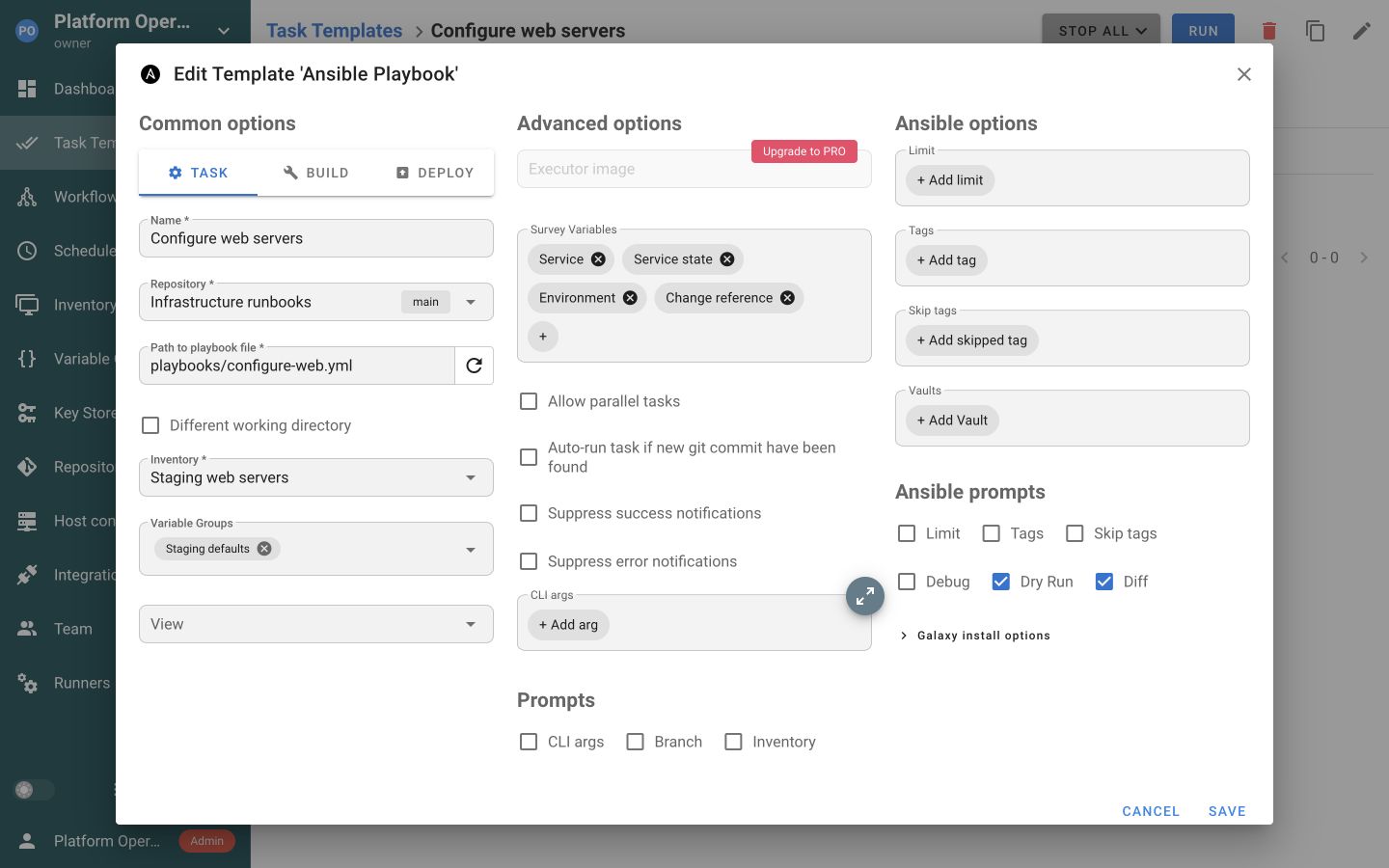
Semaphore UI organizes the procedure around a Task Template. The template selects an automation tool and repository, then connects the settings that operation needs. For Ansible, these include an inventory, credentials and Variable Groups. Surveys collect values at launch, schedules repeat the operation and workflows connect several templates. The automation remains in Git, while the interface gives the team a shared way to use it.
Quick comparison
Both can launch a playbook on demand or on a schedule. The differences become clearer when that playbook needs to be reused for several environments, handed to another team member or combined with provisioning.
| Criteria | Semaphore UI | Jenkins |
|---|---|---|
| Automation tools | Ansible, Terraform/OpenTofu, Terragrunt, Bash, PowerShell, Python templates | Command-line tools and plugin-provided build steps |
| Installation | Binary, native packages, Docker, Kubernetes | WAR package, native packages, Docker, Kubernetes |
| Execution | On the server or runners | Agents, including container-based environments |
| Ansible inventory | Shared static or Git-backed inventories, Ansible discovery plugins | Inventory configured through the Ansible plugin or the job |
| Job setup | Tool-specific Task Templates | UI-configured jobs and Jenkinsfile Pipelines |
| Inputs and variables | Survey forms and reusable Variable Groups | Job parameters, Pipeline variables and configuration in code |
| Workflows | Visual graph connecting task templates | Declarative or Scripted Pipeline, reusable libraries |
| Terraform state | External backend or built-in HTTP backend in Pro | Backend configured by the Terraform process |
| Credentials | Key Store and external secret-store integrations | Credentials store, bindings and secret-store plugins |
| Access control | Project roles, Enterprise custom roles and template permissions | Configurable authorization, including project-based permissions |
| License | MIT Community, commercial Pro and Enterprise | MIT core, individual plugin licenses |
For a routine Ansible operation, Semaphore UI keeps the playbook, targets, connection credentials and shared configuration together. A staging deployment, a certificate check and a service restart can reuse those project resources while presenting different launch forms. Jenkins can represent the same operations through configured jobs and plugins or Pipeline code. Its additional delivery features become valuable when the procedure also depends on build artifacts, test reports or common pipeline libraries.
Feature comparison
A shared automation service has to do more than start a command. Engineers prepare the operation and its access, colleagues launch it with suitable inputs, and execution reaches the systems being managed. The following sections compare how each product supports that sequence, including the parts of a delivery pipeline that may still belong in Jenkins.
Installation and setup
The runtime, persistent storage and update process determine how a shared automation service is hosted. Jenkins stores controller data on its filesystem, while Semaphore UI uses a database.
| Criteria | Semaphore UI | Jenkins |
|---|---|---|
| Standalone native binary | Yes | NoJava runtime required |
| Native packages | Yes | Yes |
| Server platforms | Linux, macOS, Windows, FreeBSD | Linux, macOS, Windows and other supported Java platforms |
Jenkins runs from an executable WAR on a supported Java runtime, native packages or a container. The controller coordinates jobs on agents, and agent labels select an appropriate operating system or toolchain. Existing agents and their installed tools can therefore remain useful for both delivery pipelines and maintenance jobs.
Semaphore UI provides standalone binaries, native packages, Docker and Kubernetes deployments. A small installation can run automation on the same server as the web service. The binary and package options do not require a JVM or a Kubernetes cluster, giving a team a conventional server deployment before it needs distributed execution. Ansible execution still needs a supported control environment, such as Linux, WSL or a Linux runner, even when the web service runs on Windows.
Automation tools
Provisioning, configuring hosts and maintaining services often use different tools. The distinction is how each operation is prepared and reused, rather than whether a shell can invoke its command.
| Criteria | Semaphore UI | Jenkins |
|---|---|---|
| Ansible playbooks | YesTask Template | YesAnsible plugin or CLI |
| Terraform/OpenTofu | YesTask Template | YesJob step or Pipeline |
| Terragrunt | YesTask Template | YesJob step or Pipeline |
| Bash | YesTask Template | YesJob step or Pipeline |
| PowerShell | YesTask Template | YesJob step or Pipeline |
| Python | YesTask Template | YesJob step or Pipeline |
| Built-in Terraform HTTP backend | YesPro | NoConfigure a separate backend |
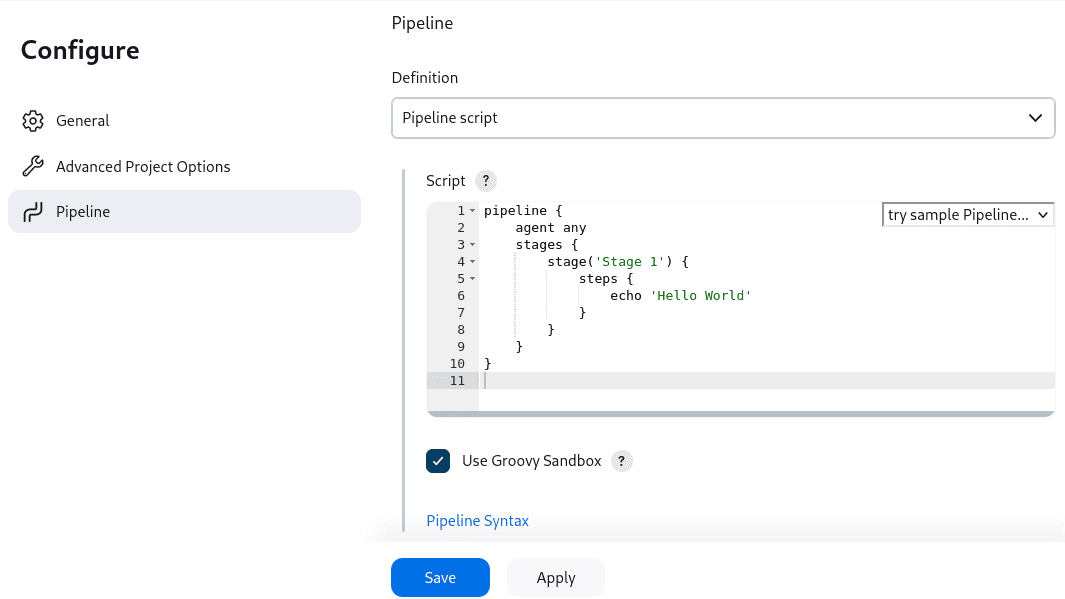
Jenkins invokes command-line tools through Freestyle build steps or Pipeline code. Its Ansible plugin adds playbook, inventory and credential settings to both job types. A Jenkinsfile can combine compilation, tests, image creation and infrastructure changes, keeping the sequence under review alongside the application.
Semaphore UI gives Ansible, Terraform/OpenTofu, Terragrunt, Bash, PowerShell and Python their own Task Templates. Engineers select the repository, tool settings, credentials and shared variables in the interface, while the automation code stays in Git. A Terraform provisioning task or Python readiness check can run independently, on a schedule or within a workflow. This suits teams that want shared launch settings maintained in Semaphore UI and prepared operations available through the interface. A Jenkinsfile is useful when changes to the orchestration itself, including job sequencing and configuration, need code review and version history.
Semaphore UI Pro includes an HTTP backend for Terraform/OpenTofu state, with workspaces, version history and UI management. A team provisioning several environments can review their state versions in the same service used to run the changes. Jenkins does not provide an integrated HTTP state backend. Its Terraform plugin retains a local state file in the job workspace, while CLI-based jobs can use an S3, cloud or other remote backend configured by the team. A local plugin state file is different from a shared state service. Semaphore UI can use an external backend too.
When an IaC change needs approval, storing state is separate from preserving the exact plan to apply. Semaphore UI’s default Terraform sequence plans and applies without automatically reusing a saved plan, and its default commands disable state locking unless overridden. Configure those command options for a process that needs a saved-plan approval or locking. The state backend and the workflow then support the intended change process rather than substituting for its configuration.
Saved operations and schedules
A service restart, certificate renewal or application release should retain its configuration. Colleagues then select the operation, provide the changing inputs and run it manually or on a schedule.
| Criteria | Semaphore UI | Jenkins |
|---|---|---|
| Launch inputs | Yes | Yes |
| Shared configuration | YesVariable Groups | YesShared Libraries or managed files |
| Scheduled runs | Yes | Yes |
| Build versions and deployment selection | YesLinked Build and Deploy templates | YesPipeline stages and build parameters |
| Saved repository connections | YesNamed project repositories reused by templates | YesJob SCM settings or Jenkinsfile |
Jenkins Freestyle jobs collect parameters in the interface, while Pipelines keep the sequence in code. Semaphore UI Task Templates bring the tool, repository, inventory, credentials and Variable Groups into one saved operation. Engineers can prepare separate backup, deployment and service-recovery templates that reuse those resources.
For a restart, a survey can ask for a service and desired state without asking the operator to reconstruct the connection details. Named Variable Groups supply shared environment configuration. Jenkins parameters and managed configuration files can serve the equivalent job, with the references and any required bindings configured in that job or its Pipeline.
Semaphore UI also links Build and Deploy templates. A build records an incrementing version, and a deployment selects a successful build version or starts automatically after a successful build. The automation publishes and retrieves the package or image from the team’s chosen storage. Jenkins Pipelines provide the same release progression through stages, parameters and artifact handling, with more extensive test and delivery reporting.
Both can run a nightly certificate check without a new commit. Semaphore UI attaches a cron expression or a one-time schedule to the prepared template. Jenkins attaches cron triggers to jobs or Pipelines. The saved inventory and variables make recurring host operations repeatable without turning each launch into new configuration.
Inventory
Host maintenance depends on a reusable definition of the targets and their connection settings. A patching run, backup and certificate check can share that definition.
| Criteria | Semaphore UI | Jenkins |
|---|---|---|
| Reusable Ansible inventories | YesUI-managed inventory resources | YesInventory files or plugin configuration |
| Dynamic host discovery | YesAnsible inventory plugins | YesRun Ansible inventory plugins in the job |
| Host selection at launch | YesAnsible limit prompt | YesAnsible plugin limit or job parameter |
Semaphore UI makes an inventory a named project resource that templates can share. It can contain editable INI/YAML, reference a file in Git or use Ansible’s dynamic inventory plugins. The selected inventory also holds host and optional sudo credential references, so changing the target configuration does not require editing every maintenance operation.
Jenkins can use the same Ansible files and discovery plugins. Its Ansible plugin accepts an inventory path or inline content and exposes Ansible limit settings. Jobs and managed files can reuse that configuration. Both can discover hosts from cloud APIs or other systems supported by the installed Ansible plugins. Semaphore UI’s difference is the reusable inventory object and connection settings in the operations interface.
For a recovery task on one server, a permitted Ansible limit narrows the run without creating a new inventory. This selects hosts within one task, rather than automatically splitting the fleet into independent jobs. An inventory in Git remains useful in either product when its changes need review.
Execution
Execution must reach the target network with the correct dependencies. Worker placement and per-job isolation are separate from how the web server is installed.
| Criteria | Semaphore UI | Jenkins |
|---|---|---|
| Remote execution | YesRunners | YesAgents |
| Containerized jobs | YesProPer-task Docker executor | YesDocker Pipeline plugin |
| Kubernetes job pods | YesEnterprise | YesKubernetes plugin |
| Runner routing | YesProRunner tags | YesAgent labels |
| Worker allocation | YesProProject-assigned runners | YesAgent labels selected by jobs |
Jenkins agents run jobs on machines selected by labels and Pipeline configuration. Semaphore UI can run locally on its server or send tasks to runners near the managed systems. A runner can serve automation inside a private network while the central interface records the operation.
Semaphore UI Pro adds project-assigned runners and tag-based routing, so production operations can use a different execution pool from staging. Jenkins agent labels select where a job runs, but do not themselves restrict who can use that agent. Builds run as SYSTEM by default, so enforcing agent permissions also requires an appropriate build-authorization setup.
For disposable runtimes, Semaphore UI Pro executes individual tasks in Docker and Enterprise supports Kubernetes task pods. Jenkins uses Docker Pipeline and Kubernetes plugins for corresponding environments. Containerizing the server alone does not give each operation a separate runtime. These options matter when jobs require different tool versions or dependencies.
Workflows
Provisioning a host, configuring it and verifying its service combines several saved operations. Failures and approval points determine whether the next step should run.
| Criteria | Semaphore UI | Jenkins |
|---|---|---|
| Graph-based workflow editing | YesConnect saved templates visually | YesBlue Ocean editor, deprecated |
| Success and failure branches | YesVisual workflow connections | YesPipeline conditions and post actions |
| Approval steps | Yes | YesPipeline Input Step |
| Passing workflow values | Yes | YesPipeline variables and step return values |
| Files between steps | PartialConfigure shared storage or transfer | Yesstash and unstash within a Pipeline |
| Reusable multi-step components | PartialReuse tasks, rebuild the sequence | YesShared Libraries |
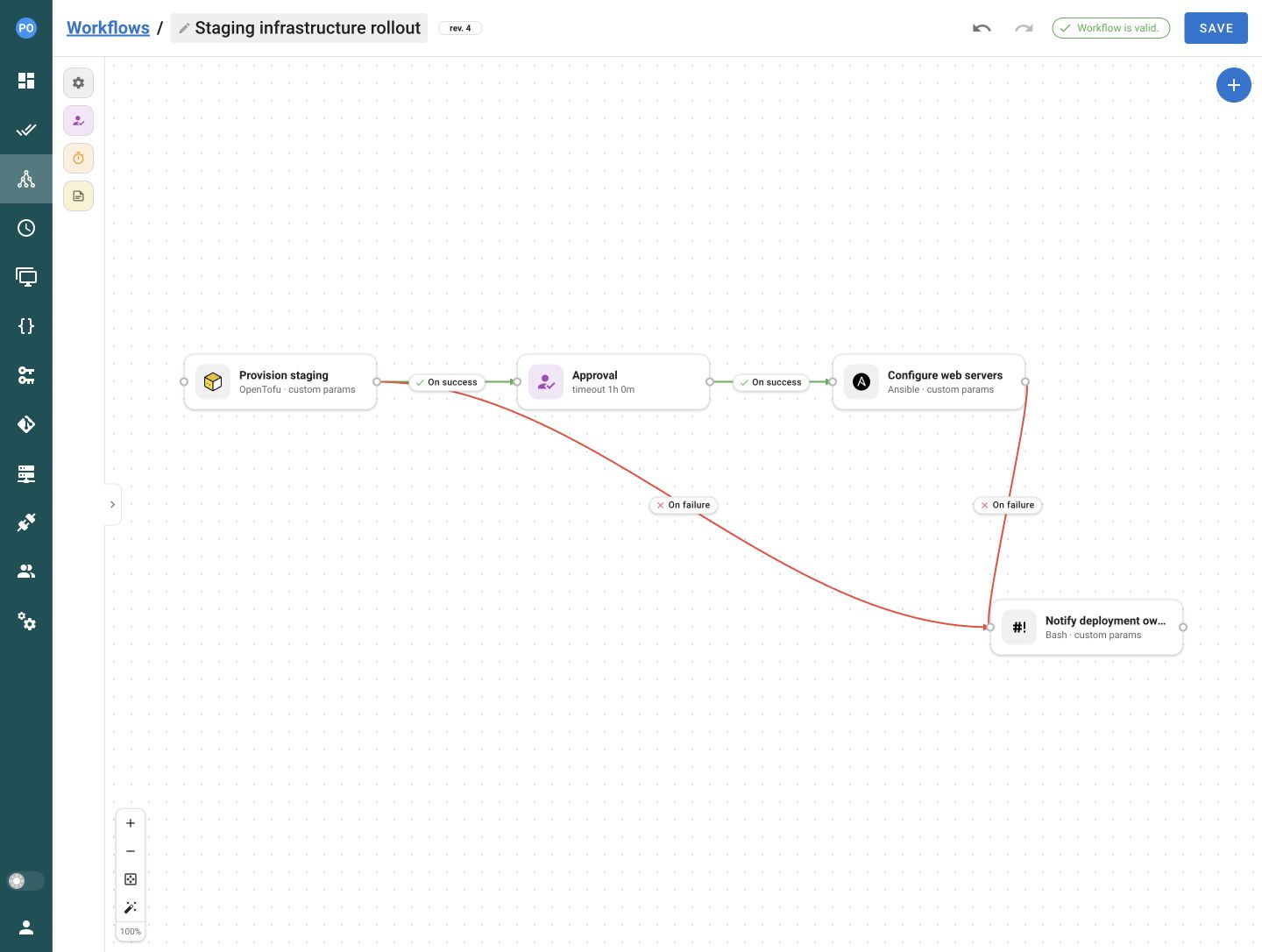
Several operations can become a Semaphore UI workflow. An OpenTofu template provisions staging, an approval step pauses before the next change, and an Ansible template configures the hosts. A failure branch can launch a Bash notification or recovery procedure. Each task keeps its own tool-specific configuration and can also be launched independently. The graph makes the relationship between those prepared operations visible without turning all of them into one Pipeline script.
Semaphore UI authors the connections between saved templates in its workflow editor. Jenkins also has visual authoring through the Blue Ocean Pipeline Editor, which creates SCM-based Declarative Pipelines and saves a Jenkinsfile. It does not cover every Declarative Pipeline feature. Blue Ocean was deprecated in July 2026 and no longer receives security or functionality updates, so Jenkins recommends its maintained syntax-generation tools for Pipeline creation.
Workflow values can connect those steps, such as passing a provisioned host address into a configuration task. Semaphore UI 2.20 collects Ansible set_stats, Terraform/OpenTofu/Terragrunt outputs and JSON from Bash, PowerShell or Python with the local executor on the server or a runner. Docker and Kubernetes task executors do not produce those workflow outputs. The receiving template declares the input, which its playbook or inventory configuration then uses to target the new host.
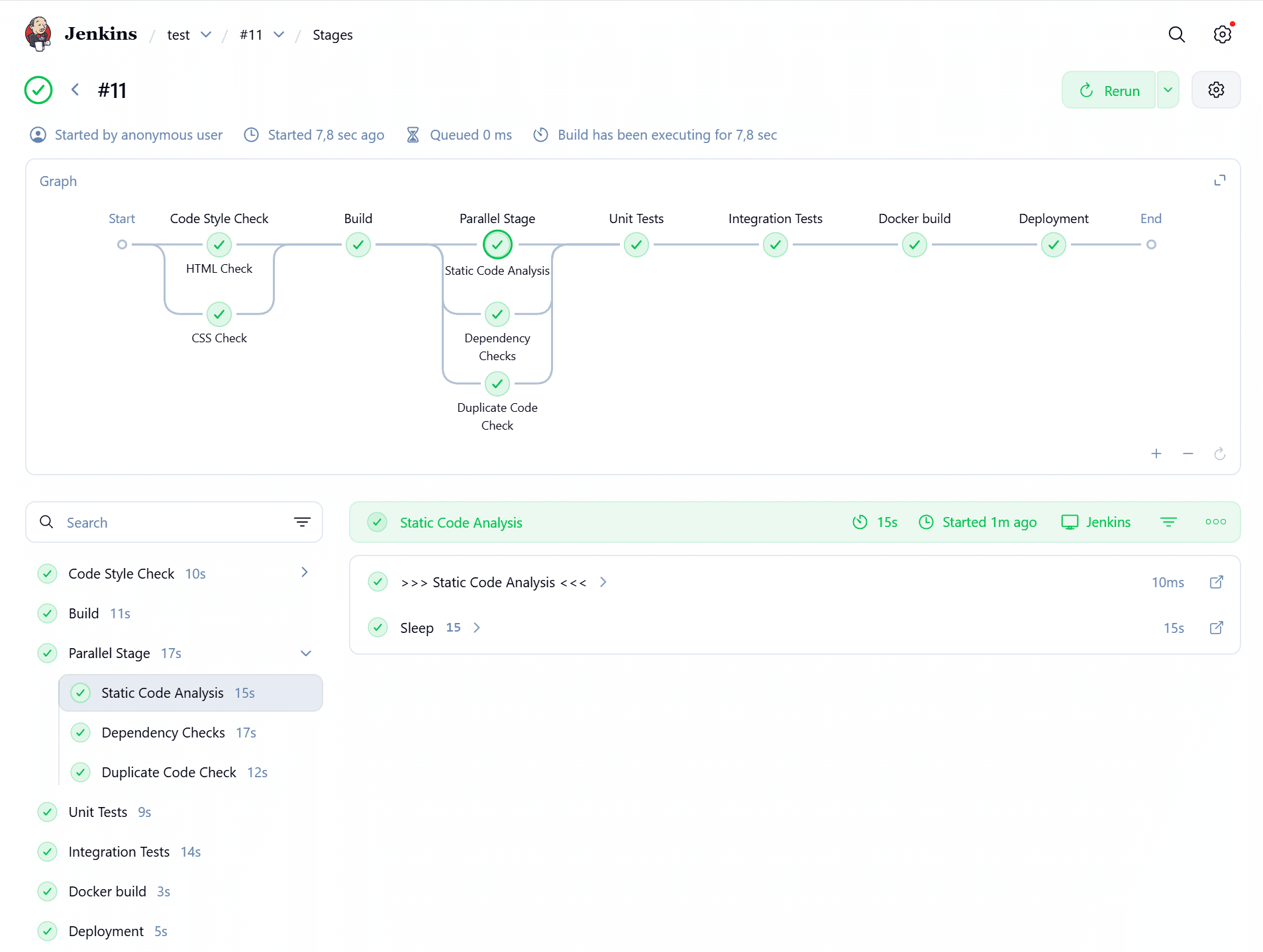
Jenkins Shared Libraries can package a maintained multi-step procedure for many Pipelines. Semaphore UI reuses individual Task Templates, while each workflow defines the connections between them and cannot embed another workflow as one node. Shared Libraries are valuable when a delivery sequence itself must be centrally versioned. Reusing independent operations is often sufficient when deployment, diagnostics and recovery combine them differently.
Jenkins stash, unstash and archived artifacts move or retain files. Semaphore UI’s workflow values carry data, while packages and saved Terraform plans need configured storage or explicit transfer. A build version identifies what to retrieve, not a file repository. This distinction matters when later steps must consume the exact tested package or approved plan.
Access control and sign-in
The person running a prepared operation may not be the engineer who changes it. Project permissions, narrower execution rights and sign-in controls solve different parts of that delegation.
| Criteria | Semaphore UI | Jenkins |
|---|---|---|
| Project access rules | Yes | YesAuthorization strategy |
| Run without job administration | YesTask Runner | YesBuild permission without Configure |
| Job-level permissions | YesEnterpriseTemplate permissions | YesProject-based authorization plugin |
| LDAP sign-in | YesPro | YesLDAP plugin |
| OpenID Connect sign-in | YesPro | YesOIDC plugin |
| Multi-factor authentication | YesProLocal TOTP or identity provider | YesThrough the configured identity provider |
Jenkins separates authentication from authorization. Matrix and project-based authorization strategies can distinguish who can configure a job and who can build it. Administrators combine the relevant plugins and permissions with the identity system their organization uses.
Semaphore UI Community already supports shared execution through project roles. Owners and Managers maintain the project, while a Task Runner can launch its templates and has read-only access to other project resources. This lets an engineering team share its operations without giving every operator project-administration duties. The role covers the project’s templates rather than only one selected procedure.
Enterprise adds custom roles and template-level execution permissions. If support staff should run a particular production restart rather than every template in the project, an administrator can start with a Guest role and grant execution on that template through a custom role. The engineer prepares its inventory, credentials and launch options. That is a more specific delegation model within Semaphore UI, while Jenkins can pursue job-level delegation through its authorization configuration.
A launch form collects inputs, while the automation and permissions define what the operation may do. For a tightly scoped restart, the playbook and allowed overrides need to preserve the intended service and targets. Template permissions do not create independent inventory or credential permissions for arbitrary combinations of resources.
Jenkins adds LDAP and OpenID Connect through security-realm plugins. Multi-factor checks can be enforced by the selected identity provider. Semaphore UI Pro provides local TOTP and supports LDAP and OIDC. Central identity verifies who is signing in, while project roles and template permissions still define which operations that person can run.
Secrets
An operator should select the prepared connection rather than repeatedly paste passwords into launch inputs. Existing vaults can supply those connections without becoming job parameters.
| Criteria | Semaphore UI | Jenkins |
|---|---|---|
| Stored SSH keys and passwords | YesKey Store | YesCredentials store |
| Ansible Vault passwords | YesTemplate credential | YesAnsible plugin |
| HashiCorp Vault | YesPro | YesVault plugin |
| AWS Secrets Manager | YesEnterprise | YesCredentials Provider plugin |
| Azure Key Vault | YesEnterprise | YesAzure Key Vault plugin |
| External OpenBao secrets | YesProKey Store integration | YesCLI retrieval configured in the job |
| Devolutions Server credentials | YesEnterpriseKey Store integration | YesCredential API call configured in the job |
| CyberArk secrets | YesEnterprisePVWA REST API storage | YesConjur Secrets plugin |
Jenkins stores credentials and exposes them through build-step integrations and Pipeline bindings. Plugins also connect jobs to services such as HashiCorp Vault and AWS Secrets Manager. This fits teams that already maintain a credential and plugin setup for their delivery pipelines.
Semaphore UI’s Key Store represents SSH keys and login/password credentials, including passwords or access tokens used without a login. Repositories use the credential needed to fetch the code, while an Ansible inventory selects the login and optional sudo credentials for its hosts. A template can also refer to an Ansible Vault password. The operator launches the prepared task rather than copying these separate connection details into the run form.
Existing secret-management systems can remain the source of credentials. Semaphore UI Pro adds HashiCorp Vault and OpenBao integrations, while Enterprise adds AWS Secrets Manager, Azure Key Vault and Devolutions Server. Jenkins delivers comparable connections through selected plugins. Compare the vault and authentication method the team already operates, then decide whether a plugin-managed setup or a supported Semaphore UI integration is the better fit.
For OpenBao and Devolutions Server, Semaphore UI provides named Key Store integrations in Pro and Enterprise respectively. Jenkins jobs can retrieve an OpenBao value through its CLI or a Devolutions Credentials entry through its API. The team maintains that authentication, retrieval and injection in the job, rather than selecting a saved Key Store connection. This is a viable route when the existing vault and job code already cover the procedure.
Semaphore UI Enterprise integrates CyberArk through the PVWA REST API. Jenkins offers the Conjur Secrets plugin for CyberArk’s Conjur/Secrets Manager service. These use different CyberArk interfaces, so the integration must match the CyberArk service the team operates.
Logs and audit
After patching or deployment, the team needs both execution results and a record of who changed or launched the operation. Those records answer different questions.
| Criteria | Semaphore UI | Jenkins |
|---|---|---|
| Execution history and logs | Yes | Yes |
| Ansible result presentation | YesProBuilt-in host/task summary | YesConfigured Ansible JUnit callback and report publishing |
| Administrative audit history | YesEnable recording, administrator view | YesAudit Trail plugin |
| SIEM forwarding | YesProTLS Syslog or Splunk HEC | YesAudit Trail Syslog or Elasticsearch |
Semaphore UI retains task status, launch details, repository revision and output. Pro adds an integrated Ansible host/task summary, making a fleet-wide failed check easier to follow to affected hosts. Jenkins uses console output and its configured reports. The Ansible JUnit callback and JUnit plugin can publish structured results, but require callback and report-publishing setup.
For access reviews and incident investigations, Semaphore UI records authentication, resource changes and task activity when audit logging is enabled. Its administrator audit view spans projects in every edition. Jenkins Audit Trail logs configured requests, authentication events, build triggers and credential use through a plugin. Configure its event patterns and destinations for the activity the team needs.
Semaphore UI Pro adds filtering, CSV or JSONL export and TLS Syslog or Splunk HEC forwarding. Audit Trail can send Jenkins events to Syslog or Elasticsearch. Both can feed a security information and event management (SIEM) system, but the events and scope differ from ordinary job output.
Integrations
A release event or monitoring system can start a prepared operation and send its result to the team. The useful comparison is how much of that connection is configured in the product.
| Criteria | Semaphore UI | Jenkins |
|---|---|---|
| Launch and inspect jobs by API | Yes | Yes |
| Incoming webhook triggers | YesRequest matchers and value extractors | YesGeneric Webhook Trigger plugin |
| Chat notifications | YesSlack, Teams, Telegram and other channels | YesNotification plugins |
Semaphore UI provides an authenticated task API and incoming integration endpoints. Matchers filter a request, and extractors map headers or body fields to task inputs. Jenkins exposes build and job APIs, while Generic Webhook Trigger adds extraction and filters for incoming events. A monitoring alert can therefore start a prepared diagnostic without a new code commit.
Semaphore UI includes email, Slack, Microsoft Teams, Telegram, Rocket.Chat, DingTalk and Gotify notification channels. Templates and project alerts select where results go. Jenkins provides corresponding connections through notification plugins such as Slack Notification. A notification link helps colleagues inspect a run, but is not itself approval from inside chat.
AI-assisted automation
A coding assistant can help prepare an operation or investigate a failed run using documented APIs, configuration examples and the relevant output.
| Criteria | Semaphore UI | Jenkins |
|---|---|---|
| MCP access | Yes | YesMCP Server plugin |
Both products provide public documentation and APIs that assistants such as Claude Code and Codex can consult when drafting configuration or investigating job output. A Jenkinsfile gives the assistant a versioned pipeline definition, while Semaphore UI’s API exposes the saved operation and its project resources. This supports assistance with setup and troubleshooting without making generated changes automatically correct.
Jenkins offers an MCP Server plugin for job and build tools. Semaphore UI has an MCP connector for its API and has announced official MCP support for Pro in version 2.21.0. Connector access follows the account and credentials supplied to it, so an assistant should receive the scope appropriate to the operation.
Licensing and support
Both products offer a free open-source starting point. The cost of a shared automation service also includes the software around it, the execution machines and the work required to maintain the configuration. Paid support and commercial capabilities are separate parts of that decision.
Open-source and commercial options
Jenkins core is MIT-licensed and the community project has no license fee. Plugins have their own licenses and maintainers. The team operates its controller, agents, Java runtime and selected integrations, and can obtain commercial support through a separate provider or offering.
Semaphore UI Community is also MIT-licensed and includes the core task interface, project roles, schedules and workflows. Pro and Enterprise extend the same product family with commercial capabilities and vendor support. A team can therefore begin with shared Ansible operations and add the controls it needs without adopting an entire application-delivery platform for those jobs.
Paid capabilities
Semaphore UI Pro covers capabilities discussed here such as built-in Terraform/OpenTofu state storage, project runners and per-task Docker execution. Enterprise adds custom roles, template permissions and Kubernetes task execution. Pro includes business-time vendor support, while Enterprise offers tailored support commitments and assistance with onboarding, configuration, upgrades and migration. Compare that coverage with the terms of any Jenkins support arrangement rather than assuming either product’s community assistance is a support SLA.
Maintenance and ownership
For a team using Jenkins mainly to expose playbooks and maintenance commands, Semaphore UI can replace custom job setup with its inventory, credential, variable and template model. The operating benefit comes from the configuration and integrations it actually replaces. Conversely, if Jenkins already supplies the required jobs, agents, reports and support, a second service adds work. A replacement is practical when Semaphore UI covers the jobs and controls the team uses. Where Jenkins-specific reports, artifact handling or Shared Libraries remain essential, selected operations can move while those pipelines stay in Jenkins.
Semaphore UI includes its Ansible template and inventory settings in the product, with vault and container integrations supplied by the relevant edition. Jenkins provides corresponding integrations through plugins whose dependencies and updates are managed alongside the controller. This changes the integration work the team maintains. Both still need the automation tools and runtimes used on their execution machines.
How to choose
Choose around the work colleagues perform and the configuration the team wants to maintain. Neither product is limited to one trigger or one automation language. Their strongest cases come from the surrounding operational model.
When to choose Jenkins
Choose Jenkins when integrated test reporting, artifact handling and shared multi-stage Pipeline code are central to the procedure.
- Build outputs and test evidence drive the next step. The process compiles code, runs a test matrix, produces reports and moves artifacts between stages.
- Many projects share delivery logic in code. Jenkinsfiles and Shared Libraries are already the team’s way to review and maintain those sequences.
- The existing installation covers the operational need. Jobs, agents, plugins and authorization already provide an effective interface for the people who run them.
When to choose Semaphore UI
Choose Semaphore UI when the service’s main job is to make infrastructure operations reusable and available to the team.
- Ansible is part of everyday operations. Patching, certificate checks and service recovery reuse inventories, host credentials and shared environment configuration.
- Colleagues need prepared actions. Engineers maintain the code and Task Templates, while operators launch procedures with surveys or schedules. Project roles provide that basic division, with Enterprise template permissions for narrower delegation.
- You prefer tool-specific configuration in the interface. Prepare Ansible, Terraform/OpenTofu, Terragrunt, Bash, PowerShell and Python operations through dedicated templates, with shared inventories, credentials and Variable Groups.
- The deployment should stay focused. A binary or package can run on an existing server, runners reach other networks, and Pro can supply the shared Terraform/OpenTofu state backend.
Using Semaphore UI with Jenkins
A release can begin in Jenkins with compilation, tests and artifact publication. The pipeline then supplies an image digest or versioned package reference to a prepared Semaphore UI deployment template through the authenticated task API. Semaphore UI uses its configured repository, inventory and credentials, and sends the operation to the appropriate execution machine. The deployment automation retrieves the artifact from the registry or repository used by the team.
The Jenkins integration must record the returned task identifier, check its final status and decide whether the pipeline passes or fails. An accepted API request means the task was queued, not that deployment succeeded. The built-in incoming webhook receiver is another trigger option, while completion reporting and pipeline pass/fail logic remain part of the integration the team implements.
After deployment, the same operations team can run a service restart from a form or leave a certificate check on its nightly schedule in Semaphore UI. Those jobs use the prepared infrastructure configuration without needing a new application commit, while Jenkins continues to own build and test evidence.
FAQ
Can we reuse existing Ansible and Terraform automation?
Yes. Jenkins jobs and Pipelines can run those tools, with its Ansible plugin providing playbook, inventory and credential settings. Semaphore UI uses tool-specific templates connected to reusable inventories, credentials, Variable Groups and launch forms. Existing code can remain in its Git repository while the team prepares the operation in either model.
Can colleagues run Semaphore UI tasks without Enterprise?
Yes. Community project roles include Task Runner, which can launch templates in the project with read-only access to the other project resources. Enterprise adds custom roles and permissions for individual templates when access needs to be narrower.
Can maintenance run independently of a new commit?
Yes, in both products. Jenkins supports manual builds and scheduled jobs. Semaphore UI supports manual Task Template launches, cron schedules and one-time runs, using the prepared inventory, credentials and variables.
Can Semaphore UI replace a Jenkins pipeline?
It can cover provisioning, deployments and maintenance implemented with its supported tools. Keep or replace Jenkins-specific requirements deliberately, including report plugins, artifact handling and Shared Libraries. A separate Semaphore UI operation can also be called by an existing Pipeline.
Can automation run inside a private network?
Both do. Jenkins uses agents, while Semaphore UI runs on its server or on runners. The execution machines can be placed near private systems, and the required tools must be available in their selected runtime.
Was this article helpful?
Sources
- Semaphore UI, “Semaphore UI build and deploy templates”. URL: https://semaphoreui.com/docs/user-guide/task-templates/build-deploy (accessed: ).
- Semaphore UI, “Semaphore UI automation applications”. URL: https://semaphoreui.com/docs/user-guide/apps (accessed: ).
- Semaphore UI, “Semaphore UI task templates”. URL: https://semaphoreui.com/docs/user-guide/task-templates (accessed: ).
- Semaphore UI, “Semaphore UI installation methods”. URL: https://semaphoreui.com/docs/admin-guide/installation (accessed: ).
- Semaphore UI, “Semaphore UI runners”. URL: https://semaphoreui.com/docs/admin-guide/runners (accessed: ).
- Semaphore UI, “Semaphore UI workflow nodes and data passing”. URL: https://semaphoreui.com/docs/user-guide/workflows (accessed: ).
- Semaphore UI, “Semaphore UI Terraform HTTP backend”. URL: https://semaphoreui.com/docs/user-guide/apps/terraform/states (accessed: ).
- Semaphore UI, “Semaphore UI project roles and template permissions”. URL: https://semaphoreui.com/docs/user-guide/team (accessed: ).
- Semaphore UI, “Semaphore UI Key Store”. URL: https://semaphoreui.com/docs/user-guide/key-store (accessed: ).
- Semaphore UI, “Semaphore UI Variable Groups”. URL: https://semaphoreui.com/docs/user-guide/environment (accessed: ).
- Semaphore UI, “Semaphore UI schedules”. URL: https://semaphoreui.com/docs/user-guide/schedules (accessed: ).
- Semaphore UI, “Semaphore UI webhook integrations”. URL: https://semaphoreui.com/docs/user-guide/integrations (accessed: ).
- Semaphore UI, “Semaphore UI Community, Pro and Enterprise”. URL: https://semaphoreui.com/pricing (accessed: ).
- Semaphore UI, “Semaphore UI inventories”. URL: https://semaphoreui.com/docs/user-guide/inventory (accessed: ).
- Semaphore UI, “Semaphore UI 2.20 candidate Terraform execution”. URL: https://github.com/semaphoreui/semaphore/blob/58a596ed20b724af67c468588edcda12d1779549/db_lib/TerraformApp.go (accessed: ).
- Semaphore UI, “Semaphore UI 2.20 candidate runner output handling”. URL: https://github.com/semaphoreui/semaphore/blob/58a596ed20b724af67c468588edcda12d1779549/services/runners/job_pool.go (accessed: ).
- Jenkins project, “Jenkins downloads and release lines”. URL: https://www.jenkins.io/download/ (accessed: ).
- Jenkins project, “Installing Jenkins”. URL: https://www.jenkins.io/doc/book/installing/ (accessed: ).
- Jenkins project, “Using a Jenkinsfile”. URL: https://www.jenkins.io/doc/book/pipeline/jenkinsfile/ (accessed: ).
- Jenkins project, “Pipeline Nodes and Processes”. URL: https://www.jenkins.io/doc/pipeline/steps/workflow-durable-task-step/ (accessed: ).
- Jenkins Ansible plugin contributors, “Ansible plugin”. URL: https://plugins.jenkins.io/ansible/ (accessed: ).
- Jenkins project, “Pipeline Syntax”. URL: https://www.jenkins.io/doc/book/pipeline/syntax/ (accessed: ).
- Jenkins project, “Extending with Shared Libraries”. URL: https://www.jenkins.io/doc/book/pipeline/shared-libraries/ (accessed: ).
- Jenkins project, “Pipeline Input Step”. URL: https://www.jenkins.io/doc/pipeline/steps/pipeline-input-step/ (accessed: ).
- Jenkins project, “Pipeline Basic Steps”. URL: https://www.jenkins.io/doc/pipeline/steps/workflow-basic-steps/ (accessed: ).
- Jenkins project, “Using Jenkins agents”. URL: https://www.jenkins.io/doc/book/using/using-agents/ (accessed: ).
- Jenkins project, “Using Docker with Pipeline”. URL: https://www.jenkins.io/doc/book/pipeline/docker/ (accessed: ).
- Jenkins project, “Using credentials”. URL: https://www.jenkins.io/doc/book/using/using-credentials/ (accessed: ).
- Jenkins project, “Jenkins Access Control”. URL: https://www.jenkins.io/doc/book/security/access-control/ (accessed: ).
- Jenkins project, “Managing Plugins”. URL: https://www.jenkins.io/doc/book/managing/plugins/ (accessed: ).
- Jenkins project, “Jenkins Project Governance and license”. URL: https://www.jenkins.io/project/governance/ (accessed: ).
- Jenkins Matrix Authorization contributors, “Jenkins Matrix Authorization Strategy”. URL: https://plugins.jenkins.io/matrix-auth/ (accessed: ).
- Jenkins JUnit plugin contributors, “JUnit plugin”. URL: https://plugins.jenkins.io/junit/ (accessed: ).
- Jenkins HashiCorp Vault plugin contributors, “HashiCorp Vault plugin”. URL: https://plugins.jenkins.io/hashicorp-vault-plugin/ (accessed: ).
- Jenkins AWS Secrets Manager plugin contributors, “AWS Secrets Manager Credentials Provider”. URL: https://plugins.jenkins.io/aws-secrets-manager-credentials-provider/ (accessed: ).
- Jenkins project, “Getting started with Pipeline”. URL: https://www.jenkins.io/doc/book/pipeline/getting-started/ (accessed: ).
- Stefan Spieker, Jenkins project, “Plugin of the Month – April 2026: Pipeline Graph View”. URL: https://www.jenkins.io/blog/2026/04/06/plugin-of-the-month/ (accessed: ).
- Semaphore UI, “Semaphore UI REST API, task creation and task status”. URL: https://semaphoreui.com/api-docs (accessed: ).
- Semaphore UI, “Tasks, execution history and Ansible summaries”. URL: https://semaphoreui.com/docs/user-guide/tasks (accessed: ).
- Semaphore UI, “Get Started, installation methods and server platforms”. URL: https://semaphoreui.com/docs/getting-started (accessed: ).
- Jenkins Kubernetes plugin contributors, “Kubernetes plugin, agents in job pods”. URL: https://plugins.jenkins.io/kubernetes/ (accessed: ).
- Jenkins Config File Provider contributors, “Config File Provider, reusable managed configuration”. URL: https://plugins.jenkins.io/config-file-provider/ (accessed: ).
- Jenkins Terraform plugin contributors, “Terraform plugin, job workspace and local state file”. URL: https://plugins.jenkins.io/terraform/ (accessed: ).
- Ansible project, “JUnit callback, structured playbook result reports”. URL: https://docs.ansible.com/projects/ansible/latest/collections/ansible/builtin/junit_callback.html (accessed: ).
- Semaphore UI, “Semaphore UI authentication”. URL: https://semaphoreui.com/docs/admin-guide/authentication (accessed: ).
- Jenkins project and plugin contributors, “LDAP authentication plugin”. URL: https://plugins.jenkins.io/ldap/ (accessed: ).
- Jenkins project and plugin contributors, “OpenID Connect Authentication plugin”. URL: https://plugins.jenkins.io/oic-auth/ (accessed: ).
- Jenkins project and plugin contributors, “Azure Key Vault plugin”. URL: https://plugins.jenkins.io/azure-keyvault/ (accessed: ).
- Semaphore UI, “Semaphore UI audit history, export and SIEM forwarding”. URL: https://semaphoreui.com/docs/admin-guide/audit-log (accessed: ).
- Jenkins project and plugin contributors, “Audit Trail plugin and external log destinations”. URL: https://plugins.jenkins.io/audit-trail/ (accessed: ).
- Semaphore UI, “Semaphore UI notification channels”. URL: https://semaphoreui.com/docs/admin-guide/notifications (accessed: ).
- Jenkins project and plugin contributors, “Jenkins Remote Access API”. URL: https://www.jenkins.io/doc/book/using/remote-access-api/ (accessed: ).
- Jenkins project and plugin contributors, “Generic Webhook Trigger plugin”. URL: https://plugins.jenkins.io/generic-webhook-trigger/ (accessed: ).
- Jenkins project and plugin contributors, “Slack Notification plugin”. URL: https://plugins.jenkins.io/slack/ (accessed: ).
- Community connector contributors, “MCP connector for Semaphore UI”. URL: https://github.com/cloin/semaphore-mcp (accessed: ).
- Jenkins project and plugin contributors, “Jenkins MCP Server plugin”. URL: https://plugins.jenkins.io/mcp-server/ (accessed: ).
- OpenBao project, “OpenBao CLI, read a secret”. URL: https://openbao.org/docs/commands/kv/get/ (accessed: ).
- Devolutions, “Devolutions Server REST API, credential retrieval”. URL: https://docs.devolutions.net/server/web-interface/utilities/api-documentation (accessed: ).
- Semaphore UI, “Semaphore UI CyberArk PVWA secret storage”. URL: https://semaphoreui.com/docs/user-guide/key-store/cyberark (accessed: ).
- Jenkins Conjur plugin contributors, “Jenkins Conjur Secrets plugin”. URL: https://plugins.jenkins.io/conjur-credentials/ (accessed: ).
- Jenkins project, “Jenkins access control for builds”. URL: https://www.jenkins.io/doc/book/security/build-authorization/ (accessed: ).
- Jenkins project, “Blue Ocean Pipeline Editor and deprecation status”. URL: https://www.jenkins.io/doc/book/blueocean/pipeline-editor/ (accessed: ).
- Jenkins project, “Jenkins persistent objects and filesystem storage”. URL: https://www.jenkins.io/doc/developer/persistence/ (accessed: ).
Comparison by Semaphore UI Team using the documentation, repositories and product information listed above. Access dates are recorded for each source.
Useful links
Evaluate the operations your team already runs and the controls it needs.