
Manage Semaphore configuration as code
Define supported projects, repositories and Task Templates as code. Review a Terraform plan before changing the automation platform.
 main.tf
resource "semaphoreui_project" "production_ops" { name = "Production operations" alert = true max_parallel_tasks = 10}Still configuring Semaphore by hand?
Repeating setup across projects takes time. Manual changes are easy to lose track of.
Use the Terraform provider to define supported Semaphore resources in Git and review changes before applying them.
Repeated setup
Defined in Git
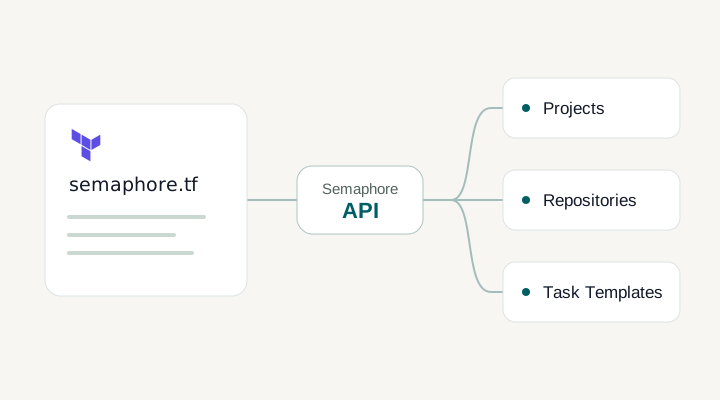
semaphore.tf
+Projects
+Repositories
+Task Templates
Plan→Review→Apply
Create your first Semaphore project with Terraform
- 01
Connect the provider to Semaphore
Set your Semaphore address and authenticate with an API token.
- 02
Define the resources in Git
Declare projects, repositories and Task Templates. Review changes in the same pull request as your infrastructure configuration.
- 03
Review the plan, then apply
Inspect the proposed changes before applying them. Keep the configuration in Git for the next update.
Manage the platform your jobs depend on
Connect configuration with the API
API & webhooksWhere the provider ends and Semaphore begins
Configure the platform that runs your jobs
The provider README lists projects, environments, inventories, keys, repositories, schedules, templates, users and views. Resource coverage is specific to the provider version. Use the registry documentation to confirm exact fields and lifecycle behavior rather than assuming every UI setting is represented.
Review platform changes before applying them
A plan helps the team see the proposed changes to managed resources. Changing a template can change a future operational run, so review those diffs with the same care as executable source. Terraform state and provider credentials also need appropriate access controls and a backend strategy.
Understand the current maintenance model
The provider repository currently describes best-effort maintenance with AI assistance and states that it is not actively maintained. That is a material adoption consideration. Test the resources you rely on, pin versions and read open issues before making it a critical provisioning dependency.
Documentation and related features
FAQ
What does the Semaphore Terraform provider manage?
The provider manages supported Semaphore resources through the Semaphore API, such as projects, repositories, templates, and other documented resource families. It configures the platform itself. That differs from using Semaphore to execute Terraform code that manages your cloud infrastructure. Check the resource and argument documentation for the provider version you pin, because a setting available in the web UI is not automatically evidence that the provider supports it.
Do I need to run Terraform inside Semaphore to use the provider?
No. The provider can run wherever you run Terraform, provided that environment can reach the Semaphore API and authenticate with the required access. You can use a workstation or your existing configuration pipeline. Keep the provider's execution environment, API credentials, and state backend explicit. If you later run it through Semaphore itself, evaluate that dependency carefully so platform configuration and the ability to execute it remain recoverable.
Can I use the Semaphore Terraform provider with OpenTofu?
The provider uses the Terraform provider protocol, and a local test pinned semaphoreui/semaphore 0.3.9 in OpenTofu against an isolated Semaphore 2.19.12 instance. That test read an existing project, created a disposable project, and found no drift on a subsequent plan. It did not test the Terraform CLI or every provider resource. Pin your own versions and verify the resources and lifecycle operations your team needs before adoption.
Can I import existing UI-created resources into Terraform?
Check import support and the required identifier for each resource in the documentation of your pinned provider version. Do not assume every resource has the same import behaviour. Decide how existing configuration will be represented and which system will own subsequent changes before applying a plan. Start with a non-production resource, inspect the resulting state and proposed changes, and avoid accidentally replacing a working shared configuration.
Can we keep Semaphore configuration in Git?
Yes. Keep the Terraform configuration for supported Semaphore resources in a version-controlled repository and review changes through your normal pull request process. The provider applies that configuration through the Semaphore API. Store API credentials separately from the code, and use a state backend appropriate for the configuration your team manages.
Can the provider manage Task Templates?
Task Templates are among the provider’s documented resource families. Use the registry reference for the exact arguments supported by your pinned provider version. A template change can affect subsequent automation runs, so review the plan and confirm the resulting configuration in Semaphore before letting the team use the updated job.
Is the provider the same as running Terraform in Semaphore?
They serve different purposes. The provider manages Semaphore configuration through its API. A Terraform Task Template runs your infrastructure configuration from Semaphore. You can use either independently: configure the automation platform from your existing Terraform environment, then use its templates to run the infrastructure jobs your team already maintains.
Where should I keep the provider API token and Terraform state?
Supply the API token through the supported provider configuration without committing it to Git. Choose a Terraform state backend with access and backup controls appropriate for your team. The environment running the provider needs network access to Semaphore and an identity allowed to manage the resources declared in the configuration.