

Provision an application environment
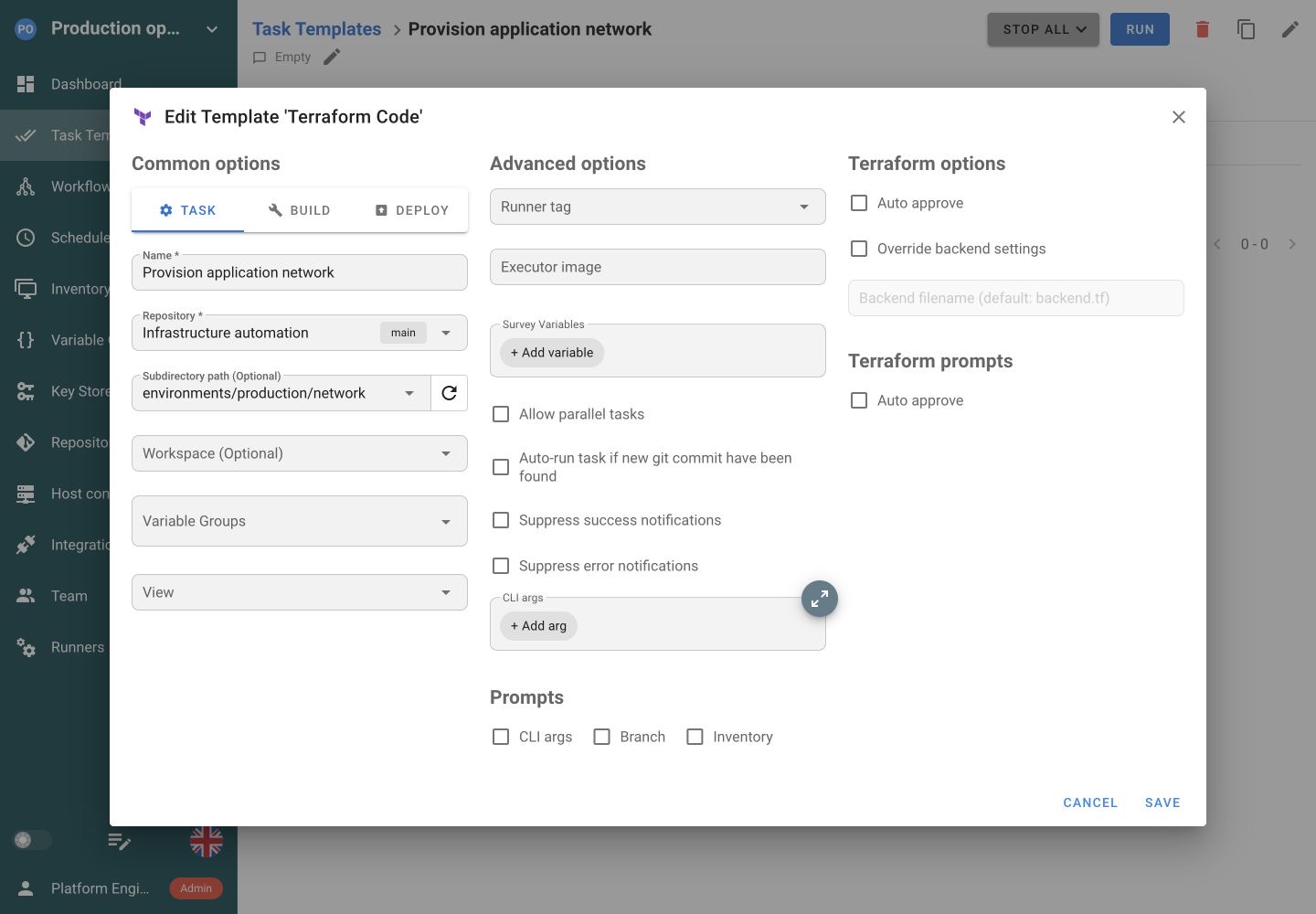
Create a template for your configuration directory and workspace. Supply environment inputs through Variable Groups.
Share a prepared jobConnect your Terraform code to Semaphore. Select a workspace, review plan output, run Apply and keep the execution history available to your team.


The code is in Git, but the workspace, variables and credentials can differ between terminal sessions. The next engineer needs the same starting point.
Create a template for your configuration directory and workspace. Supply environment inputs through Variable Groups.
Share a prepared jobStart a Plan-only task and share its output. Run Apply as a separate action when the team is ready to make the change.
Share a prepared jobSchedule a Plan-only template to compare configuration with infrastructure and retain each plan’s output. Review the plan for differences.
Set up a scheduleThe template selects the repository, configuration directory, and Terraform workspace. Variable groups supply the inputs for the run.
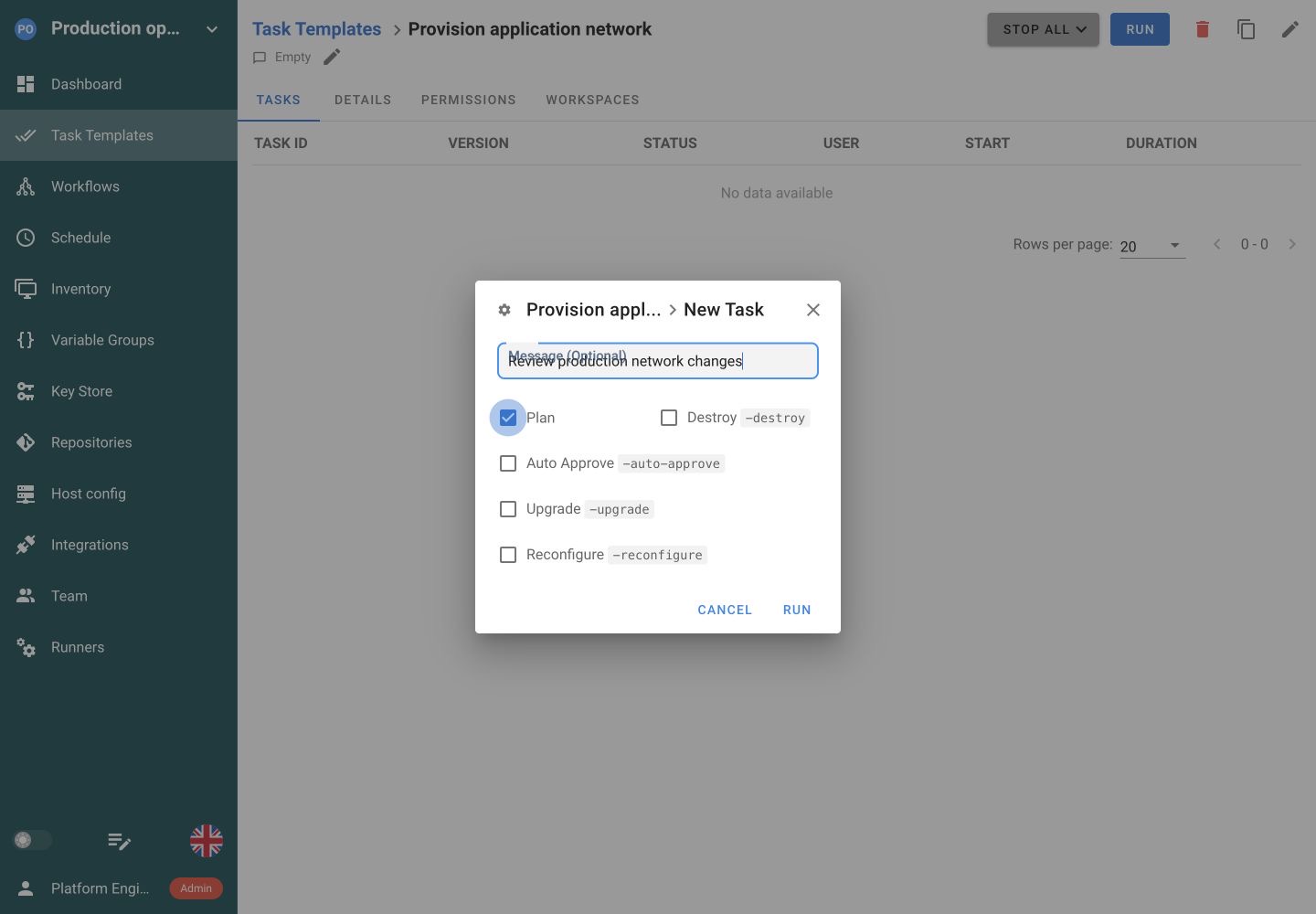
Run Plan to review proposed infrastructure changes. Keep destructive options off. Apply remains a separate action.
A successful Terraform step publishes infrastructure outputs automatically. Map those values into an Ansible task’s inputs, then verify the configured service with Python. Workflows connect the jobs, their data and their success or failure paths.
Provision infrastructure
 Configure services
 Verify the deployment
 Collect diagnostics
Choose Plan to inspect proposed changes without applying them. Apply is a separate execution. A later Apply does not automatically use the saved output of an earlier Plan task.
Select a Terraform workspace through the template’s Inventory field. Use Variable Groups with TF_VAR_ names for inputs. Workspace selection does not automatically select different variables or credentials.
Continue with the backend in your Terraform code. Pro can override it with Semaphore’s HTTP backend, which provides locking, state versions and UI management.
Semaphore runs init before execution. Prepare the Terraform version, providers, private-module credentials and API access on the server or runner that executes the job.
Yes. Create a Terraform Task Template pointing at the repository and configuration directory. Select its workspace, supply inputs through Variable Groups and prepare the required Terraform runtime. Semaphore runs your configuration and keeps the task output and execution status.
No. Terraform can continue using the backend configured in your code. In Pro, you can select Semaphore’s HTTP backend for state locking, version history and UI management. Choose the backend that fits your existing access and recovery process.
No. Workspace selection chooses the state workspace. Configure the variables and credentials the job needs separately. Use deliberate combinations of Task Templates and Variable Groups for environments with different inputs, and make the intended scope clear in the template name.
A later Apply does not automatically consume the saved output of an earlier Plan task. They are separate executions. Use Plan to review proposed changes, then choose the intended Apply operation. Task history keeps the output and result of each run.
Yes. Schedule a Plan-only template and inspect its output for differences between configuration and infrastructure. Each run has a record. This provides a recurring plan to review rather than an automatic alert for every drift detected in the plan.
Yes. Put the Terraform Task Template before an Ansible template in a Workflow, then add checks such as a Python readiness job. Configure the conditions that start each step. The Terraform plan and state remain separate from Workflow coordination.
Attach Variable Groups to the template. Use TF_VAR_ names for Terraform input variables, and the environment values expected by your providers for authentication. Keep sensitive values in secret entries and prepare module and backend access on the execution environment.
No. This integration executes your infrastructure Terraform configurations as Semaphore tasks. The Semaphore Terraform provider works in the other direction, using Terraform to manage supported Semaphore resources. You can use either approach independently or combine them in your setup.

