

Secret masking in Ansible
Ansible playbooks often need passwords and API tokens to connect to servers and deploy applications. These values can also appear in task output, for example when a command returns an error containing a password.
Ansible is adding secret masking to help with this. It replaces known secret values with $REDACTED$ in the output, while keeping the rest of the message readable. Tasks continue to use the original values.
The feature was added by the Secret Masking API pull request, merged on September 10, 2026. At the time of writing, it is available in ansible-core 2.22 development builds. It is not yet part of a stable release.
Let’s look at a simple playbook, then see how we plan to use this feature in Semaphore UI.
Firstly, register a secret
Ansible needs to know which values to mask. The new API registers values from known secret sources, such as vaulted variables and module parameters marked no_log.
For an ordinary variable, we can use the register_secret filter. A variable passed through --extra-vars also needs registration; naming it db_password is not enough.
For this example, we will use a fictional database password. Create a playbook named masking.yml:
- name: Try secret masking
  hosts: localhost
  gather_facts: false
  vars:
    db_password: "example-db-password-123456"

  tasks:
    - name: Register the password before using it
      ansible.builtin.set_fact:
        db_password: "{{ db_password | ansible.builtin.register_secret }}"

    - name: Show a message containing the password
      ansible.builtin.debug:
        msg: "Connecting to db.internal with password={{ db_password }}"
The first task registers the password. The filter returns the original value, so the playbook can still use it to connect to the database. Registration must happen before any task prints the value.
Run the playbook with an ansible-core 2.22 development build:
ansible-playbook -i localhost, -c local masking.yml
The second task will display this message:
Connecting to db.internal with password=$REDACTED$
We print the password here only to demonstrate masking. In a real playbook, get it from your secret source and avoid printing credentials deliberately.
Integration with Semaphore UI
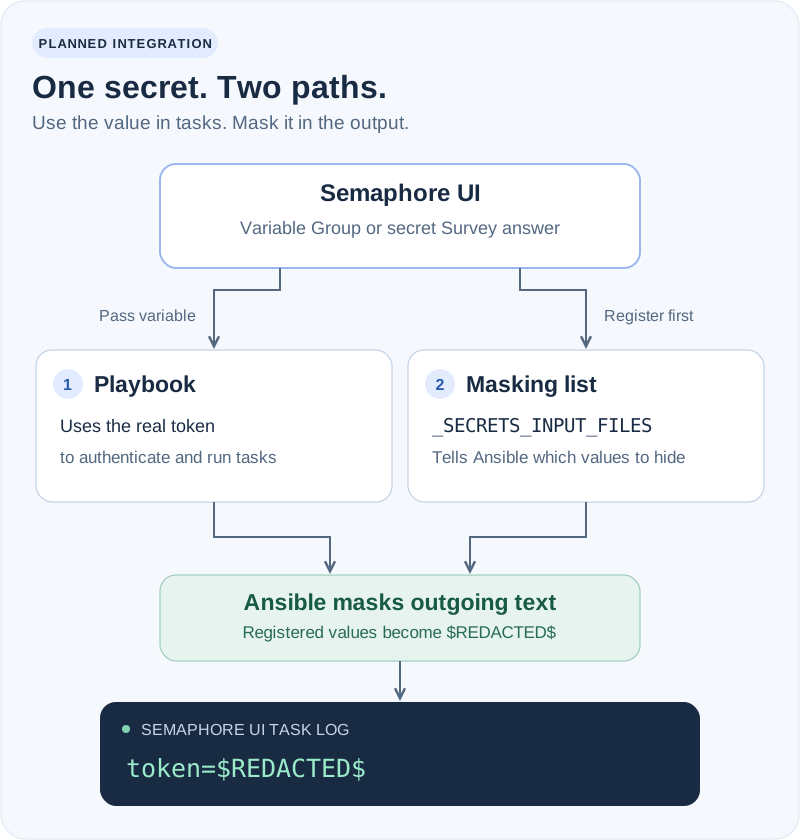
Semaphore UI already knows which variables you have marked as secret. We plan to use this information in future versions to register those values with Ansible automatically.
For this, we will use Ansible’s _SECRETS_INPUT_FILES option. It is configured through the _ANSIBLE_SECRETS_INPUT_FILES environment variable and lets Ansible read a list of secrets before a playbook starts.
The input can be YAML or JSON. A document with our example password looks like this:
version: 1
secrets:
  - example-db-password-123456
This list tells Ansible what to mask. The variables themselves are still passed to the playbook separately.
The planned integration will cover secret values from:
- Variable Groups — secrets saved for use by your tasks.
- Surveys — secret answers entered when starting a task.
For these values, you would not need to add a register_secret task to each playbook.
We tested this approach on an ansible-core 2.22 development build. Registered values were masked in debug messages, command results, failure messages, verbose output, and Ansible’s log file. Passing the list through a pipe also worked, without writing a separate secrets file to disk.
The option is currently internal and may change. Semaphore UI support is planned for a future release and will require a compatible Ansible version.
Example: deploying an application
Suppose we have a Task Template that deploys an application. The deployment script uses an API token saved as a secret in a Variable Group.
With the planned integration, the task will work as follows:
- Semaphore UI passes the token to the playbook.
- It also supplies the token to Ansible’s masking list through
_SECRETS_INPUT_FILESbefore execution. - The playbook runs the deployment script with the real token.
- If the script includes that token in its output, Ansible masks it in the displayed result.
For example, an expired token could produce this message in the task log:
Deployment rejected: service=payments environment=staging token=$REDACTED$ reason=token expired
We can see which deployment failed and why, without showing the token to everyone reading the log. The same flow will apply to a temporary token entered through a secret Survey field.
Limitations
Masking works with registered values. The development implementation skips secrets shorter than four characters, and an encoded or otherwise transformed value may need separate registration.
It also does not protect credentials in process arguments, files written by a playbook, or logs produced outside Ansible. Keep using no_log: true for tasks whose entire output should remain private.
With this integration, secrets marked in Semaphore UI will also be known to Ansible’s masking system. This will help keep credentials out of task logs while leaving useful information for troubleshooting.