

Platform engineering is changing how development teams interact with infrastructure.
Instead of asking developers to learn Ansible, Terraform, Kubernetes, cloud credentials, CI pipelines, and half a dozen internal tools, many organizations are putting a developer portal in front of this complexity.
Backstage has become one of the most prominent open-source projects for building such portals.
But a developer portal still needs something behind it to actually perform infrastructure operations.
This is where Semaphore UI fits naturally.
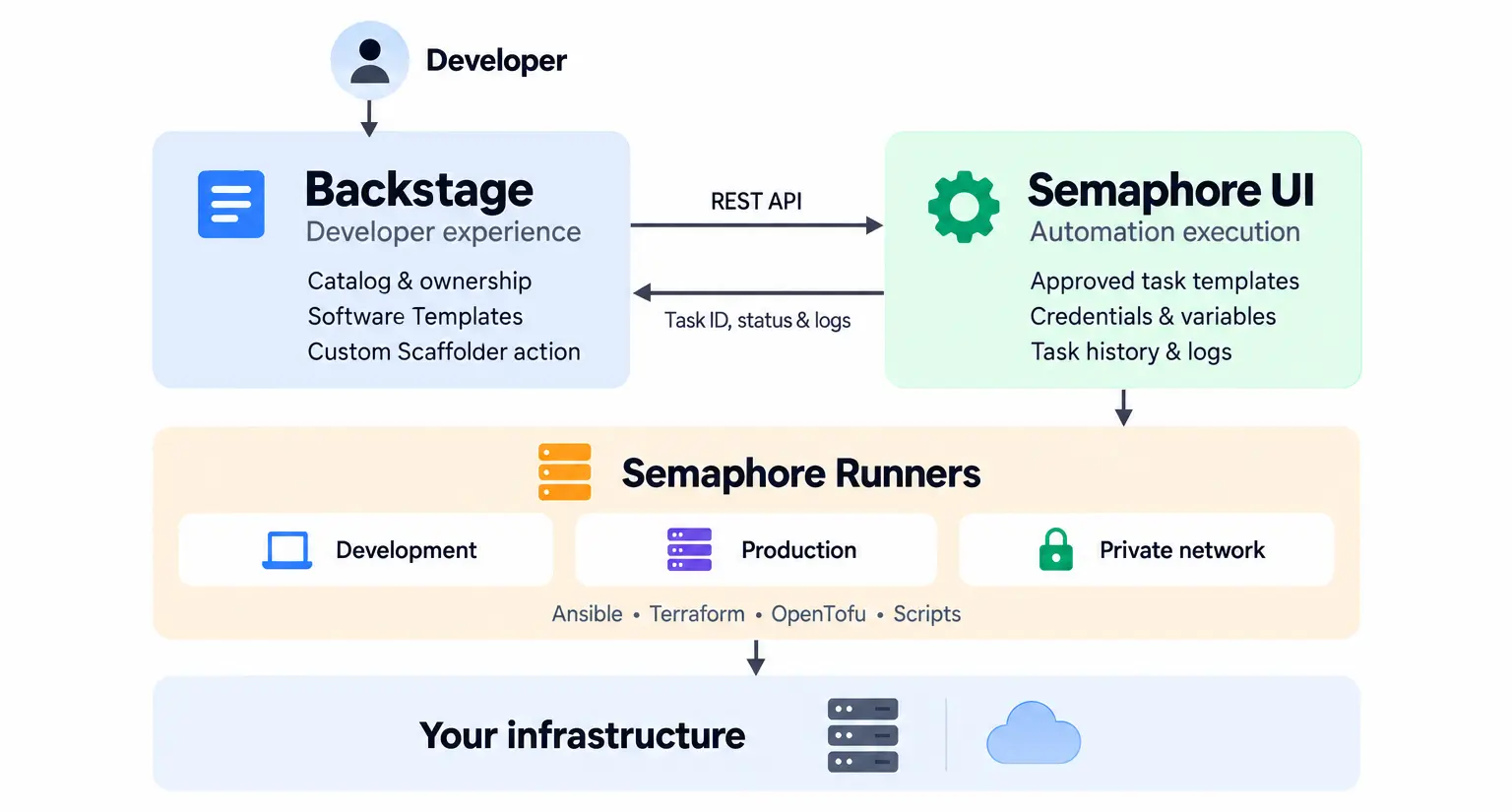
Backstage can provide the self-service experience. Semaphore can provide the execution layer.
Together, they create a relatively simple architecture for exposing infrastructure automation to developers without moving credentials, playbooks, Terraform configurations, and execution logic into Backstage itself.
Backstage is the front door
A typical engineering organization may already have:
- Ansible playbooks for server configuration
- Terraform or OpenTofu for provisioning infrastructure
- Bash and Python scripts for operational tasks
- Kubernetes clusters
- GitHub or GitLab repositories
- monitoring and incident-management systems
- internal scripts maintained by platform teams
The problem is rarely the lack of automation.
The problem is making that automation safely accessible to other teams.
A developer who wants a new test environment should not necessarily have to know:
terraform init
terraform workspace select ...
terraform plan
terraform apply
Nor should they need direct access to cloud credentials.
With Backstage, the platform team can instead expose something like:
Create
  ├── New Go Service
  ├── Provision Test Environment
  ├── Create PostgreSQL Database
  ├── Deploy Application
  └── Configure Linux Server
Backstage Software Templates are designed around exactly this kind of self-service workflow: templates collect input from the user and execute a sequence of Scaffolder actions. Custom actions can be added when a platform needs to interact with its own systems.
But Backstage does not have to become the system that actually runs all of the underlying automation.
That responsibility can be delegated to Semaphore.
Backstage as the control plane, Semaphore as the execution plane
The basic architecture is straightforward:
                     Developer
                         │
                         ▼
                   ┌───────────┐
                   │ Backstage │
                   └─────┬─────┘
                         │
                    Semaphore API
                         │
                         ▼
                  ┌──────────────┐
                  │ Semaphore UI │
                  └──────┬───────┘
                         │
                   Task / Workflow
                         │
              ┌──────────┼──────────┐
              ▼          ▼          ▼
           Runner      Runner      Runner
              │          │          │
              ▼          ▼          ▼
          Ansible     OpenTofu    Python
          Terraform   Terragrunt   Bash
                                  PowerShell
Backstage owns the developer experience.
Semaphore owns the automation execution.
This separation is useful because both systems remain focused on what they are good at.
Backstage manages things such as:
- software catalog
- ownership
- documentation
- developer forms
- service templates
- self-service actions
Semaphore manages:
- automation repositories
- task templates
- inventories
- credentials
- variable groups and secrets
- execution history
- logs
- runners
- workflows
- schedules
Semaphore currently supports Ansible, Terraform, OpenTofu, Terragrunt, Bash, PowerShell, and Python as task applications.
Calling Semaphore from a Backstage template
Semaphore exposes a REST API, so integrating it into a Backstage Scaffolder workflow does not require a new execution protocol.
For example, a Semaphore task can be started with:
POST /api/project/1/tasks
Authorization: Bearer <token>
Content-Type: application/json

{
  "template_id": 42,
  "message": "Triggered from Backstage"
}
Semaphore returns the task information, and the caller can use the task ID to query its status and output. The API provides endpoints for starting a task, retrieving an individual task, stopping it, and retrieving its output.
A Backstage custom Scaffolder action can therefore become a thin adapter:
Backstage parameters
        │
        ▼
Semaphore task parameters
        │
        ▼
POST /api/project/{id}/tasks
        │
        ▼
Semaphore executes automation
The Backstage action does not need to understand how Ansible or Terraform works.
It only needs to know which approved Semaphore template to start and which parameters it is allowed to pass.
Example: Provisioning an environment
Imagine a development team needs disposable testing environments.
The platform team already has an OpenTofu configuration that creates:
- a virtual machine
- networking
- DNS
- firewall rules
and an Ansible playbook that configures the machine afterward.
Instead of giving every developer access to OpenTofu and Ansible directly, the platform team creates a Semaphore workflow:
Provision Infrastructure
          │
          ▼
       OpenTofu
          │
          ▼
    Configure Server
          │
          ▼
       Ansible
Then Backstage exposes a friendly form:
Provision Test Environment

Application:
[ payments-api ]

Region:
[ eu-central-1 ]

Size:
[ small ]

Environment name:
[ feature-123 ]

              [ Create ]
From the developer’s perspective, that is the whole workflow.
Behind the scenes:
Developer
    │
    ▼
Backstage
    │
    │ application=payments-api
    │ region=eu-central-1
    │ size=small
    │ environment=feature-123
    ▼
Semaphore
    │
    ├── OpenTofu
    └── Ansible
          │
          ▼
    Infrastructure
The developer gets self-service infrastructure.
The platform team keeps control over how that infrastructure is created.
Keep infrastructure credentials out of Backstage
There is another useful consequence of this architecture.
Backstage does not need direct access to every infrastructure credential required by the automation.
It needs credentials for calling Semaphore.
Semaphore can keep the credentials required by the actual automation separately.
For example:
Backstage
   │
   │ Semaphore API token
   ▼
Semaphore
   │
   ├── AWS credentials
   ├── SSH keys
   ├── Ansible Vault password
   ├── repository credentials
   └── environment secrets
Semaphore’s Key Store is designed for reusable SSH keys, logins and other credentials, while Variable Groups can provide reusable values and secrets to tasks.
This creates a useful security boundary.
The developer portal requests an operation.
The execution system receives the credentials necessary to perform it.
Those do not have to be the same security context.
Run automation where the infrastructure lives
Execution location matters as well.
Imagine Backstage and Semaphore are hosted in a central platform environment, but the company also operates:
Production network
Development network
Customer environment
Private data center
Remote edge location
The Backstage instance does not necessarily need network access to all of these environments.
Semaphore Runners can execute tasks outside the main Semaphore server.
The architecture can therefore look like this:
                      Backstage
                          │
                          ▼
                   Semaphore Server
                          │
          ┌───────────────┼───────────────┐
          │               │               │
          ▼               ▼               ▼
      Dev Runner      Prod Runner      DC Runner
          │               │               │
          ▼               ▼               ▼
     Dev network     Prod network     Data center
The portal stays centralized while execution can be distributed closer to the target infrastructure. Semaphore task templates can also bind execution options, repositories, inventories, variables and runner selection to an approved automation definition.
This becomes especially useful in environments where direct connectivity from a central developer portal to every infrastructure network would be undesirable.
Semaphore templates become platform capabilities
There is an important conceptual shift here.
A Semaphore Task Template does not have to be exposed to users as:
Run
deploy.yml.
From Backstage, the same template can instead represent a business-level platform capability:
Restart Application

Provision Environment

Rotate Certificates

Deploy Version

Create Database

Configure Server

Run Database Migration

Destroy Preview Environment
The implementation may be Ansible today and Terraform tomorrow.
Developers do not have to care.
For example:
             "Create Environment"
                      │
                Backstage UI
                      │
                      ▼
             Semaphore Template
                      │
             ┌────────┴────────┐
             ▼                 ▼
          OpenTofu          Ansible
             │                 │
             └────────┬────────┘
                      ▼
                Infrastructure
This is one of the central ideas behind platform engineering: expose capabilities instead of implementation details.
Semaphore provides a convenient boundary around those implementation details.
One portal does not mean one automation tool
Platform teams often try to solve self-service by moving everything into one system.
That usually creates another monolith.
Backstage offers a different model.
It can become a common interface while specialized systems remain behind it.
For example:
                         Backstage

          ┌─────────────────┼──────────────────┐
          │                 │                  │
          ▼                 ▼                  ▼
       GitHub            Argo CD          Semaphore
          │                 │                  │
          ▼                 ▼             ┌────┼─────┐
       Source           Kubernetes        │    │     │
                                          ▼    ▼     ▼
                                      Ansible IaC Scripts
Semaphore does not need to replace Argo CD.
Backstage does not need to replace Semaphore.
Each tool can own a different part of the platform.
For organizations with significant automation outside Kubernetes, this becomes particularly useful.
Ansible jobs, Terraform/OpenTofu infrastructure, PowerShell automation, Python scripts and traditional servers can be exposed through the same Backstage experience as cloud-native services.
From developer self-service to AI self-service
There is another reason this architecture is becoming interesting.
Backstage is expanding its model beyond human users.
Its MCP Actions Backend can expose registered Backstage actions through MCP endpoints, with filtering that determines which actions are available to MCP clients. Backstage also supports catalog entities for AI-related resources and MCP servers.
That makes this architecture possible:
        Developer               AI Agent
            │                       │
            └──────────┬────────────┘
                       ▼
                   Backstage
                       │
                approved action
                       │
                       ▼
                   Semaphore
                       │
                 controlled task
                       │
                       ▼
                Infrastructure
This is an important distinction.
Giving an AI agent shell access to production infrastructure is one model.
Giving an AI agent access to a predefined action such as:
restart-payment-service

provision-test-environment

run-database-backup

deploy-version
is a very different model.
The second approach gives the infrastructure team a place to define what can actually be executed.
Semaphore can act as that execution boundary.
Backstage — or an AI agent working through Backstage — requests an approved automation.
Semaphore executes it using the configured template, credentials, variables and runner and records the resulting task.
A practical integration pattern
A good starting architecture requires surprisingly little.
1. Define automation in Semaphore
Create Task Templates or Workflows for operations you want to expose:
Provision Environment
Deploy Application
Configure Host
Restart Service
Destroy Environment
Keep implementation details inside Semaphore.
2. Create a Backstage Scaffolder action
Implement a small action such as:
semaphore:runTask
with inputs such as:
projectId:
templateId:
parameters:
message:
The action calls the Semaphore REST API.
3. Create Backstage Software Templates
Use those actions from developer-facing workflows:
steps:
  - id: provision
    name: Provision environment
    action: semaphore:runTask
    input:
      projectId: 10
      templateId: 42
4. Return execution status
The action can poll the corresponding Semaphore task and return:
task ID
status
result
link to Semaphore task
For short operations, Backstage can wait for completion.
For long-running automation, it can simply start the operation and link users to the Semaphore task.
Why the combination works
Backstage and Semaphore solve different problems.
That is precisely why they fit together well.
| Backstage | Semaphore UI |
|---|---|
| Developer portal | Automation execution |
| Software catalog | Task templates |
| Software templates | Ansible / Terraform / OpenTofu |
| Self-service forms | Bash / Python / PowerShell |
| Developer experience | Credentials and variables |
| Platform discovery | Runners |
| MCP actions | Task API |
| Service ownership | Execution logs |
| Platform frontend | Automation backend |
The resulting model is simple:
Backstage defines how developers interact with the platform.
Semaphore defines how infrastructure automation is executed.
This lets platform teams provide a clean self-service experience without rewriting existing automation or turning their developer portal into another CI/CD and infrastructure execution system.
Build a portal around the automation you already have
Many organizations already have years of infrastructure automation.
They have Ansible repositories, Terraform modules, shell scripts and operational procedures that work.
Building an Internal Developer Platform should not require throwing those investments away.
With Semaphore, that existing automation can become a set of reusable, controlled platform capabilities.
Backstage can then put a modern self-service interface in front of them.
Developer / AI Agent
          │
          ▼
      Backstage
          │
          ▼
     Semaphore UI
          │
      ┌───┼────────────┐
      ▼   ▼            ▼
  Ansible OpenTofu   Scripts
      │   │            │
      └───┴─────┬──────┘
                ▼
         Your Infrastructure
Backstage becomes the front door.
Semaphore becomes the execution layer.
And the automation your platform team already maintains becomes available as self-service infrastructure.


