

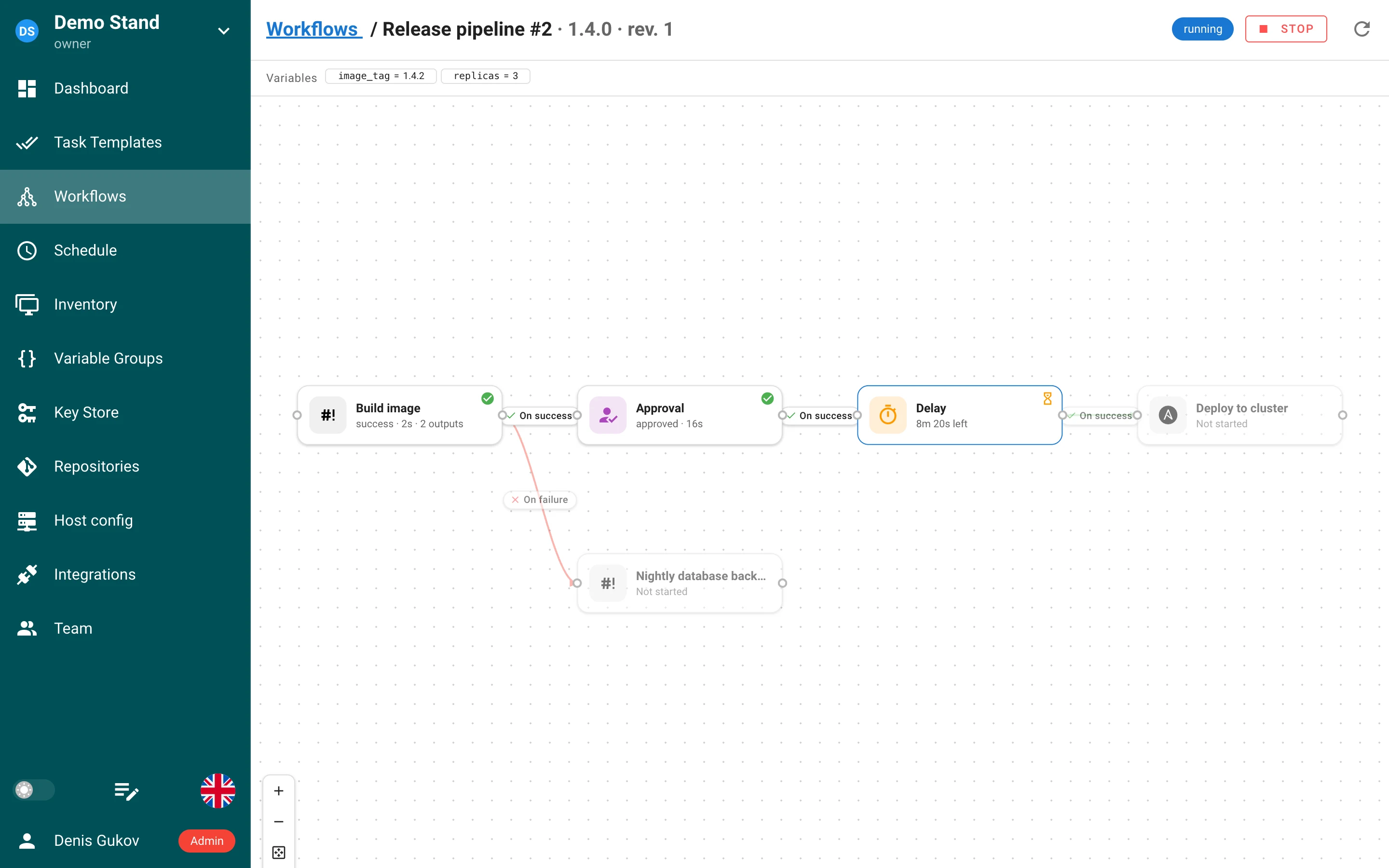
Semaphore UI 2.20 adds an audit log with SIEM export, grows Workflows into a real pipeline engine with delay nodes, revisions, outputs passed between tasks and workflow variables, reworks roles so a member can hold several of them and administrators get instance‑wide roles and IdP group mappings, introduces host config for per‑host SSH and Git credentials, moves every Ansible extra variable into Vault‑encrypted files, and exposes Prometheus metrics.
The line starts at v2.20.0. Patch releases will be listed at the end of this page as they ship.
Highlights
- Audit log — who did what, from where, with what result; an admin screen, retention, and Syslog / Splunk HEC export for SIEMs (export and filters in Pro).
- Workflows — delay nodes, immutable revisions pinned to runs, outputs delivered as inputs of the next task, workflow variables asked in a Run dialog, a redesigned editor with hotkeys and undo, and webhooks that start workflows.
- Several roles per member, roles with ids and slugs, global roles with instance‑wide permissions (Pro), and IdP group → role mappings applied at sign‑in (Enterprise).
- External identities — LDAP and OIDC logins are bound to accounts by the provider’s stable id, not by e‑mail; several LDAP directories on one login page.
- Host config — map SSH hosts and Git URLs to project credentials, applied to clones, Galaxy, Terraform modules and Ansible.
- Ansible extra variables are never on the command line any more; secrets travel in an Ansible Vault‑encrypted file, and Jinja2 inside values is no longer evaluated.
- Templates: Ansible working directory, unique names and
template_namein the task API, suppressed error notifications, hidden Dry Run / Diff, Galaxy install options, multi‑select survey variables, survey secrets on remote runners. - Monorepo repositories share one checkout between templates; Git retries, parallel submodule fetch, SSH host‑key checking.
- Prometheus metrics at
/api/metrics. - Generate SSH key pairs on the server and copy the public key from the Key Store.
Audit log
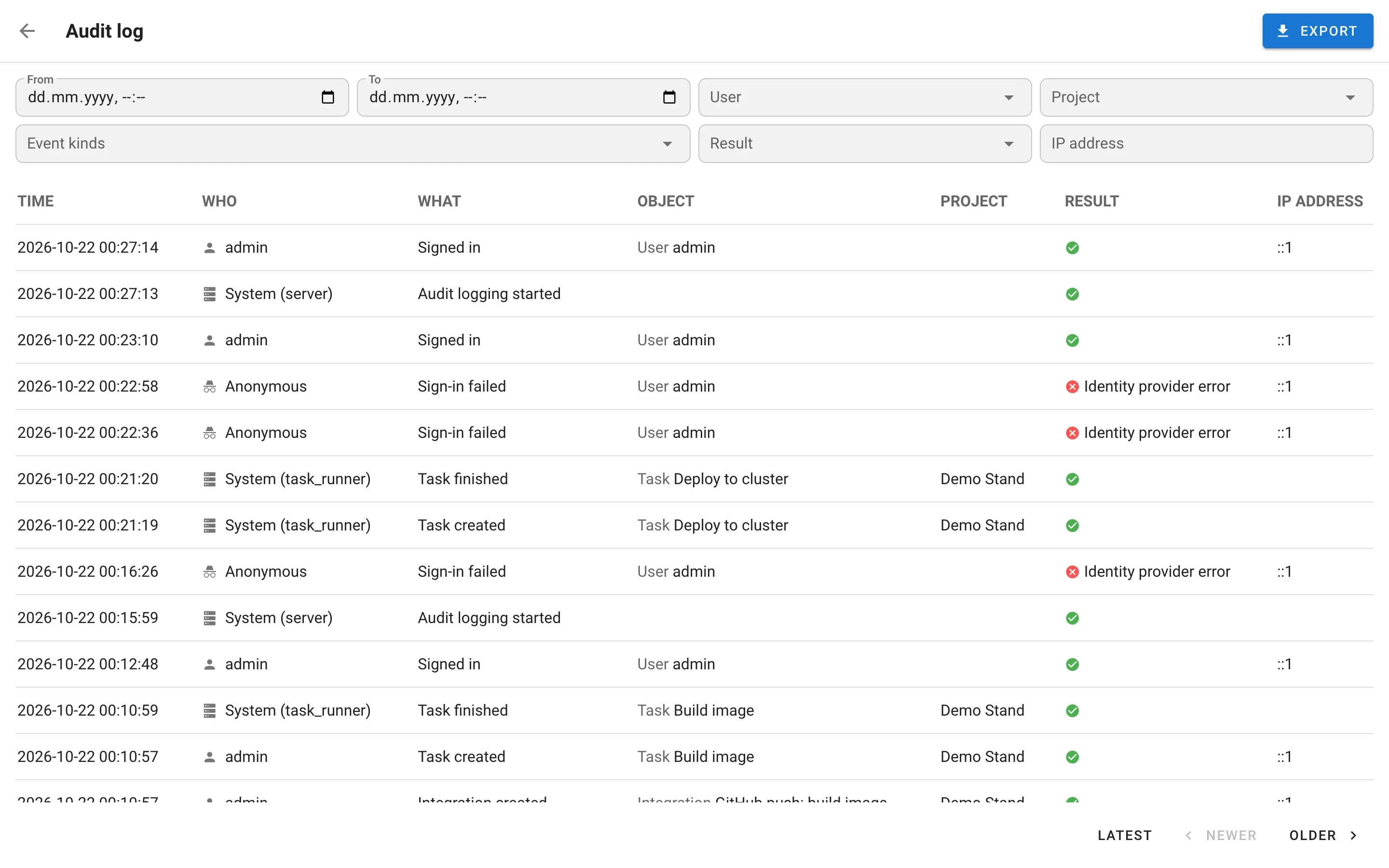
Semaphore now records security‑relevant events in a dedicated, append‑only log. Enable it with:
"audit": {
  "enabled": true,
  "instance_id": "semaphore-prod"
}
(SEMAPHORE_AUDIT_ENABLED, SEMAPHORE_AUDIT_INSTANCE_ID; instance_id is required and names the
installation on every event.)
What is recorded. 116 event kinds in eight categories: auth (sign‑ins, sign‑outs, MFA, API
token rejects, denied requests, CSRF blocks), iam (users, passwords, API tokens, identities,
memberships, roles, template permissions), resource (projects, backups, inventories, repositories,
templates, schedules, integrations, host configs, workflows, variable groups), secret (credentials
and secret storages), task (start with its trigger, completion with result and duration,
approvals, stops, history deletion), runner (registration, changes, rejected reports), system
(settings, licence) and audit itself (start, retention, export). Passwords, tokens, secret values,
task output and variables are never written.
Event envelope. Every event carries a UUID, a gap‑free sequence number, a microsecond UTC
timestamp, the actor (user / anonymous / system / runner / integration, with session or API‑token
auth and a token fingerprint), the source IP and User‑Agent, the target, the project, a request id
(also returned in the X-Request-ID response header), the instance id and the HA node id. Outcomes
are success or failure with a closed list of reasons; an action that saved the object but failed
a later step is a success with partial = true. Behind a reverse proxy, X-Forwarded-For is
trusted only from audit.trusted_proxy_cidrs.
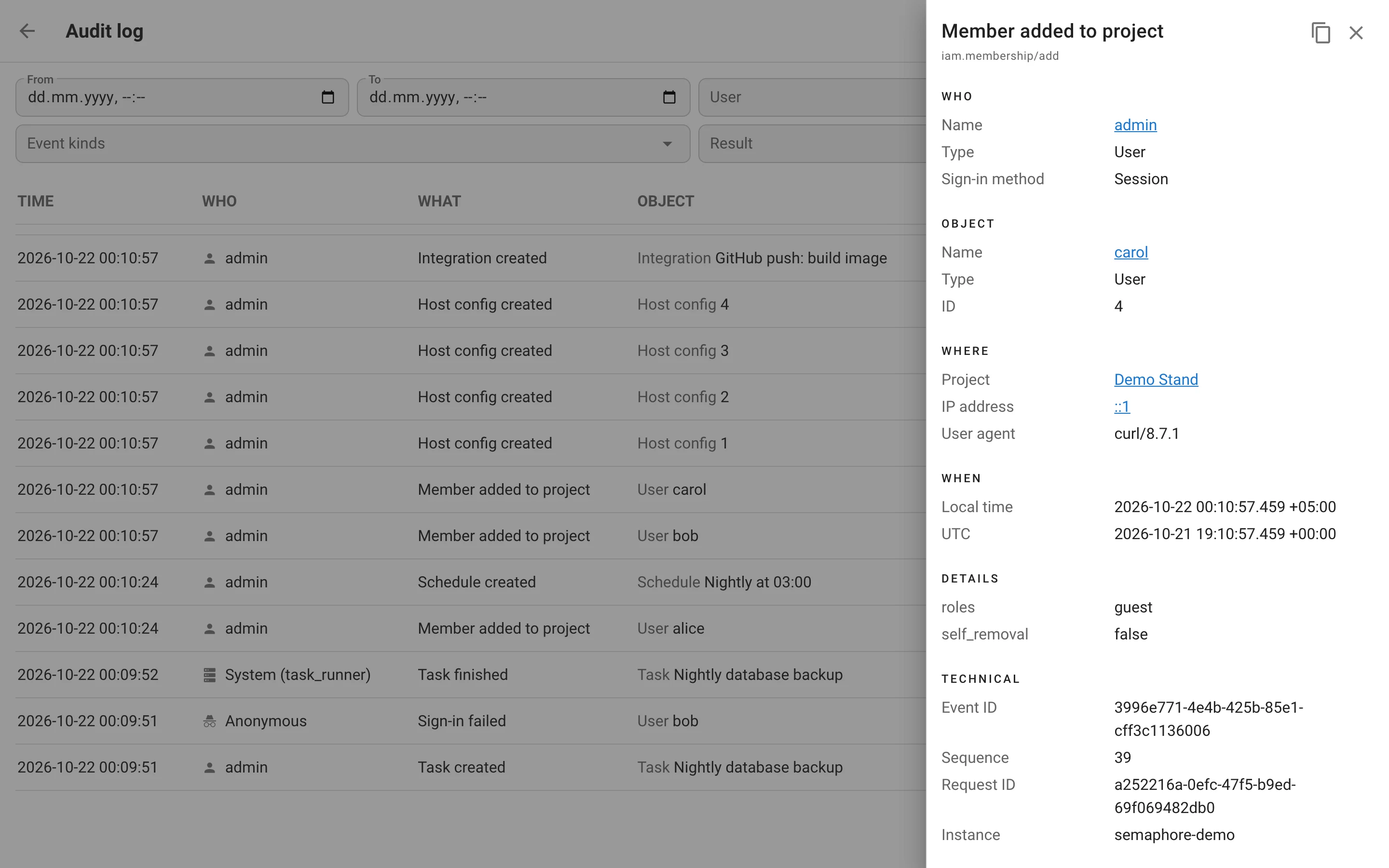
Admin screen. Audit log in the user menu (/audit-log) lists events newest first, 50 per
page, with Older / Newer paging; a row opens a card with Who, Object, Where, When,
Details and Technical sections and a button that copies the event as the JSON sent to a SIEM.
Access needs the new Read the audit log global permission.
Retention. audit.retention_days deletes older events in batches, hourly with jitter so HA
nodes do not collide; every pass that deletes something is itself recorded.
Pro: filters and export. Filter by period, user, project, event kind, result and IP; pivot from any card value; export the current selection as CSV or JSON Lines.
Pro: SIEM export. Two destinations, each with its own cursor so nothing is skipped when a
receiver is down: Syslog over TLS (RFC 5424, event JSON as the body) via audit.syslog and
Splunk HTTP Event Collector via audit.splunk_hec (url, token, index, source,
sourcetype, ca_file, …). Delivery is at‑least‑once, ordered by sequence; in HA only one node
exports per destination, coordinated through a Redis lease. Three Prometheus series describe the
exporter: semaphore_audit_export_pending_events, semaphore_audit_export_oldest_pending_seconds
and semaphore_audit_export_errors_total.
Storage: tables audit_event, audit_event_sequence, audit_export_state (migrations v2.20.9
to v2.20.11). API: GET /api/audit/events and GET /api/audit/events/export.
Workflows
Workflows are a Pro feature; the Beta label is gone.
Delay nodes
A fourth node kind next to task, approval and note: Delay pauses the run for a number of
seconds and then releases its edges. The run view shows a live countdown on the card; a stopped run
cancels the delay. Field delay_seconds, migration v2.20.2.
Revisions
Every save of a workflow creates a new revision of the graph; a run pins the revision it started
from, so editing a workflow never changes a run in flight and never orphans the nodes of past runs.
The editor shows a rev. N chip and how many runs are still executing an older revision; the run
view shows which revision it executes. Revisions no run references are deleted when a newer one is
saved. API: GET …/workflows/{id}/revisions and …/revisions/{revision_id}.
Outputs and inputs
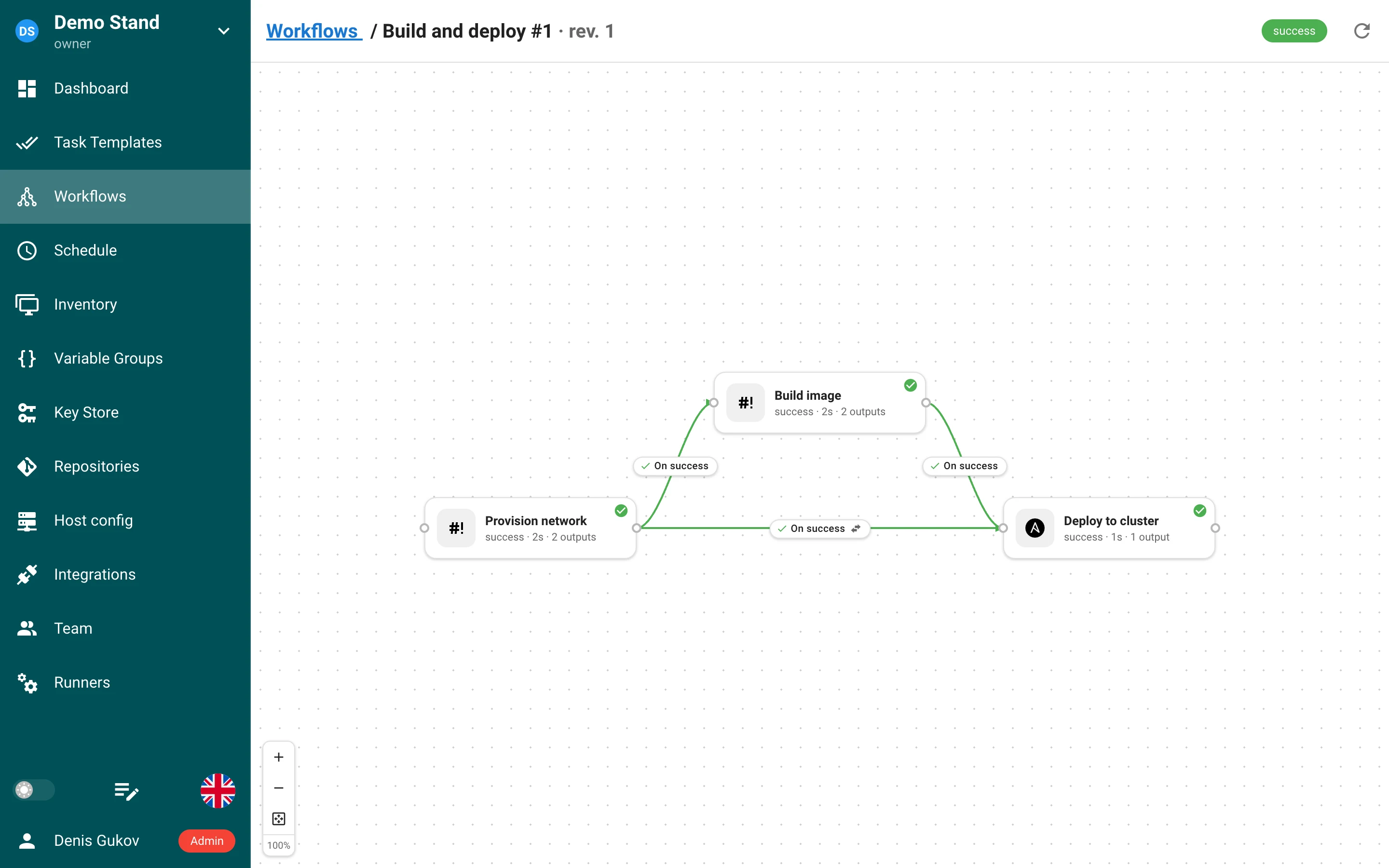
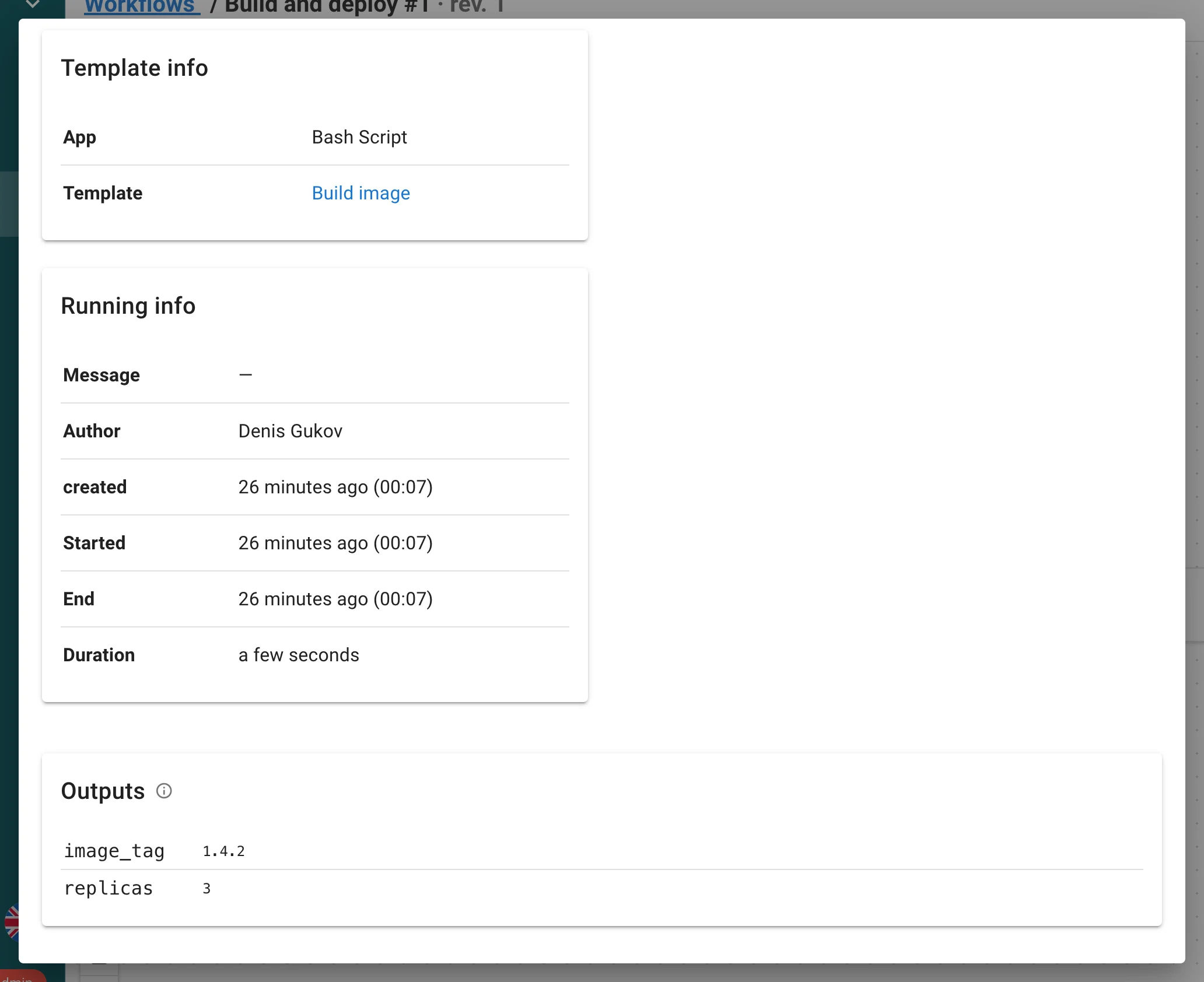
A task can hand structured data to the nodes after it. Every task started by a workflow gets
SEMAPHORE_OUTPUTS_FILE; whatever it writes there as a JSON object becomes its outputs:
cat > "$SEMAPHORE_OUTPUTS_FILE" <<EOF
{"image_tag": "1.4.2", "replicas": 3, "subnet_ids": ["subnet-1", "subnet-2"]}
EOF
Ansible produces outputs with ansible.builtin.set_stats through a bundled callback plugin;
Terraform, OpenTofu and Terragrunt outputs are captured automatically from output -json
(sensitive values are skipped and listed as Not captured). Outputs are read only when the task
succeeds; limits are 100 outputs, 32 KB each, 256 KB per file.
A connection into a task node delivers inputs — it fills the survey variables of the destination template from the outputs of the source node:
- By name (default): every output whose name equals a survey variable fills it.
- Map inputs explicitly: list the
variable ← output keypairs to deliver; once the workflow has a finished run the panel suggests the keys that run produced.
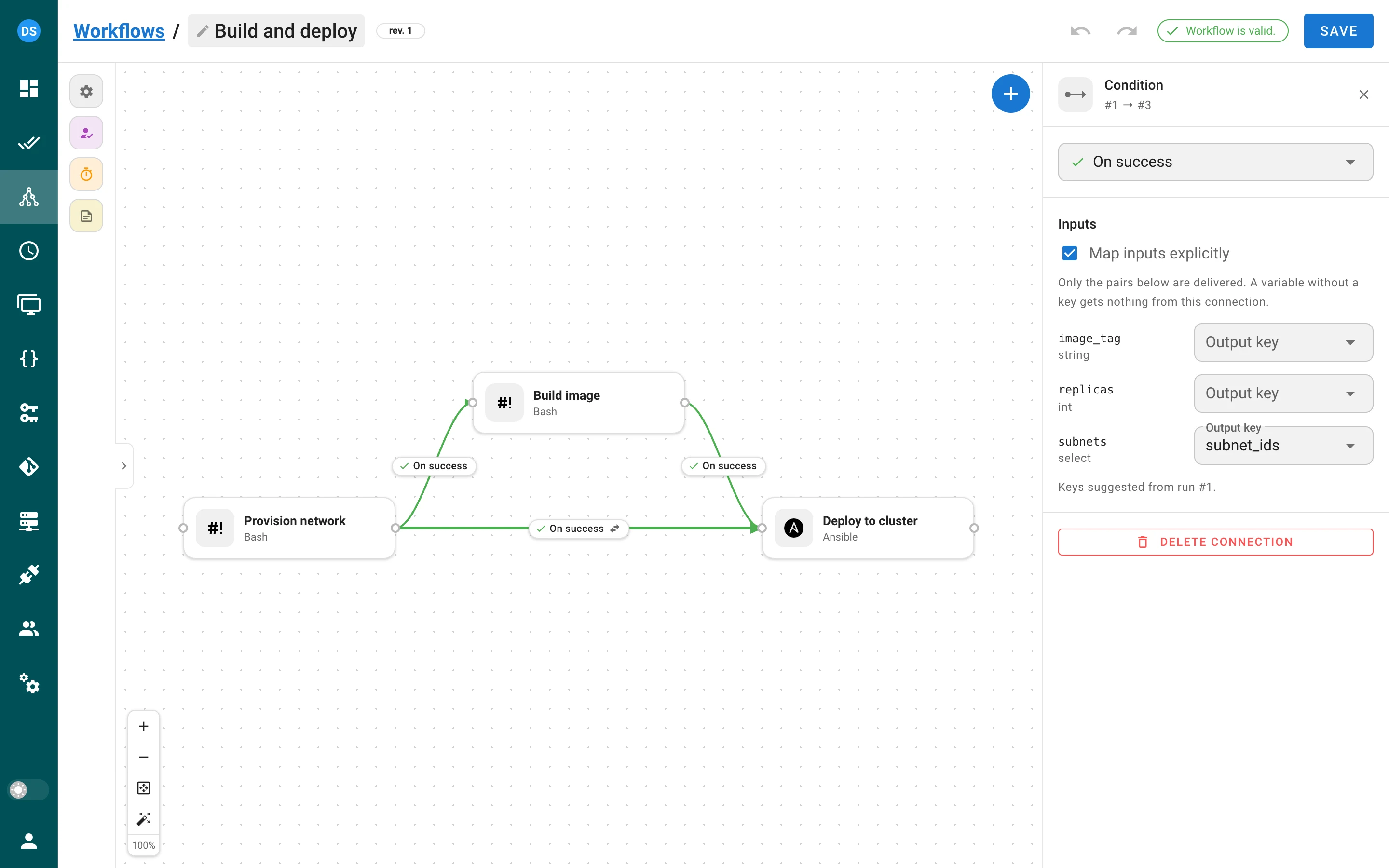
Values are coerced to the variable type, approval and delay nodes pass outputs through, an
explicit mapping wins over a by‑name delivery, and a required variable left without a value
fails the node’s task before it starts so the run follows its On failure edges. The run view
shows an N outputs badge per node, the task dialog has an Outputs table, and the task log
starts with one Input "x" <- output "y" of node N line per delivered value. Outputs are stored in
plain text and never fill a secret variable; a secret can not be passed through outputs. Tasks
on remote runners produce and receive outputs; the Docker and Kubernetes executors do not capture
them yet.
Workflow variables and the Run dialog
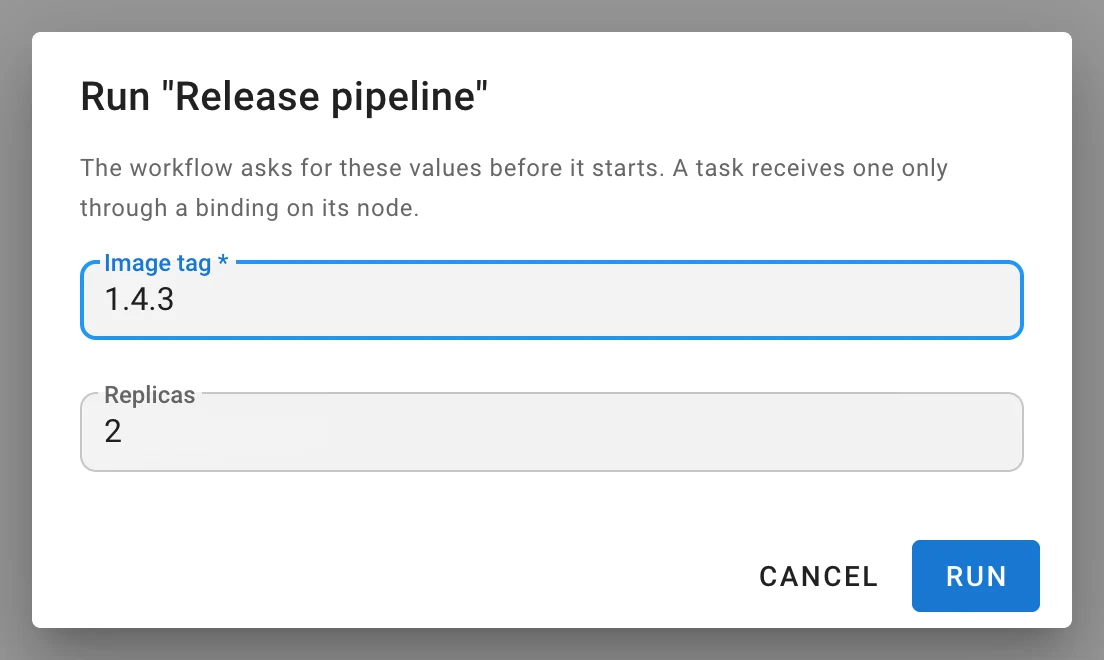
A workflow has its own survey variables, asked once in a Run “…” dialog when a run starts
(a workflow without variables starts immediately, as before). Answers are stored on the run, shown
as chips in a Variables strip above the run canvas, and reach a task only through an explicit
binding in the node panel — a workflow variable never leaks into a template by name. Secrets
are not allowed as workflow variables. POST …/workflows/{id}/runs accepts
{"environment": {"image_tag": "1.4.3"}}; an answer that does not fit its type or a missing required
value rejects the start.
Environment of a workflow task
Every task started by a workflow receives SEMAPHORE_WORKFLOW_ID, SEMAPHORE_WORKFLOW_RUN_ID,
SEMAPHORE_WORKFLOW_URL (needs web_host) and SEMAPHORE_OUTPUTS_FILE, for every app and on
remote runners.
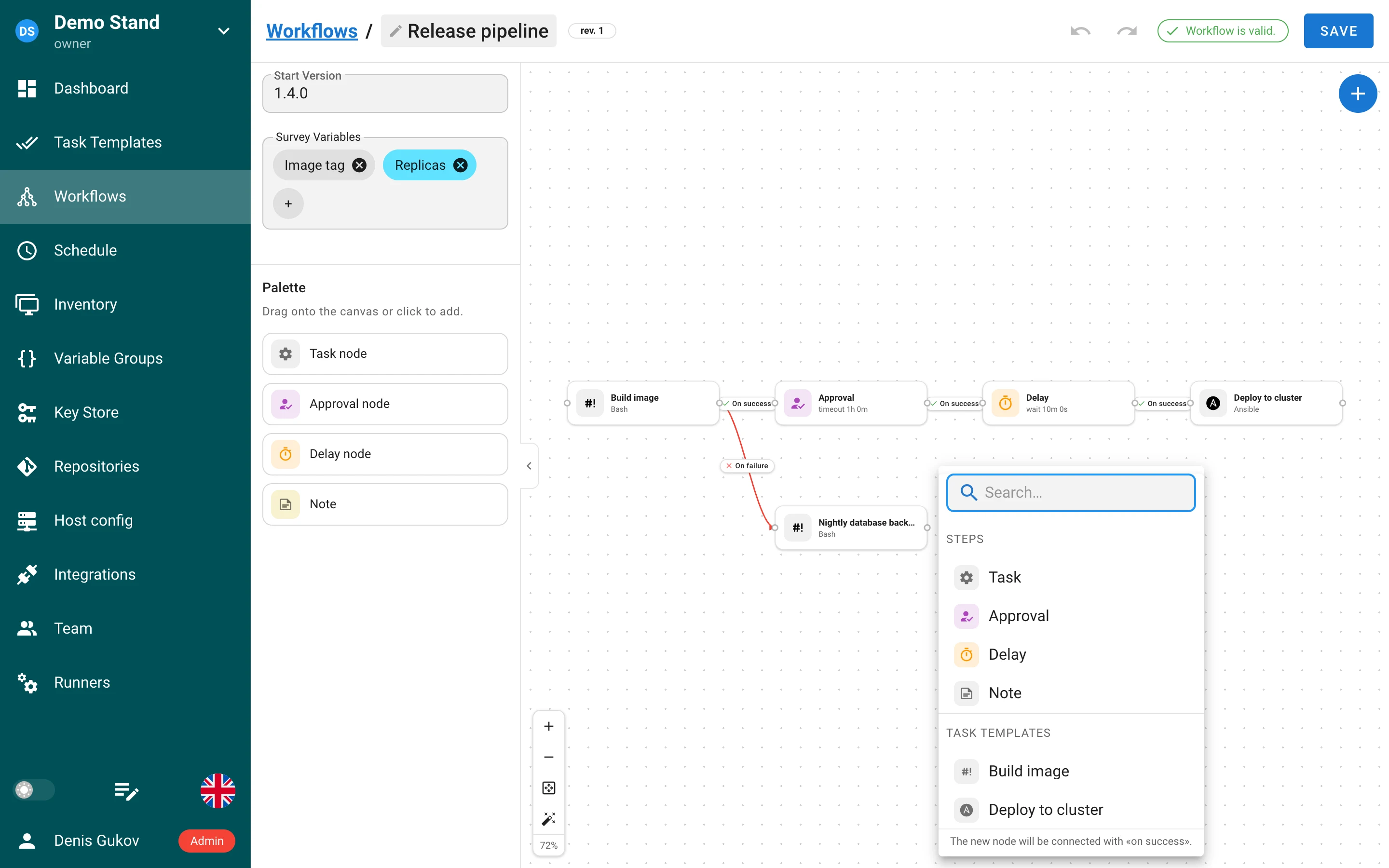
Redesigned editor
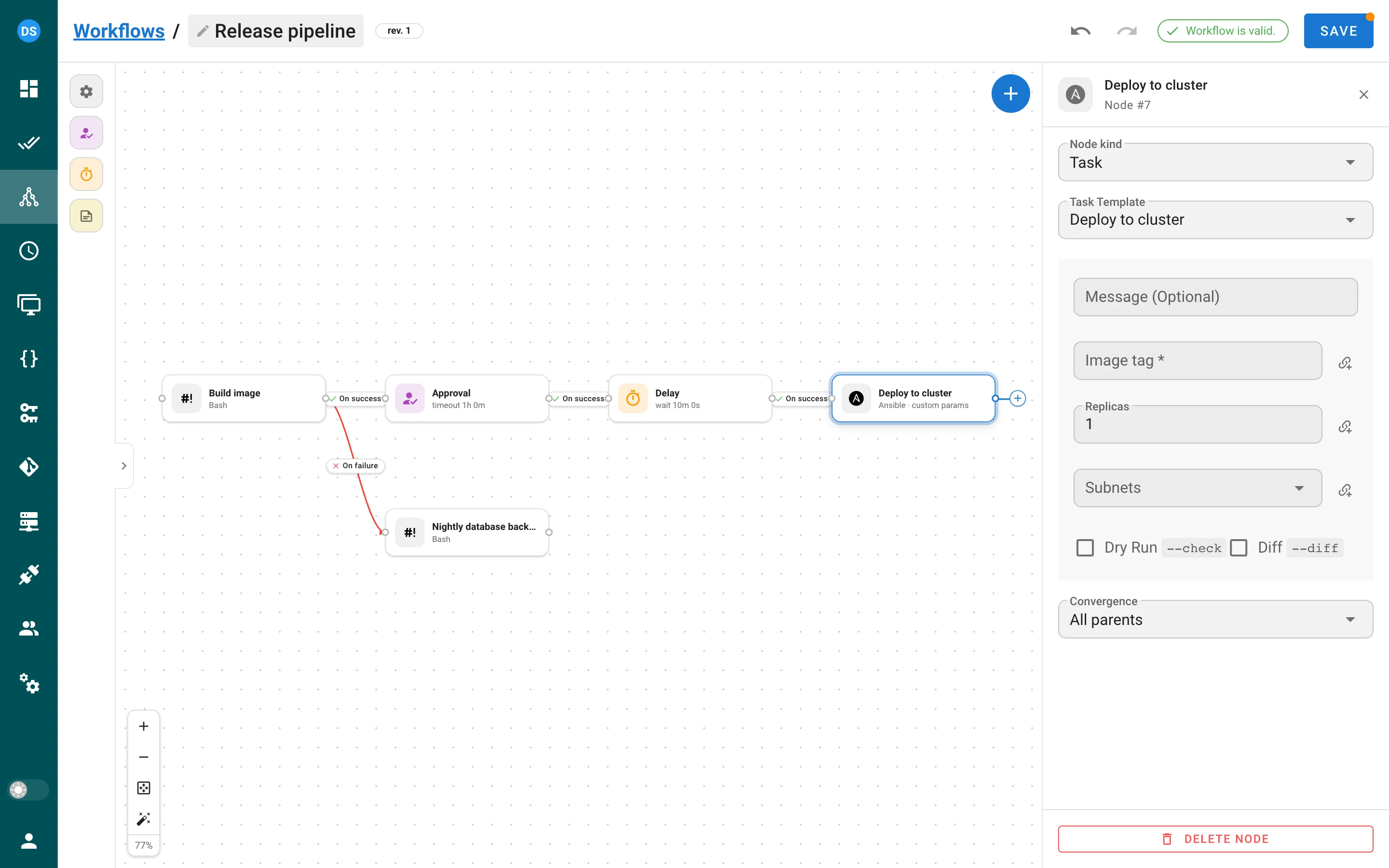
- New node cards with kind tile, status, duration, outputs badge and inline Approve / Reject; edge labels with an in‑place condition dropdown and a delete button; a dot‑grid canvas.
- Quick‑add menu from the
+handle of a node, a right‑click on the canvas or the empty‑state button: searchable list of node kinds and task templates, the new node is connected on success. - Undo / redo (
Ctrl/⌘+Z,Ctrl/⌘+Shift+Z), inline rename of the workflow, a Problems menu that focuses the offending node, a Save badge for unsaved changes and a leave‑page guard. - Hotkeys on the canvas: arrows pan (
Shiftfor a big step),+/-zoom,0fits the graph,1resets zoom,Escclears the selection; node cards are keyboard‑focusable. - Floating controls: zoom in / out, fit view, Tidy up auto‑layout, zoom percentage.
- One chevron collapses the palette and the main navigation together; the state is remembered.
- Trackpad overscroll no longer triggers the browser’s Back gesture on macOS.
Webhooks start workflows
An integration can now run a workflow instead of a template (Runs: Template / Workflow in the
integration form). Every extracted value becomes an answer to the workflow’s survey. Managing such
integrations needs the Pro workflow_integrations_management feature. For template integrations,
an extracted Task Params value named git_branch sets the branch of the started task when the
template allows overriding it.
API changes
POST …/workflows/{id}/run was renamed to POST …/workflows/{id}/runs and accepts the
environment body. Run details carry revision_id, revision, a delay object per node and
task.artifacts. Client‑supplied workflow_run_id, workflow_node_id and artifacts on a task
are ignored, so a task can not pose as a node of someone else’s run.
Roles and access control
Several roles per member
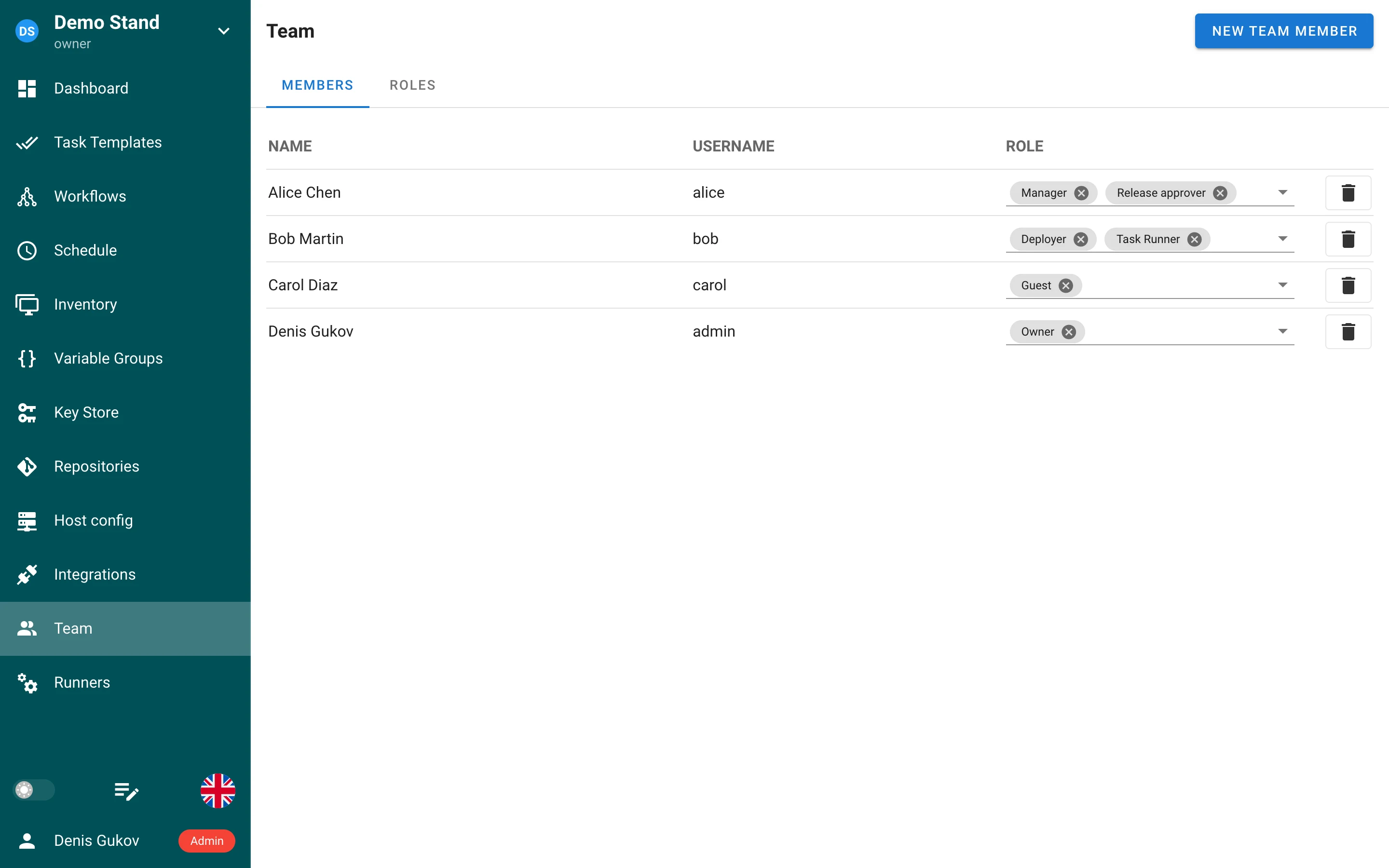
A project member holds a set of roles, edited as chips on the Team page. The API accepts
roles: ["manager", "release_approver"] next to the legacy role; the response keeps the scalar
role only for single‑role members. A non‑admin can not take the built‑in Owner role from the
last owner.
Roles with ids, slugs and scopes
Roles are now rows with an integer id and a slug (^[A-Za-z0-9_-]{1,100}$, derived from the
name in the form); the four built‑in roles are rows too and can no longer be shadowed by a custom
role. Roles have a scope: built‑in, shared (usable in any project) or project. Deleting a role
that is in use answers 409 with its impact (members, projects, template permissions, mappings)
and can be repeated with ?force=true — Delete with assignments in the UI. Migrations v2.20.12
and v2.20.13 rebuild the role tables; see the upgrade notes.
Global roles and permissions (Pro)
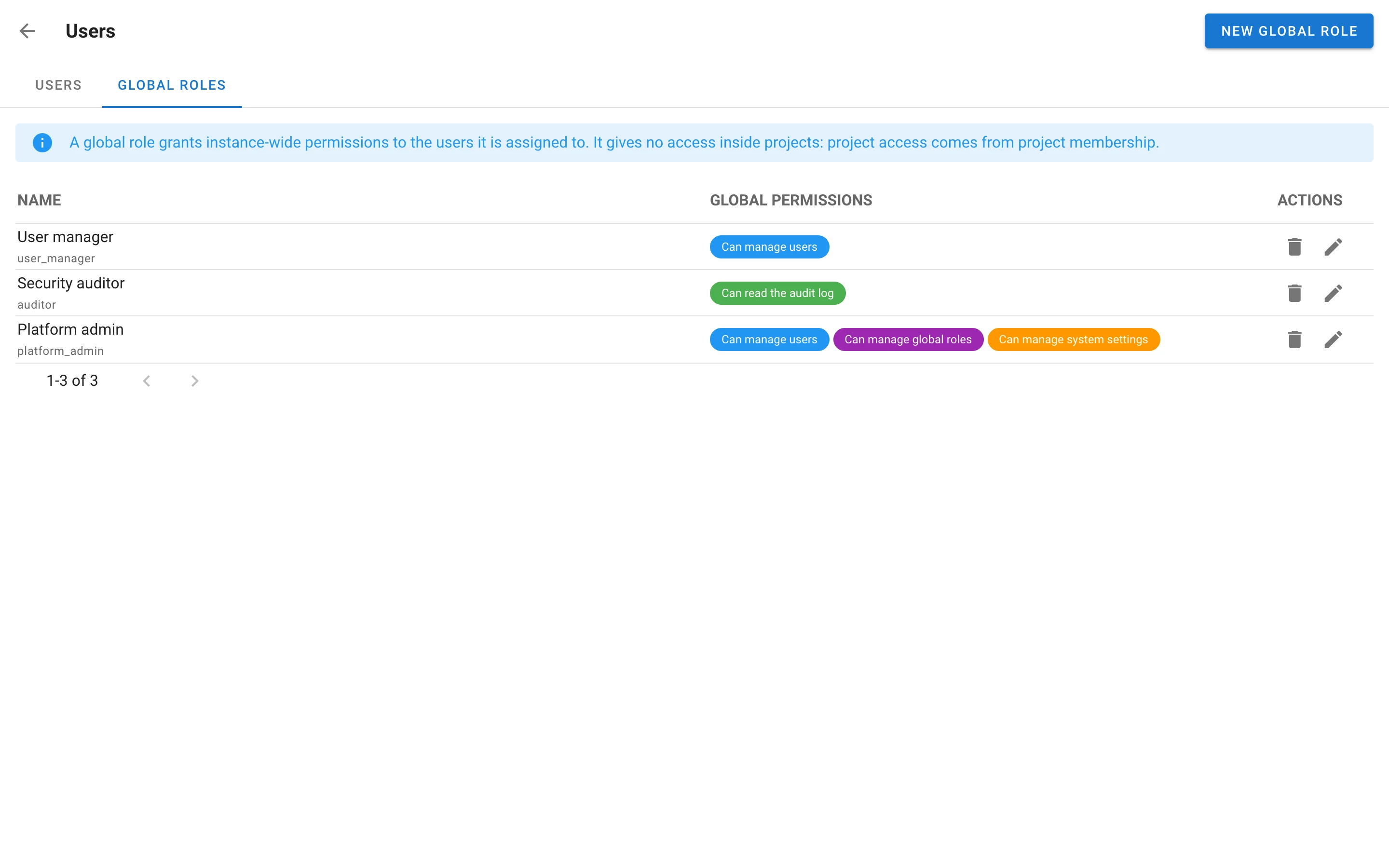
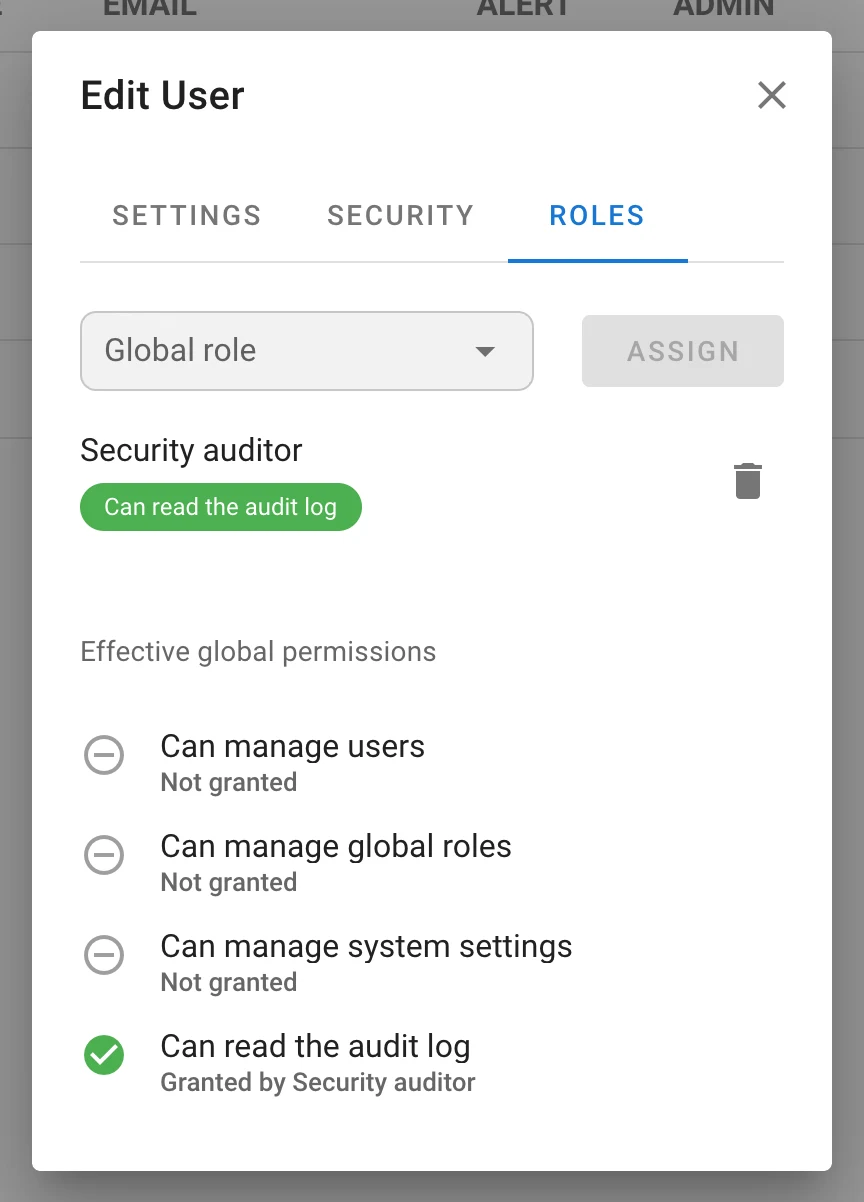
Instance‑wide rights are no longer only the admin flag. A global role grants a mask of four
permissions — Manage users, Manage global roles, Manage system settings, Read the audit
log — and is assigned to users on the Roles tab of the Users page (/users/roles) and in the
Global roles tab of the user dialog, which also shows the effective permissions and which role
grants each. Every admin route is guarded by one of the four bits; GET /api/user returns
global_permissions. An instance always keeps at least one administrator, enforced with a row lock
that is safe across HA nodes. A user with Manage users can not edit an admin or anyone holding a
permission they lack. API: /api/global-roles, /api/users/{id}/global-roles,
/api/users/{id}/global-permissions, catalog at /api/global-roles/permissions.
Group role mappings (Enterprise)
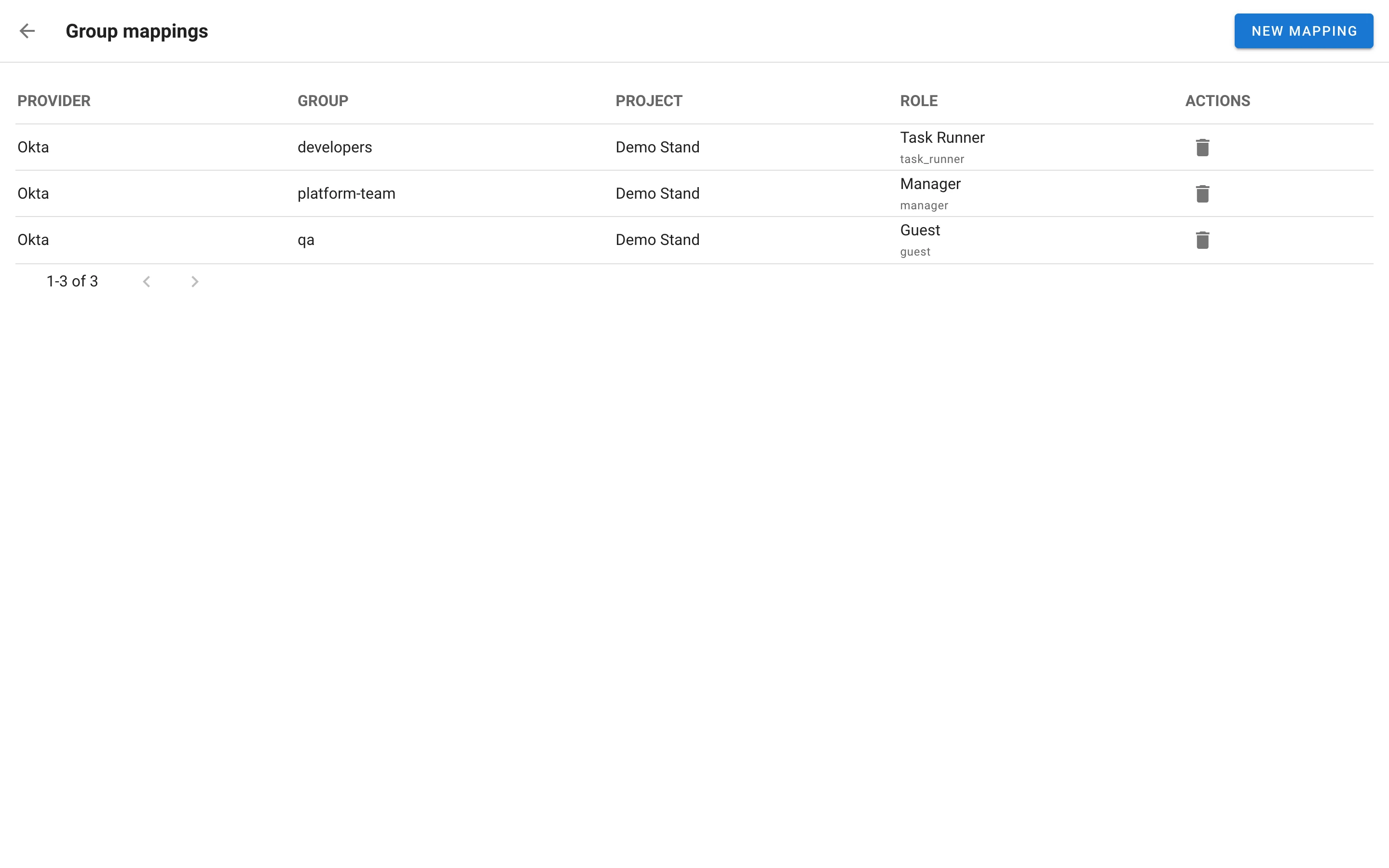
Map an identity‑provider group to a project role on the new Group mappings page
(/role-mappings): provider, group, project, role. At every OIDC sign‑in the user’s mapped roles
are made to match the groups in the token (groups_claim of the provider). Mapped roles show on the
Team page as locked chips with a provider: group tooltip and can not be removed as member roles;
mapped roles do not count as the project’s last owner. A password or LDAP sign‑in clears mapped
roles, because it brings no groups. API: /api/role_mappings.
Authentication and identities
- External identities. LDAP and OIDC logins are bound to Semaphore accounts by the provider’s
stable id (OIDC
sub, LDAP DN) in the newuser__external_identitytable, not by e‑mail. This closes the class of bug where an IdP that accepts any typed address adopts someone else’s account.external_auth_email_matching(autodefault,always,never) controls whether an existing external user without an identity may still be matched by e‑mail once; local password accounts are never adopted. OIDC e‑mail counts only whenemail_verifiedand the provider setsrequire_verified_email. Users link and unlink identities themselves in the account dialog (/api/users/{id}/identities,POST /api/user/identities/ldap,/api/auth/oidc/{provider}/login?link=1). - Several LDAP directories.
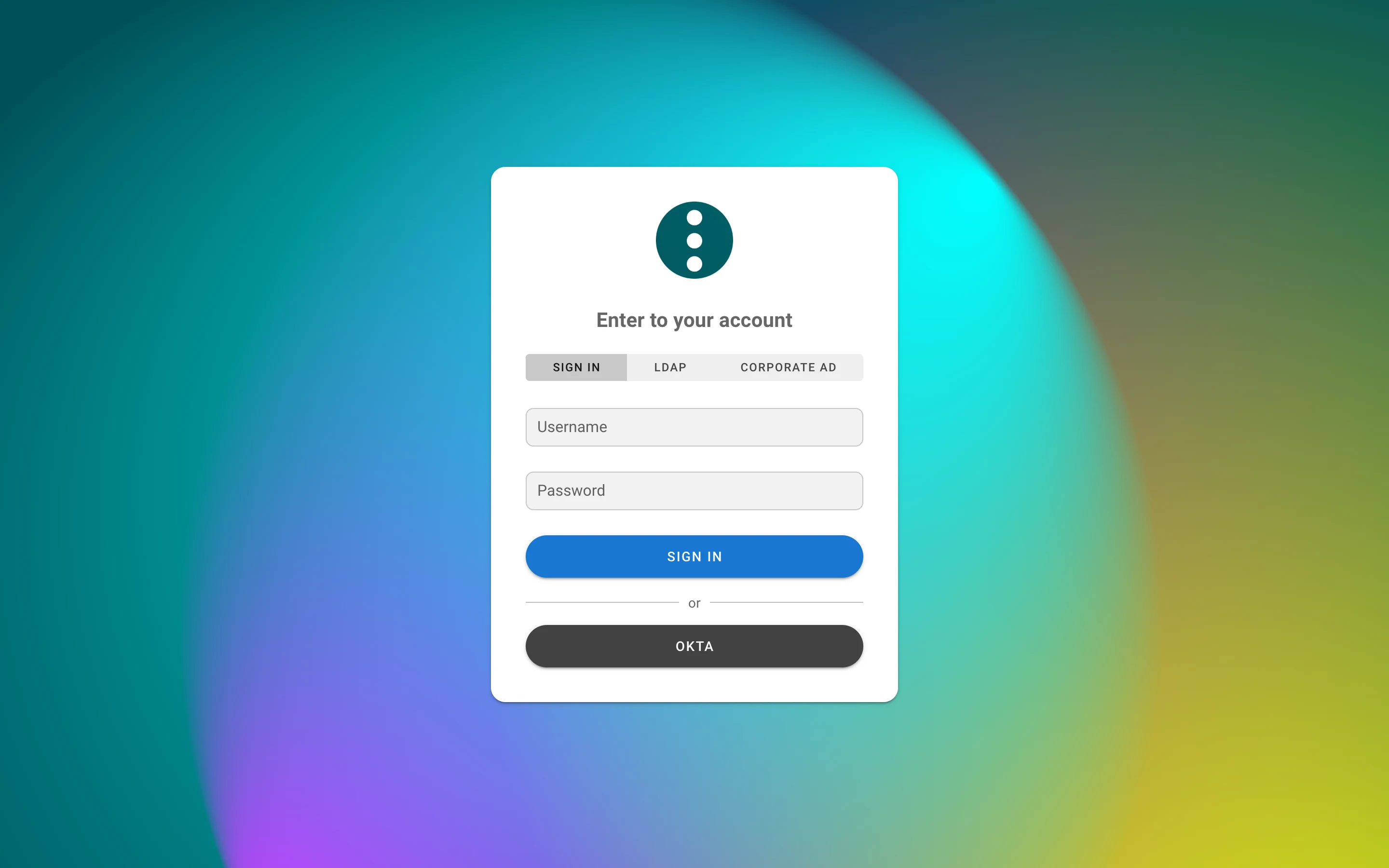
ldap_providersis a map of named directories, each with its own server, bind, search, mappings, colour and order; the legacy flatldap_*block keeps working as the providerldap. The login page shows a switcher when there is more than one tab, and the internal tab never sends a password to a directory.GET /api/auth/loginreturnsldap_providersandlogin_with_password. - LDAPS certificates are verified by default. Set
ldap_tls_skip_verify(flat block) ortls_skip_verify(per provider) for a self‑signed certificate. - Absolute session lifetime.
auth.max_session_life_hours(SEMAPHORE_AUTH_MAX_SESSION_LIFE_HOURS) expires a session a fixed time after login, whatever its activity;0keeps the inactivity timeout only. - A user without projects who may not create one sees a No projects yet page instead of a form
they can not submit;
POST /api/projectsanswers403in that case. - The language picked in the user menu is stored on the server and follows the user across
browsers (
langin/api/user/options).
Host config
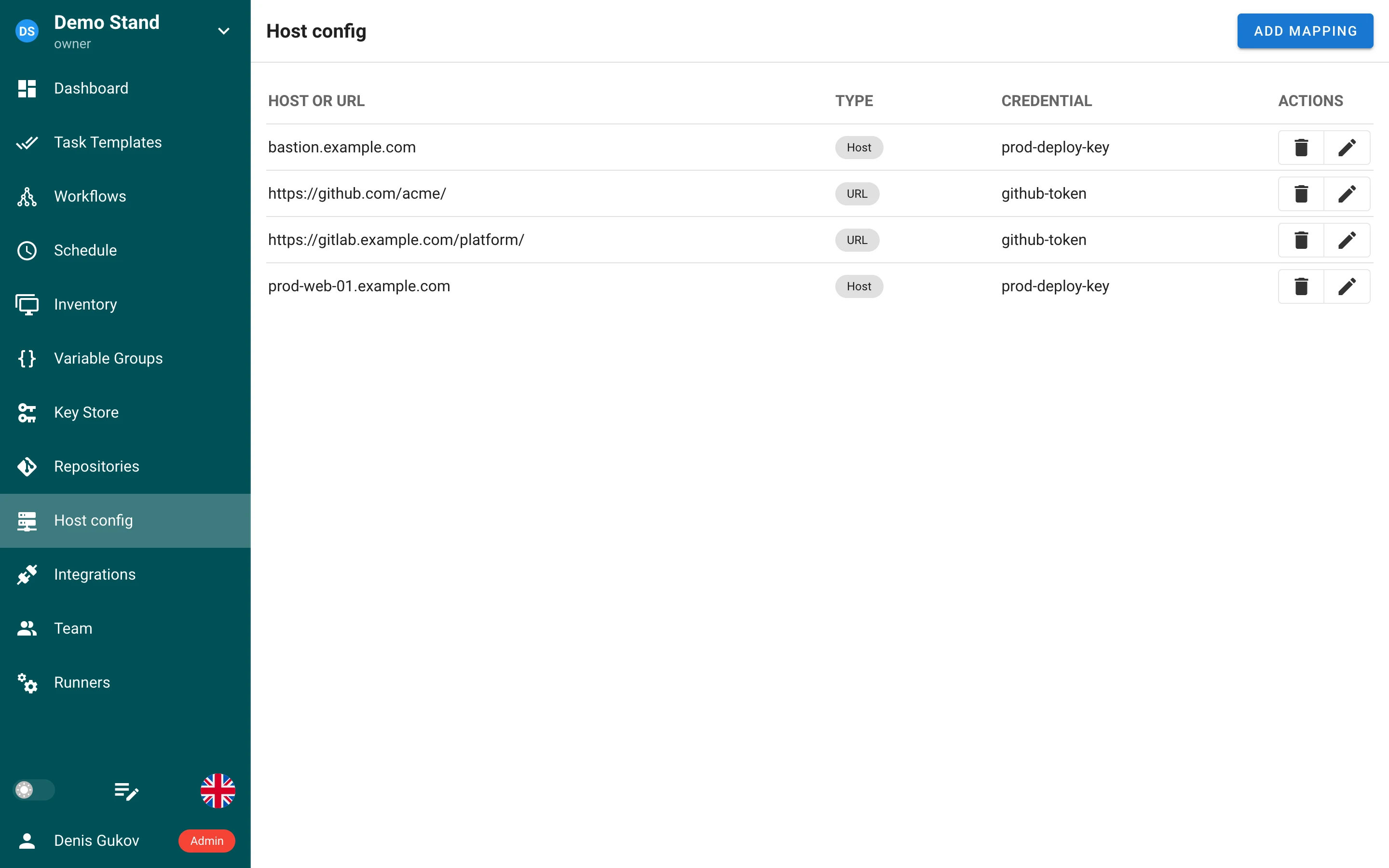
A new project page, Host config, maps SSH hosts and Git URLs to project credentials:
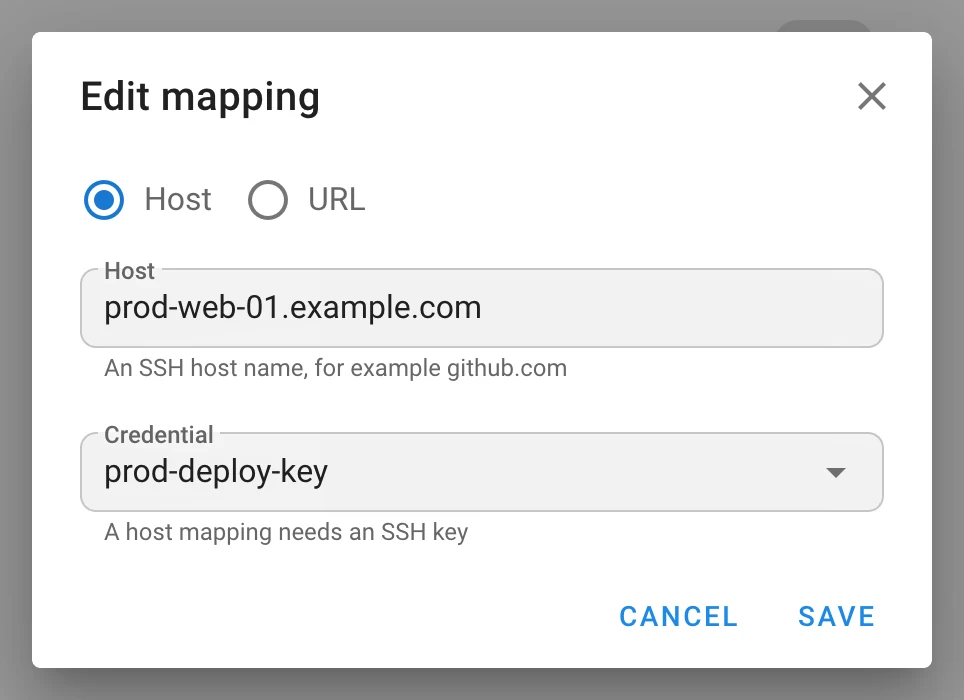
- a Host mapping (
bastion.example.com) attaches an SSH key, as aHostblock of a generatedssh_config; - a URL mapping (
https://github.com/acme/, a prefix ending in/covers a group) attaches an SSH key or a login/password (HTTPS only), as a GitinsteadOfrewrite; the most specific URL wins.
Mappings apply to the template repository and its submodules, requirements.yml roles and
collections, terraform init modules, git commands run by a playbook, inventory repositories and
inventory hosts, and to branch and playbook browsing; they are shipped to remote runners. Private
keys never touch disk — one SSH agent per mapping, bound with IdentityAgent; passwords go through
GIT_CONFIG_PARAMETERS, and repository URLs are redacted in task logs. A key referenced by a
mapping can not be deleted. Mappings are part of project backups. Requires git_client: cmd_git.
Table project__host_config, migration v2.20.7; API /api/project/{id}/host_configs.
Templates and tasks
-
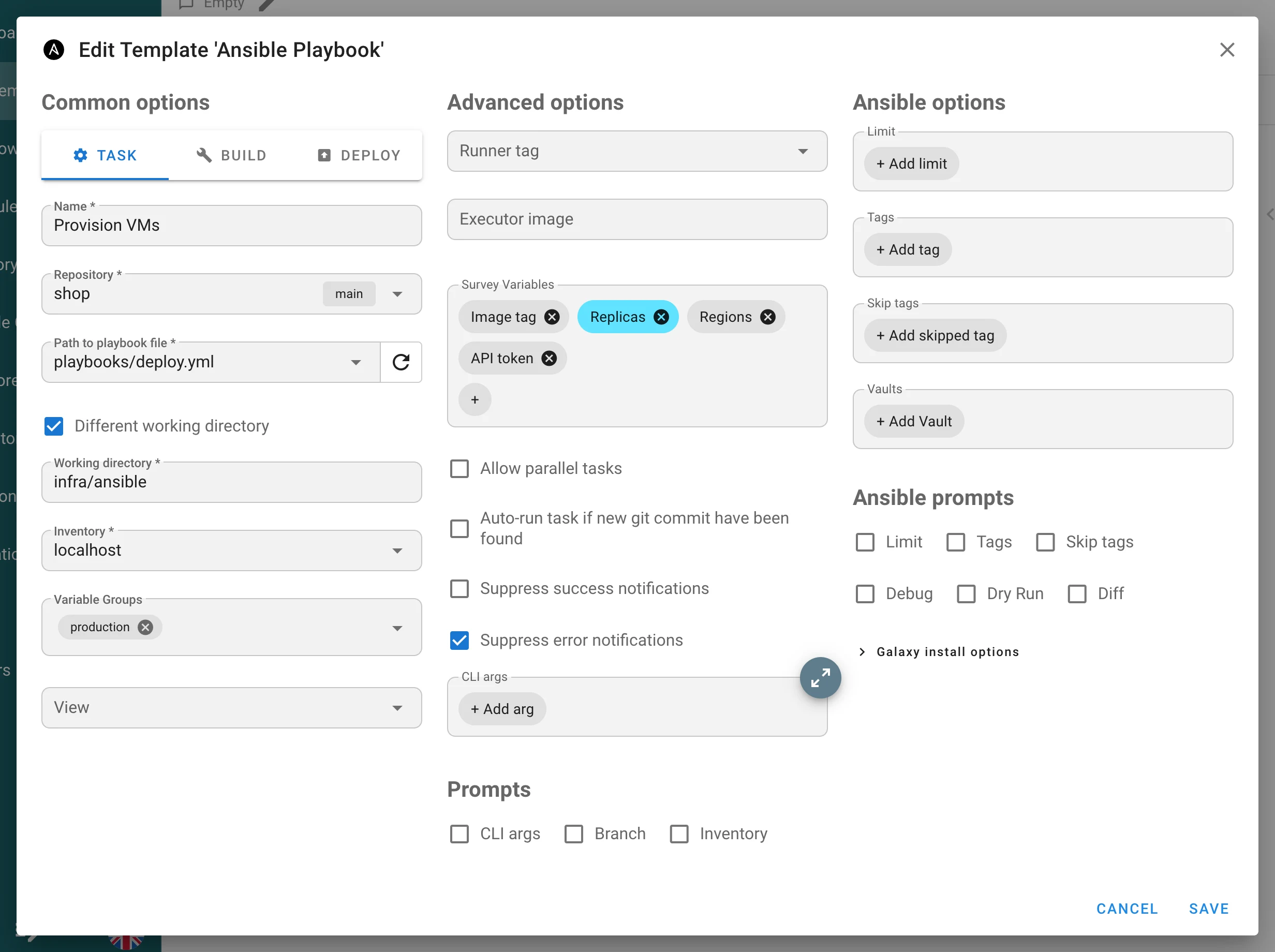
Ansible working directory. Different working directory runs
ansible-playbookfrom a subdirectory of the repository; the path must stay inside the checkout (working_directory, migrationv2.20.3). -
Unique template names per project (migration
v2.20.4), andPOST /api/project/{id}/tasksacceptstemplate_nameinstead oftemplate_id. -
Suppress error notifications per template, next to the existing success suppression; e‑mail alerts honour both for the first time (
suppress_error_alerts, migrationv2.20.5). -
Hide Dry Run / Diff from the task dialog per template; the server also stops appending
--check/--difffor that template (task_params.hide_dry_run,hide_diff). -
Galaxy install options — a collapsible section with Skip Galaxy install, separate CLI arguments for
ansible-galaxy role installandcollection install(an allow‑list of flags;--token,--api-keyand path flags are refused) and the per‑task override prompt. -
Playbook picker lists subdirectories as you type, filtered per app (
.ymlfor Ansible, top‑level directories for Terraform / OpenTofu / Terragrunt / Pulumi,.sh,.py,.ps1), skips Ansible layout directories and dot directories, is capped at 30 entries and browses a shallow clone confined to the repository root. -
Multi‑select survey variables — the new
selecttype accepts several values, rendered as chips in the task dialog;default_valuemay be an array.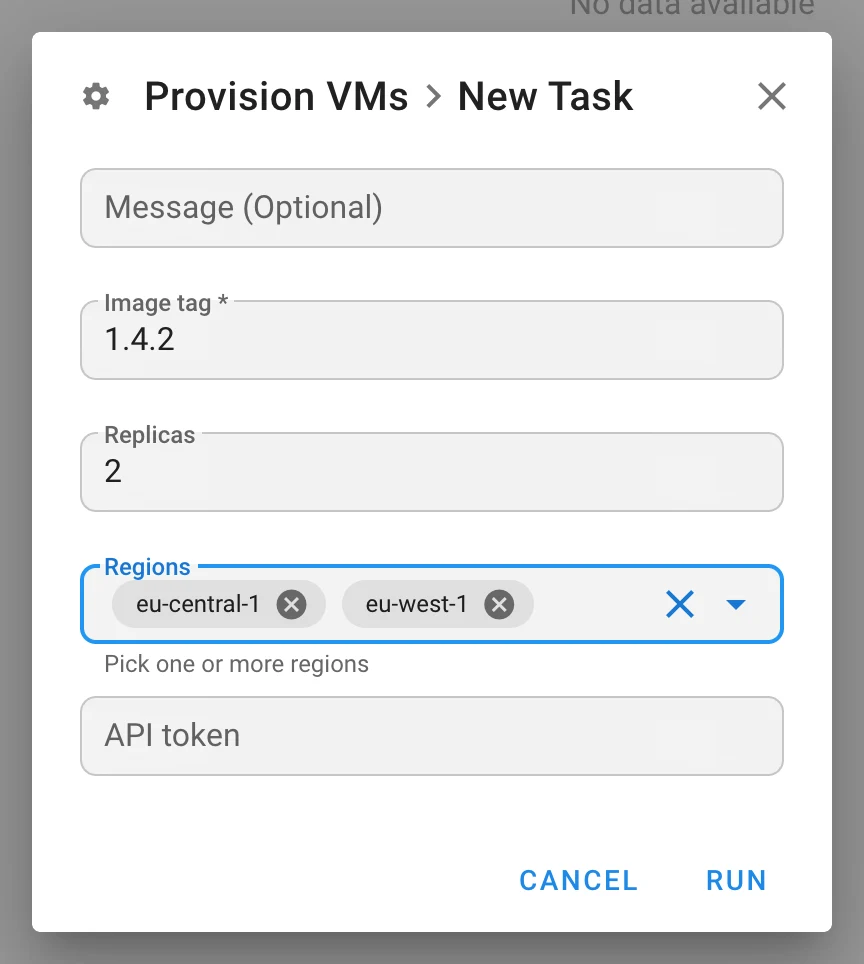
-
Survey secrets reach remote runners. A
secretsurvey answer used to arrive empty on a runner. It is now stored encrypted as a task‑bound access key (access_key.task_id,expire_at, migrationv2.20.1), decrypted by whichever HA node serves the runner, deleted when the task ends and swept hourly; it is hidden from the Key Store, backups and the keys API. -
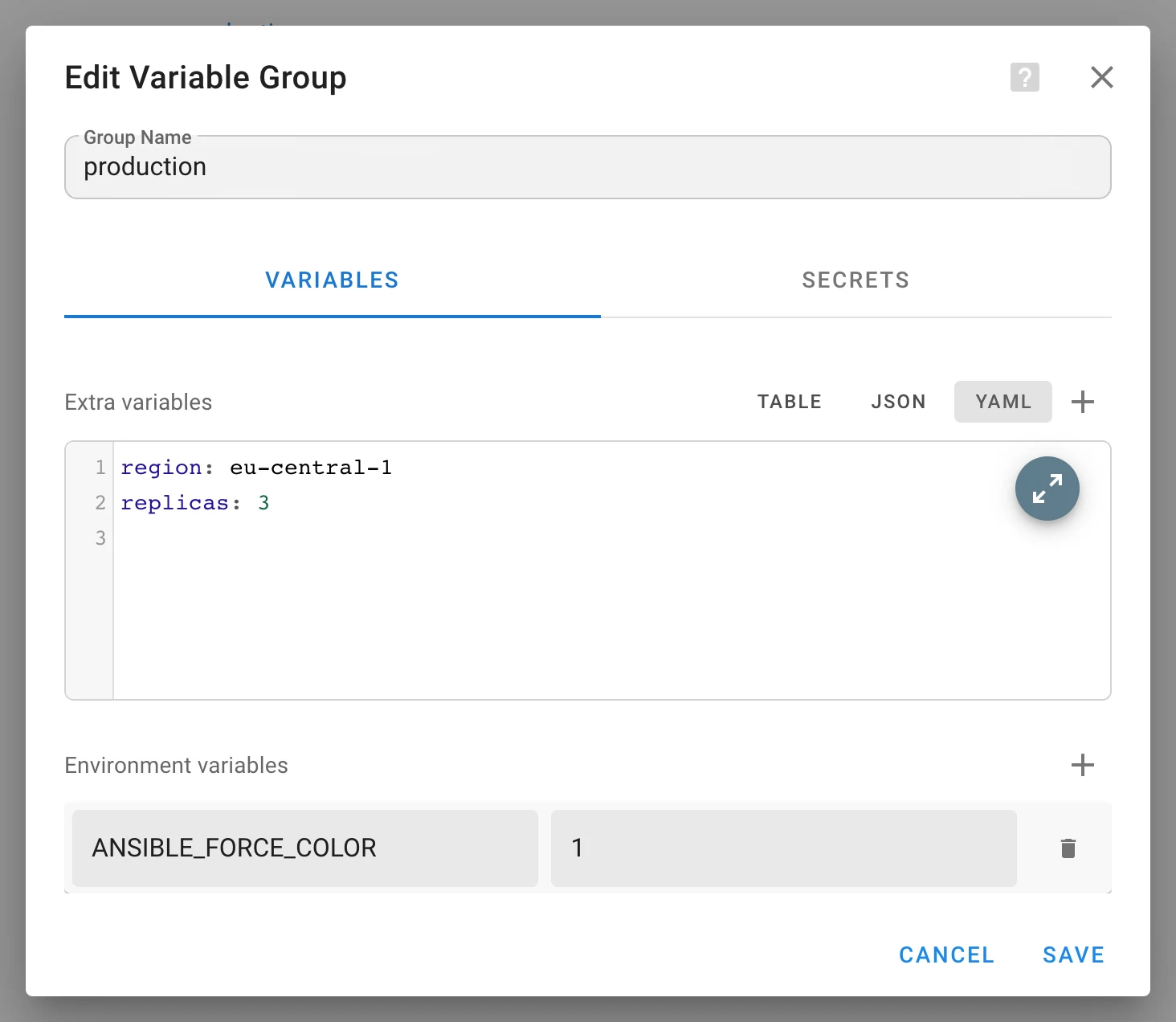
YAML extra variables. The variable‑group editor gained a Table | JSON | YAML toggle and a fullscreen editor; conversions are strict (dates stay strings, non‑object roots and non‑finite numbers are rejected). Storage is unchanged.
-
The task page names and links the schedule or integration that started a task, and marks a deleted origin as
#id (deleted). Log timestamps are no longer selected when copying a log. -
Schedules validate the expression on the server before saving, so
@hourlyis accepted, and the timezone banner can be dismissed.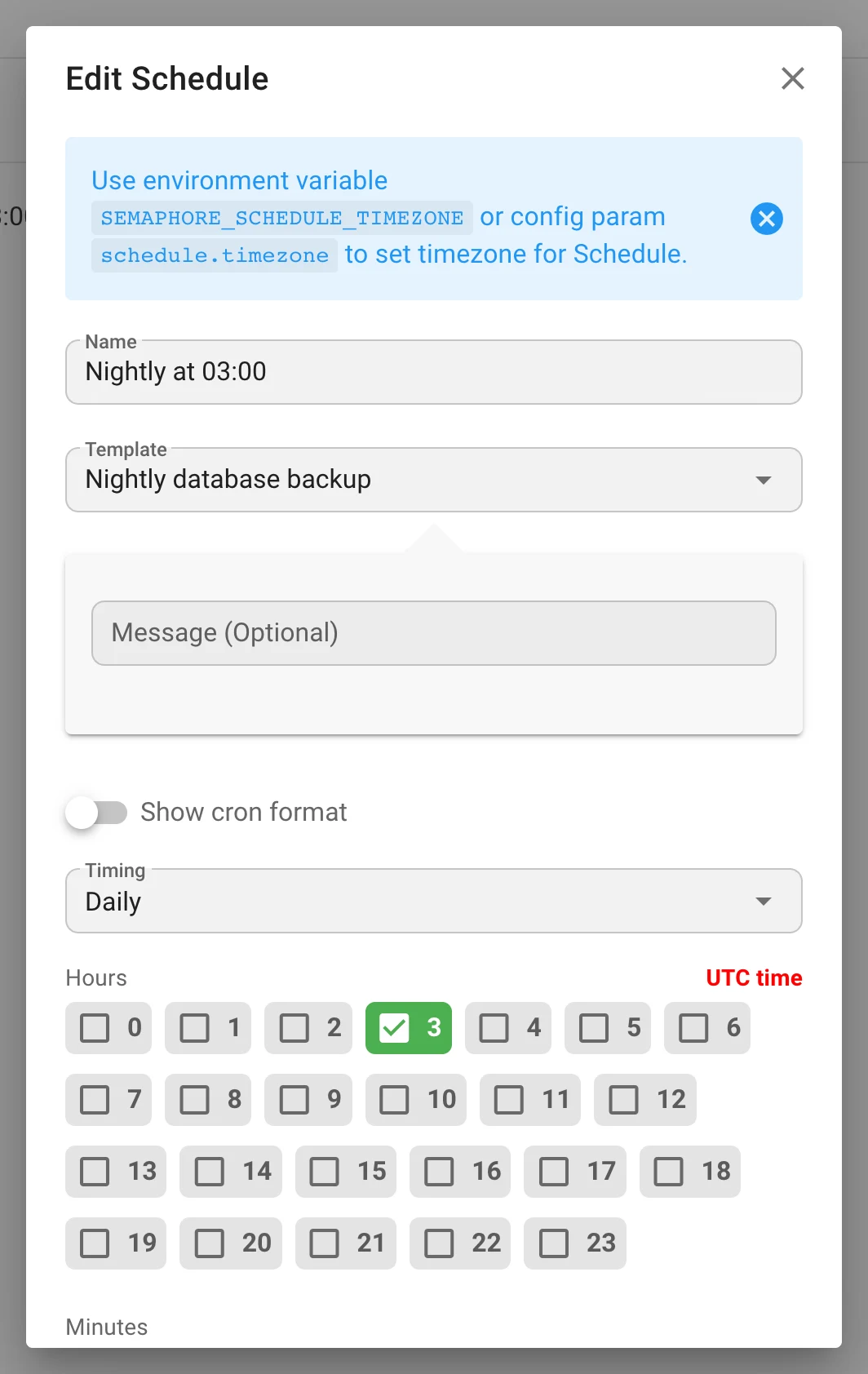
-
Stopping a local task terminates its whole process group:
SIGTERM, a 15 s grace period, thenSIGKILL; orphanedsshor provider processes no longer outlive the task. A stopped Terraform plan no longer continues; a plan that exits0onSIGTERMis not read as success. -
Inventory
repository_idis kept only for thefiletype and must belong to the project. -
Server logs name the user in Task added to queue / Task started entries.
Secrets and Ansible Vault
- Extra variables travel in files, not on the command line. Variable groups, survey answers,
workflow inputs and task details are written to a
0600YAML file passed as--extra-vars @file. Secrets —secretsurvey answers and variable‑group secrets — go into a second file encrypted in the Ansible Vault 1.1 / AES‑256 format by a native Go implementation, unlocked with a one‑off password answered onansible-playbook’s--vault-id <uuid>@prompt. Neither the values nor the password appear inps, and both files are removed when the task ends. - Jinja2 in values is data, not code. Every string holding
{{,{%,{#or a#jinja2:header is tagged!unsafe, recursively, so a survey answer such as{{ lookup('pipe', 'id') }}is passed literally. Strings without a delimiter are left untagged on purpose: ansible‑core ≥ 2.19 re‑resolves!unsafescalars, which would turn"2026.08"into a float. - A new
extra_varsdebug namespace (SEMAPHORE_DEBUG_FILTER=extra_vars) logs how variables are split and written — names, files and sizes only, never values. - Generate an SSH key pair on the server. Generate SSH Key in the Key Store creates an RSA
key; the public key is kept with the key, shown with Show / Hide and a copy button, and offered
in a dialog right after creation (
generate_ssh_key).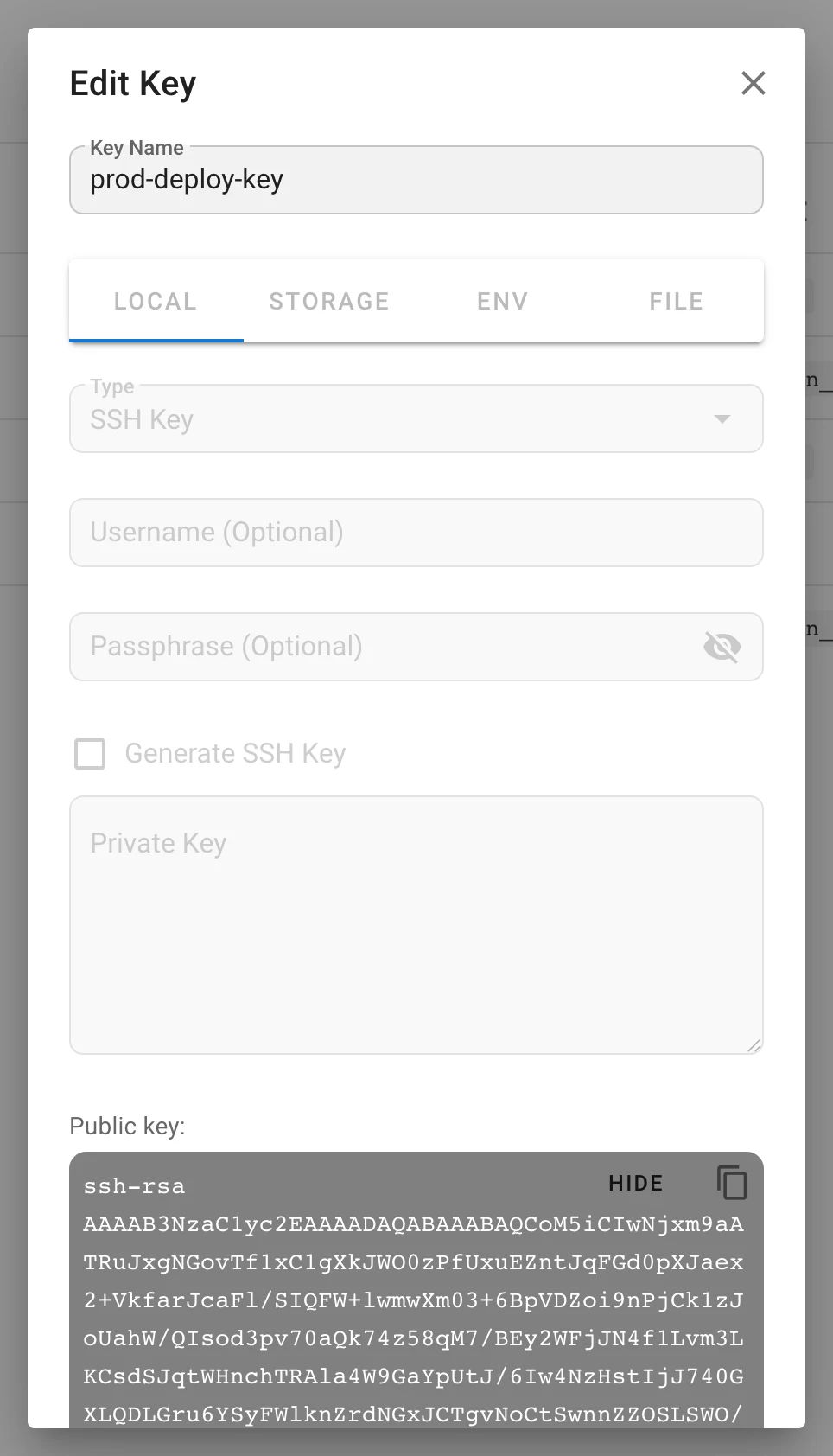
- A key update writes
type,secretand the public part only when Override is set, so a client can not alter a key’s payload without replacing the secret. - Reading a credential from a server environment variable or a file under
dirs.secretsis now documented (Env / File tabs of the Key Store form).
Repositories and Git
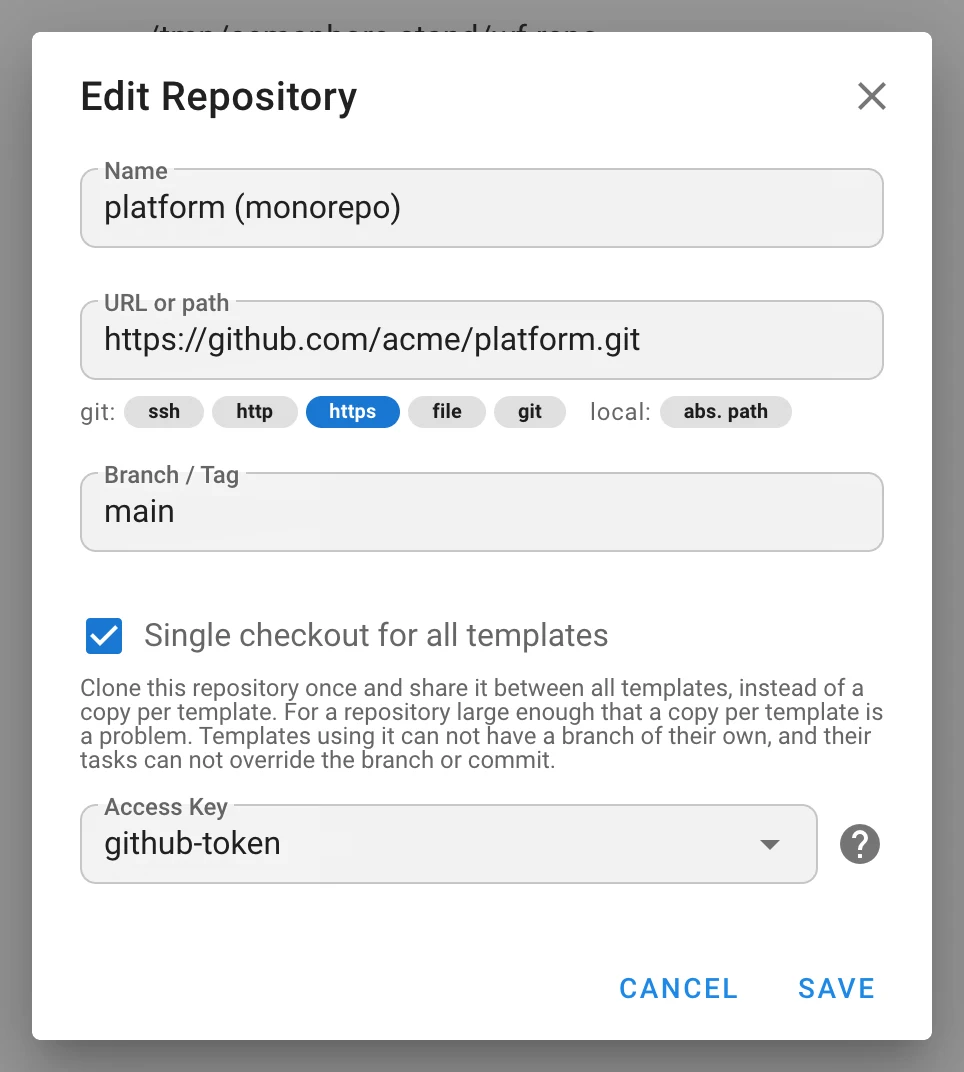
- Monorepo: single checkout for all templates. A repository option clones the repository once
and shares it between templates instead of a copy per template; the checkout is locked for
fetch and pull, tasks then run in parallel. Templates of such a repository can not have a branch
of their own and their tasks can not override branch or commit (
monorepo, migrationv2.20.11). - Git retries.
cloneandpullare retried with an exponential delay capped at one minute;git_attempts(SEMAPHORE_GIT_ATTEMPTS, default4). - Parallel submodules.
git_submodule_jobs(SEMAPHORE_GIT_SUBMODULE_JOBS, default4) is passed as--jobs. - SSH host‑key checking. New
sshsection:config_path,known_hosts_file(SEMAPHORE_SSH_KNOWN_HOSTS_FILE) andstrict_host_key_checking—no(default),yesoraccept-new— applied to Git over SSH. - Repository browsing uses a shallow clone keyed per branch; credentials are percent‑encoded for bare‑metal clones and redacted in logs and the event feed.
Runners and integrations
runner.check_interval_seconds(SEMAPHORE_RUNNER_CHECK_INTERVAL_SECONDS, default5) sets how often a runner polls; an Advanced options switch on the Runners page puts it into the generated env, config and Docker snippets (shipped inv2.19.17).runner.connection.timeout_seconds(SEMAPHORE_RUNNER_CONNECTION_TIMEOUT_SECONDS, default3) bounds connect, TLS handshake and response headers separately; log uploads are not cut.runners.default_global_runners_mode(SEMAPHORE_DEFAULT_GLOBAL_RUNNERS_MODE:disable,prefer,require) replaces the deprecateduse_remote_runner;runners.registration_tokenreplaces the top‑levelrunner_registration_token.- Server‑side runner diagnostics under
SEMAPHORE_DEBUG_FILTER=runner: token rejection reasons, restart and online detection, rejected progress reports, dispatch tracing. - Runner
unregisterrequests are authenticated; the runner client refuses HTTP redirects. - HMAC‑SHA512 webhook authentication (
hmac-sha512) next to the existing HMAC‑SHA256; the signature header is configurable.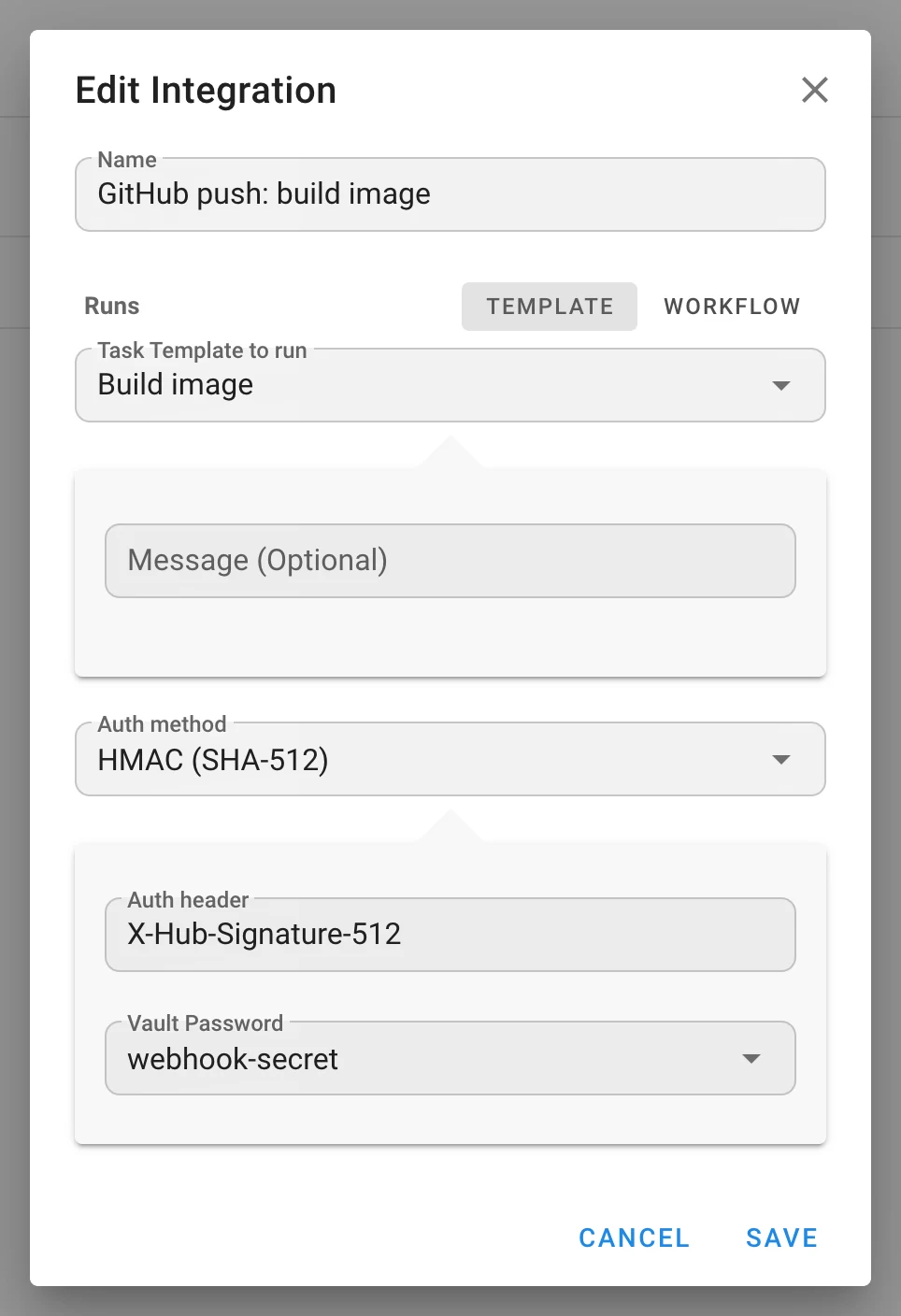
- A webhook whose integration belongs to another project is rejected.
Observability
-
Prometheus metrics.
GET /api/metricsbehind HTTP Basic Auth with a static service credential:"metrics": { "enabled": true, "username": "prometheus", "password": "…" }(
SEMAPHORE_METRICS_ENABLED,SEMAPHORE_METRICS_USERNAME,SEMAPHORE_METRICS_PASSWORD.) Series:semaphore_tasks_running,semaphore_tasks_total{status}, the standardgo_*andprocess_*collectors, and the audit export gauges in Pro. -
New debug namespaces
extra_varsandrunner; repository browsing logs Git output at DEBUG. -
Export and restore of project backups are logged.
Security
- Identity linking by provider id instead of e‑mail; LDAPS certificate verification on by default.
- Extra variables off the command line; secrets Vault‑encrypted; Jinja2 in values not evaluated.
- Forged
workflow_run_id,workflow_node_idandartifactsstripped from client tasks. - Admin routes guarded by explicit global permissions instead of the admin flag; unknown permission bits rejected; privilege‑escalation guard on user management.
- Playbook picker confined to the repository root (
OpenRoot), capped and filtered. - Extra‑variable roots and YAML numbers validated; Galaxy CLI arguments allow‑listed.
- Repository credentials redacted in logs and the event feed;
=escaped in Git config parameters. - Audit endpoints refuse cross‑site reads and malformed cursors; trusted‑proxy networks validated.
- Runner
unregisterauthenticated; redirects refused by the runner client. - Webhook project and integration ids verified.
- Local tasks stopped with their whole process group.
Upgrade notes
Breaking and behavioural changes
- Template names must be unique per project. Migration
v2.20.4adds a unique index; rename duplicates before upgrading. - Role tables are rebuilt (
v2.20.12/v2.20.13). Back up first. A custom role whose slug collides case‑insensitively with a built‑in or another role is renamed (logged); template permissions pointing at an unresolvable role are dropped (logged). Membership moved toproject__user_role; theproject__user.rolecolumn is gone. GET /api/project/{id}/usersreturnsroleonly for single‑role members — readroles./roles*moved from the admin flag to the Manage global roles permission; admins are unaffected.- LDAPS certificates are verified by default. Set
ldap_tls_skip_verifyor a provider’stls_skip_verifyfor self‑signed certificates. ansible-playbookis invoked differently:--extra-vars @file, plus a second file and a--vault-id <uuid>@promptwhen the task has secrets, even for templates without a vault. Anything parsing the command line, or anansible.cfgthat forbids vault prompts, is affected.- Jinja2 inside extra‑variable values is no longer evaluated. A playbook that relied on templating a webhook or survey value will stop doing so.
- Workflow run endpoint renamed:
POST …/workflows/{id}/run→…/runs. - Monorepo repositories override the template: no per‑template branch, no branch or commit override in tasks.
- Inventory
repository_idis dropped for every type exceptfile. - Stopping a local task kills its process group (no equivalent on Windows yet).
- Workflow outputs are not captured by the Docker and Kubernetes executors yet; survey secrets do not reach those executors yet.
New configuration
audit, metrics, auth.max_session_life_hours, ssh.{config_path,known_hosts_file,strict_host_key_checking},
git_attempts, git_submodule_jobs, ldap_providers, ldap_tls_skip_verify,
external_auth_email_matching, per‑OIDC‑provider groups_claim and require_verified_email,
runner.check_interval_seconds, runner.connection.timeout_seconds,
runners.{default_global_runners_mode,registration_token}. All optional. Pointer‑typed config
fields can now be set from environment variables. The configuration and CLI reference pages are
generated from the source.
Database migrations
v2.20.0 external identities · v2.20.1 task‑bound survey secrets · v2.20.2 delay nodes ·
v2.20.3 working directory · v2.20.4 unique template names · v2.20.5 error‑alert suppression ·
v2.20.7 host config · v2.20.8 workflow revisions · v2.20.9–v2.20.11 audit log and indexes,
edge input mappings, monorepo flag · v2.20.12–v2.20.13 role tables, workflow variables ·
v2.20.14 workflow integrations and group mappings · v2.20.16 global roles.
Dependencies
Go 1.26; Docker images on Alpine 3.24; prometheus/client_golang 1.23 added; go-oidc 3.21,
go-ldap 3.4.14, golang.org/x/crypto 0.57, modernc.org/sqlite 1.59, logrus 1.10; frontend
js-yaml 5 and cron-parser 5.10. New one‑click deployments: Cloudzy, RepoCloud and Pethost.