Keys from environment variables and files
Besides storing a secret in the database, a Key Store entry can read its value at task time from a file on the Semaphore server or from an environment variable of the Semaphore server process. This is useful when the credential is already provisioned outside Semaphore, for example:
- an SSH key mounted into the Semaphore container as a Docker or Kubernetes secret;
- a token written to disk by an agent (HashiCorp Vault Agent, cert-manager, etc.) and rotated regularly;
- a password injected into the container environment by your orchestrator.
Semaphore does not copy the value into its database. Every time a task needs the key, the server reads the file or the variable again, so rotating the credential on disk takes effect on the next task.
The file or variable is read by the Semaphore server, not by a runner. When you use remote runners, mount the file on the server host; the server resolves the secret and hands it to the runner.
Choosing the source
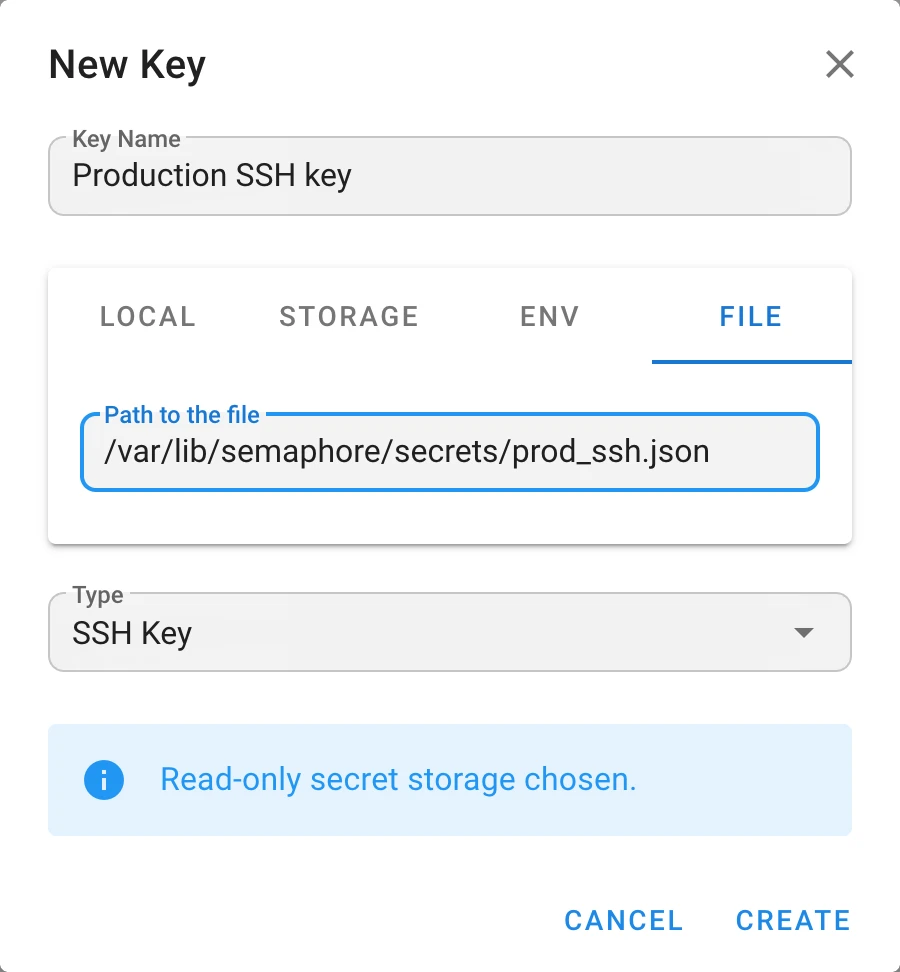
When you create or edit a key (Key Store → New Key), the top of the form has source tabs:
| Tab | Where the value comes from | What to enter |
|---|---|---|
| Local | Semaphore database (encrypted) | The login, password, or private key in the form |
| Storage Pro | External secret storage such as HashiCorp Vault | Storage and the secret path |
| Env | An environment variable of the Semaphore server process | The variable name, for example PROD_SSH_KEY |
| File | A file on the Semaphore server | The absolute path to the file, for example /var/lib/semaphore/secrets/prod.json |
With Env or File selected, the login, password, and private-key fields disappear. The whole credential, including the login for SSH and Login With Password keys, must be in the file or variable.
1. Allow the directory
For security, Semaphore only reads key files that are inside its secrets directory. Any other path is rejected when a task starts:
Failed to install inventory: file path must be inside secrets path
The default secrets directory is /tmp/semaphore. Point it at the directory where your key files
live using dirs.secrets in config.json or the SEMAPHORE_SECRETS_PATH environment variable.
See Secrets directory for precedence rules.
Docker Compose example that mounts a host directory and allows it:
services:
  semaphore:
    image: semaphoreui/semaphore:latest
    environment:
      SEMAPHORE_SECRETS_PATH: /var/lib/semaphore/secrets
    volumes:
      - /srv/semaphore/secrets:/var/lib/semaphore/secrets:ro
Equivalent config.json fragment:
{
  "dirs": {
    "secrets": "/var/lib/semaphore/secrets"
  }
}
Rules for the path entered in the File tab:
- it must be absolute (
/var/lib/semaphore/secrets/prod.json, notprod.json); - it must not contain
..segments; - it must resolve to a location inside the secrets directory (subdirectories are fine);
- the file must be readable by the user Semaphore runs as (in the official Docker image this is
semaphore, UID 1001).
Environment variables have no such restriction; the server just reads the named variable from its own environment.
2. Format the value
The content of the file (or the value of the variable) depends on the key type. A single trailing newline at the end of a file is ignored; anything else is used verbatim.
SSH key
Semaphore expects a JSON document, not a raw PEM or OpenSSH private key file:
{
  "login": "deploy",
  "passphrase": "",
  "private_key": "-----BEGIN OPENSSH PRIVATE KEY-----\n...\n-----END OPENSSH PRIVATE KEY-----\n"
}
login— the SSH user name, passed to Ansible as--user. Leave it empty to let the inventory decide (ansible_user). For Git repositories an empty login defaults togit.passphrase— passphrase of the private key, or an empty string.private_key— the private key with line breaks encoded as\n.
Generate the wrapper from an existing key with jq, which takes care of the escaping:
jq -n --arg login deploy --rawfile key ~/.ssh/id_ed25519 \
  '{login: $login, passphrase: "", private_key: $key}' \
  > /srv/semaphore/secrets/prod_ssh.json
chmod 0400 /srv/semaphore/secrets/prod_ssh.json
Then create a key of type SSH, open the File tab, and enter /var/lib/semaphore/secrets/prod_ssh.json
(the path as seen inside the container).
Pointing the File tab at a raw private key such as ~/.ssh/id_ed25519 does not work.
The file is parsed as JSON and the task fails to load the inventory.
Login With Password
Also a JSON document:
{
  "login": "svc-ansible",
  "password": "s3cr3t"
}
Leave login empty to use the key as a plain token or password, for example as an Ansible vault password.
Environment variable example
The same JSON format applies to the Env tab. In Docker Compose:
services:
  semaphore:
    image: semaphoreui/semaphore:latest
    environment:
      PROD_SSH_KEY: '{"login":"deploy","passphrase":"","private_key":"-----BEGIN OPENSSH PRIVATE KEY-----\n...\n-----END OPENSSH PRIVATE KEY-----\n"}'
Create an SSH key, select the Env tab, and enter PROD_SSH_KEY as the variable name.
Environment variables are visible to every process in the container and often end up in orchestrator metadata and logs. Prefer the File tab with a mounted secret when you can.
Troubleshooting
| Error | Cause | Fix |
|---|---|---|
file path must be absolute | A relative path was entered | Enter the full path starting with / |
file path must not contain traversal segments | The path contains .. | Enter the resolved path |
file path must be inside secrets path | The file is outside dirs.secrets | Set SEMAPHORE_SECRETS_PATH to the directory of the file, or move the file |
no such file or directory | The path is wrong or not mounted into the container | Check the volume mount and use the in-container path |
permission denied | The Semaphore process cannot read the file | Fix file ownership or mode |
invalid character '-' looking for beginning of value | A raw private key was given instead of the JSON wrapper | Wrap the key as shown above |