Host config
Why you need it
A Repository has exactly one key: the one Semaphore uses to clone it. That is enough as long as everything the task needs lives in that repository. In practice a task reaches out to other places, and each of them may require a different credential:
The dashed arrows are the gap: the repository key is not offered to those servers, so the task fails with Permission denied or Authentication failed as soon as it touches them. Until now the only workarounds were to give one key access everywhere, or to bake credentials into the files of the repository.
Host config solves this without touching the repository. You tell Semaphore "whenever the project connects to this host or this URL, use that credential from the Key Store". The mapping is applied to every Git and SSH connection of the task, wherever it is started from.
| You have | What is in the repository | Without a mapping | With a mapping |
|---|---|---|---|
| A private submodule on another Git server | .gitmodules pointing at [email protected]:infra/common.git | git submodule update is rejected: the deploy key of the main repository is not known there | A Host mapping for gitlab.example.com with the key allowed on that server |
Private roles or collections in Ansible requirements.yml | src: https://gitlab.example.com/ansible/role-nginx.git | ansible-galaxy install asks for a login and fails | A URL mapping for https://gitlab.example.com/ansible/ with a GitLab access token |
| Private Terraform / OpenTofu modules fetched from Git | source = "git::https://github.com/acme/tf-modules.git" | terraform init can not download the module | A URL mapping for https://github.com/acme/ with an SSH key or a token |
| An inventory whose hosts need a different SSH key than the repository | An inventory with db-01.internal, db-02.internal | The inventory can name one key only, and the repository key is the wrong one for those hosts | A Host mapping for each host name, or one mapping with the inventory key for the host they share |
One mapping serves all of these at once; you do not configure them per template. When a project has no mappings, nothing changes: tasks keep using the key of the repository, exactly as before.
How it works
A mapping is a rule with three parts: what to match (a host name or a URL prefix), which credential of the Key Store to use, and nothing else. Semaphore installs the mappings of the project before the first Git command of a task and removes them when the task ends. Every connection the task opens, from its own clone down to a git module inside a playbook, goes through them.
The page is in the project menu, below Repositories. Adding, editing and deleting mappings requires the permission to manage project resources, the same one the Key Store needs.
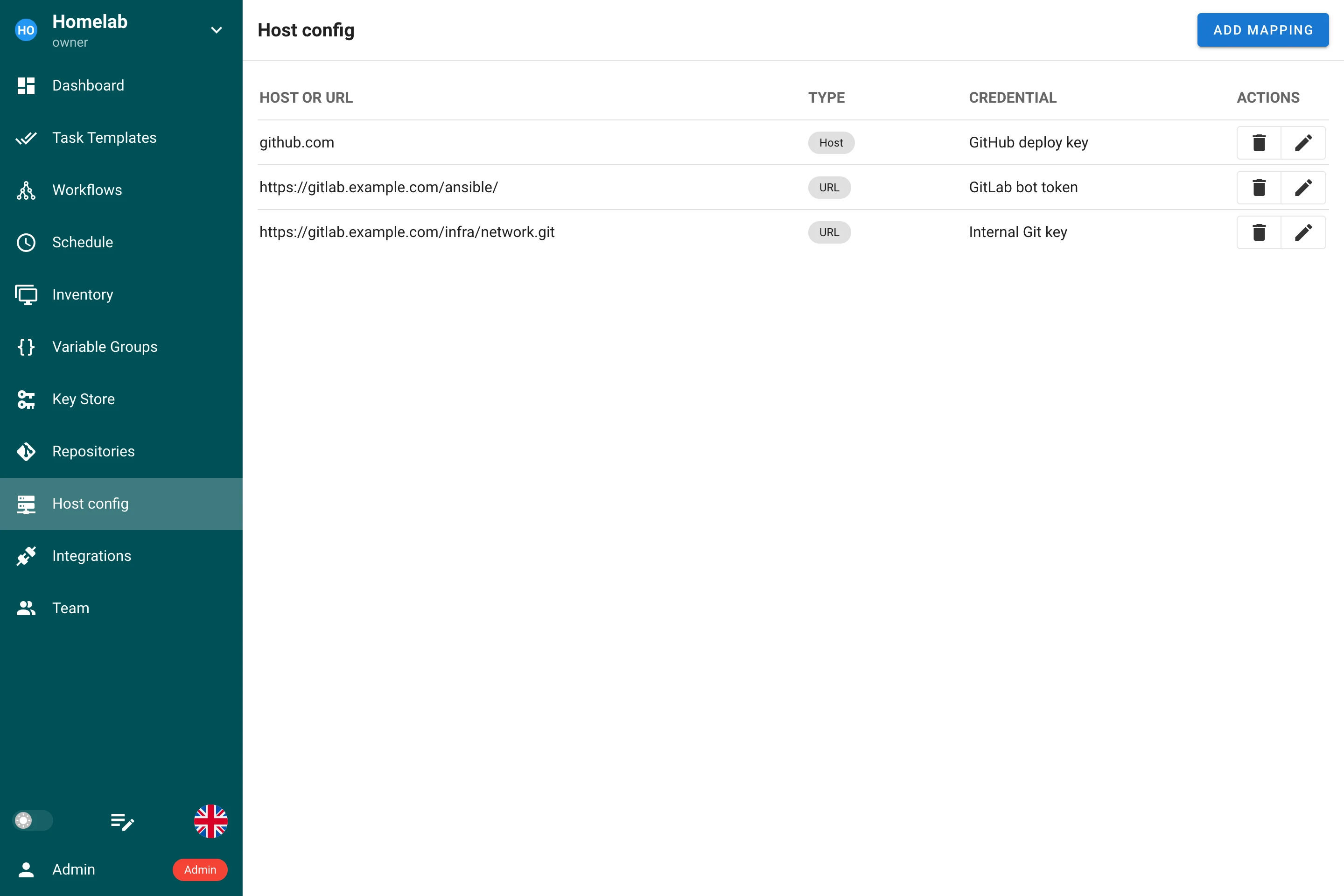
Mapping types
Press Add mapping and choose what the mapping matches.
Host
A Host mapping matches an SSH host name, for example github.com or gitlab.example.com, and needs an SSH key. Whenever the task opens an SSH connection to that host, it authenticates with the mapped key: a repository or submodule cloned over SSH, a git@host:group/repo.git URL in requirements.yml, and also the hosts of an Ansible inventory with that name. When the key has a login, it is used as the SSH user for the host.

URL
A URL mapping matches an https:// or http:// repository URL. It can name one repository, https://gitlab.example.com/infra/network.git, or end with / to cover every repository under a group, https://gitlab.example.com/ansible/. When several mappings match, the most specific URL wins, so a mapping of one repository overrides the mapping of the group containing it.
The credential decides how the URL is reached:
| Credential | What happens |
|---|---|
| SSH key | The URL is rewritten to its SSH form and the connection authenticates with the key. The login of the key is the SSH user, git when the key has none. |
| Login with password | The login and password are added to the URL and sent over HTTPS. Leave the login empty to use a personal access token. Only an https:// URL accepts this credential, so the secret never travels in clear text. |
The URL must not contain credentials of its own, spaces, quotes or an = character.

Where mappings apply
The mappings of a project are installed before the first Git command of a task and stay in force until it ends. They cover:
- cloning and updating the repository of the template, including its submodules;
- roles and collections installed from
requirements.yml, see Galaxy requirements; - modules fetched by
terraform initortofu init; - Git commands started by the playbook or script itself, for example the Ansible
gitmodule; - the repository of an inventory stored in Git;
- the hosts of the inventory, when a Host mapping matches their name;
- browsing branches and playbooks of a repository in the template form, and the polling of schedules that start on a new commit.
Tasks sent to a remote runner receive the mappings together with the task, so they behave the same way there.
A mapping overrides the entry for the same host in the server-wide SSH configuration (ssh.config_path in the configuration); every other entry of that file keeps working. Mappings need the command-line Git client, which is the default git_client: cmd_git; with the built-in go_git client a task of a project with mappings fails with an explanatory error instead of using the wrong credential.
Credentials
Private keys never touch the disk: each SSH mapping holds its key in an SSH agent that lives as long as the task, and the generated SSH configuration only names the agent. A login with password is passed to Git through its configuration environment, not on the command line, and Git reports the original URL in the task log, so the secret appears in neither.
A key referenced by a mapping can not be deleted; the confirmation dialog lists the mappings that use it. Changing the type of such a key to one the mapping can not use, for example turning the SSH key of a Host mapping into a login with password, is rejected as well.
Example
A playbook lives on GitHub, uses a submodule from a self-hosted GitLab and installs a role from a second GitLab group through requirements.yml:
# requirements.yml
- src: https://gitlab.example.com/ansible/role-nginx.git
  version: v2.1.0
Three mappings make the task run without any change to the repository:
| Type | Host or URL | Credential |
|---|---|---|
| Host | github.com | The deploy key of the GitHub repository |
| URL | https://gitlab.example.com/ansible/ | A GitLab access token, as a login with password |
| URL | https://gitlab.example.com/infra/network.git | The SSH key allowed on that one repository |
Backups
Mappings are part of the project backup. They refer to their credential by name, so a restored project keeps them bound to the restored keys. As with every key, the secret value itself is not exported.