
What's new in Semaphore UI 2.21

Adds Claude Code Agent and Codex Agent templates for running AI coding agents, prompt expressions, an MCP inventory and a task log shown as a transcript.
Discuss this release with AI


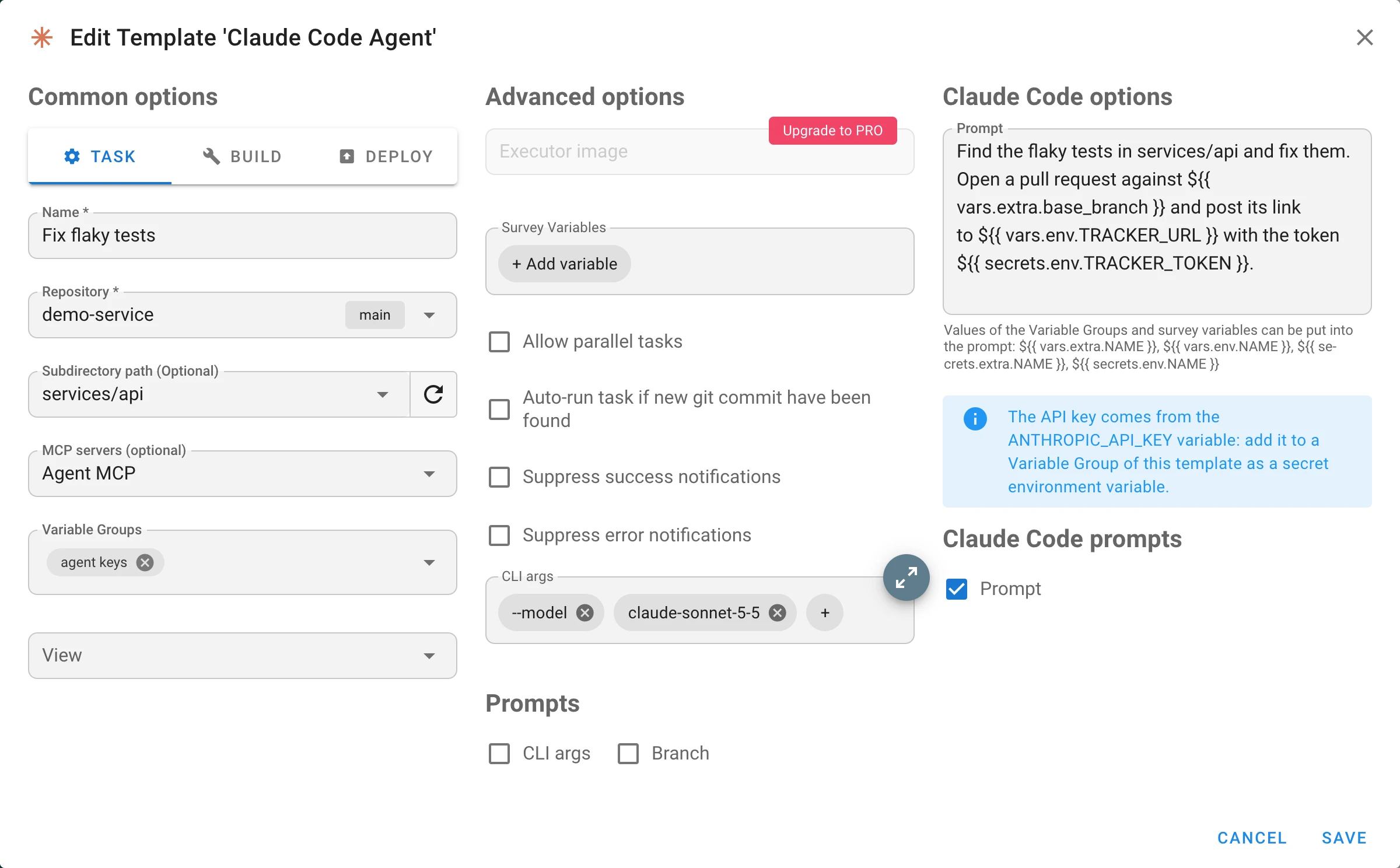
Semaphore UI 2.21 runs AI coding agents. Two new applications, Claude Code Agent and Codex Agent, start the agent’s command line tool in a repository and give it a prompt. The agent works on its own and reports what it does to the task log. The prompt can take values from Variable Groups and survey variables, the agent can call the tools of MCP servers, and the log shows its work as a transcript.
Semaphore 2.21 is in development. It is not released yet: this page describes what is already in the development branch and will grow until the release. Details can still change.
Highlights
- Claude Code Agent and Codex Agent templates: an agent is a template like any other. Start it by hand, by a schedule, an integration, or as a step of a workflow.
- Prompt expressions:
${{ vars.extra.NAME }},${{ vars.env.NAME }},${{ secrets.extra.NAME }}and${{ secrets.env.NAME }}put the values of Variable Groups and survey variables into the prompt, as in GitHub Actions. - Prompt of a task: a template can let whoever starts a task replace the prompt for one run.
- MCP inventory: a new inventory type with the remote MCP servers whose tools the agent can call. Tokens are stored encrypted.
- Agent task log: the agent’s text, tool calls, subagents and a summary with the tokens and the cost, updated while the agent works.
- Isolation: every task gets its own, empty configuration directory of the agent. Tokens and the secrets put into the prompt are masked in the log.
AI agent templates
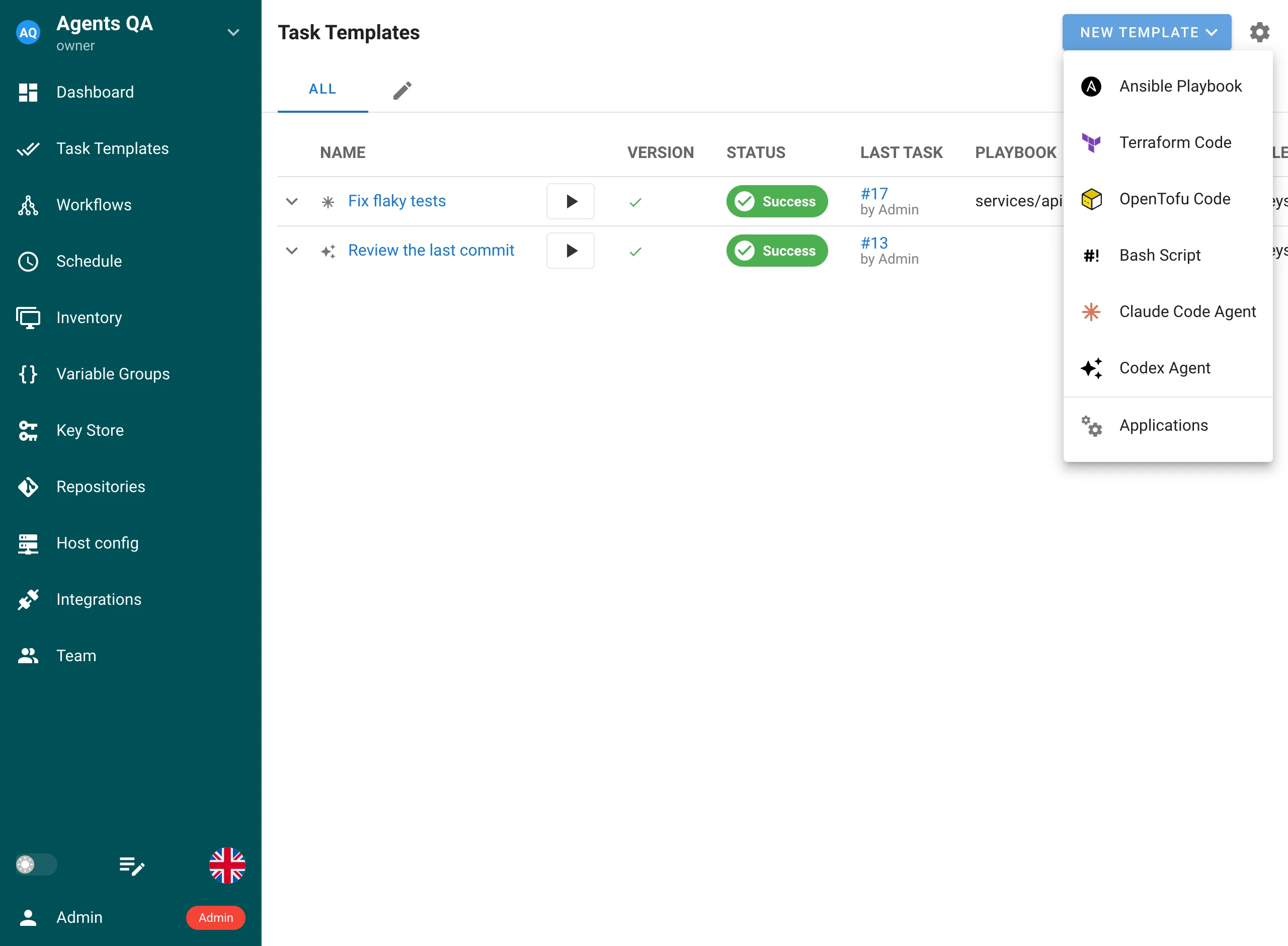
An agent template starts Claude Code or Codex in a directory of a repository and gives it a prompt. Use it for work you would otherwise describe to a colleague: review the last commit, find and fix a failing test, update a dependency and open a pull request.
To create one, go to Task Templates, click New Template and then Claude Code Agent or Codex Agent.
| Field | Description |
|---|---|
| Repository | The repository the agent works in. Semaphore clones or updates it before the task, like for any other template. |
| Subdirectory path | Optional. The directory of the repository the agent is started in. |
| MCP servers | Optional. An MCP inventory with the servers whose tools the agent can call. |
| Variable Groups | Variables and secrets for the agent: the API key, values for the prompt expressions, environment variables of the agent’s process. |
| Prompt | The instruction the agent runs with. |
| CLI args | Extra arguments for the agent’s command: the model, the limits, the permissions. |
| Survey Variables | Questions asked when the task is started. The answers can be put into the prompt. |
What you need. The agent’s command line tool must be installed on the machine that executes tasks, the Semaphore server or the runner:
| Application | Command | Install |
|---|---|---|
| Claude Code Agent | claude |
npm install -g @anthropic-ai/claude-code |
| Codex Agent | codex |
npm install -g @openai/codex |
Semaphore enables an application when it finds its command in PATH at startup. An administrator
can also enable it and set the path to the executable on the Applications page.
How the agent runs. Semaphore starts the agent in the repository directory with the prompt on its standard input, so the prompt does not appear in the process list:
| Application | Command |
|---|---|
| Claude Code Agent | claude -p --output-format=stream-json --verbose --include-partial-messages --mcp-config=<file> --strict-mcp-config --no-session-persistence <CLI args> |
| Codex Agent | codex exec --json --skip-git-repo-check <CLI args> - |
- Nothing is kept between tasks. Each run is a new session of the agent. What should survive a run belongs in the repository: a commit, a pull request, a file.
- On Docker and Kubernetes runners the agent runs in a container, so the executor image must
contain the
claudeorcodexcommand.
API key
The agent takes its API key from an environment variable. Add the key to a Variable Group of the template as a secret environment variable:
| Application | Variable | Also accepted |
|---|---|---|
| Claude Code Agent | ANTHROPIC_API_KEY |
CLAUDE_CODE_OAUTH_TOKEN |
| Codex Agent | OPENAI_API_KEY |
CODEX_API_KEY |
The login of the user that runs Semaphore is not used: the configuration directory of the agent is created for the task and is empty, so a key from a Variable Group is the only way to authenticate. If none of the variables is set, the task log says which one to add.
Prompt expressions
The prompt of a template can take values from the Variable Groups of the template. Write an expression in double braces, as in GitHub Actions, and Semaphore replaces it when the task starts:
| Expression | Value |
|---|---|
${{ vars.extra.NAME }} |
An extra variable of a Variable Group. |
${{ vars.env.NAME }} |
An environment variable of a Variable Group. |
${{ secrets.extra.NAME }} |
A secret extra variable of a Variable Group. |
${{ secrets.env.NAME }} |
A secret environment variable of a Variable Group. |
Find the flaky tests in services/api and fix them.
Open a pull request against ${{ vars.extra.base_branch }} and post its link
to ${{ vars.env.TRACKER_URL }} with the token ${{ secrets.env.TRACKER_TOKEN }}.
- Survey variables are extra variables: the answer to the survey variable
versionis${{ vars.extra.version }}, and a secret one is${{ secrets.extra.NAME }}. A survey variable that is delivered as an environment variable is underenvinstead. A survey variable left unanswered gives an empty string. - A variable that does not exist fails the task before the agent starts, with a message that names the expression. Semaphore does not run an agent with a hole in its prompt.
- A misspelled expression is refused when the template is saved:
${{ secrets.TOKEN }}has noextraorenv. - Other expressions are left as they are. Only
vars.…andsecrets.…belong to Semaphore, so a prompt can ask the agent to write a workflow with${{ github.sha }}in it. To keep avarsorsecretsexpression as text, put one more dollar sign before it:$${{ secrets.env.NAME }}. - A value is put in as it is. A string is used as written, a list or an object as JSON. A value is not looked through for expressions again.
- A secret that was put into the prompt is masked in the task log, wherever the agent repeats it.
A secret in the prompt is sent to the model provider together with the rest of the prompt. Prefer giving a secret to the agent’s tools: as a secret environment variable of a Variable Group, or as the token of an MCP server.
Prompt of a task
With the Prompt checkbox enabled in the template, the task form shows the prompt of the template and lets you change it for one run. A schedule, an integration, or a workflow step can keep a prompt of its own in the same way. Through the API, send it in the task parameters:
{
  "template_id": 12,
  "params": {
    "prompt": "Review the changes of the last release and list the risky ones."
  }
}
A prompt given by a task is used exactly as it is written: prompt expressions are replaced only in the prompt stored in the template. This keeps the variables and secrets of the project away from anyone who may only run tasks. If the template does not allow it, a task that brings a prompt is refused.
MCP servers
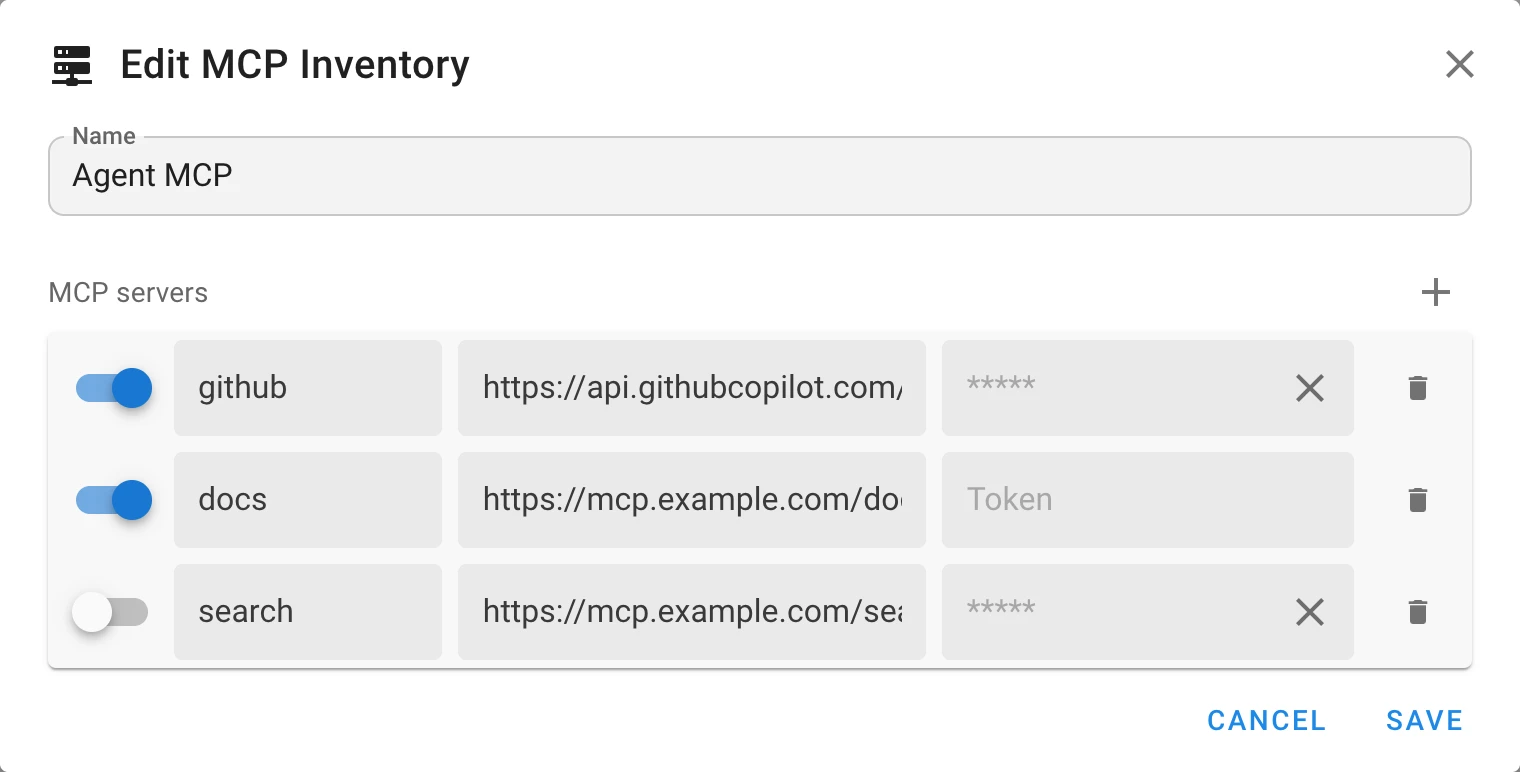
An agent can call the tools of remote MCP servers: an issue tracker, a documentation search, your own service. The servers are kept in an inventory of the new MCP Inventory type, and one inventory serves both Claude Code and Codex templates.
| Field | Description |
|---|---|
| Switch | A server that is switched off stays in the list and is not given to the agent. |
| Name | The name the agent knows the server by: up to 64 letters, digits, - and _. |
| URL | An http or https address of a server that speaks MCP over HTTP or SSE. A user name or password in the URL is not accepted. |
| Token | Optional. The agent sends it in the Authorization header as a bearer token. |
- A saved token is stored encrypted and never shown again: type a new one to replace it, or remove it.
- The token reaches the agent as an environment variable of its process. It is not written to the agent’s configuration file, to the command line, or to the task log.
- The agent gets exactly these servers. Their tools are approved in advance, since nobody is there to confirm a call, and MCP servers configured for the user that runs Semaphore are not used.
Task log
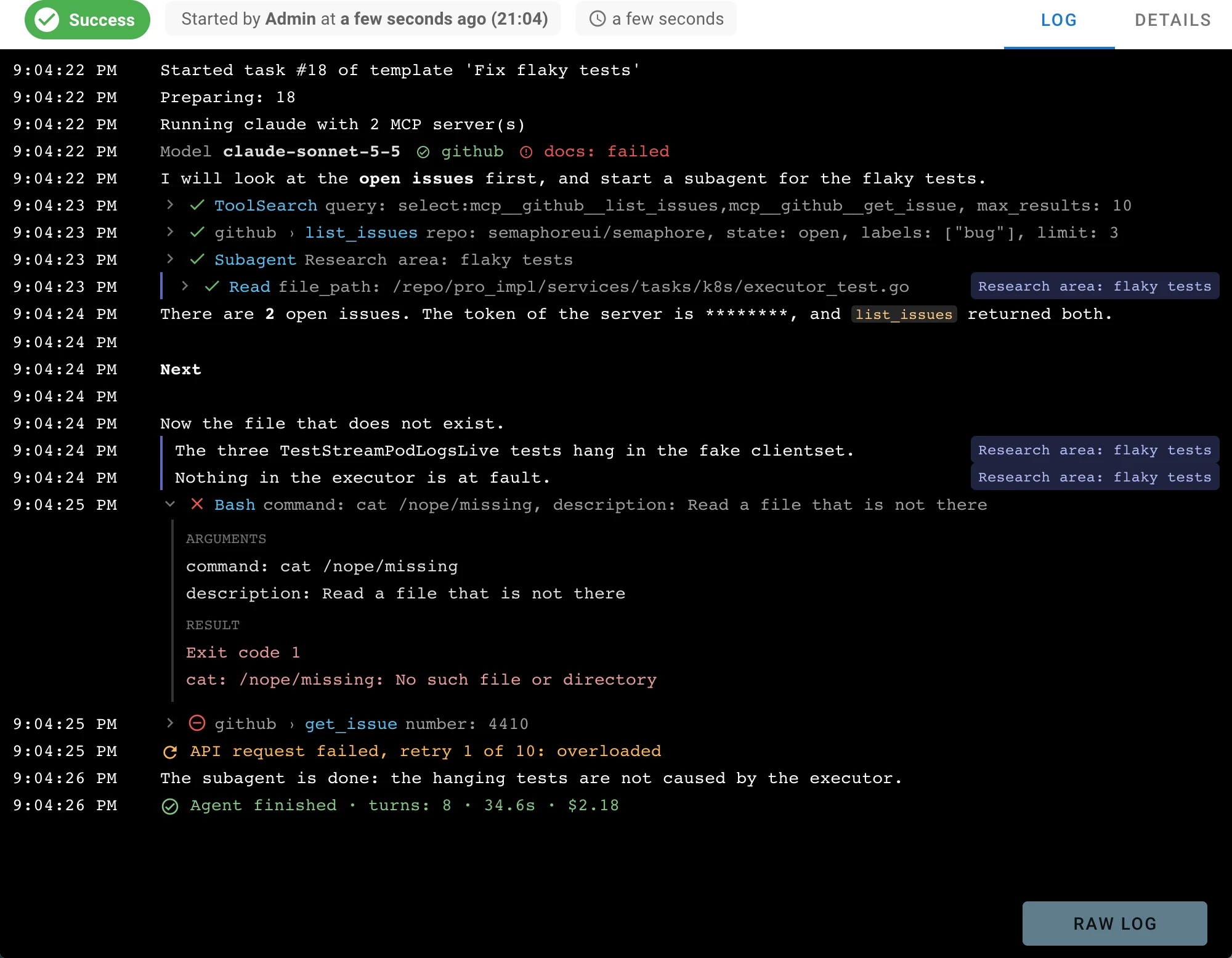
The task log shows the agent’s work as it happens, as a transcript and not as the JSON events the command line tool prints:
- Text of the agent, line by line. Codex prints a message when it is complete.
- Tool calls, each in one row: the state, the MCP server and the tool, the arguments. Click a row to see the arguments and the result. A failed call is open from the start.
- Subagents: the rows of a subagent are marked with its name.
- The first row of a Claude Code run names the model and the MCP servers, with the ones that did not connect in red.
- The summary at the end: the number of turns, the duration, the tokens, and the cost, as far as the agent reports them.
Raw log shows the same log as plain text.
Security
- An agent executes commands. Within the permissions its command line tool gives it, the agent can read and change the repository directory, run programs as the user that executes tasks, and call the tools of its MCP servers. Give an agent template a repository and tokens with the narrowest rights that do the job, and a separate runner for work you want to keep apart from the server.
- Every task has its own configuration directory of the agent (
CLAUDE_CONFIG_DIR,CODEX_HOME), created for the task and removed after it. Settings, logins, and MCP servers of the user that runs Semaphore do not reach the agent, and a variable of a Variable Group cannot redirect the directory. - The prompt and what the agent reads go to the model provider: the files of the repository, the output of commands, the results of tools.
- A repository can instruct the agent. Text in the files the agent reads, in an issue, or in the result of a tool can change what the agent does. Do not point an agent with powerful tokens at content you do not control.
- Tokens and secrets are masked in the task log: the tokens of the MCP servers and the secrets
put into the prompt are replaced with
********. - Variables and secrets stay off the command line of an agent, where the process list would show them.
Documentation
The user guide has a page with every field and rule: AI agents.